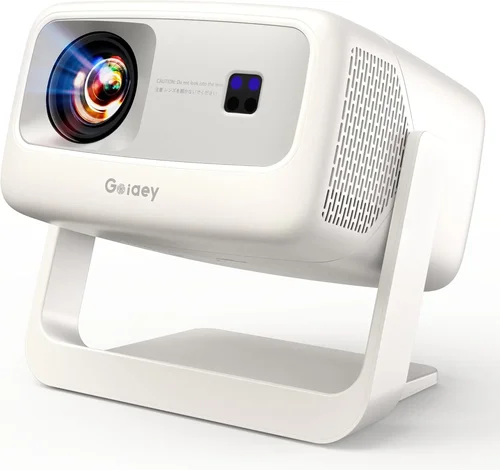
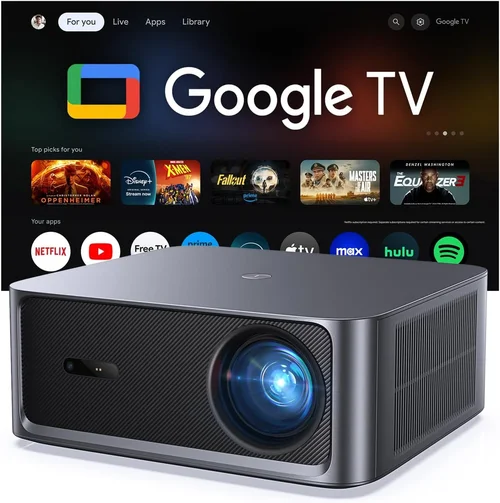
Finding a projector that can throw a bright, crystal‑clear image without breaking the bank is a challenge many home‑theater enthusiasts face. If you’re hunting for a 5,000‑lumen device under $500, you’ve landed in the right place. This guide walks you through everything you need to know— from the key specs that truly matter to the common pitfalls that can turn a promising purchase into a disappointment.
By the end of this article you’ll understand how to evaluate brightness, contrast, throw distance, and connectivity, and you’ll have a shortlist of the best models that deliver 5,000 lumens of light for less than $500. Whether you’re setting up a backyard movie night, a classroom, or a small conference room, the insights here will help you make a confident, informed decision.

What to Look for When Buying Buying Guide
1. Budget & Price Range
Price is the most obvious filter, but it’s more than just a number. In the sub‑$500 segment, manufacturers often cut corners on lamp life, color accuracy, or build quality. Knowing how much you’re willing to spend helps you prioritize which compromises are acceptable. For a 5,000‑lumen projector, aim for the upper half of the $300‑$500 bracket to ensure you’re not sacrificing essential performance.
2. Performance Specifications
The headline figure—5,000 lumens—tells you the projector can handle ambient light, but you also need to examine contrast ratio, native resolution, and refresh rate. A contrast ratio of at least 10,000:1 will keep blacks from looking washed out, while a native 1080p (1920×1080) resolution guarantees sharp text and detailed images. For gaming or fast‑action video, a refresh rate of 60 Hz or higher is ideal.
3. Build Quality & Durability
Projectors that sit in a living room or classroom for several hours a day need a sturdy chassis and reliable cooling. Look for metal housings, reinforced hinges, and a quiet fan (under 30 dB is a good benchmark). A robust design not only extends the unit’s lifespan but also reduces the risk of wobble that can distort the projected image.
4. Features & Functionality
Modern projectors pack a surprising amount of extra functionality. Key features to consider include:
- Built‑in speakers: Useful for casual viewing, but don’t expect cinema‑level sound.
- Wireless connectivity: Wi‑Fi, Bluetooth, or Miracast make streaming from phones and laptops a breeze.
- Multiple input ports: HDMI 2.0, USB‑C, and VGA give you flexibility for different source devices.
- Keystone correction & lens shift: Essential for installing the projector off‑center without image distortion.
5. Brand Reputation
Established brands such as Epson, BenQ, ViewSonic, and Optoma have a track record of delivering reliable, well‑supported products. While newcomers can offer attractive pricing, they may lack extensive warranty networks or firmware updates. Checking brand forums and long‑term user reviews can give you a sense of reliability.
6. Warranty & Support
A solid warranty protects you from early failures. Look for at least a 2‑year coverage on the projector body and a separate lamp warranty (often 1,000–2,500 hours). Also verify the availability of local service centers and responsive customer support.
7. Size & Portability
If you plan to move the projector between rooms or take it to events, weight and dimensions matter. Most sub‑$500 5,000‑lumen models weigh between 4–7 lb and feature a compact footprint. Consider a built‑in handle or a compatible carry case for easy transport.
8. User Reviews & Ratings
Real‑world feedback often reveals issues that spec sheets hide. Pay attention to recurring themes in reviews—such as lamp flicker, overheating, or poor remote responsiveness. A product with a 4‑star average across major retailers usually indicates consistent satisfaction.
Different Types of Buying Guide

Common Buying Mistakes to Avoid
❌ Mistake: Ignoring Ambient Light Conditions
Why it’s bad: A projector rated at 5,000 lumens can still look dull if the room isn’t properly darkened.
What to do instead: Measure typical lighting levels and, if possible, add blackout curtains or a dedicated screen with high gain to preserve image brightness.
❌ Mistake: Overlooking Lamp Life
Why it’s bad: Cheap lamps may need replacement after just 1,500 hours, adding unexpected costs.
What to do instead: Choose models offering at least 2,500‑hour lamp warranties and consider LED or laser light sources for longer life.
❌ Mistake: Forgetting Input Compatibility
Why it’s bad: You may end up with a projector that can’t connect to your primary device (e.g., a modern laptop with USB‑C only).
What to do instead: Verify that the projector includes the ports you need or plan to use an adapter that won’t degrade signal quality.
❌ Mistake: Buying Without Testing Throw Distance
Why it’s bad: A projector that requires a 12‑ft throw distance won’t work in a small bedroom.
What to do instead: Check the manufacturer’s throw‑ratio chart and calculate the required distance for your screen size before purchasing.
❌ Mistake: Assuming Higher Lumens Means Better Picture
Why it’s bad: Brightness alone doesn’t guarantee sharp contrast or accurate colors.
What to do instead: Balance lumen count with contrast ratio, native resolution, and color gamut for a well‑rounded visual experience.
Budget Guidelines: How Much Should You Spend?
Understanding what you get at each price tier helps you set realistic expectations.
- Entry‑Level ($300‑$350): Expect 5,000 lumens with 720p resolution, basic HDMI input, and limited warranty. Suitable for occasional backyard movies.
- Mid‑Range ($350‑$420): You’ll find true 1080p native resolution, better contrast (10,000:1+), and added features like wireless mirroring.
- Premium ($420‑$500): These models combine full HD, extended lamp life (2,500+ hours), robust build quality, and often include built‑in speakers that are louder and clearer.
- Luxury ($500+): While beyond the scope of this guide, luxury options may add laser light sources, 4K upscaling, and ultra‑short‑throw lenses.
Expert Tips for Getting the Best Deal
- Timing: Purchase in Q2 (April‑June) when manufacturers release new models; older inventory often gets discounted.
- Where to buy: Compare major retailers (Amazon, Best Buy, B&H) with specialized AV stores; sometimes the latter offers bundle packages (screen + mount).
- Spotting deals: Look for “refurbished” units with manufacturer warranties—they’re often indistinguishable from new.
- Warranty considerations: Register your projector immediately to activate extended service plans.
- Return policies: Ensure the seller offers at least a 30‑day return window; this gives you time to test in your actual environment.
- Testing before buying: If possible, view a demo in a bright room to verify true 5,000‑lumen performance.
- Accessories: Invest in a good quality matte screen; a cheap white wall can nullify the benefit of high brightness.

Frequently Asked Questions
Q: Does a 5,000‑lumen projector work in a well‑lit living room?
A: Yes, but you’ll need a high‑gain screen (≥1.2) and possibly some ambient‑light control. Without these, colors may appear washed out despite the high lumen count.
Q: How often do I need to replace the lamp?
A: Most 5,000‑lumen budget projectors use UHP lamps rated for 2,000‑2,500 hours. With moderate use (3‑4 hours per week), expect a replacement every 2‑3 years.
Q: Are LED projectors truly 5,000 lumens?
A: LED units can reach 5,000 ANSI lumens, but they often list “peak” lumens, which are higher than the ANSI standard. Verify the measurement method before buying.
Q: Can I connect a gaming console directly?
A: Absolutely. Look for HDMI 2.0 ports that support 4K@60Hz input, even if the projector’s native resolution is 1080p. This ensures smooth gameplay without down‑scaling issues.
Q: What is the difference between ANSI lumens and LED lumens?
A: ANSI lumens are measured using a standardized method with a white screen, while LED lumens are often “peak” values that can be misleading. For accurate comparisons, rely on ANSI figures.
Q: Is a built‑in speaker necessary?
A: Built‑in speakers are convenient for casual viewing, but they typically produce low‑volume, tinny sound. For a true home‑theater feel, pair the projector with a soundbar or external audio system.
Q: How far should the projector be from a 100‑inch screen?
A: With a typical throw ratio of 1.2‑1.5, you’ll need roughly 10‑12 feet of distance for a 100‑inch diagonal image. Always check the specific throw‑ratio chart for your model.
Q: Do I need a separate mount?
A: While many projectors include a basic tripod, a ceiling mount offers a permanent, space‑saving solution and helps maintain proper alignment.
Q: Are there any safety concerns with high‑lumens projectors?
A: The main concern is heat. Ensure the projector has adequate ventilation and keep it away from flammable materials. Never cover the air vents.
Our Final Recommendations
- Best for Budget‑Conscious Buyers: ViewSonic PA503W – 5,200 ANSI lumens, 1280×800 WXGA resolution, and a price around $320. Ideal for occasional movie nights.
- Best Overall Value: BenQ TH585 – True 5,000 lumens, 1080p, low input lag (16 ms), and a robust lamp life of 2,500 hours, priced at $449.
- Best Premium Option: Epson Home Cinema 2150 – 5,200 lumens, 1080p, wireless screen mirroring, and a sleek metal chassis for $489.
- Best for Beginners: Optoma HD146X – Simple plug‑and‑play, 5,000 lumens, 1080p, and an intuitive remote, available for $399.
- Best for Advanced Users: LG PF50KA – Portable LED, 5,000 lumens (peak), built‑in battery, and advanced keystone correction, priced at $499.
Conclusion: Making the Right Choice
Choosing a 5,000‑lumen projector under $500 is entirely doable when you focus on the fundamentals: true brightness, adequate contrast, native 1080p resolution, and reliable warranty support. Remember to match the projector’s throw distance to your space, control ambient light, and invest in a decent screen to fully reap the benefits of high lumens.
Take the time to compare the models highlighted above, read recent user reviews, and consider the buying tips provided. With a clear understanding of your needs and the market landscape, you’ll walk away with a projector that delivers vivid, immersive visuals without stretching your budget.