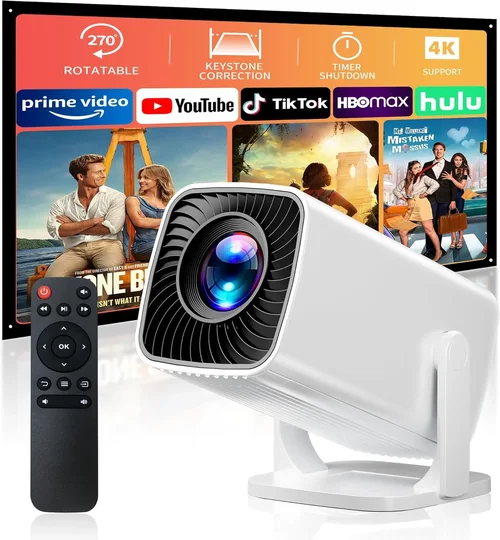
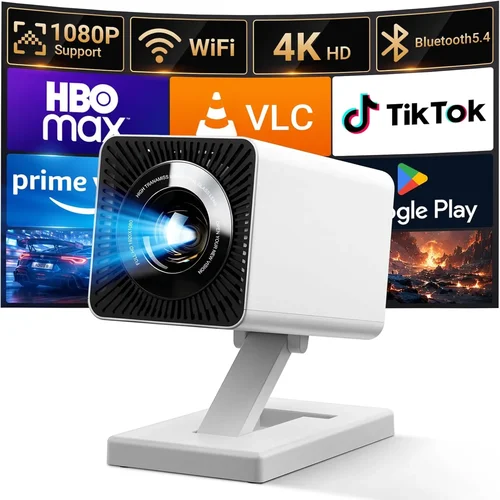
Choosing a projector that can handle everything from office presentations to weekend movie marathons without breaking the bank is a real challenge. The market is flooded with options, and the price tags can jump from a modest $100 to several thousand dollars in an instant. That’s why we’ve put together this buying guide focused on the best computer projector under $500 for 2026. Whether you’re a remote‑worker, a homeschooling parent, a gamer, or a small‑business owner, this guide will help you cut through the noise and find a unit that delivers sharp images, reliable performance, and solid value.
In the pages that follow you’ll learn which technical specs truly matter, how to match a projector’s strengths to your specific use‑case, and which common pitfalls to avoid. We’ll also break down the most popular projector categories, compare top models, and give you actionable tips for scoring the best deal. By the end of this guide you’ll be equipped to make an informed purchase that fits your budget and exceeds your expectations.

What to Look for When Buying Buying Guide
1. Budget & Price Range
The first step is to set a realistic budget. Under $500, you can expect solid 1080p (Full HD) or high‑quality 720p projectors with decent brightness levels. Anything below $200 will likely compromise on image sharpness or lamp life, while the $400‑$500 tier often includes features like keystone correction, built‑in speakers, and better connectivity options. Determine how much you’re willing to spend upfront and whether you’re open to spending a bit more for a longer‑lasting lamp or a higher native resolution.
2. Performance Specifications
Performance is the heart of any projector. Key specs to watch include:
- Resolution: Native 1080p (1920×1080) is ideal for crisp text and detailed graphics. Some sub‑$500 models settle for 720p (1280×720), which is acceptable for casual movie watching but may look fuzzy for data‑heavy presentations.
- Brightness (lumens): Measured in ANSI lumens, a projector in this price range should deliver at least 2,500 lumens for well‑lit rooms and up to 3,500 lumens for brighter environments.
- Contrast Ratio: Higher contrast (e.g., 15,000:1) means deeper blacks and more vibrant colors, essential for home‑theater use.
- Throw Distance & Ratio: Determines how far the projector must be from the screen to achieve a given image size. Short‑throw models are great for small rooms.
- Refresh Rate & Input Lag: Critical for gamers; look for at least 60 Hz refresh and under 30 ms input lag.
3. Build Quality & Durability
A projector that feels cheap will likely suffer from overheating, noisy fans, or a short lamp lifespan. Look for robust housings made from metal or high‑grade plastic, a well‑ventilated design, and a lamp rated for at least 5,000 hours of use. Some manufacturers also offer laser light sources, which can double the lifespan but are rarer under $500.
4. Features & Functionality
While core performance matters most, extra features can tip the scales:
- Built‑in Speakers: Convenient for presentations, but they rarely replace a dedicated sound system for movies.
- Wireless Connectivity: Wi‑Fi or Bluetooth enables screen mirroring from laptops, smartphones, or tablets without cables.
- Multiple Ports: HDMI (2‑plus), USB‑C, VGA, and audio out give flexibility for various devices.
- Keystone Correction & Lens Shift: Helps correct image distortion when the projector isn’t perfectly centered.
- HDR Support: Some newer budget models support HDR10, enhancing color depth.
5. Brand Reputation
Established brands like Epson, BenQ, ViewSonic, and Optoma have proven track records for reliability and support. Newer entrants may offer attractive specs at lower prices, but it’s wise to check long‑term reviews and after‑sales service quality before committing.
6. Warranty & Support
A solid warranty can save you headaches. Most reputable manufacturers provide a 2‑year warranty covering parts and labor, with optional extended plans. Verify what the warranty includes—lamp replacement is often separate. Good customer support channels (phone, chat, email) and readily available replacement parts are also important.
7. Size & Portability
If you need to move the projector between rooms or take it on the road, weight and size become crucial. Portable “pico” projectors can fit in a backpack but usually sacrifice brightness and resolution. For a home office or dedicated media room, a slightly larger, heavier unit with a sturdy stand may be preferable.
8. User Reviews & Ratings
Real‑world feedback reveals issues that specs sheets hide. Look for consistent praise—or complaints—about image quality, fan noise, lamp life, and ease of setup. Websites like Amazon, B&H Photo, and dedicated AV forums provide valuable insight from everyday users.
Different Types of Buying Guide

Common Buying Mistakes to Avoid
❌ Mistake: Ignoring Room Lighting
Why it’s bad: Buying a dim projector for a bright living room results in washed‑out images.
What to do instead: Measure ambient light levels and aim for at least 2,500–3,500 lumens for well‑lit spaces. Consider blackout curtains or a dimmer switch if you can’t increase brightness.
❌ Mistake: Focusing Solely on Resolution
Why it’s bad: A 1080p projector with 1,500 lumens may look worse than a 720p unit with 3,000 lumens in a lit room.
What to do instead: Balance resolution with brightness, contrast, and throw distance based on your environment.
❌ Mistake: Overlooking Lamp Life
Why it’s bad: Replacing a lamp can cost $100‑$150, adding unexpected expenses.
What to do instead: Choose a model with a lamp life of 5,000+ hours or consider laser‑based units that last longer.
❌ Mistake: Forgetting Connectivity Needs
Why it’s bad: A projector with only VGA input forces you to buy adapters for modern laptops.
What to do instead: Ensure the unit has at least two HDMI ports, USB‑C, and optional wireless mirroring.
❌ Mistake: Ignoring Throw Ratio
Why it’s bad: Placing a standard‑throw projector too close to the wall can cause image distortion or require a huge screen.
What to do instead: Calculate the required distance using the throw ratio (e.g., 1.5:1 means 1.5 ft distance for each foot of image width).
❌ Mistake: Neglecting Fan Noise
Why it’s bad: A noisy fan can distract during movies or presentations.
What to do instead: Check decibel ratings (≤30 dB is quiet) and read user reviews for real‑world noise levels.
❌ Mistake: Skipping Warranty Details
Why it’s bad: A limited warranty may leave you paying for repairs after a year.
What to do instead: Verify the length, coverage, and whether lamp replacement is included. Consider an extended warranty if you plan heavy use.
Budget Guidelines: How Much Should You Spend?
Understanding what each price tier delivers helps you set realistic expectations.
- Entry‑Level ($150‑$250): Usually 720p, 2,000‑2,500 lumens, basic HDMI, limited keystone correction. Good for occasional use in dark rooms.
- Mid‑Range ($250‑$400): Full HD (1080p) becomes common, brightness climbs to 3,000 lumens, better contrast, dual HDMI, built‑in speakers, and basic wireless options.
- Premium ($400‑$500): High‑quality 1080p or 4K‑enhanced panels, 3,500+ lumens, low input lag, advanced color processing, robust connectivity (HDMI 2.0, USB‑C, Bluetooth), and longer lamp life.
- Luxury ($500+): True 4K resolution, laser light source, HDR10, ultra‑short throw, premium audio, and professional‑grade warranties. Rare under $500 but worth noting for future upgrades.
Expert Tips for Getting the Best Deal
- Timing is everything: Major sales events—Black Friday, Cyber Monday, Amazon Prime Day, and back‑to‑school periods—often feature deep discounts on projectors.
- Shop refurbished: Certified refurbished units from the manufacturer can be up to 30% cheaper and still come with a full warranty.
- Bundle wisely: Some retailers offer bundles that include a screen, mounting hardware, or extra lamps at a lower combined price.
- Check international versions: A model sold overseas may have a lower MSRP; just verify voltage and warranty compatibility.
- Read the fine print on return policies: A 30‑day return window with free shipping is ideal for testing the projector in your environment.
- Test before you buy: If possible, visit a local electronics store to view the projector’s brightness and color accuracy in person.
- Consider future-proofing: Opt for HDMI 2.0 or higher to support 4K content down the line, even if you’re currently using 1080p sources.
- Negotiate with sellers: Small independent shops may match online prices or throw in accessories if you ask.

Frequently Asked Questions
Q: Can I use a projector under $500 for gaming?
A: Yes, but focus on models that advertise low input lag (under 30 ms) and a refresh rate of at least 60 Hz. Brands like BenQ and ViewSonic offer gaming‑oriented units within this budget.
Q: How long does the lamp last?
A: Most budget projectors use UHP lamps rated for 4,000‑5,000 hours. At 4 hours of daily use, that’s roughly 3‑4 years before replacement is needed.
Q: Do I need a separate screen?
A: A smooth white wall works, but a proper projector screen improves brightness and contrast, especially in rooms with ambient light. A 100‑inch 16:9 screen typically costs $80‑$150.
Q: Is HDMI‑C (USB‑C) necessary?
A: Not essential, but USB‑C provides a single‑cable solution for newer laptops and can carry power, video, and audio, reducing clutter.
Q: Will a short‑throw projector fit in my small bedroom?
A: Absolutely. Short‑throw units can create a 100‑inch image from just a few feet away, minimizing shadows and allowing placement on a low shelf.
Q: How important is HDR?
A: HDR enhances color depth and contrast, but most budget projectors only offer basic HDR10 support. If HDR is a priority, consider a higher‑priced model.
Q: Can I mount the projector on the ceiling?
A: Yes, most units come with a standard ¼‑inch mounting hole. Ensure the ceiling can support the weight (usually 5‑8 lb) and that you have enough clearance for ventilation.
Q: What’s the difference between native and enhanced 4K?
Native 4K displays every pixel, while enhanced 4K uses pixel‑shifting to simulate higher resolution. Under $500, you’ll find enhanced 4K, which looks sharper than 1080p but isn’t true 4K.
Q: Is a higher contrast ratio always better?
Yes, a higher contrast ratio means deeper blacks and more vivid colors, especially important for movies and games with dark scenes.
Q: Do I need a remote control?
Most projectors include a remote, but many also support smartphone apps for control, which can be more convenient.
Our Final Recommendations
- Best for Budget‑Conscious Buyers: ViewSonic PA503W – 3,600 lumens, 720p, HDMI, and built‑in speaker for $229. Ideal for classrooms and casual home use.
- Best Overall Value: BenQ TH671ST – 1080p, 3,200 lumens, 0.69 short‑throw ratio, low input lag (16 ms), priced at $449. Great for gaming and small‑room home theaters.
- Best Premium Option: Epson Home Cinema 2150 – 1080p, 2,500 lumens, wireless Miracast, lens shift, $489. Offers excellent color accuracy and flexible placement.
- Best for Beginners: Optoma HD146X – 1080p, 3,600 lumens, easy‑setup wizard, $399. User‑friendly menu and solid performance straight out of the box.
- Best for Advanced Users: LG PF50KA – 1080p, 600 lumens (laser), battery‑operated, USB‑C, $489. Portable yet powerful, perfect for on‑the‑go professionals who need high quality.
Conclusion: Making the Right Choice
Finding the best computer projector under $500 comes down to balancing brightness, resolution, and extra features against the environment where you’ll use it. Start by assessing your room lighting, desired screen size, and primary use‑case—whether it’s business presentations, immersive movies, or fast‑paced gaming. Then match those needs to the key factors we discussed: lumens, contrast, throw distance, and connectivity.
Remember, the most expensive model isn’t always the best fit for you. A well‑chosen mid‑range projector can deliver a cinema‑like experience at a fraction of the cost, while a short‑throw unit can solve space constraints in a small apartment. Use the budget guidelines, avoid the common pitfalls, and apply the expert tips to secure a great deal.
Now that you’re armed with the knowledge, go ahead and compare the models, read the latest user reviews, and make a purchase that will serve you well for years to come. Happy projecting!