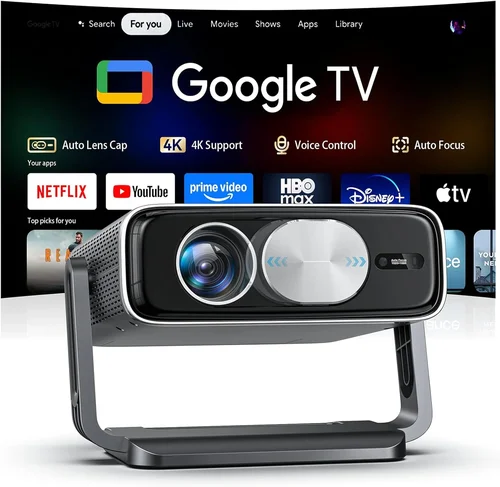
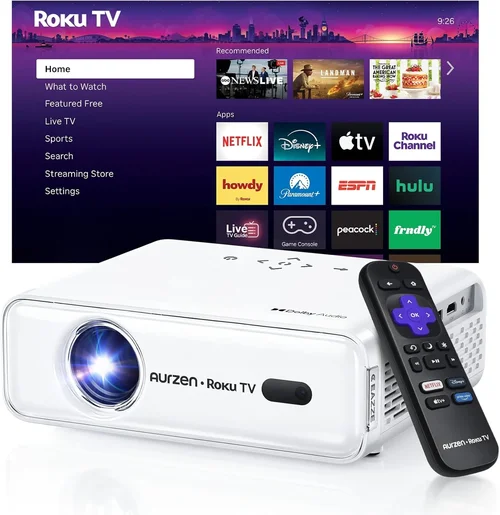
Finding a home projector that delivers a cinematic experience without breaking the bank can feel like searching for a needle in a haystack. The market is flooded with models that promise bright images, booming sound, and cutting‑edge features, yet many of them sit well above the $500 mark. This guide cuts through the noise, focusing exclusively on the best home projectors you can buy for under $500 in 2026.
By the end of this article you will understand exactly which specifications matter most, how different projector types compare, and which models consistently earn top marks from both experts and everyday users. Whether you want to turn your living room into a movie theater, host game nights with friends, or simply replace a dull TV with a larger picture, this guide equips you with the knowledge to make a confident purchase.
The projector landscape has evolved dramatically over the past few years. LED and laser light sources have become more affordable, throw distances have shrunk, and smart‑TV integration is now commonplace even in budget devices. As a result, you no longer need to spend a fortune to enjoy a bright, sharp image on a 100‑inch screen. Let’s dive into the factors that separate a good projector from a great one, and discover which models dominate the sub‑$500 segment.

What to Look for When Buying Buying Guide
1. Budget & Price Range
Price is the most obvious filter, but it’s more than just a number. A projector priced at $199 will likely sacrifice brightness and resolution, while a $480 model can often include advanced features like built‑in speakers and wireless streaming. Determine your absolute ceiling first, then use the remaining budget to prioritize other specs. Remember that accessories—screen, mounting hardware, cables—add to the total cost.
2. Performance Specifications
Performance is the heart of any projector and includes three core metrics:
- Brightness (lumens): For a dark home theater, 1,500–2,000 ANSI lumens is ample. In brighter rooms, aim for 2,500+ lumens.
- Resolution: 1080p (Full HD) is the sweet spot under $500. Some budget models offer 720p, which may appear pixelated on larger screens.
- Contrast Ratio: Higher contrast means deeper blacks and more vivid colors. Look for ratios of at least 10,000:1.
Balancing these three ensures a clear, immersive picture without sacrificing other features.
3. Build Quality & Durability
A projector that feels cheap will likely develop issues sooner. Check for a sturdy chassis, quality fan design (quiet operation is essential), and a reliable lens mount. Metal housings and reinforced plastic reduce vibration, which helps maintain image stability over long viewing sessions.
4. Features & Functionality
Modern projectors pack a lot of convenience tools. Key features to consider include:
- Built‑in Android TV or Roku: Eliminates the need for external streaming sticks.
- Wireless Mirroring (AirPlay, Miracast, Chromecast): Enables effortless casting from phones, tablets, or laptops.
- Multiple HDMI Ports: Allows you to connect a console, Blu‑ray player, and streaming device simultaneously.
- Speaker Quality: While most budget projectors have modest built‑in speakers, some models (e.g., Anker Nebula series) offer surprisingly robust audio.
- Keystone Correction & Lens Shift: Helps align the image without physically moving the projector.
5. Brand Reputation
Established brands such as Epson, BenQ, ViewSonic, and Anker have proven track records for reliability and firmware support. Newer entrants may offer innovative features at lower prices, but research their after‑sales service and community forums before committing.
6. Warranty & Support
Even the best projectors can encounter lamp failures or firmware glitches. A minimum 1‑year warranty is standard; 2‑year coverage is a strong indicator of confidence from the manufacturer. Verify what the warranty covers—lamp, fan, and internal components—and whether on‑site service is available.
7. Size & Portability
If you plan to move the projector between rooms or use it for outdoor movie nights, size matters. Compact, pico‑projectors are ultra‑portable but often compromise on brightness. Mid‑range models strike a balance, offering a manageable footprint while delivering adequate lumens for indoor use.
8. User Reviews & Ratings
Real‑world feedback reveals issues that specifications can’t capture. Look for consistent praise—or recurring complaints—across at least 50 verified buyer reviews. Pay attention to comments about fan noise, image uniformity, and software stability.
Different Types of Buying Guide

Common Buying Mistakes to Avoid
❌ Mistake: Ignoring Ambient Light Conditions
Why it’s bad: Selecting a projector with low brightness for a well‑lit living room results in a washed‑out picture that defeats the purpose of a home cinema.
What to do instead: Measure the typical lighting in your viewing area. If you can’t control ambient light, aim for at least 2,500 ANSI lumens. Otherwise, a darker room lets you get away with 1,500–2,000 lumens.
❌ Mistake: Overlooking Throw Distance
Why it’s bad: A short‑throw projector placed too far from the screen will produce a tiny image, while a long‑throw model may need a ceiling mount you don’t have.
What to do instead: Use the manufacturer’s throw‑ratio chart. For a 100‑inch screen in a 10‑ft room, a throw ratio of 1.5–2.0 works well.
❌ Mistake: Forgetting About Audio Needs
Why it’s bad: Relying solely on built‑in speakers often leads to thin, tinny sound, especially for action movies or games.
What to do instead: Pair the projector with a soundbar or external speakers via the audio out or HDMI ARC port.
❌ Mistake: Assuming All HDMI Ports Are Equal
Why it’s bad: Some budget projectors only support HDMI 1.3, limiting 4K HDR input and causing latency with gaming consoles.
What to do instead: Verify that at least one HDMI port is 2.0 or higher for smoother 1080p playback and low‑input lag.
❌ Mistake: Neglecting Firmware Updates
Why it’s bad: Out‑of‑date firmware can cause connectivity glitches, poor color accuracy, and even security vulnerabilities.
What to do instead: Choose a brand that provides regular OTA (over‑the‑air) updates and check the support page before purchase.
❌ Mistake: Not Accounting for Lamp/LED Lifespan
Why it’s bad: A short‑life lamp can become an unexpected expense, especially if it’s not covered under warranty.
What to do instead: Prefer LED or laser light sources, which typically last 20,000–30,000 hours, far exceeding traditional lamps.
❌ Mistake: Buying Without Testing
Why it’s bad: Pictures can vary dramatically between units due to factory calibration differences.
What to do instead: Purchase from retailers with a solid return policy, and test the projector on a proper screen for at least 30 minutes before committing.
Budget Guidelines: How Much Should You Spend?
Understanding what each price tier offers helps you set realistic expectations.
- Entry-Level ($150 – $250): Expect 720p resolution, 1,500 lumens, basic HDMI connectivity, and minimal smart features. Ideal for occasional movie nights in dark rooms.
- Mid-Range ($251 – $400): Full HD 1080p, 2,000–2,500 lumens, built‑in Android TV or Roku, and better contrast ratios. This tier delivers a solid all‑round experience for most households.
- Premium ($401 – $500): Higher brightness (up to 3,000 lumens), laser light source, advanced keystone correction, and enhanced audio. Suitable for bright rooms and frequent use.
- Luxury ($501+): While beyond the scope of this guide, luxury models push 4K resolution, HDR10+, and cinema‑grade optics. They are best left for dedicated home‑theater enthusiasts.
Expert Tips for Getting the Best Deal
- Timing is everything: Major sales happen around Black Friday, Cyber Monday, and back‑to‑school periods (July–August). Early‑year clearance sales (January) also feature deep discounts.
- Shop from authorized dealers: This ensures you receive a valid warranty and access to genuine accessories.
- Bundle wisely: Some retailers offer a free screen or HDMI cable when you buy a projector above $350. Evaluate the bundle’s actual value before accepting.
- Check for refurbished units: Certified refurbished models often come with a full warranty and can save you 20‑30%.
- Read the fine print on return policies: A 30‑day “no‑questions‑asked” return window is ideal for testing the unit in your home environment.
- Consider future-proofing: A projector with HDMI 2.0 and Wi‑Fi 5 will stay compatible with newer devices for longer.
- Don’t forget the screen: A high‑gain, matte white screen dramatically improves perceived brightness and contrast, often more than upgrading the projector itself.

Frequently Asked Questions
Q: Can I use a projector under $500 in a well‑lit living room?
A: Yes, but you’ll need a model that offers at least 2,500 ANSI lumens and a high contrast ratio. Laser‑based projectors tend to perform better in ambient light because they maintain consistent brightness throughout their lifespan.
Q: How long do LED lamps actually last?
A: LED light sources typically last between 20,000 and 30,000 hours, which translates to roughly 5–8 years of daily 4‑hour use. Most manufacturers count this as the “lamp life” in their warranty.
Q: Do I need a special screen for a projector under $500?
A: While you can project onto a plain white wall, a dedicated projector screen (gain 1.0–1.2) improves image uniformity and color accuracy. It’s a worthwhile investment if you plan to watch frequently.
Q: Is a 1080p resolution necessary?
A: For screen sizes up to 100 inches, 1080p offers a crisp image without noticeable pixelation. If you’re limited to 70 inches or less, 720p may be acceptable, but you’ll miss out on finer detail.
Q: What is the difference between DLP and LCD technology?
A: DLP (Digital Light Processing) uses tiny mirrors for each pixel, delivering high contrast and fast response—great for gaming. LCD (Liquid Crystal Display) offers richer colors and uniform brightness, making it ideal for movies. Both can be found under $500, but DLP models often have lower fan noise.
Q: Can I connect my gaming console directly?
A: Absolutely. Ensure the projector has an HDMI 2.0 port and supports low input lag (under 30 ms). Some models also feature a “Game Mode” that automatically optimizes settings.
Q: How far should I place the projector from the screen?
A: Use the throw‑ratio specification. For example, a 1.5:1 ratio means you need 1.5 feet of distance for every foot of image width. A 100‑inch diagonal (≈87 in width) would require roughly 13 feet of throw distance.
Q: Are there any safety concerns with long‑term projector use?
A: Projectors generate heat, so keep ventilation clear. Avoid placing them near flammable materials and allow at least a few inches of clearance behind the unit.
Q: Do I need an external speaker?
A: Built‑in speakers are adequate for casual viewing, but for an immersive experience, a dedicated soundbar or a 2.1 speaker system will deliver richer bass and clearer dialogue.
Q: Will a projector work with a ceiling mount?
A: Most mid‑range models include a standard 1/4‑20 mounting hole. Verify the mount’s weight capacity and ensure the projector’s throw distance aligns with your ceiling height.
Our Final Recommendations
- Best for Budget‑Conscious Buyers: ViewSonic M1 Mini Plus – Priced around $199, this LED pico‑projector offers 1080p support, built‑in Harman Kardon speakers, and Android TV, making it a versatile choice for small spaces.
- Best Overall Value: Epson EF‑100B – At $449, it combines a laser light source, 2,200 lumens, and an integrated Android TV interface. The color wheel design provides excellent contrast for both movies and games.
- Best Premium Option (Under $500): BenQ TH585 – For $479, you get 3,500 lumens, low‑input‑lag gaming mode, and a robust 10,000:1 contrast ratio. Ideal for bright rooms and serious gamers.
- Best for Beginners: Anker Nebula Capsule II – This soda‑can‑sized projector ($389) runs Android TV, includes a 360° speaker, and offers simple plug‑and‑play operation.
- Best for Advanced Users: Optoma GT1080HDR – Priced at $489, it delivers 3,800 lumens, HDR support, and a short‑throw lens (0.5:1), perfect for limited‑space setups that still demand high performance.
Conclusion: Making the Right Choice
Choosing the best home projector under $500 boils down to matching your viewing environment, usage habits, and budget. Prioritize brightness and resolution first, then layer in smart features, audio quality, and portability based on your lifestyle. Remember that a good screen and proper placement can elevate a modest projector to cinema‑level experiences.
Take the time to read user reviews, verify warranty terms, and, if possible, test the unit before finalizing your purchase. With the right research, you’ll enjoy countless movie nights, gaming sessions, and family gatherings without spending a fortune.
Ready to transform your living room? Browse the models listed above, compare prices, and seize the best deal before it’s gone. Happy viewing!