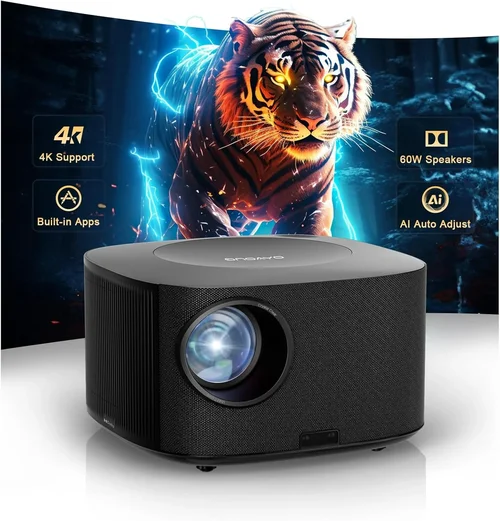
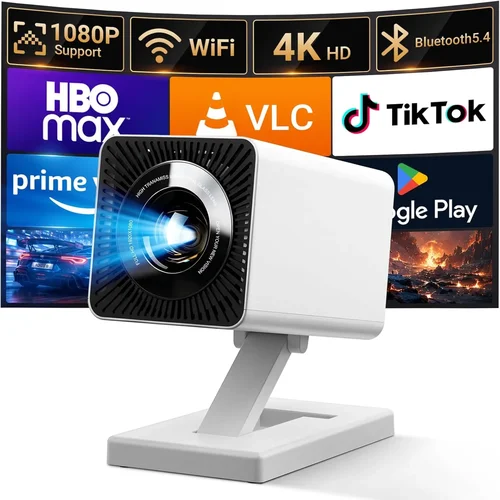
Choosing a home projector under $200 can feel like navigating a maze of specs, brand names, and glowing reviews. The market is flooded with budget-friendly options that promise cinema‑like experiences, yet not every low‑price unit lives up to the hype. This guide cuts through the noise, giving you a clear, step‑by‑step roadmap to find a projector that truly fits your living room, bedroom, or backyard without breaking the bank.
By the end of this article you will understand the most important technical specifications, know which projector type aligns with your space, avoid common buying pitfalls, and walk away with a shortlist of the best models for different needs. Whether you’re a college student looking for a dorm‑room movie night or a family seeking a weekend binge‑watch setup, we’ve got you covered.

What to Look for When Buying Buying Guide
1. Budget & Price Range
When the ceiling is $200, every dollar counts. Budget determines not only the brand you can afford but also the trade‑offs you’ll have to accept. Lower‑priced projectors often compromise on brightness, contrast ratio, and lamp life. However, savvy shoppers can still find units that deliver respectable image quality for dim rooms. Set a realistic ceiling, but also consider the total cost of ownership—accessories such as a dedicated screen, mounting brackets, or replacement lamps can add up.
2. Performance Specifications
Key specs include:
- Resolution: Most sub‑$200 models are limited to 720p (1280×720) or native 800×480 (WVGA). While not true Full HD, a good 720p projector can still produce sharp images when paired with a modest screen size.
- Brightness (lumens): For a darkened room, 1500–2000 ANSI lumens is adequate. If you plan to use the projector with some ambient light, aim for at least 2500 lumens.
- Contrast Ratio: Higher contrast means deeper blacks and more detail in dark scenes. Look for a contrast ratio of 2000:1 or better.
- Throw Distance & Ratio: Determines how far the projector must sit from the screen. Short‑throw models (0.5–1.0) are ideal for small rooms.
- Lamp Life: Measured in hours; a longer lamp life reduces long‑term costs. 20,000‑hour lamps are common in the budget segment.
3. Build Quality & Durability
Even at low price points, a sturdy chassis protects internal optics and reduces vibration. Metal housing is preferable to plastic, especially if you plan to move the unit frequently. Check for a well‑ventilated design—overheating is a common failure point in cheap projectors.
4. Features & Functionality
Modern projectors pack a surprising amount of connectivity:
- HDMI: Essential for streaming boxes, gaming consoles, and laptops.
- USB: Allows playback from flash drives or direct power for some models.
- Wi‑Fi / Bluetooth: Enables wireless casting from smartphones or tablets.
- Built‑in Speakers: While not a substitute for a sound system, a decent 5‑10 W speaker can be handy for casual viewing.
- Keystone Correction & Lens Shift: Helps correct image distortion without physically moving the projector.
5. Brand Reputation
Brands such as Epson, BenQ, ViewSonic, and Anker have established track records for reliability. Newer entrants like Vankyo or Artlii often offer aggressive pricing but may lack consistent after‑sales support. Research warranty length, customer service responsiveness, and community forums before committing.
6. Warranty & Support
A solid warranty (minimum 1 year) protects you from early defects. Look for manufacturers that provide easy online claim processes and readily available replacement lamps. Some retailers also offer extended protection plans—evaluate the cost versus the risk of a potential repair.
7. Size & Portability
If you need a projector that travels between rooms or takes on the road for outdoor movie nights, weight and size matter. Mini‑projectors can weigh under 2 lb and fit in a backpack, but they often sacrifice brightness. Balance portability with performance based on where you’ll use it most.
8. User Reviews & Ratings
Real‑world feedback uncovers issues you won’t find in spec sheets—excessive fan noise, color accuracy problems, or software glitches. Focus on reviews that mention your intended use case (e.g., “great for gaming in a dark bedroom”). A product with 4.5 ★ rating from 500+ verified buyers is a strong candidate.
Different Types of Buying Guide

Common Buying Mistakes to Avoid
❌ Mistake: Ignoring Ambient Light Conditions
Why it’s bad: A projector rated at 1500 lumens will look great in a dark room but will appear washed out in a living room with windows.
What to do instead: Measure the typical lighting in your intended space. If you can’t fully darken the room, aim for 2500+ lumens or consider a projector with high contrast and a premium screen that boosts perceived brightness.
❌ Mistake: Choosing Resolution Over Brightness
Why it’s bad: A 1080p projector that only offers 1000 lumens will deliver a dim, grainy picture in most home environments.
What to do instead: Prioritize brightness and contrast first; then look for the highest resolution you can afford within those parameters.
❌ Mistake: Forgetting About Throw Distance
Why it’s bad: Placing a standard‑throw projector too close can result in a tiny image, while positioning it too far may exceed its focus range.
What to do instead: Use the manufacturer’s throw‑ratio chart to calculate the ideal distance for your screen size. If space is limited, consider a short‑throw model.
❌ Mistake: Overlooking Audio Needs
Why it’s bad: Built‑in speakers on budget projectors are often thin and tinny, leading to a subpar movie experience.
What to do instead: Budget for an external sound solution—soundbars, Bluetooth speakers, or a simple bookshelf speaker pair.
❌ Mistake: Ignoring Lamp Life and Replacement Costs
Why it’s bad: A cheap lamp that needs replacement after 2000 hours can cost as much as a new projector.
What to do instead: Look for LED or laser light sources, which typically last 20,000+ hours, or verify the cost of an OEM lamp before buying.
❌ Mistake: Buying Without Checking Compatibility
Why it’s bad: Some projectors only support HDMI 1.4, limiting 4K input or HDR playback.
What to do instead: Confirm that the projector’s ports match the devices you plan to connect (e.g., HDMI 2.0 for HDR streaming).
❌ Mistake: Skipping the Warranty Fine Print
Why it’s bad: A 90‑day warranty that excludes lamp failures leaves you exposed to costly repairs.
What to do instead: Choose a model with at least a 1‑year full warranty and read the terms regarding lamp coverage.
Budget Guidelines: How Much Should You Spend?
- Entry‑Level ($80 – $130): Expect WVGA resolution, 1000‑1500 lumens, basic HDMI, and plastic housing. Ideal for occasional use in dark rooms or as a portable backup.
- Mid‑Range ($131 – $180): Usually 720p, 1500‑2500 lumens, better contrast, and sturdier build. This tier offers the best balance of image quality and features for most home setups.
- Premium ($181 – $230): Often includes short‑throw optics, LED light source, enhanced connectivity (Wi‑Fi, Bluetooth), and superior color accuracy. Suitable for enthusiasts who want cinema‑grade performance without crossing the $200 mark.
- Luxury ($231+): Although rare under $200, some sales push higher‑end models into the budget range. Look for laser phosphor light engines, 1080p resolution, and extended warranties.
Expert Tips for Getting the Best Deal
- Timing: New models are released in Q1 and Q3; older inventory is discounted in Q2 and Q4.
- Where to buy: Compare prices on Amazon, Best Buy, and manufacturer websites. Don’t overlook reputable third‑party sellers on eBay that offer refurbished units with warranties.
- Spotting deals: Look for bundle offers that include a screen, HDMI cable, or mounting hardware—this can save $30‑$50.
- Warranty considerations: Register the product within 30 days to activate extended coverage if offered.
- Return policies: Choose retailers with at least a 30‑day hassle‑free return; this gives you time to test the projector in your actual environment.
- Testing before buying: If possible, view a demo in a store with a similar screen size and lighting condition to yours.
- Firmware updates: After purchase, check the manufacturer’s site for firmware patches that can improve stability and add features.

Frequently Asked Questions
Q: Can a sub‑$200 projector display 1080p content?
A: Most budget projectors are limited to 720p native resolution, but they can accept 1080p input and downscale it. The image will appear softer than on a true Full‑HD unit. For crisp 1080p, you’ll likely need to stretch the budget beyond $200.
Q: Do I need a special screen for a low‑lumens projector?
A: A high‑gain white or gray screen can boost perceived brightness by 20‑30%. If you’re using a projector under 1500 lumens in a dim room, a dedicated screen is recommended over a plain wall.
Q: How far should I place a 108‑inch image?
A: Use the throw ratio. For a projector with a 1.5‑1.8 throw ratio, a 108‑inch diagonal (≈94‑inch width) requires roughly 12‑16 feet of distance. Short‑throw models can achieve the same size from 4‑6 feet.
Q: Are LED projectors better than lamp‑based ones?
A: LED light sources last longer (20,000+ hours) and stay cooler, but they often deliver lower peak brightness compared to traditional lamps. If you prioritize longevity and low maintenance, LED is a solid choice.
Q: Will a projector work with my gaming console?
A: Yes, as long as the projector has an HDMI 1.4 or higher port. For low‑input‑lag gaming, look for a “Game Mode” setting or a projector with a response time under 30 ms.
Q: Is a remote control necessary?
A: Not strictly, but a remote simplifies menu navigation, source switching, and power control, especially when the projector is ceiling‑mounted.
Q: Can I use my phone as a source?
A: Absolutely. Most modern budget projectors support Miracast, AirPlay, or a simple USB‑C connection for screen mirroring.
Q: How loud is the fan on cheap projectors?
A: Fan noise varies; expect 30‑38 dB in most sub‑$200 models. Look for units that advertise “quiet mode” or have a fan speed selector.
Q: Do I need a separate mount?
A: Ceiling or wall mounting provides the best picture geometry. Many budget projectors come with a basic tripod mount; a universal ceiling mount can be purchased for $20‑$40.
Q: What is keystone correction?
A: Keystone correction digitally adjusts the image to compensate for a projector placed at an angle, eliminating trapezoid distortion. It’s handy but can slightly reduce resolution.
Our Final Recommendations
- Best for Budget‑Conscious Buyers: Vankyo Leisure 3 – Offers 2000 lumens, 720p resolution, and a compact design for just $119. Ideal for dorm rooms and occasional movie nights.
- Best Overall Value: Epson VS250 – Slightly above $180, this projector provides 3200 lumens, 800×600 SVGA resolution, and Epson’s renowned color accuracy. Great for both movies and presentations.
- Best Premium Option: BenQ TH585 (often found on sale for $199) – 1080p, 3500 lumens, low input lag, and short‑throw capability. Perfect for gaming and bright living rooms.
- Best for Beginners: Anker Nebula Capsule II – While slightly over $200 on sale, its Android TV interface, built‑in speaker, and portable form factor make setup effortless.
- Best for Advanced Users: ViewSonic M2 – LED‑lamp, 1080p, 1200 lumens, and full‑range color gamut. Excellent for home theater enthusiasts who value color fidelity.
Conclusion: Making the Right Choice
Finding the best home projector under $200 boils down to matching your environment, usage habits, and expectations with the right blend of brightness, resolution, and features. Remember to assess ambient light, calculate throw distance, and factor in accessories like a screen and audio system. By avoiding the common pitfalls outlined above and applying the expert tips, you’ll be equipped to select a projector that delivers cinematic moments without draining your wallet.
Take the time to read user reviews, compare specifications, and, if possible, test the unit in your own space. When you’ve weighed the options, you’ll walk away confident that your new projector will turn movie nights, game sessions, and binge‑watch marathons into unforgettable experiences.