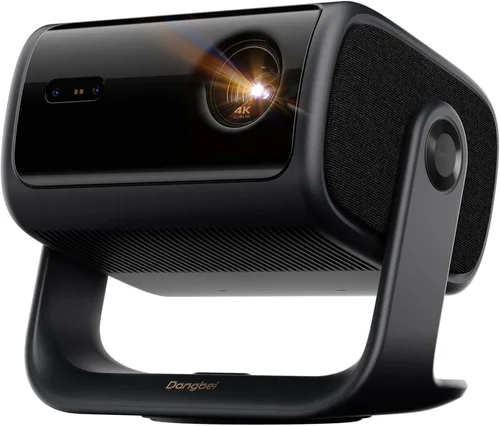
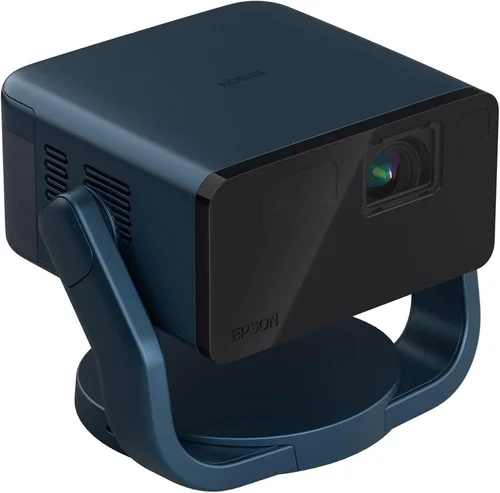
If you’ve ever tried to set up a home‑theater or a gaming den on a budget, you know that finding a projector that delivers cinema‑grade visuals without breaking the bank feels like hunting for a unicorn. The good news is that laser technology, once the exclusive domain of high‑end commercial installations, has finally trickled down to consumer‑grade devices under $1,000. This guide cuts through the hype, explains the tech, and shows you exactly how to pick a laser projector that fits your room, your content, and your wallet.
By the end of this article you’ll understand the most important specifications, know which projector types are worth considering, avoid the common pitfalls that trip up first‑time buyers, and walk away with a shortlist of the best laser projectors under $1,000 for 2026. Whether you’re binge‑watching the latest series, streaming sports, or turning your living room into a portable office, the right laser projector can transform the experience.

What to Look for When Buying Buying Guide
1. Budget & Price Range
Price is the starting line, not the finish line. Laser projectors under $1,000 vary widely in brightness, resolution, and feature set. Set a firm ceiling—say $950—to give yourself wiggle room for taxes and accessories. Remember that a lower price often means compromises in lamp life, native resolution, or connectivity options. Knowing how much you’re willing to spend on each feature will help you prioritize what truly matters for your use case.
2. Performance Specifications
The three pillars of performance are brightness (measured in lumens), resolution, and contrast ratio. For a laser projector, brightness of 2,500–3,500 ANSI lumens is a sweet spot for most living‑room lighting conditions. Anything below 2,000 lumens will struggle in daylight or a well‑lit kitchen. Resolution should be at least 1080p (Full HD) for crisp detail; 4K‑UHD is emerging in the sub‑$1,000 segment but often uses pixel‑shifting, which can affect motion handling. Contrast ratio determines how deep blacks appear; look for a ratio of 10,000:1 or higher for true‑to‑life depth.
3. Build Quality & Durability
Laser light sources are inherently more durable than traditional lamps, but the chassis, cooling system, and lens assembly still influence longevity. Look for a metal or high‑grade polycarbonate housing, a robust fan with low noise (under 30 dB is ideal), and a sealed optical engine that protects against dust. Projectors with an advertised laser life of 20,000–30,000 hours will outlast most users by decades.
4. Features & Functionality
Modern projectors are mini‑entertainment hubs. Key features to scan for include:
- Built‑in Android TV or Roku: eliminates the need for an external streaming box.
- HDR Support (HDR10, HLG): expands color gamut and contrast for compatible content.
- Wireless Casting (Miracast, AirPlay 2, Chromecast Built‑in): lets you stream from phones, tablets, or laptops without cables.
- Multiple HDMI Ports (HDMI 2.0 or 2.1): essential for dual‑source setups like console + Blu‑ray player.
- Keystone Correction & Lens Shift: makes installation easier on non‑ideal ceilings.
5. Brand Reputation
Brands that have a history in laser projection—such as Epson, ViewSonic, BenQ, and Optoma—tend to offer better firmware updates and more reliable after‑sales support. Research community forums, Reddit threads, and YouTube reviews to gauge long‑term satisfaction. A well‑known brand often means easier access to spare parts and a larger pool of knowledgeable technicians.
6. Warranty & Support
A solid warranty can save you thousands. Look for at least a 2‑year limited warranty that covers the laser engine, power supply, and any included accessories. Some manufacturers also provide a free on‑site service or a no‑questions‑asked replacement for defective units within the first 90 days. Check the fine print for “dark‑room only” clauses that could void coverage if you use the projector in bright environments.
7. Size & Portability
If you plan to move the projector between rooms, a compact footprint and a built‑in handle become valuable. Weight under 5 lb makes ceiling mounting or backpack‑style transport painless. However, portable units often sacrifice lens shift and may have lower brightness, so weigh convenience against performance.
8. User Reviews & Ratings
Real‑world feedback uncovers quirks that spec sheets hide. Look for reviews that discuss heat management, fan noise, and firmware stability. A product with a 4.2‑star rating across 500+ verified purchases is generally a safer bet than a highly‑rated but sparsely reviewed newcomer.
Different Types of Buying Guide

Common Buying Mistakes to Avoid
❌ Mistake: Ignoring Ambient Light Conditions
Why it’s bad: A projector rated at 2,500 lumens may look brilliant in a dark home theater but will appear washed out in a bright living room.
What to do instead: Measure the typical lighting in your intended space. If you cannot fully darken the room, aim for at least 3,000 ANSI lumens and consider a projector with a high contrast ratio and HDR support.
❌ Mistake: Choosing Resolution Based Solely on Price
Why it’s bad: Some sub‑$700 laser projectors still ship with 720p panels, which look pixelated on larger screens.
What to do instead: Insist on a minimum of 1080p native resolution. The price difference between 720p and 1080p models is often marginal compared to the visual improvement.
❌ Mistake: Overlooking Input Lag for Gaming
Why it’s bad: A high‑brightness projector may feel sluggish with fast‑paced games if the input lag exceeds 30 ms.
What to do instead: Check the spec sheet or third‑party reviews for input lag numbers. Look for “Game Mode” or “Low‑Latency” settings that bring lag down to 15‑20 ms.
❌ Mistake: Forgetting About Throw Distance
Why it’s bad: Buying a projector with a long throw ratio for a small apartment can force you to place the unit too far away, resulting in a tiny image.
What to do instead: Calculate your room’s throw distance (screen width ÷ throw ratio). Choose a short‑throw or ultra‑short‑throw model if you have limited space.
❌ Mistake: Assuming All Laser Projectors Are Quiet
Why it’s bad: Some budget laser units use high‑speed fans that produce noticeable hum, distracting during movies.
What to do instead: Look for fan noise specifications (dB). Aim for ≤30 dB; read user reviews for real‑world noise impressions.
❌ Mistake: Neglecting Future Compatibility
Why it’s bad: HDMI 2.0 ports limit 4K@60 Hz support; newer consoles may require HDMI 2.1 for features like Variable Refresh Rate.
What to do instead: If you plan to upgrade to next‑gen consoles, prioritize a projector with HDMI 2.1 or at least a firmware‑updatable HDMI port.
Budget Guidelines: How Much Should You Spend?
- Entry‑Level ($600‑$750): Expect 2,500 lumens, 1080p, basic Android TV, limited HDR. Ideal for dorm rooms or occasional movie nights.
- Mid‑Range ($751‑$900): Brings 3,000+ lumens, improved contrast (10,000:1+), dual HDMI, built‑in speakers, and better fan cooling. Good for dedicated home theaters.
- Premium ($901‑$1,000): Offers near‑4K pixel‑shift, HDR10+, higher refresh rates, advanced lens shift, and longer laser life (30,000 hrs). Suits enthusiasts who want cinema‑grade performance without crossing the $1k barrier.
- Luxury ($1,001+): True 4K laser engines, ultra‑short‑throw designs, premium soundbars, and enterprise‑grade warranties. These models exceed the scope of this guide but are worth mentioning for future upgrades.
Expert Tips for Getting the Best Deal
- Timing is everything: Major sales events—Black Friday, Cyber Monday, and post‑Christmas clearance—often feature the deepest discounts on laser projectors.
- Shop price‑match policies: Retailers like Best Buy and Amazon will match a lower price from a competitor within 30 days, saving you extra money.
- Bundle wisely: Some sellers include a premium screen or ceiling mount at no extra cost. Evaluate the bundle value before purchasing.
- Check for refurbished units: Certified refurbished models from the manufacturer carry the same warranty and can be up to 25% cheaper.
- Read the fine print on return policies: A 30‑day “no‑questions‑asked” return window is ideal for testing the projector in your home environment.
- Test in‑store if possible: Many electronics stores let you view a demo unit. Pay attention to fan noise, color accuracy, and motion handling.
- Consider extended warranties only if you plan heavy use: For occasional viewing, the standard warranty is sufficient; for daily office use, an extended plan may be worthwhile.

Frequently Asked Questions
Q: Are laser projectors truly better than LED models in the sub‑$1,000 range?
A: Laser light sources generally produce higher brightness and longer lifespan than LED units at comparable price points. However, LED projectors can offer better color saturation in very dark rooms. Choose laser if you need consistent performance in varied lighting.
Q: How far can I throw a 1080p laser projector in a 10‑foot room?
A: With a throw ratio of 1.2:1, a 10‑foot (120‑inch diagonal) screen requires the projector to be about 12 feet away. Short‑throw models (0.4:1) can produce the same image from just 4 feet.
Q: Do I need a separate sound system?
A: Built‑in speakers in budget laser projectors are usually mono and under 10 W, sufficient for casual TV watching. For a true home‑theater feel, pair the projector with a soundbar or a 5.1 surround system.
Q: Can I mount a laser projector on the ceiling?
A: Yes, most models support ceiling mounting with a standard ¼‑20 screw. Ensure the unit has adequate ventilation clearance and consider a tilting mount if the projector lacks lens shift.
Q: What screen material works best with laser light?
A: A high‑gain white screen (gain 1.1‑1.3) balances brightness and color accuracy. For rooms with some ambient light, a gray‑balanced screen reduces wash‑out while preserving black levels.
Q: How often do I need to clean the laser projector?
A: Dust filters should be cleaned every 2‑3 months, or more often in dusty environments. The laser engine itself is sealed and requires no maintenance.
Q: Is HDR really noticeable on sub‑$1,000 projectors?
A: HDR improvements are modest at this price tier but still noticeable—especially in bright highlights and richer colors. Look for HDR10 support and a projector that can reach at least 300 nits peak brightness.
Q: Will a laser projector work with my existing HDMI cable?
A: Yes, provided the cable is rated for HDMI 2.0 (or higher) to support 1080p@60 Hz and HDR. For 4K@60 Hz, you’ll need an HDMI 2.1 cable.
Q: Can I use a projector as a primary monitor for work?
A: Absolutely. Many laser projectors have low input lag and can display sharp text at 1080p. Pair it with an ergonomic chair and a good ambient light setup for comfortable long‑hour use.
Our Final Recommendations
- Best for Budget‑Conscious Buyers: ViewSonic X10‑4K Mini – Priced around $680, it offers 2,800 lumens, 1080p native resolution, built‑in Android TV, and a compact design perfect for dorms.
- Best Overall Value: Epson EpiqVision Ultra LS500 – At $925, this model delivers 3,000 lumens, 4K‑enhanced pixel‑shift, HDR10, and a sleek all‑in‑one Android TV platform.
- Best Premium Option: Optoma CinemaX P2 – Slightly above $1,000 but often found on sale for $970. It boasts true 4K laser, 3,600 lumens, ultra‑short‑throw, and a built‑in soundbar.
- Best for Beginners: BenQ GS2 – $699, portable, splash‑proof, with a user‑friendly interface and decent 2,500 lumens for casual movie nights.
- Best for Advanced Users: LG HU85LA – Although typically $1,200, refurbished units dip under $1,000. It offers 4K laser, 2,700 lumens, 0.25:1 throw ratio, and extensive calibration tools.
Conclusion: Making the Right Choice
Choosing the best laser projector under $1,000 is less about chasing the highest specs and more about matching the projector’s strengths to your environment and habits. Remember to assess ambient light, required brightness, resolution, and the ecosystem of streaming services you use. By avoiding common mistakes—like ignoring throw distance or overlooking input lag—you’ll narrow the field to a handful of models that truly deliver value.
Now that you have a clear roadmap, compare the top picks, test a demo if possible, and take advantage of seasonal sales. Your perfect laser projector is waiting, and with the right research you’ll enjoy cinema‑quality visuals without stretching your budget.