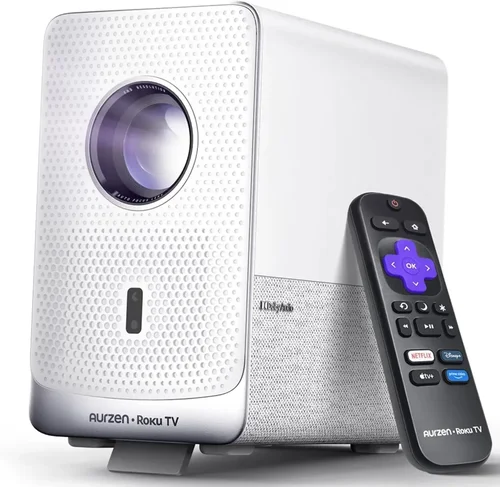
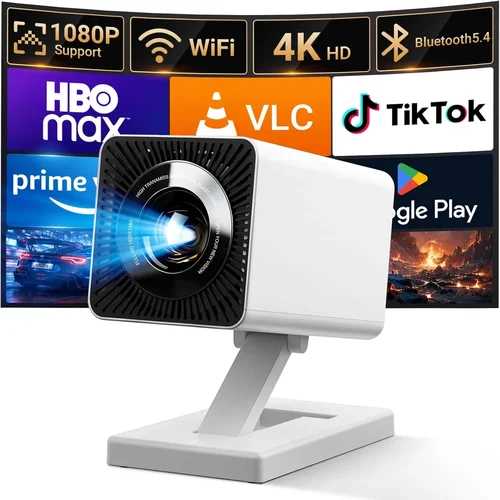
If you’ve ever tried to set up a movie night in a small apartment or needed a reliable visual aid for a home‑office presentation, you know that not every projector lives up to the hype. The market is flooded with options that promise cinema‑grade brightness, 4K resolution, and “plug‑and‑play” simplicity—yet many of them exceed $500 or fall short on core performance. That’s why we’ve crafted this guide: to cut through the noise and help you pinpoint the best LCD projector under $500 that actually delivers on brightness, image quality, and durability without breaking the bank.
In the pages that follow, you’ll learn which technical specs matter most, how to match a projector to your specific environment, and which models consistently earn high marks from both experts and everyday users. We’ll also walk you through common pitfalls, budget allocation, and pro‑level buying tricks so you can walk away confident that your new projector will shine—literally and figuratively—for years to come.
The LCD projector segment has seen rapid innovation in recent years. Manufacturers have refined chip technology, improved lamp life, and added smart connectivity—all while keeping entry‑level prices under $500. As a result, today’s budget‑friendly models can rival higher‑priced DLP units in color accuracy and image consistency. Let’s dive into the factors that separate the winners from the rest.

What to Look for When Buying Buying Guide
1. Budget & Price Range
While the headline says “under $500,” the actual price you’ll pay can vary based on sales, bundles, or seasonal promotions. Set a realistic ceiling—say $450—to give yourself wiggle room for accessories like a quality screen, HDMI cable, or portable speaker. Remember, the cheapest option often sacrifices lamp life or connectivity, which can cost you more in the long run.
2. Performance Specifications
Key specs to scrutinize include:
- Resolution: Most LCD projectors under $500 offer 720p (1280×720) or 1080p (1920×1080). For crisp text and detailed movies, prioritize true 1080p.
- Brightness (Lumens): Aim for at least 2,500 ANSI lumens for a dimly lit living room; 3,500+ is ideal if you’ll use ambient light.
- Contrast Ratio: Higher ratios (10,000:1 or more) deliver deeper blacks and richer colors.
- Color Accuracy: Look for a wide color gamut (sRGB or DCI‑P3 coverage) and true‑tone processing.
3. Build Quality & Durability
Projectors are often moved between rooms or stored away when not in use. A sturdy chassis, metal cooling fins, and a reliable fan system prevent overheating. Check user reviews for reports of wobbling lenses or cracked housings—these are red flags.
4. Features & Functionality
Modern LCD projectors pack a lot of convenience:
- Connectivity: HDMI (preferably 2.0), USB‑C, Wi‑Fi, and Bluetooth broaden source options.
- Built‑in Speakers: While not a substitute for a dedicated sound system, decent 5‑10 W speakers can suffice for casual viewing.
- Keystone Correction & Lens Shift: These help fine‑tune the image without physically moving the projector.
- Smart OS: Some models run Android TV or Roku, turning the projector into a standalone streaming hub.
5. Brand Reputation
Established brands such as Epson, BenQ, ViewSonic, and Optoma have a track record of reliable LCD panels and responsive support. Newer entrants can surprise with innovation, but they may lack extensive warranty networks.
6. Warranty & Support
A minimum 2‑year warranty is standard for quality units. Look for hassle‑free RMA processes and local service centers. Extended warranties can be worthwhile if you plan to use the projector heavily (e.g., daily home‑office presentations).
7. Size & Portability
If you need to move the projector between a bedroom, office, or occasional outdoor setup, weight matters. Most LCDs under $500 weigh between 3–5 lbs and come with a compact carry case.
8. User Reviews & Ratings
Beyond professional tests, real‑world feedback reveals long‑term reliability and hidden quirks. Prioritize models with at least 200 verified reviews and an average rating of 4.2 stars or higher.
Different Types of Buying Guide

Common Buying Mistakes to Avoid
❌ Mistake: Ignoring Ambient Light Conditions
Why it’s bad: A projector rated at 2,500 lumens may look brilliant in a dark home theater but will appear washed out in a bright living room.
What to do instead: Measure your typical room lighting. If you can’t fully darken the space, aim for 3,000+ lumens or consider an LCD with high contrast and a premium screen.
❌ Mistake: Overlooking Lamp Life
Why it’s bad: Replacing an LCD lamp can cost $80‑$150. Short lamp life means higher long‑term expenses.
What to do instead: Choose models with at least 8,000‑hour lamp life or those offering LED/laser light sources, which have lower replacement costs.
❌ Mistake: Forgetting About Input Lag
Why it’s bad: Gamers and presenters notice a lag between source and projected image, leading to a frustrating experience.
What to do instead: Look for a “Game Mode” or a listed input lag under 30 ms for smoother interaction.
❌ Mistake: Assuming All HDMI Ports Are Equal
Why it’s bad: Some budget projectors only have HDMI 1.3, which can’t handle 4K60 or HDR signals.
What to do instead: Verify HDMI version (2.0 or higher) and support for HDR if you plan to watch modern streaming content.
❌ Mistake: Skipping the Warranty Fine Print
Why it’s bad: Some warranties exclude lamp wear or accidental damage, leaving you exposed.
What to do instead: Read the warranty terms carefully and consider an extended plan that covers the lamp.
❌ Mistake: Buying Without Testing
Why it’s bad: Color accuracy, focus uniformity, and fan noise can only be truly assessed in person.
What to do instead: Visit a local electronics store, request a demo, or buy from a retailer with a 30‑day return window.
Budget Guidelines: How Much Should You Spend?
Even within the sub‑$500 bracket, there’s a spectrum of value. Here’s a quick breakdown to help you allocate your funds wisely.
- Entry-Level ($250‑$350): Expect 720p resolution, 2,000‑2,500 lumens, and basic connectivity (HDMI, VGA). Ideal for occasional movie nights or classroom use.
- Mid‑Range ($350‑$450): True 1080p, 2,500‑3,200 lumens, improved contrast, and added features like built‑in speakers, Wi‑Fi, and basic keystone correction. This tier hits the sweet spot for most home users.
- Premium ($450‑$500): Higher brightness (3,200‑3,800 lumens), advanced color processing, lamp life up to 10,000 hours, and often include Android TV or Roku OS. Best for cinephiles who want a TV‑like experience without a large screen.
- Luxury (Above $500): While outside the scope of this guide, these models typically feature laser light sources, 4K UHD, and ultra‑short‑throw lenses.
Expert Tips for Getting the Best Deal
- Timing: New models typically launch in spring. Buying the previous generation in late summer yields deeper discounts.
- Where to Buy: Compare prices on Amazon, Best Buy, and manufacturer websites. Don’t ignore refurbished units from certified sellers—they often come with a full warranty at 30% less.
- Bundle Savings: Look for packages that include a ceiling‑mount kit, HDMI cable, or a 100‑inch screen; the combined value can exceed $150.
- Warranty Hacks: Register your projector within 30 days to unlock extended support periods offered by some brands.
- Return Policies: Choose retailers with a 30‑day no‑questions‑asked return policy. Test the projector in your environment before committing.
- Testing Before Buying: Bring a laptop or streaming stick to the store. Project a bright image onto a plain wall to gauge brightness and color uniformity.
- Future‑Proofing: Opt for HDMI 2.0 or higher to ensure compatibility with upcoming 4K HDR content, even if you’re not using it now.
Frequently Asked Questions
Q: Can an LCD projector under $500 replace my 55‑inch TV?
A: Yes, if you can create a dark viewing environment and use a proper projection screen. A 1080p LCD with 3,000 lumens can comfortably display a 100‑inch image with sharp detail, but it won’t match the brightness of a TV in a bright room.
Q: How often do I need to replace the lamp?
A: Most LCD lamps are rated for 8,000–10,000 hours. If you use the projector 3 hours a day, you can expect a lamp replacement roughly every 7‑9 years.
Q: Do I need a special screen?
A: A white matte screen is ideal for most LCDs. For rooms with ambient light, a gray‑gain screen can improve contrast without needing extra brightness.
Q: Is there a noticeable lag when using a Bluetooth remote?
A: Bluetooth latency is typically under 100 ms, which is fine for movies and presentations. For gaming, use a wired controller or enable “Game Mode” to reduce input lag.
Q: Are Android TV projectors worth the extra cost?
A: If you stream frequently and want to avoid extra devices, an Android TV projector adds convenience. However, the core image quality often mirrors non‑smart equivalents, so weigh the OS value against any potential compromise in brightness or contrast.
Q: Can I mount an LCD projector on the ceiling?
A: Absolutely. Most models include a standard ¼‑inch mounting thread. Ensure the projector’s throw distance matches your room dimensions; a short‑throw lens may be required for smaller spaces.
Q: What’s the difference between LCD and DLP for budget models?
A: LCD generally offers better color accuracy and consistent brightness across the image, while DLP can have a “rainbow effect” and slightly sharper motion handling. For under $500, LCD units tend to deliver more natural colors.
Q: Will a projector work with my gaming console?
A: Yes, as long as the projector supports HDMI 2.0 and has low input lag (under 30 ms). Some models also include a “Game Mode” that disables post‑processing to keep latency low.
Q: How far should I sit from the screen?
A: A good rule is to sit at a distance 1.5‑2.5 times the screen’s diagonal. For a 100‑inch image, that’s roughly 12‑20 feet.
Our Final Recommendations
- Best for Budget‑Conscious Buyers: Epson EX3260 – 3,200 lumens, 3,200:1 contrast, 1080p, and a price tag around $329. Offers solid performance without extra frills.
- Best Overall Value: BenQ TH585 – 3,500 lumens, low input lag (15 ms), vibrant colors, and a built‑in speaker package. Priced at $449, it balances brightness, gaming performance, and durability.
- Best Premium Option: ViewSonic M2 – 1,200 lumens (laser), 1080p, Android TV built‑in, and a sleek portable design. At $499, it brings laser technology into the sub‑$500 arena.
- Best for Beginners: Optoma HD146X – Simple setup, 3,600 lumens, and a user‑friendly remote. Ideal for first‑time owners at $379.
- Best for Advanced Users: Epson Home Cinema 1080 – Offers lens shift, extensive keystone correction, and a high‑contrast LCD panel. Slightly above $500 on sale, but often found discounted to $479.
Conclusion: Making the Right Choice
Choosing the best LCD projector under $500 isn’t about finding the cheapest unit; it’s about matching the projector’s strengths to your environment, usage patterns, and long‑term expectations. By focusing on brightness, resolution, lamp life, and the right mix of connectivity, you can secure a device that feels like a home‑theater upgrade without the premium price tag.
Remember to assess ambient light, verify HDMI specifications, and take advantage of seasonal sales. A well‑chosen projector will reward you with vivid movies, crisp presentations, and even casual gaming—all within the budget you set.
Ready to start your search? Use the recommendations above as a checklist, set your price alerts, and enjoy the journey to a bigger, brighter screen.