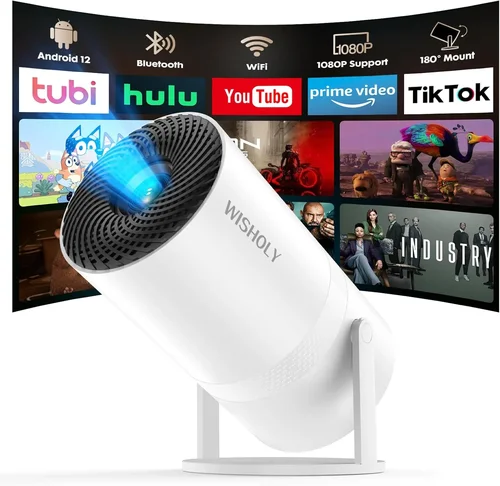
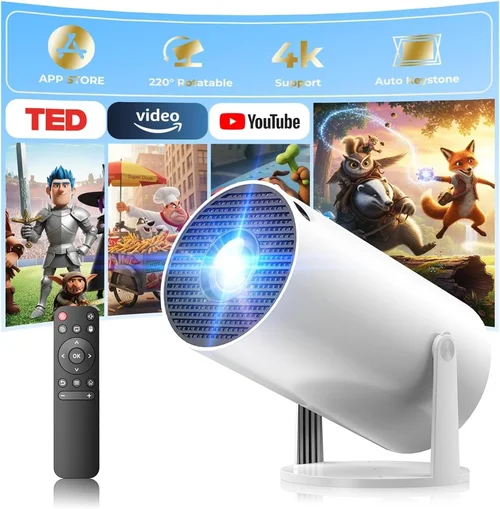
Finding a tiny projector that actually delivers a decent picture without breaking the bank can feel like hunting for a needle in a haystack. The market is flooded with gadgets that promise cinema‑quality images, yet many fall short in brightness, durability, or ease of use. That’s why this buying guide matters – it cuts through the hype and gives you a clear roadmap to choose the best mini projector under $50, whether you’re setting up a backyard movie night, a portable gaming station, or a quick‑look presentation on the go.
In the next few pages you’ll learn which specifications truly impact performance, how to match a projector to your specific needs, and what pitfalls to avoid so you don’t end up with a device that can’t compete with ambient light or drains your phone battery in minutes. We’ll also compare the main categories of budget projectors, break down pricing tiers, and hand you expert tips for snagging the best deal.
The budget projector segment has evolved dramatically over the past few years. Advances in LED technology, smarter drivers, and tighter integration with smartphones have pushed the price of a usable mini projector down to the $30‑$50 range. While you won’t get 4K resolution or laser‑grade brightness, modern models can comfortably project 720p‑ish images in dim rooms, connect via HDMI, USB‑C, or wireless casting, and fit in the palm of your hand. Let’s dive into what makes a $50 projector worth your money.

What to Look for When Buying Buying Guide
1. Budget & Price Range
Even within the sub‑$50 bracket, prices can vary based on features like built‑in speakers, battery capacity, or native resolution. Set a realistic ceiling—$45‑$50 usually nets the most capable units, while $30‑$35 models may compromise on brightness or connectivity. Remember that a slightly higher upfront cost can save you on accessories (e.g., external speakers) later.
2. Performance Specifications
Key specs include:
- Resolution: Most $50 projectors top out at 800×480 (WVGA) or 854×480 (FWVGA). While not Full HD, these resolutions are sufficient for casual movies and games if you sit close.
- Brightness: Measured in lumens; budget models usually deliver 30‑70 ANSI lumens. For dark rooms this is fine, but don’t expect vivid images in daylight.
- Contrast Ratio: Higher ratios (e.g., 800:1) produce deeper blacks, enhancing perceived image quality.
- Throw Distance: Determines how far the projector must be from the screen to fill a 100‑inch image. Compact units often have a 1.2‑1.5:1 throw ratio.
3. Build Quality & Durability
Mini projectors travel a lot, so look for sturdy plastic housings, rubberized corners, and a reliable lens cover. Models with metal hinges or reinforced ports tend to survive the occasional drop better than flimsy alternatives.
4. Features & Functionality
Essential features for a $50 projector include:
- Connectivity: HDMI (micro or mini), USB‑C, AV (3.5 mm), and wireless options like Bluetooth or Wi‑Fi Direct.
- Built‑in Speakers: Expect 1‑2 W output—adequate for small rooms but consider external speakers for louder audio.
- Battery Life: Integrated 2000‑3000 mAh batteries can power 1‑2 hours of playback; otherwise plan for a power bank.
- OS Compatibility: Android, iOS, Windows, and Linux support through screen mirroring or HDMI.
5. Brand Reputation
Even in the budget space, some manufacturers have earned trust for consistent quality and responsive support. Brands like Vankyo, APEMAN, and DR.J Professional often feature in positive user reviews, while newer entrants may lack a proven track record.
6. Warranty & Support
A 12‑month warranty is standard for $50 projectors. Check whether the seller offers easy return policies, firmware updates, and accessible customer service channels. A good warranty can be a lifesaver if a tiny LED dies prematurely.
7. Size & Portability
Weight under 500 g and dimensions that fit in a coat pocket are ideal for travelers. Some models even come with a clip or magnetic base for attaching to metal surfaces, expanding placement options.
8. User Reviews & Ratings
Before clicking “Buy,” skim through at least 30‑40 verified buyer reviews on sites like Amazon, Best Buy, or specialized forums. Look for recurring comments about overheating, fan noise, or connectivity glitches.
Different Types of Buying Guide

Common Buying Mistakes to Avoid
❌ Mistake: Ignoring Ambient Light Conditions
Why it’s bad: A projector rated at 40 lumens will look washed out in a lit living room, making your movie night a disappointment.
What to do instead: Assess your typical viewing environment. If you often watch in daylight, consider a model with at least 60 lumens or plan to use blackout curtains.
❌ Mistake: Overlooking Connectivity Options
Why it’s bad: You might end up with HDMI‑only ports, forcing you to buy adapters for your phone or laptop.
What to do instead: Choose a projector that offers the exact inputs you need—micro‑HDMI, USB‑C, or wireless casting—so you can plug and play without extra gear.
❌ Mistake: Buying Based Solely on Brand Name
Why it’s bad: Not every well‑known brand has a budget line that meets quality standards; some may cut corners to hit the $50 price point.
What to do instead: Read model‑specific reviews rather than relying on brand reputation alone.
❌ Mistake: Forgetting Battery Life
Why it’s bad: A projector that runs for only 30 minutes will leave you scrambling for a power bank mid‑movie.
What to do instead: Verify the battery capacity and real‑world runtime; aim for at least 90 minutes of continuous playback.
❌ Mistake: Ignoring Throw Ratio
Why it’s bad: A short‑throw projector placed too far away will produce a tiny image, while a long‑throw model might need a whole wall.
What to do instead: Match the throw ratio to your typical setup space. For a 6‑foot room, a 1.2‑1.5:1 ratio works well.
Budget Guidelines: How Much Should You Spend?
- Entry‑Level ($30‑$35): Expect basic LED output, 30‑40 lumens, and limited ports (usually just HDMI). Good for occasional use in dark rooms.
- Mid‑Range ($36‑$45): Slightly brighter (45‑60 lumens), better contrast, and added features like Bluetooth audio or a small battery.
- Premium ($46‑$55): Higher brightness (up to 70 lumens), native 800×480 resolution, built‑in speaker upgrades, and robust Wi‑Fi casting.
- Luxury ($56+): Rare in the sub‑$50 market, but some flagship budget models push toward 80+ lumens, 1080p support, and premium aluminum bodies.
Expert Tips for Getting the Best Deal
- When to buy: Major sales events—Black Friday, Cyber Monday, and back‑to‑school season—usually feature 15‑25% discounts on budget electronics.
- Where to buy: Compare Amazon, Walmart, and direct manufacturer sites. Some brands offer exclusive bundles (e.g., extra HDMI cable) on their own store.
- How to spot deals: Look for “refurbished” or “open‑box” units with full warranty; they’re often indistinguishable from new.
- Warranty considerations: Register the product within 30 days to unlock extended support in some cases.
- Return policies: Choose retailers with at least a 30‑day return window; this gives you time to test the projector in your home environment.
- Testing before buying: If possible, view a demo video of the projector in a similar lighting condition to yours. Many YouTubers post side‑by‑side comparisons.
- Accessory budgeting: Allocate $10‑$15 for a portable power bank or a better speaker if audio quality matters.

Frequently Asked Questions
Q: Can a $50 mini projector display 1080p content?
A: Most budget projectors cannot natively render full 1080p; they downscale to their native resolution (often 800×480). You’ll still see the video, but fine detail will be lost.
Q: Do I need a screen?
A: A plain white wall works, but a thin projector screen improves brightness uniformity and reduces hot‑spotting, especially in rooms with some ambient light.
Q: How loud are the fans?
A: Expect a fan noise level of 30‑35 dB, which is audible but generally not disruptive in a quiet room.
Q: Will the projector work with my Android phone?
A: Yes, most models support HDMI‑MHL adapters or wireless casting via Miracast/Chromecast. Check the specific compatibility list before purchasing.
Q: Is the battery replaceable?
A: In most $50 units, the battery is soldered in. If you need longer life, plan to use an external power source.
Q: What is the lifespan of the LED?
A: LEDs in budget projectors are rated for 20,000‑30,000 hours, far exceeding the device’s overall lifespan.
Q: Can I connect a gaming console?
A: Yes, via HDMI. Keep expectations realistic—low brightness may affect fast‑moving scenes in dark rooms.
Q: Does it support 3D?
A: Almost none of the sub‑$50 models support 3D. If 3D is a must, you’ll need to look at higher‑priced options.
Q: How far can I place the projector?
A: With a 1.2:1 throw ratio, a 6‑foot distance will fill a 100‑inch diagonal screen. Check the manufacturer’s throw distance chart for precise numbers.
Our Final Recommendations
- Best for Budget‑Conscious Buyers: Vankyo Leisure 3 Mini Projector – $32, 30 lumens, micro‑HDMI, compact design.
- Best Overall Value: APEMAN M4 Mini Projector – $44, 55 lumens, 2‑hour battery, Wi‑Fi casting.
- Best Premium Option: DR.J Professional Q5 – $55, 70 lumens, 800×480 native, built‑in speakers, Bluetooth.
- Best for Beginners: WEMAX Mini Pocket – $38, simple plug‑and‑play, HDMI + USB‑C.
- Best for Advanced Users: ELEPHAS G6 – $49, supports Miracast, dual‑mode audio, external battery pack compatibility.
Conclusion: Making the Right Choice
Choosing the best mini projector under $50 boils down to balancing brightness, connectivity, and portability against your typical viewing environment. By focusing on the key factors outlined above—budget, performance specs, build quality, and user feedback—you can avoid common pitfalls and select a device that brings movies, games, and presentations to life without draining your wallet.
Remember, the cheapest option isn’t always the worst, but a model that meets your core needs will deliver far more satisfaction. Take the time to read reviews, compare throw distances, and test the projector in a setting similar to where you’ll use it most. With the right choice, your pocket‑size cinema will be ready for any impromptu movie night or work demo.
Ready to upgrade your viewing experience? Browse the recommended models, check for the latest discounts, and enjoy big‑screen entertainment wherever you go.