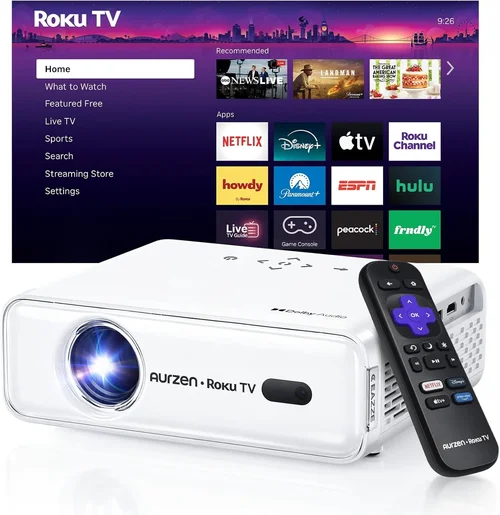
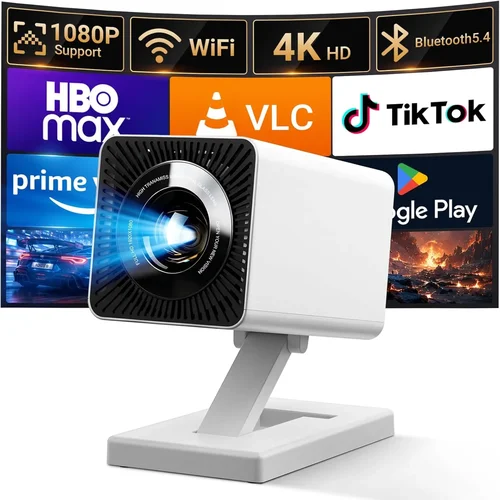
Welcome to the ultimate guide for anyone hunting a high‑performance multimedia projector without breaking the bank. Whether you’re setting up a home theater, a small classroom, or a portable office, the right projector can turn a modest room into a cinematic experience or a dynamic presentation space. The market is flooded with options, and the sub‑$500 segment has become especially competitive, offering features that were once reserved for premium models. This guide cuts through the noise, giving you the knowledge to make a confident purchase.
In the pages that follow, you’ll discover the most important specifications to evaluate, the different projector technologies that suit various use‑cases, common pitfalls that trip up even seasoned buyers, and a clear breakdown of how much you should expect to spend at each performance tier. By the end, you’ll be equipped to choose the best multimedia projector under $500 that aligns perfectly with your needs and budget.
The projector landscape has evolved dramatically over the past few years. LED and laser light sources have become more affordable, boosting lifespan and reducing maintenance costs. Meanwhile, resolution standards have risen, with 1080p now becoming the baseline for many mid‑range units. These advances mean that a $500 budget can secure a bright, sharp, and feature‑rich device—provided you know what to look for. Let’s dive in.

What to Look for When Buying Buying Guide
1. Budget & Price Range
While the headline says “under $500,” the actual price you’ll pay can vary widely based on sales, bundles, and regional taxes. Set a firm ceiling—say $480 after discounts—to give yourself wiggle room for accessories like a screen, mounting hardware, or a portable speaker system. Remember that a lower price often means compromises in brightness, contrast, or connectivity, so weigh each trade‑off against your primary use‑case.
2. Performance Specifications
Three specs dominate projector performance: brightness (measured in lumens), resolution, and contrast ratio. For a multimedia projector used in ambient lighting, aim for at least 2,500 ANSI lumens. If you’ll be in a darkened room, 1,500 lumens can suffice, allowing you to prioritize higher resolution. Native 1080p (1920×1080) delivers crisp detail for movies and games, while many budget models use “Full HD” marketing for 1080p‑scaled images—still acceptable but not truly native. Contrast ratio determines how deep blacks appear; a ratio of 10,000:1 or higher is desirable for vivid images.
3. Light Source Technology
Projectors use three main light sources: traditional lamps, LEDs, and lasers. Lamp‑based units are cheap but require bulb replacements every 2,000–3,000 hours. LED and laser models have longer lifespans (20,000+ hours) and maintain consistent brightness over time, though they can be slightly pricier. For a sub‑$500 projector, LED is the sweet spot, offering low heat, quiet operation, and long life without the expense of a full laser system.
4. Build Quality & Durability
Portable projectors often feature plastic housings that can crack under stress. Look for reinforced chassis, rubberized corners, and a sturdy lens cover. If you plan to move the unit frequently, a compact, lightweight design (<5 lb) with a built‑in handle is ideal. Check user reviews for reports of overheating or fan noise—both indicators of potential durability issues.
5. Features & Functionality
Modern projectors pack a suite of smart features. Key ones to consider:
- Wireless connectivity (Wi‑Fi, Bluetooth, or Miracast) for hassle‑free streaming from phones or laptops.
- Built‑in speakers—useful for casual movie nights, though external audio is recommended for serious audiophiles.
- Multiple HDMI ports for dual‑source setups, such as a gaming console and a streaming stick.
- Keystone correction (both vertical and horizontal) to adjust image geometry without a physical mount.
- Screen mirroring via Apple AirPlay or Google Cast for seamless device integration.
6. Brand Reputation
Established manufacturers like Epson, BenQ, ViewSonic, and Optoma often provide more reliable firmware updates and better customer service than obscure brands. While a lesser‑known label might offer a lower price, research their warranty terms and post‑sale support before committing.
7. Warranty & Support
A solid warranty can save you from costly repairs. Look for at least a 2‑year coverage that includes the light source. Some brands offer extended warranties for a modest fee—worth considering if you plan heavy usage. Also verify the availability of local service centers or authorized repair partners.
8. Size & Portability
If you need a projector for travel, conference rooms, or backyard movie nights, size matters. Compact “pico” projectors can fit in a backpack but often sacrifice brightness and throw distance. Mid‑range portable units (around 5 lb) strike a balance, delivering sufficient lumens while remaining easy to transport.
Different Types of Buying Guide

Common Buying Mistakes to Avoid
❌ Mistake: Ignoring Ambient Light Conditions
Why it’s bad: Purchasing a dim projector for a bright living room will result in washed‑out images, making the device feel useless.
What to do instead: Measure the typical lighting of your space. If you can’t control ambient light, aim for 3,000 lumens or more. If you can dim the room, 2,000 lumens may be sufficient.
❌ Mistake: Over‑focusing on Resolution Alone
Why it’s bad: A 1080p projector with 1,200 lumens will look worse in daylight than a 720p unit with 3,000 lumens.
What to do instead: Balance resolution with brightness and contrast. Prioritize the spec that matches your typical environment.
❌ Mistake: Forgetting About Throw Distance
Why it’s bad: You might end up with a tiny image in a large room or need to place the projector far away, causing image distortion.
What to do instead: Check the projector’s throw ratio. A 1.2:1 ratio means you’ll need 12 ft of distance for a 10‑ft screen. Short‑throw models are ideal for limited space.
❌ Mistake: Neglecting Connectivity Needs
Why it’s bad: You may find you can’t plug in your favorite streaming stick or gaming console because of missing ports.
What to do instead: List all devices you plan to connect. Ensure the projector has enough HDMI ports, USB‑C for modern laptops, and optional wireless options.
❌ Mistake: Assuming All “Full HD” Labels Mean Native 1080p
Why it’s bad: Some manufacturers upscale 720p panels and market them as “Full HD,” leading to blurry text and reduced sharpness.
What to do instead: Verify the native resolution in the spec sheet. Look for “Native 1080p” wording.
❌ Mistake: Skipping the Warranty Fine Print
Why it’s bad: A short warranty may leave you paying for a lamp replacement or repairs out of pocket.
What to do instead: Choose a model with at least a two‑year warranty covering the light source. Register the product online to activate extended coverage.
❌ Mistake: Buying Without Testing the Throw Ratio on Site
Why it’s bad: You might discover the image is too large for your wall or that you need a ceiling mount you don’t have.
What to do instead: If buying in‑store, ask for a demo at varying distances. Online, read user photos that show the projector in real rooms.
Budget Guidelines: How Much Should You Spend?
Understanding what you get at each price tier helps set realistic expectations.
- Entry-Level ($200‑$300): Expect 720p resolution, 1,500–2,000 lumens, basic HDMI connectivity, and limited warranty. Ideal for casual presentations or occasional movie nights in dark rooms.
- Mid‑Range ($301‑$400): Native 1080p becomes common, brightness climbs to 2,500–3,000 lumens, and you’ll find built‑in speakers plus wireless mirroring. This bracket offers the best value for most home users.
- Premium ($401‑$500): Higher contrast ratios (10,000:1+), advanced keystone correction, dual HDMI ports, and sometimes short‑throw optics. Perfect for gamers and small‑room home theaters.
- Luxury ($501+): Though beyond the scope of this guide, luxury models introduce laser light sources, 4K UHD panels, and premium lens optics. Consider these only if your budget permits.
Expert Tips for Getting the Best Deal
- Shop during major sales events: Black Friday, Cyber Monday, and Amazon Prime Day often feature 20‑30% discounts on popular models.
- Compare refurbished units: Certified refurbished projectors from the manufacturer can be up to 40% cheaper while retaining full warranty.
- Use price‑tracking tools: Extensions like Keepa or CamelCamelCamel alert you when a product’s price drops below your target.
- Check bundle offers: Some retailers include a screen, HDMI cable, or mounting kit at no extra cost—great value for first‑time buyers.
- Read the fine print on return policies: A 30‑day return window with free shipping ensures you can test the projector in your own space.
- Consider extended warranties only if you plan heavy use: For occasional movie nights, the standard warranty is sufficient.
- Test the throw distance before buying: Measure your wall or screen size and calculate required distance using the projector’s throw ratio.
- Prioritize models with firmware updates: Brands that regularly release updates fix bugs and improve compatibility with new devices.

Frequently Asked Questions
Q: Can I use a projector under 500 dollars for gaming?
A: Yes, but focus on low input lag (under 30 ms) and a refresh rate of at least 60 Hz. Models marketed as “gaming” often have game modes that reduce processing delay.
Q: How long will the LED light source last?
A: Most LED projectors in this price range guarantee 20,000 to 30,000 hours of use, which translates to several years of daily weekend viewing.
Q: Do I need a separate screen?
A: A smooth, white wall works, but a dedicated screen improves brightness and contrast, especially in rooms with ambient light. Portable pull‑down screens are affordable and easy to store.
Q: Is a short‑throw projector worth the extra cost?
A: If you have limited throw distance (e.g., a small bedroom), a short‑throw model eliminates shadowing and allows a larger image from a few feet away. Expect to pay $50‑$100 more.
Q: What is the difference between ANSI lumens and LED lumens?
A: ANSI lumens are measured using a standardized method for lamp‑based projectors. LED lumens are often higher on paper but can appear dimmer due to different color spectra. Compare real‑world reviews for accurate brightness perception.
Q: Can I connect my smartphone directly?
A: Most modern units support Miracast, AirPlay, or a dedicated app for wireless streaming. HDMI adapters (USB‑C to HDMI) also work for wired connections.
Q: How far should I place the projector from the screen?
A: Use the throw ratio formula: Throw Distance = Throw Ratio × Screen Width. For a 1.5:1 ratio and a 100‑inch diagonal screen (≈87 in width), you’ll need about 130 inches (≈11 ft) of distance.
Q: Is it safe to use a projector in a bedroom?
A: Absolutely, provided the projector has adequate ventilation. Avoid placing it on soft surfaces that could block airflow.
Q: Do I need a separate sound system?
A: Built‑in speakers are convenient for casual use, but they lack depth. Pairing the projector with a soundbar or Bluetooth speaker dramatically improves audio quality.
Our Final Recommendations
- Best for Budget‑Conscious Buyers: ViewSonic M2 – 1,200 lumens, native 1080p, LED light source, and Wi‑Fi mirroring all under $350.
- Best Overall Value: Epson EF‑100 – 2,000 lumens, 1080p, laser‑phosphor light source, and a sleek design at $429.
- Best Premium Option (Just Under $500): BenQ TH585 – 3,500 lumens, 1080p, low‑input‑lag gaming mode, and dual HDMI ports for $479.
- Best for Beginners: Optoma HD146X – Simple plug‑and‑play, 3,600 lumens, decent contrast, and an intuitive remote at $389.
- Best for Advanced Users: LG PF50KA – Portable, 600‑lumens LED, native 1080p, built‑in battery, and extensive wireless options for $499.
Conclusion: Making the Right Choice
Choosing the best multimedia projector under $500 boils down to matching the device’s strengths with your environment and usage habits. Prioritize brightness when ambient light is unavoidable, seek native 1080p for sharp visuals, and verify that the connectivity options align with your devices. By avoiding common pitfalls—like ignoring throw distance or over‑valuing resolution alone—you’ll secure a projector that delivers cinema‑grade entertainment or crisp presentations without draining your wallet.
Now that you’ve been equipped with the essential factors, price breakdowns, and top picks, it’s time to take action. Compare the models that fit your criteria, watch a few video reviews, and make a purchase during a sale to maximize value. Happy projecting!