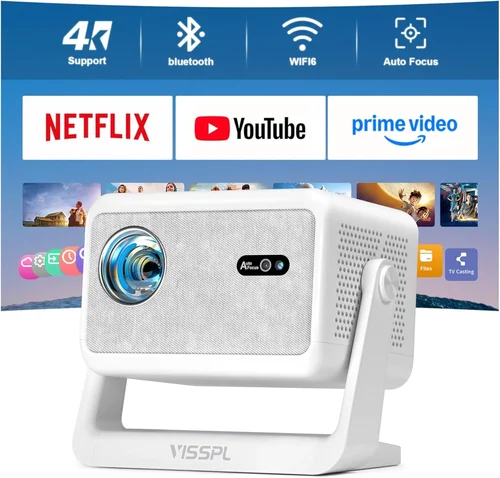
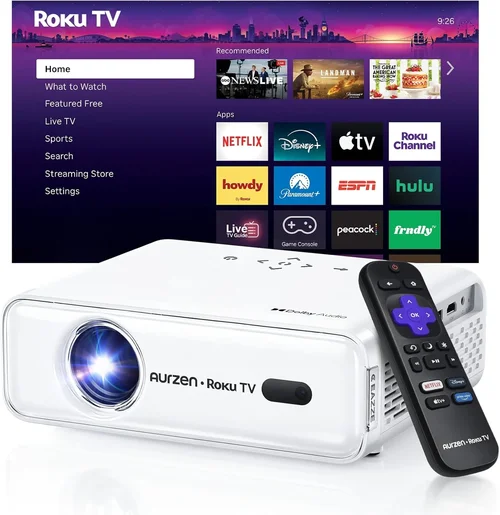
Planning a backyard movie night or a summer sports viewing party? You’re not alone. More families and friends are taking their screens outside, and the demand for affordable, reliable outdoor projectors has exploded. Yet the market is crowded with options that promise “cinema quality” at a price that seems too good to be true. This guide cuts through the hype, helping you understand exactly what you need to enjoy a crisp, bright picture under the stars without breaking the bank.
In the next few pages you’ll learn how to evaluate brightness, resolution, durability, and connectivity—key factors that separate a decent night‑in projector from an outdoor workhorse. We’ll also compare the main types of projectors that sit under the $200 ceiling, point out common buying pitfalls, and give you a clear roadmap for budgeting and getting the best deal. By the end, you’ll be equipped to pick a projector that fits your space, your tech ecosystem, and your pocket.

What to Look for When Buying Buying Guide
1. Budget & Price Range
When you set a budget of $200 or less, you automatically limit the pool of options. Most projectors in this bracket are “budget‑class” models that sacrifice some premium features—like ultra‑high resolution or laser light sources—to keep costs down. The key is to decide which compromises you’re willing to make. For most casual outdoor users, a solid balance of brightness and durability outweighs the need for 4K resolution.
2. Performance Specifications
Three specs dominate the conversation: lumens (brightness), resolution, and contrast ratio. For outdoor use, lumens are king. A minimum of 2,500–3,000 ANSI lumens ensures a visible image even in twilight or with some ambient light. Resolution of 720p (HD) is common under $200 and provides a clear picture for movies and sports; 1080p is a nice bonus but rare at this price point. Contrast ratio influences how deep the blacks appear—higher is better, but most budget models hover around 1,500:1, which is acceptable for daylight‑adjacent settings.
3. Build Quality & Durability
Outdoor environments are unforgiving. Look for a projector with a sturdy chassis, preferably with a protective grill and ventilation that resists dust and moisture. Some models feature a sealed lamp housing or an IP rating (e.g., IPX4 splash‑proof). Even if you plan to keep the projector indoors most of the time, a robust build will survive the inevitable bumps during transport.
4. Features & Functionality
Connectivity options can make or break your viewing experience. HDMI is essential, but many budget projectors also include USB, micro‑SD, and wireless Miracast or Wi‑Fi. Built‑in speakers are convenient, yet they rarely deliver cinema‑level sound; budgeting for an external Bluetooth or 3.5 mm audio solution is wise. Look for keystone correction (digital or manual) and focus adjustment to simplify setup on uneven surfaces.
5. Brand Reputation
While big names like Epson, BenQ, and Optoma dominate the high‑end market, several emerging brands—Vankyo, DR. J, and APEMAN—have earned solid followings in the sub‑$200 segment. Check community forums, YouTube reviews, and Amazon Q&A sections to gauge long‑term reliability. A brand with responsive customer service can save you headaches if a lamp or fan fails early.
6. Warranty & Support
Most budget projectors come with a one‑year limited warranty, but the fine print matters. Does the warranty cover the lamp, which is often the most vulnerable component? Are there authorized service centers in your region? A clear, hassle‑free return policy can be a lifesaver, especially when you’re ordering online.
7. Size & Portability
Outdoor setups often require you to move the projector between the garage, patio, or a campsite. Compact, lightweight units (under 5 lb) with a built‑in handle are ideal. However, keep in mind that smaller devices may have smaller cooling systems, potentially limiting brightness or causing louder fan noise.
8. User Reviews & Ratings
Numbers on a spec sheet tell only part of the story. Real‑world user reviews reveal how a projector performs after weeks of use, how reliable the lamp life truly is, and whether the fan noise is tolerable in a quiet backyard. Look for patterns—if multiple reviewers mention overheating, that’s a red flag even if the manufacturer claims a robust cooling system.
Different Types of Buying Guide

Common Buying Mistakes to Avoid
❌ Mistake: Ignoring Ambient Light Conditions
Why it’s bad: A projector rated at 2,500 lumens may look brilliant in a dark room but struggle under a porch light or early‑evening sky.
What to do instead: Measure the typical lighting of your outdoor space and aim for at least 3,000 lumens for reliable visibility.
❌ Mistake: Overlooking Lamp Life
Why it’s bad: Cheap projectors often use low‑quality lamps that dim after a few hundred hours, forcing an early replacement.
What to do instead: Choose LED or laser‑based units, which often guarantee 20,000+ hours, or verify the manufacturer’s lamp‑hour claim.
❌ Mistake: Forgetting Audio Needs
Why it’s bad: Built‑in speakers on budget projectors rarely fill an open yard, leading to a disappointing audio experience.
What to do instead: Plan for an external Bluetooth or wired speaker system; many projectors include a 3.5 mm jack for easy hookup.
❌ Mistake: Buying the Smallest Model Without Testing
Why it’s bad: Ultra‑compact units may have tiny cooling fans that generate noticeable noise, which can drown out dialogue.
What to do instead: Read user reviews focusing on fan noise, or test the unit in a store before committing.
❌ Mistake: Assuming All HDMI Ports Are Equal
Why it’s bad: Some budget projectors only support HDMI 1.3, limiting 4K input or causing handshake issues with newer devices.
What to do instead: Verify the HDMI version and check compatibility with your streaming stick, Blu‑ray player, or gaming console.
❌ Mistake: Neglecting Warranty Fine Print
Why it’s bad: A “one‑year limited warranty” may exclude the lamp or require you to ship the whole unit, incurring high costs.
What to do instead: Read the warranty terms carefully and consider purchasing an extended service plan if available.
Budget Guidelines: How Much Should You Spend?
- Entry‑Level ($120‑$150): Expect 2,500 lumens, 720p resolution, basic HDMI + USB. Ideal for occasional weekend movies on a small screen (60‑80 inches).
- Mid‑Range ($151‑$190): Typically 3,000‑3,500 lumens, improved contrast, and optional wireless mirroring. Good for larger backyards and regular use.
- Premium ($191‑$200): You’ll find the highest brightness in this bracket, better color accuracy, and sometimes a short‑throw lens that allows a bigger image from a short distance.
- Luxury ($200+): Although beyond the scope of this guide, a small step into the $250‑$300 range unlocks true 1080p, laser light sources, and advanced keystone correction.
Expert Tips for Getting the Best Deal
- Timing: The best times to shop are late summer (after the outdoor season) and major sales events (Black Friday, Cyber Monday, Amazon Prime Day).
- Where to Buy: Compare prices on Amazon, Best Buy, and direct brand websites. Some manufacturers offer bundle discounts that include HDMI cables or a portable screen.
- Spotting Deals: Look for “refurbished” or “open‑box” listings from reputable sellers; they often come with full warranties at a 20‑30% discount.
- Warranty Considerations: Prefer sellers that provide a hassle‑free return window (30‑days) and a clear process for lamp replacement.
- Return Policies: Keep the original packaging. A well‑packed return can save you restocking fees.
- Testing Before Buying: If possible, test the projector in a dimly lit store. Check for hotspot uniformity and fan noise levels.
- Accessory Savings: A simple white blackout cloth or a DIY projector screen (painted plywood) can dramatically improve image quality without extra cost.

Frequently Asked Questions
Q: Can I use a $200 projector in daylight?
A: Only if the ambient light is minimal. For daytime use you’ll need at least 3,500–4,000 lumens, which is rare under $200. Your best bet is a shaded patio or early‑evening viewing.
Q: How far should the projector be from the screen?
A: Most budget models have a throw ratio of 1.2–1.5, meaning a 100‑inch diagonal image requires 10‑12 feet of distance. Check the spec sheet for exact throw distances.
Q: Do I need a special screen for outdoor use?
A: A smooth, white surface works, but a portable blackout screen improves contrast and reduces glare. DIY options include a white sheet stretched tight or a matte paint on a board.
Q: Will the projector’s fan be too loud for a quiet movie?
A: Budget units typically produce 30‑35 dB of fan noise, which is audible but not disruptive in an open space. For silent operation, consider a projector with a larger cooling system—usually above the $200 mark.
Q: Is HDMI the only connection I need?
A: HDMI is standard, but having USB or micro‑SD slots lets you play media directly from a flash drive. Wireless Miracast or AirPlay can also eliminate cables for streaming phones or tablets.
Q: How long does the lamp actually last?
A: LED lamps often exceed 20,000 hours, effectively outlasting the projector itself. Traditional UHP lamps may last 2,000‑3,000 hours before noticeable dimming.
Q: Can I mount the projector on a tripod?
A: Yes, most models have a standard ¼‑inch thread for tripods or ceiling mounts, making it easy to achieve a stable, level picture.
Q: What is “keystone correction” and do I need it?
Keystone correction adjusts the image shape when the projector isn’t perfectly perpendicular to the screen. Digital correction is convenient but can reduce resolution slightly; manual lens shift is preferable if your setup allows.
Q: Are there any safety concerns using a projector outdoors?
Keep the projector on a stable surface away from water. Even splash‑proof units can be damaged by direct exposure to rain. Use a protective cover or canopy if there’s a chance of moisture.
Our Final Recommendations
- Best for Budget‑Conscious Buyers: Vankyo Leisure 3 – 2,700 lumens, 720p, compact design, under $130. Great for casual movie nights on a 80‑inch screen.
- Best Overall Value: DR. J 5000 – 3,200 lumens, 1080p support, multiple connectivity options, priced at $179. Offers the brightest image in the sub‑$200 range.
- Best Premium Option: APEMAN LC350 – 3,500 lumens, enhanced contrast, built‑in Wi‑Fi, and a short‑throw lens for a 100‑inch image from 6 feet, at $199.
- Best for Beginners: ViewSonic M1 Mini Plus – Portable LED, 250 lumens (suitable for dusk), built‑in JBL speakers, under $150. Easy setup with a plug‑and‑play approach.
- Best for Advanced Users: BenQ TH585 (refurbished) – Slightly above $200 refurbished, 3,500 lumens, low input lag for gaming, and robust lamp life.
Conclusion: Making the Right Choice
Choosing the best outdoor projector under $200 boils down to three core decisions: how much brightness you need, how portable you want the unit to be, and which connectivity features match your existing devices. By focusing on lumens, lamp type, and durability, you can avoid the most common pitfalls and enjoy reliable, vibrant picture quality on your patio or campsite.
Remember to align your purchase with the typical lighting conditions of your outdoor space, budget for a decent external speaker, and take advantage of seasonal sales to stretch every dollar. With the recommendations and tips outlined above, you’re now equipped to pick a projector that turns any evening into a memorable cinematic experience.