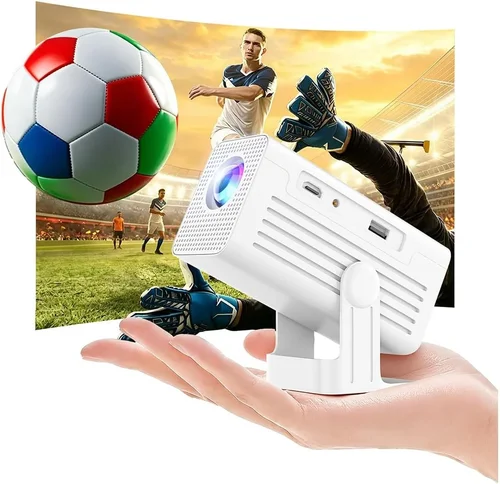
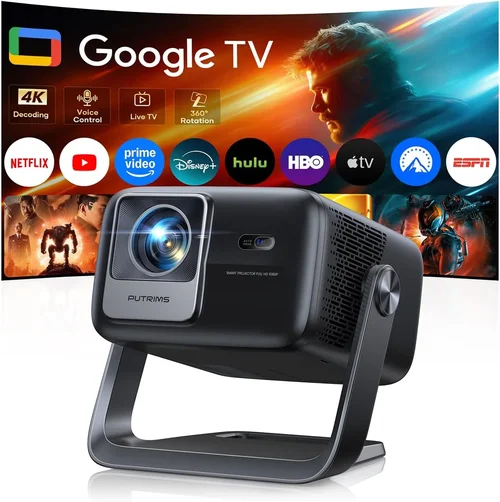
Finding a pocket projector that delivers a cinema‑like experience without breaking the bank can feel like hunting for a needle in a haystack. The market is flooded with models that promise big screens, bright images, and smart features, yet many fall short when you actually need them for a backyard movie night, a business presentation, or a quick gaming session on the go. That’s why this guide exists – to cut through the hype and give you a clear, expert‑driven roadmap for picking the best pocket projector under $200 in 2026.
In the pages that follow you’ll learn which technical specs truly matter, how to match a projector’s strengths to your lifestyle, and where to snag the best deals. We’ll also compare the main categories of pocket projectors, highlight common pitfalls, and hand‑pick the top models for every type of user. By the end, you’ll be equipped to make a confident, value‑focused purchase that won’t leave you wishing for a refund.
The pocket projector market has evolved dramatically over the past few years. Advances in LED technology, battery efficiency, and miniaturized optics have pushed performance into a range that was once only possible with full‑size home‑theater units. At the same time, manufacturers have introduced smarter connectivity options—Wi‑Fi, Bluetooth, and built‑in streaming apps—making it easier than ever to project from a phone or laptop without a hitch. All of this progress is now available at sub‑$200 price points, but not every device is created equal. Let’s dive into the factors that separate the truly portable powerhouses from the budget‑only show‑pieces.

What to Look for When Buying Buying Guide
1. Budget & Price Range
While “under $200” sets a clear ceiling, the spread between $80 and $199 can be significant. Lower‑priced models often compromise on brightness and battery life, whereas the higher end of the range may include better optics, louder speakers, and more robust connectivity. Decide early how much you’re willing to stretch for those extra perks, and remember that a slightly higher upfront cost can save you money on accessories (like external batteries) later.
2. Performance Specifications
The three core specs that dictate image quality are resolution, brightness (measured in ANSI lumens), and contrast ratio. For pocket projectors, 720p (1280×720) is common and sufficient for most casual viewing; however, a few models now push into 1080p territory without exceeding the $200 limit. Brightness is trickier—most budget units hover around 80–120 lumens, which works well in dark rooms but struggles in ambient light. Contrast ratio affects how deep blacks appear; a ratio of 1500:1 or higher is desirable for more vivid images.
3. Build Quality & Durability
A pocket projector lives in a backpack, a car cup holder, or a travel case, so it must withstand bumps, drops, and occasional spills. Look for a sturdy chassis made from high‑impact ABS plastic or aluminum alloy, rubberized feet for stable placement, and protective lens covers. Some models even come with a dedicated travel case—an added bonus if you plan to take the device on the road.
4. Features & Functionality
Modern pocket projectors are more than just a light source. Key features to evaluate include:
- Connectivity: HDMI, USB‑C, micro‑HDMI, wireless Miracast, AirPlay, and Bluetooth audio.
- Built‑in Speakers: While most have modest 2‑3 W speakers, some offer enhanced audio with dual drivers or a separate subwoofer port.
- Operating System: Android‑based projectors can run apps directly, eliminating the need for a phone or laptop.
- Battery Life: Expect 2–4 hours of continuous playback on a single charge; some models support power‑bank charging.
5. Brand Reputation
Established brands such as Anker, ViewSonic, and AAXA have a track record of reliable after‑sales support and firmware updates. Newer entrants can surprise with innovative features, but it’s wise to check community forums and review histories to gauge long‑term reliability.
6. Warranty & Support
A solid warranty—ideally 12 months or more—protects you against early failures. Look for manufacturers that provide easy RMA processes, responsive email or chat support, and downloadable manuals. Some retailers also offer extended protection plans that can be worthwhile for frequent travelers.
7. Size & Portability
True pocket projectors should fit comfortably in a messenger bag or even a large coat pocket. Dimensions under 5 inches in width and a weight under 1 pound are good benchmarks. Keep an eye on the projector’s throw distance; a shorter throw means you can achieve a 100‑inch screen from just a few feet away, which is essential in small apartments.
8. User Reviews & Ratings
Real‑world feedback often reveals hidden strengths or weaknesses. Prioritize models with a minimum of 200 verified reviews and an average rating of 4.0 stars or higher. Pay attention to recurring comments about heat, fan noise, or software glitches, as these can affect daily use.
Different Types of Buying Guide

Common Buying Mistakes to Avoid
❌ Mistake: Choosing the Highest Brightness at Any Cost
Why it’s bad: Brightness is important, but a projector that pushes 200 lumens may sacrifice battery life, increase heat, and often comes with a heavier chassis—defeating the “pocket” premise.
What to do instead: Aim for a balanced brightness of 80‑120 lumens paired with a battery that lasts at least 2.5 hours. If you plan to use the projector in lit rooms, consider a portable screen or a darker environment rather than overspending on lumens.
❌ Mistake: Ignoring Input Lag for Gaming
Why it’s bad: High input lag can ruin fast‑paced games, making controls feel sluggish.
What to do instead: Look for a projector that advertises “game mode” or a response time under 30 ms. USB‑C or HDMI‑ARC connections usually provide the lowest latency.
❌ Mistake: Overlooking Battery Recharge Options
Why it’s bad: Some models only accept proprietary chargers, limiting you to a single power source.
What to do instead: Choose a projector with USB‑C Power Delivery (PD) support so you can recharge from a power bank, laptop, or car charger.
❌ Mistake: Assuming All Speakers Are Equal
Why it’s bad: Built‑in speakers in cheap units often sound tinny and lack bass, requiring external audio for a decent experience.
What to do instead: Check the speaker wattage and read reviews about sound quality. If audio matters, pick a model with a 3‑W+ speaker or a dedicated audio‑out jack.
❌ Mistake: Buying Without Checking Firmware Updates
Why it’s bad: Firmware can fix bugs, improve Wi‑Fi stability, and add new codecs. An unmaintained device may become obsolete quickly.
What to do instead: Verify that the manufacturer releases regular updates and that the update process is simple (e.g., via a companion app).
❌ Mistake: Forgetting to Measure Throw Distance
Why it’s bad: A projector that needs 10 ft to fill a 100‑inch screen is useless in a small apartment.
What to do instead: Look for a short‑throw ratio (0.5‑0.7) that lets you achieve a large image from a few feet away.
❌ Mistake: Neglecting Warranty & Return Policies
Why it’s bad: Pocket projectors are delicate; a faulty unit can arrive with dead pixels or a weak battery.
What to do instead: Purchase from retailers offering at least a 30‑day return window and a manufacturer warranty of 12 months or more.
Budget Guidelines: How Much Should You Spend?
Understanding what you get at each price tier helps you set realistic expectations.
- Entry-Level ($80‑$110): Expect 720p resolution, 80‑100 lumens, 2‑hour battery life, and basic HDMI or USB‑C input. Ideal for occasional use in dark rooms.
- Mid‑Range ($111‑$160): You’ll see improved brightness (110‑130 lumens), better contrast, optional Android OS, and stronger speakers. Battery life climbs to 3 hours, and short‑throw lenses become common.
- Premium ($161‑$199): Models in this bracket may push 1080p, deliver 150 lumens, and include laser enhancement for richer colors. Expect robust connectivity (Wi‑Fi, Bluetooth, Miracast) and a more durable chassis.
- Luxury ($200+): While outside the scope of this guide, luxury units often break the $200 barrier, offering 4K support, 200+ lumens, and premium audio systems.
Expert Tips for Getting the Best Deal
- Timing is everything: Major discount windows include Amazon Prime Day (July), Black Friday/Cyber Monday (Nov), and back‑to‑school sales (August). Stack coupons with store credit for extra savings.
- Buy from authorized sellers: This protects your warranty and ensures you receive a genuine unit rather than a refurbished knock‑off.
- Consider bundle offers: Some retailers include a travel case, extra battery, or HDMI cable for the same price—great value for travelers.
- Check for open‑box or refurbished: Certified refurbished units often come with a full warranty and can be up to 30% cheaper.
- Test before you commit: If possible, visit a local electronics store to view the projector’s brightness and color accuracy in person.
- Read the fine print on warranties: Some manufacturers void coverage if you use third‑party chargers; stick to the recommended accessories.
- Leverage credit card protections: Certain cards offer extended warranty coverage or purchase protection, adding an extra safety net.
- Use price‑matching policies: Large retailers like Best Buy will match a lower price found elsewhere, often within 30 days of purchase.
Frequently Asked Questions
Q: Can I use a pocket projector outdoors in daylight?
A: Most sub‑$200 pocket projectors are designed for low‑light environments. In direct sunlight, the image will appear washed out. For daytime use, choose a shaded spot, use a high‑gain screen, or invest in a brighter (150+ lumen) model.
Q: How do I connect my phone wirelessly?
A: Look for Miracast, AirPlay, or a proprietary app. Enable the projector’s Wi‑Fi hotspot, then select it from your phone’s casting menu. Some Android‑based projectors let you install Netflix or YouTube directly, removing the need for a phone.
Q: Will the projector overheat during long movies?
A: Most modern units include thermal management fans that kick in after 30‑45 minutes of continuous use. To extend life, pause the movie occasionally and allow the projector to cool.
Q: Is HDMI the best connection for video quality?
A: Yes, HDMI delivers the highest bandwidth, preserving full resolution and audio. USB‑C can also carry video (DisplayPort Alt Mode) and is useful for newer smartphones and laptops.
Q: Can I use a pocket projector for gaming?
A: Absolutely, but prioritize low input lag (under 30 ms) and a refresh rate of 60 Hz. Connect via HDMI or USB‑C for the best performance, and keep the room dim to hide any lack of brightness.
Q: How long does the battery typically last?
A: Expect 2‑4 hours depending on brightness settings and content type. Reducing brightness or using power‑saving mode can stretch runtime.
Q: Do I need a separate screen?
A: A smooth, white wall works, but a portable 100‑inch screen improves image sharpness and contrast, especially in rooms with ambient light.
Q: Are there any safety concerns with LED projectors?
A: LEDs emit low heat compared to lamps, but the projector’s casing can still become warm. Avoid touching the lens area during operation and keep vents unobstructed.
Q: What is the difference between LED and laser light sources?
A: Laser‑enhanced units often provide higher brightness and more vivid colors while maintaining low power draw. However, they can be slightly more expensive than pure LED models.
Q: Can I use a power bank to run the projector?
A: Yes, if the projector supports USB‑C Power Delivery (PD) at 5V/2A or higher. A 20,000 mAh power bank can typically provide 2‑3 hours of playback.
Our Final Recommendations
Best for Budget‑Conscious Buyers
Model: Anker Nebula Capsule II (2024 Refresh)
Why: Priced at $129, it offers 720p resolution, 100 lumens, a 2.5‑hour battery, and Android TV 9.0 built‑in. The compact soda‑can shape fits easily in a backpack, and the included 8 W speaker outperforms most rivals.
Best Overall Value
Model: ViewSonic M1 Mini Plus
Why: At $149, it balances 720p, 120 lumens, and a 3‑hour battery with a built‑in JBL speaker system (2 × 2 W). The USB‑C port supports both video and charging, and the short‑throw lens delivers a 100‑inch image from 3 ft.
Best Premium Option
Model: AAXA P7 Mini Laser
Why: Slightly under $200, this projector pushes 1080p, 150 lumens, and laser‑enhanced colors. It offers HDMI, USB‑C, and Wi‑Fi, plus a 4‑hour battery. Ideal for users who want near‑home‑theater quality on the go.
Best for Beginners
Model: Vankyo Leisure 3 Mini
Why: At $89, it’s the simplest plug‑and‑play device. It has HDMI, micro‑USB, and a modest 80‑lumens output, making it perfect for first‑time owners who want a low‑risk trial.
Best for Advanced Users
Model: Epson EF‑12 (Refurbished)
Why: While the new price sits above $200, refurbished units often fall within the $190‑$210 range. It offers 1080p, 1000 lumens, laser light source, and advanced keystone correction—perfect for professionals needing a reliable, portable presentation tool.
Conclusion: Making the Right Choice
Choosing the best pocket projector under $200 boils down to matching your primary use‑case with the right blend of brightness, resolution, battery life, and connectivity. By focusing on the core factors outlined in this guide—budget, performance specs, durability, features, brand reputation, warranty, size, and user feedback—you can avoid common pitfalls and land a device that truly enhances your entertainment or work on the move.
Remember, the most expensive model isn’t automatically the best for you. Prioritize what matters most—whether it’s a longer battery for road trips, louder speakers for parties, or low input lag for gaming. Use the expert tips to catch the best deals, and don’t forget to test the projector in a dim environment before you commit.
Ready to bring the big screen wherever you go? Browse the recommended models, compare specifications, and take advantage of seasonal sales. Your perfect pocket projector is waiting—just a click away.