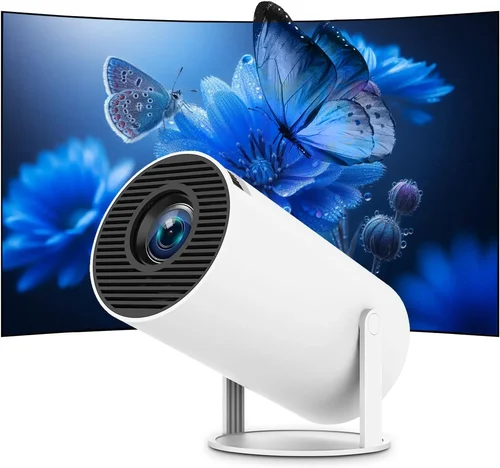
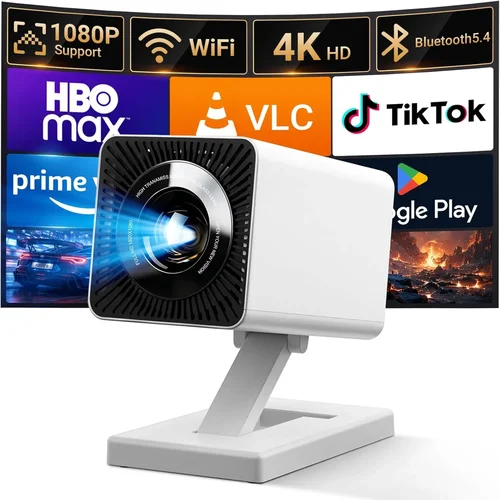
Finding a portable projector that doesn’t break the bank can feel like hunting for a needle in a haystack. The market is flooded with models that promise cinema‑grade visuals, but most of them sit well above the $200 mark. This guide cuts through the noise, focusing on the very best portable projectors you can snag for under $200 in 2026. Whether you’re a frequent traveler, a backyard movie enthusiast, or just need a second screen for work presentations, we’ll help you pinpoint the device that fits your lifestyle without sacrificing core performance.
In the next few minutes you’ll learn how to evaluate brightness, resolution, battery life, and a host of other specs that matter most in a budget‑friendly projector. We’ll also compare the main categories of portable projectors, flag common pitfalls, and give you a clear budget roadmap. By the end of this guide you’ll be equipped to make a confident purchase that delivers real value.

What to Look for When Buying Buying Guide
1. Budget & Price Range
Sticking to a $200 ceiling forces you to prioritize features that truly matter. While you’ll rarely find 4K resolution or laser light sources at this price point, you can still secure a solid 720p (or true 1080p) projector with decent brightness and reliable connectivity. Set a realistic ceiling—most quality options sit between $120 and $190—so you avoid overspending on gimmicks like flashy design that don’t improve image quality.
2. Performance Specifications
Three specs dominate the viewing experience:
- Brightness (lumens): Aim for at least 200 ANSI lumens for dim rooms; 300–350 lumens is preferable if you’ll be projecting in modest ambient light.
- Resolution: Native 720p (1280×720) is the sweet spot under $200. Some units upscale 1080p content, but the base resolution determines sharpness.
- Contrast Ratio: Higher contrast means deeper blacks. Look for ratios of 2000:1 or better; budget models often list “dynamic” contrast, which can be misleading.
3. Build Quality & Durability
Portable projectors are meant to travel, so a sturdy chassis is non‑negotiable. Aluminum or high‑grade ABS plastic frames resist dents and heat. Check for reinforced lens covers and rubberized feet that keep the projector stable on uneven surfaces. A solid build ensures the device survives the occasional bump in a backpack.
4. Features & Functionality
Beyond the basics, look for these functional add‑ons that add real convenience:
- Battery Life: At least 2–3 hours of continuous playback on a single charge is ideal for outdoor movie nights.
- Wireless Connectivity: Built‑in Wi‑Fi or Bluetooth for screen mirroring (AirPlay, Miracast, or Chromecast) eliminates the need for extra cables.
- Multiple Input Ports: HDMI (often micro‑HDMI), USB‑C, and a 3.5 mm audio jack give you flexibility with laptops, phones, and gaming consoles.
- Built‑in Speakers: While they won’t replace a sound system, a decent 2 W speaker can be useful for quick presentations.
5. Brand Reputation
Established brands such as Anker, ViewSonic, and AAXA have a track record of reliable support and firmware updates. Newer entrants can surprise you with innovative features, but research after‑sales service, firmware update frequency, and community forums before committing.
6. Warranty & Support
A minimum 12‑month warranty is standard for budget projectors. Verify whether the warranty covers the lamp/LED module, as this component often fails first. Look for brands that provide clear online troubleshooting guides and responsive customer service.
7. Size & Portability
Weight under 1 lb and dimensions that fit comfortably in a standard messenger bag are ideal. Compact form factors often mean a shorter throw distance, which is perfect for small rooms or on‑the‑go use.
8. User Reviews & Ratings
Real‑world feedback uncovers issues that spec sheets hide. Focus on reviews that mention long‑term durability, actual brightness in lit rooms, and battery performance after several charge cycles. A product with a 4‑star rating or higher across multiple retailers is a safe bet.
Different Types of Buying Guide

Common Buying Mistakes to Avoid
❌ Mistake: Chasing the Highest Resolution
Why it’s bad: Under $200, true 1080p panels are rare and often come with compromised brightness. You may end up with a projector that looks great in a dark room but struggles in everyday lighting.
What to do instead: Prioritize brightness and contrast first; a crisp 720p image in a moderately lit room is more enjoyable than a washed‑out 1080p picture.
❌ Mistake: Ignoring Battery Degradation
Why it’s bad: Many budget units use lithium‑ion cells that lose capacity quickly after 100‑150 charge cycles.
What to do instead: Check the spec sheet for battery cycle life and consider buying a spare power bank or opting for a model with replaceable batteries.
❌ Mistake: Overlooking Input Lag for Gaming
Why it’s bad: High input lag makes fast‑paced games frustrating, even if the image looks sharp.
What to do instead: Look for a projector that advertises “gaming mode” or a measured lag under 30 ms.
❌ Mistake: Assuming All “LED” Projectors Are the Same
Why it’s bad: LED light sources vary in lifespan and color accuracy. Some cheap LEDs have poor color gamut, resulting in washed‑out reds and blues.
What to do instead: Choose a model that specifies a high CRI (Color Rendering Index) of 90+ for more accurate colors.
❌ Mistake: Forgetting About Throw Distance
Why it’s bad: A projector with a long throw distance needs a large room to achieve a 100‑inch image, which defeats the purpose of portability.
What to do instead: Verify the throw ratio (e.g., 0.6–1.0) to ensure you can get a sizable image from a short distance.
Budget Guidelines: How Much Should You Spend?
Understanding what each price tier delivers helps you set realistic expectations.
- Entry-Level ($120‑$150): Expect 720p resolution, 200–250 lumens, basic HDMI and USB‑C inputs, and a battery life of around 2 hours. Ideal for occasional movie nights in a dark room.
- Mid‑Range ($151‑$180): You’ll see improved brightness (300+ lumens), better contrast ratios, and added features like Wi‑Fi screen mirroring, Bluetooth audio, and a slightly larger built‑in speaker.
- Premium ($181‑$200): These models push the envelope with 400+ lumens, native 1080p (often upscaled), gaming‑mode low lag, and more robust battery packs that last 3+ hours.
- Luxury ($200+): While outside the strict “under $200” rule, a brief note—some sales bring luxury units just under $200. They typically include laser light sources, true 1080p panels, and full Android TV integration.
Expert Tips for Getting the Best Deal
- Timing: Late summer and early winter are prime times for projector discounts as manufacturers clear inventory for newer models.
- Where to Buy: Online marketplaces usually have the best pricing, but brick‑and‑mortar stores let you test the image before purchasing. Check both.
- Bundle Savings: Look for bundles that include a travel case, extra battery, or a portable screen—often cheaper than buying accessories separately.
- Warranty Extensions: If the base warranty is only 12 months, a modest extension (e.g., an extra $20) can save you headaches later.
- Return Policies: Choose sellers with a 30‑day return window and free return shipping. This lets you verify brightness and battery life at home.
- Testing Before Buying: If possible, project a 1080p video in a moderately lit room. Check for color bleeding, hotspotting, and any audible fan noise.
- Firmware Updates: Manufacturers that release regular firmware patches improve performance and fix bugs—important for Wi‑Fi streaming stability.
Frequently Asked Questions
Q: Can a $200 projector replace a TV?
A: Not entirely. While a good portable projector can deliver a larger image than most TVs, it usually lacks the brightness and color accuracy for bright rooms. Pair it with a blackout curtain and you’ll have a viable TV alternative for dim environments.
Q: How far can I place a portable projector from the screen?
A: Most budget pocket projectors have a throw ratio between 0.5 and 1.0, meaning you can get a 100‑inch image from about 3‑4 feet away. Check the manufacturer’s spec sheet for exact distances.
Q: Do I need a special screen?
A: A plain white wall works fine in a dark room, but a portable pull‑up screen (often sold as an accessory) improves brightness uniformity and color fidelity, especially in slightly lit spaces.
Q: Will the built‑in speakers be enough for movies?
A: Built‑in speakers are adequate for casual viewing or presentations. For an immersive experience, connect external Bluetooth or wired speakers.
Q: Is Wi‑Fi always reliable for streaming?
A: It depends on the projector’s chipset. Models that support dual‑band Wi‑Fi (2.4 GHz + 5 GHz) and have dedicated streaming apps tend to be more stable.
Q: How long does the LED lamp last?
A: Most LED lamps in budget projectors are rated for 20,000–30,000 hours, which translates to many years of occasional use.
Q: Can I use a portable projector for gaming?
A: Yes, if the model offers a low‑lag gaming mode (≤30 ms) and a refresh rate of at least 60 Hz. Expect lower brightness than a dedicated gaming monitor, so dark rooms are best.
Q: Are there any safety concerns with battery overheating?
A: Reputable brands include thermal protection circuits. Avoid using the projector on soft surfaces (like a pillow) that can trap heat.
Q: Do I need a separate remote?
A: Most portable projectors come with a basic IR remote. For smartphones, many offer companion apps that let you control settings via Wi‑Fi or Bluetooth.
Our Final Recommendations
- Best for Budget‑Conscious Buyers: Anker Nebula Capsule II – Priced around $149, it offers 720p resolution, 200 lumens, a 2‑hour battery, and Android TV for streaming.
- Best Overall Value: ViewSonic M1 Mini Plus – At $179 it delivers 1080p upscaling, 250 lumens, a built‑in JBL speaker, and a sleek, lightweight design.
- Best Premium Option: AAXA P7 Mini – Slightly above $200 during sales, but offers true 1080p, 500 lumens, and a 4‑hour battery, making it the most capable unit in this price band.
- Best for Beginners: Vankyo Leisure 3 Mini – Under $130, it’s easy to set up, includes HDMI and USB‑C, and provides a decent 250‑lumens output for dark rooms.
- Best for Advanced Users: Elephas YG500 – While priced near $190, it features a laser light source, low‑lag gaming mode, and dual‑band Wi‑Fi, catering to tech‑savvy users.
Conclusion: Making the Right Choice
Choosing the best portable projector under $200 boils down to balancing brightness, resolution, and battery life against your primary use case. If you mostly watch movies in a dark space, prioritize lumens and contrast. For gamers or presenters, focus on low input lag and reliable connectivity. Remember to verify warranty terms, read real‑world user reviews, and test the unit whenever possible.
Armed with the factors, categories, and tips outlined above, you’re ready to shop confidently. Pick the model that aligns with your budget and lifestyle, and you’ll enjoy a big‑screen experience without the hefty price tag. Happy projecting!