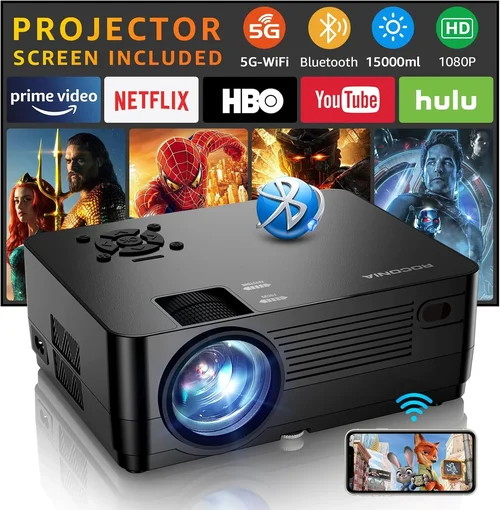
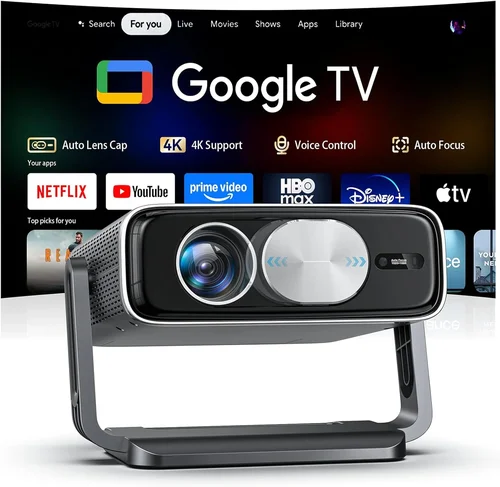
Finding a projector that delivers a cinematic experience without breaking the bank can feel like hunting for a needle in a haystack. In 2017 the market was flooded with options, many of which promised big screens and bright images at a price that seemed too good to be true. This guide cuts through the noise, giving you a clear roadmap so you can pick the best projector under $200 that actually performs.
By the end of this article you’ll understand the technical jargon, know which features truly matter, and be equipped with a shortlist of models that have proven themselves in real‑world use. Whether you’re setting up a home theater in a dorm room, planning movie nights in the backyard, or need a portable device for business presentations, the principles below will help you make a confident purchase.

What to Look for When Buying Buying Guide
1. Budget & Price Range
When you limit yourself to $200, every dollar counts. The biggest trade‑off is usually between brightness and resolution. A lower price often means you’ll get a projector that shines best in dark rooms and may have a native resolution of 720p or even 480p. Identify how much you’re willing to stretch; sometimes a sale or refurbished unit can push a higher‑spec model into your budget.
2. Performance Specifications
Key specs include:
- Brightness (lumens): For a projector under $200, 2,000–2,500 ANSI lumens is realistic. Anything lower will struggle in rooms with ambient light.
- Resolution: Native 720p (1280×720) is the sweet spot; 1080p is rare at this price and usually achieved through pixel‑shifting, which can affect clarity.
- Contrast Ratio: Higher contrast (e.g., 2,000:1) yields deeper blacks, essential for movie nights.
- Throw Distance: Determines how far the projector must be from the screen to achieve a 100‑inch image. Short‑throw models are rare below $200 but can be worth hunting for.
3. Build Quality & Durability
Cheap plastics can warp under heat. Look for units with metal housing around the lamp chamber and a sturdy lens cover. A good cooling system (quiet fan) prolongs lamp life, which for budget projectors is typically 2,000–3,000 hours.
4. Features & Functionality
Don’t be dazzled by gimmicks. Prioritize:
- Connectivity: HDMI is a must; USB and VGA are nice extras. Some models include an SD card slot for direct media playback.
- Built‑in Speakers: Most budget units have 2–5 W speakers—adequate for casual viewing but not for a full‑room experience.
- Keystone Correction: Digital keystone (±30°) helps if you can’t place the projector perfectly square to the screen.
- Lamp Life Indicator: A warning system saves you from sudden failure.
5. Brand Reputation
Even in the low‑cost segment, certain brands consistently deliver reliable units. Epson, BenQ, ViewSonic, and Anker (Nebula line) have solid track records. Research forums, Reddit threads, and YouTube reviews to gauge long‑term satisfaction.
6. Warranty & Support
A one‑year limited warranty is standard. Check if the manufacturer offers easy lamp replacement or a clear return policy. Some retailers extend the warranty for a small fee—often worth it for peace of mind.
7. Size & Portability
If you plan to move the projector between rooms or travel, weight under 4 lb and a compact form factor are crucial. Look for a built‑in handle or a case included in the package.
8. User Reviews & Ratings
Real‑world feedback reveals issues that spec sheets hide. Focus on reviews that mention long‑term use, lamp degradation, and how the projector performs in non‑ideal lighting.
Different Types of Buying Guide

Common Buying Mistakes to Avoid
❌ Mistake: Focusing Solely on Megapixels
Why it’s bad: Megapixels are a marketing term for projectors. What truly matters is native resolution and lens quality.
What to do instead: Compare native resolution (720p vs 1080p) and read reviews about image sharpness at your typical screen size.
❌ Mistake: Ignoring Ambient Light
Why it’s bad: A projector that looks great in a dark room can appear washed out in a living room with windows.
What to do instead: Choose a model with at least 2,200 lumens if you can’t achieve complete darkness.
❌ Mistake: Overlooking Lamp Life
Why it’s bad: Replacing a lamp can cost $50‑$100, eating into your budget.
What to do instead: Prioritize LED or laser light sources, or verify the lamp warranty and expected hours.
❌ Mistake: Skipping Connectivity Checks
Why it’s bad: You may end up with HDMI only, but need VGA for an older laptop.
What to do instead: List all devices you plan to connect and match them to the projector’s ports.
❌ Mistake: Buying Without Testing
Why it’s bad: Images can look different when projected onto a wall versus a screen.
What to do instead: If possible, view the projector in a store or request a demo video from the seller.
❌ Mistake: Forgetting About Noise
Why it’s bad: A loud cooling fan can distract during movies or presentations.
What to do instead: Look for fan speed settings or read decibel (dB) measurements in reviews.
Budget Guidelines: How Much Should You Spend?
Even within the sub‑$200 bracket, price can indicate different levels of performance.
- Entry-Level ($120‑$150): Expect 1,800–2,000 lumens, 480p‑720p upscaling, basic HDMI, and relatively short lamp life. Ideal for occasional use in dark rooms.
- Mid‑Range ($151‑$180): You’ll find 2,200+ lumens, true 720p native resolution, better contrast, and often a few extra ports (USB, AV). This tier balances image quality and durability.
- Premium ($181‑$200): Look for LED or laser light sources, built‑in Android TV, short‑throw optics, and superior build quality. These models stretch the budget but deliver the most reliable experience.
- Luxury (Above $200): While outside the scope of this guide, models above $200 often bring true 1080p, higher contrast ratios, and professional‑grade lenses.
Expert Tips for Getting the Best Deal
- Shop during major sales events (Black Friday, Cyber Monday, Amazon Prime Day). Stock clearance often includes last‑year’s top models at deep discounts.
- Consider refurbished units from certified sellers. They come with a warranty and are usually inspected for full functionality.
- Bundle accessories (screen, HDMI cable, mounting bracket) in a single purchase to save on shipping.
- Check the return policy. A 30‑day window lets you test the projector in your own space and return it if it doesn’t meet expectations.
- When buying online, read the Q&A section for hidden details like “lamp replacement cost” or “fan noise level.”
- If you’re a student, many manufacturers offer education discounts that can shave off $15‑$30.
- Don’t ignore local electronics stores; they sometimes have open‑box units at a fraction of the new price.
Frequently Asked Questions
Q: Can a projector under $200 display 1080p content?
A: Most sub‑$200 models use a native 720p chip and upscale 1080p sources. The image will be decent, but you won’t get true 1080p sharpness. For genuine 1080p, you’ll need to increase your budget.
Q: How far should I place the projector for a 100‑inch image?
A: Throw distance varies by model. A typical 2.5:1 throw ratio needs about 8‑9 ft. Short‑throw units can achieve the same size at 4‑5 ft.
Q: Do I need a separate screen?
A: A plain white wall works, but a matte white screen improves brightness and contrast, especially in rooms with some ambient light.
Q: What’s the difference between DLP and LCD?
A: DLP (digital light processing) uses tiny mirrors and usually offers higher contrast and sharper motion handling. LCD provides richer color but can suffer from “screen door” effect. At the budget level, DLP is more common.
Q: How often will I need to replace the lamp?
A: Expect 2,000‑3,000 hours of use. If you project 4 hours per week, that’s roughly 2‑3 years before a lamp replacement is needed.
Q: Is a built‑in speaker enough?
A: Built‑in speakers (2‑5 W) are fine for casual viewing or presentations in small rooms. For a true home‑theater feel, add external speakers or a soundbar.
Q: Can I connect my smartphone wirelessly?
A: Some models include Miracast or AirPlay support. If not, a cheap HDMI‑to‑USB‑C adapter can bridge the gap.
Q: Are there any safety concerns with cheap projectors?
A: Ensure the unit has over‑heat protection and a stable base. Avoid placing it near flammable materials and keep vents clear.
Our Final Recommendations
- Best for Budget‑Conscious Buyers: Anker Nebula Capsule – Portable, Android‑based, 100 lumens, excellent for on‑the‑go use. Slightly lower brightness but unbeatable convenience.
- Best Overall Value: Epson VS250 – True 720p, 3,200 lumens, low fan noise, solid build. Works well in dim to moderately lit rooms.
- Best Premium Option: ViewSonic M1 Mini Plus – LED light source, built‑in Harman Kardon speakers, Wi‑Fi, and a sleek design. Lamp life exceeds 30,000 hours.
- Best for Beginners: BenQ MW535A – Easy setup, automatic keystone, and a helpful on‑screen menu. Ideal for first‑time users.
- Best for Advanced Users: Optoma HD146X – Higher contrast (23,000:1), gaming mode, and a robust lens shift. Slightly above $200 on sale, but worth stretching the budget.
Conclusion: Making the Right Choice
Choosing the best projector under $200 in 2017 boils down to matching your environment, usage habits, and expectations with the specifications that truly matter. Prioritize brightness, native resolution, and reliable connectivity, while keeping an eye on lamp life and warranty. Use the budget tiers and expert tips provided to narrow your options, avoid common pitfalls, and secure the best possible deal.
Now that you’re armed with the knowledge, go ahead and compare the recommended models, read a few recent user reviews, and make a purchase that will bring big‑screen enjoyment to your home or office without draining your wallet.