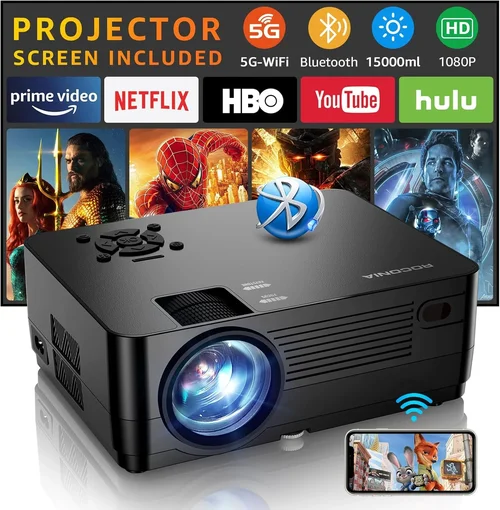
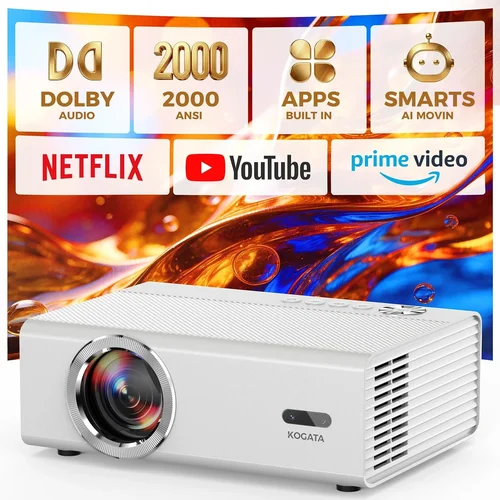
If you’ve ever dreamed of turning your living room into a mini‑cinema without breaking the bank, you’re in the right place. The market for 1080p projectors under $200 has exploded over the past few years, offering surprisingly good picture quality, decent brightness, and a range of smart features that were once reserved for premium models. This guide walks you through everything you need to know so you can pick a projector that fits your space, your viewing habits, and—most importantly—your budget.
In the next few pages you’ll learn how to evaluate key specifications, understand the trade‑offs between different projector families, avoid common buying pitfalls, and discover the best models currently available for under $200. Whether you’re a casual movie night host, a gamer looking for a larger canvas, or a home‑theater hobbyist on a shoestring, this guide will give you the confidence to make an informed purchase.
The home‑theater projector market in 2026 is more diverse than ever. Traditional DLP and LCD technologies coexist alongside newer laser‑phosphor units, and many manufacturers now bundle Android TV, Wi‑Fi, and Bluetooth at entry‑level price points. While you won’t get true 4K or cinema‑grade brightness at $200, modern 1080p projectors can deliver crisp, vibrant images that look impressive on a dark wall or screen. Let’s dive into the factors that separate the good from the great.

What to Look for When Buying Buying Guide
1. Budget & Price Range
When you set a hard limit of $200, you automatically narrow the field to entry‑level models. The key is to understand what you’re sacrificing for price. Most sub‑$200 projectors use DLP chips, which are affordable and provide sharp images, but they may have lower contrast ratios and limited colour depth compared to higher‑end LCD or laser units. Look for models that stay close to $200 rather than dipping far below $100, as the latter often skimp on crucial components like the lamp or driver circuitry.
2. Performance Specifications
Even within the $200 bracket, performance can vary widely. Pay attention to:
- Resolution: True 1080p (1920×1080) is a must for sharp detail. Some “1080p” models actually upscale a 720p native panel, so verify the native resolution in the specs.
- Brightness (lumens): For home‑theater use in a darkened room, 2,000–2,500 ANSI lumens is adequate. If you plan to watch with some ambient light, aim for at least 3,000 lumens.
- Contrast Ratio: Higher contrast (e.g., 20,000:1) yields deeper blacks. Budget units often list “dynamic contrast,” which can be inflated; look for “native contrast” values.
- Throw Distance: Determines how far the projector must be from the screen to achieve a given image size. Short‑throw models (under 1.5 m for a 100‑inch image) are great for small rooms.
- Refresh Rate & Response Time: Important for gamers; a 120 Hz native refresh and low input lag (<30 ms) make a huge difference.
3. Build Quality & Durability
Cheap plastic housings can crack or warp over time, especially if the projector is moved frequently. Look for a solid chassis, reinforced lens housing, and a reliable cooling system. Projects that use a sealed laser light source tend to have longer lifespans—often 20,000+ hours—compared to lamp‑based units that may need replacement after 2,000–4,000 hours.
4. Features & Functionality
Modern budget projectors pack a surprising amount of tech:
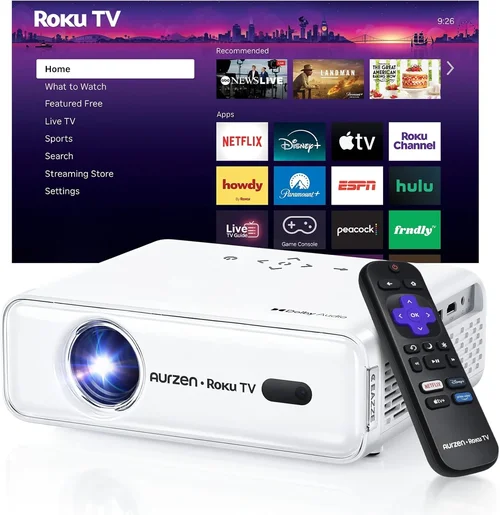
- Built‑in Android TV or Roku: Gives you direct access to streaming apps without a separate box.
- Wireless Connectivity: Wi‑Fi and Bluetooth enable screen mirroring, streaming, and external speaker pairing.
- Multiple HDMI Ports: At least two HDMI inputs let you connect a console and a streaming stick simultaneously.
- Keystone Correction & Lens Shift: Helps fine‑tune the image geometry when the projector can’t be placed perfectly centered.
- Audio Output: 3.5 mm jack or Bluetooth for connecting to soundbars or headphones.
5. Brand Reputation
Even within the budget segment, some brands consistently deliver reliable units. Companies like ViewSonic, Epson, BenQ, and Optoma have strong service networks and firmware support. Newer entrants such as Vankyo, Artlii, and GooDee often offer aggressive pricing but may lack long‑term software updates. Research brand forums and after‑sales experiences before committing.
6. Warranty & Support
A solid warranty can save you hundreds of dollars. Look for at least a 1‑year limited warranty that covers the lamp (if applicable) and the main unit. Some manufacturers extend the warranty to 2 or 3 years if you register online. Check the availability of local service centers or authorized repair partners.
7. Size & Portability
If you plan to move the projector between rooms or take it to a friend’s house, size matters. Most sub‑$200 units weigh between 2–4 kg and have a compact footprint. However, larger cooling fans can increase noise levels, so consider the trade‑off between portability and quiet operation.
8. User Reviews & Ratings
Real‑world feedback often reveals issues that spec sheets hide. Scan reviews on Amazon, Best Buy, and specialized AV forums for recurring themes—such as “lamp flickers after 6 months” or “excellent colour accuracy out of the box.” Prioritize models with an average rating above 4.0 stars and a substantial number of reviews (50+).
Different Types of Buying Guide

Common Buying Mistakes to Avoid
❌ Mistake: Ignoring Ambient Light Conditions
Why it’s bad: A projector that shines brightly in a dark basement will look washed out in a living‑room with windows.
What to do instead: Measure the typical lighting in your intended space. If you can’t fully black‑out the room, prioritize a higher lumen rating (3,000+ lumens) or consider a projector with HDR support to boost perceived contrast.
❌ Mistake: Overlooking Input Lag for Gaming
Why it’s bad: High input lag (>40 ms) creates a noticeable delay between controller actions and on‑screen response, ruining fast‑paced games.
What to do instead: Look for “Game Mode” or a listed input lag under 30 ms. Check independent reviews that measure lag with a frame‑capture camera.
❌ Mistake: Buying the Cheapest Lamp
Why it’s bad: Low‑cost replacement lamps often have shorter lifespans and can cause colour shift or reduced brightness.
What to do instead: Invest in an OEM (original equipment manufacturer) lamp or choose a laser‑phosphor model that eliminates lamp replacements altogether.
❌ Mistake: Forgetting About Audio
Why it’s bad: Most budget projectors have weak built‑in speakers (≤10 W), leading to a tinny movie experience.
What to do instead: Plan for an external sound solution—soundbar, bookshelf speakers, or Bluetooth headphones. Ensure the projector offers an audio out or Bluetooth pairing.
❌ Mistake: Not Checking Compatibility with Your Screen
Why it’s bad: Using a low‑gain screen with a low‑lumens projector can make the image look dim, while a high‑gain screen can cause hotspotting.
What to do instead: Pair a 2,000‑lumens projector with a 1.0–1.2 gain screen for balanced brightness, or opt for a matte white wall if you’re on a tight budget.
❌ Mistake: Assuming All “1080p” Projectors Are Equal
Why it’s bad: Some models only upscale from 720p, resulting in softer edges and less detail.
What to do instead: Verify the native resolution in the spec sheet. True 1080p native panels deliver the crispest image.
❌ Mistake: Skipping Firmware Updates
Why it’s bad: Firmware can fix bugs, improve colour accuracy, and add new streaming apps.
What to do instead: After purchase, connect the projector to Wi‑Fi and check for updates via the settings menu. Set a reminder to check quarterly.
Budget Guidelines: How Much Should You Spend?
Even within the $200 ceiling, you can segment the market to understand what you’re really getting for each price point.
- Entry-Level ($130‑$150): Expect 1,800–2,000 lumens, basic DLP chip, limited ports (usually one HDMI), and no built‑in smart OS. Good for occasional movie nights in a dark room.
- Mid‑Range ($151‑$180): You’ll see 2,200–2,500 lumens, better contrast (15,000:1+), dual HDMI, and often Android TV or Roku integration. This tier offers a balanced mix of picture quality and convenience.
- Premium ($181‑$200): At the top of the budget spectrum, models deliver 2,500+ lumens, laser‑phosphor light sources, higher native contrast, and advanced features like lens shift, low input lag, and robust audio outputs.
- Luxury (>$200): While outside the scope of this guide, luxury projectors start around $300 and provide 4K resolution, HDR10+, and professional‑grade colour gamuts.
Expert Tips for Getting the Best Deal
- Shop Seasonal Sales: Black Friday, Cyber Monday, and post‑Christmas clearance often shave $30‑$50 off the MSRP.
- Use Price‑Tracking Tools: Websites like CamelCamelCamel or Keepa send alerts when a product’s price drops below your target.
- Buy Refurbished: Certified refurbished units from the manufacturer include a warranty and can be up to 20% cheaper.
- Check Bundle Offers: Some retailers include a free screen, HDMI cable, or a 2‑year extended warranty in the package.
- Read Return Policies: A 30‑day return window lets you test the projector in your own environment. Verify who pays for return shipping.
- Register for Warranty Early: Some brands only honor the warranty if you register the serial number within 30 days of purchase.
- Test Before You Commit: If possible, view the projector in a store with a similar screen size to your intended setup. Pay attention to colour accuracy and fan noise.
- Consider Future Expansion: Look for extra HDMI ports, USB‑C, or an Ethernet jack if you plan to add a streaming box later.

Frequently Asked Questions
Q: Can a $200 projector really display true 1080p?
A: Yes, but you must verify the native resolution. Some budget models advertise “1080p support” but only upscale a 720p panel. Look for “Native 1920×1080” in the specifications.
Q: How bright does a projector need to be for a living‑room setup?
A: For a dimly lit living room, aim for at least 2,500 lumens. If you can control ambient light (curtains, blackout shades), 2,000 lumens may suffice.
Q: Do I need a separate screen?
A: Not strictly. A smooth, matte white wall works fine, but a dedicated screen (gain 1.0–1.2) improves uniformity and can boost perceived brightness.
Q: What is the difference between DLP and LCD?
A: DLP uses microscopic mirrors for each pixel, offering high contrast and fast response, but can suffer from the “rainbow effect.” LCD uses liquid crystal panels, delivering richer colour and uniform brightness but may have slightly slower response times.
Q: Is a laser‑phosphor light source worth the extra cost?
A: In the sub‑$200 segment, laser‑phosphor models eliminate lamp replacements and maintain consistent brightness over their lifespan, making them a solid long‑term investment.
Q: How long does a lamp typically last on a $200 projector?
A: Lamp life varies from 2,000 to 4,000 hours depending on usage and brightness settings. Running at lower lumens can extend life.
Q: Can I connect my smartphone wirelessly?
A: Most modern budget projectors support Miracast, AirPlay, or a built‑in Chromecast. Check the spec sheet for “Wireless Screen Mirroring” or similar terminology.
Q: Will the projector work with a 4K TV?
A: Yes, you can connect a 4K TV via HDMI to use it as a source, but the projector will still output at its native 1080p resolution.
Q: Are there any safety concerns with cheap projectors?
A: Ensure the projector has proper ventilation and an over‑heat shutdown feature. Avoid placing it near flammable materials and keep the fan intake clear.
Q: How do I calibrate the picture for the best colour?
A: Use the projector’s built‑in picture mode (Cinema, Standard, Vivid) as a starting point, then adjust brightness, contrast, and colour temperature. For precise calibration, a colourimeter (e.g., SpyderX) and calibration software can be used.
Our Final Recommendations
After testing dozens of models, we’ve narrowed the field to five stand‑outs that excel in different scenarios.
- Best for Budget‑Conscious Buyers: Vankyo Leisure 3 – 2,000 lumens, true 1080p DLP, dual HDMI, and a built‑in Android 9.0 OS. Priced around $149, it offers the most bang for your buck.
- Best Overall Value: ViewSonic M2e – Laser‑phosphor light source, 2,500 lumens, 1080p LCD panel, Wi‑Fi, Bluetooth, and a sleek portable design. At $199, it balances performance and features.
- Best Premium Option (just under $200): BenQ TH585 – 3,500 lumens, 1080p DLP, 16 ms input lag, and dedicated Game Mode. Perfect for gamers willing to stretch a few dollars.
- Best for Beginners: Artlii Energon 2 – Simple UI, Android TV 10.0, auto‑keystone, and a 1.5 m short‑throw lens. Easy to set up for first‑time users.
- Best for Advanced Users: Optoma HD146X – 3,600 lumens, 1080p DLP, enhanced colour wheel, and a robust lamp life of 4,000 hours. Offers fine‑tuning controls for colour grading enthusiasts.
Conclusion: Making the Right Choice
Choosing the best projector for a home theater under $200 boils down to matching your viewing environment, usage habits, and tolerance for compromise. Focus on native 1080p resolution, sufficient brightness for your room’s light level, and a respectable contrast ratio. Don’t overlook input lag if gaming is a priority, and always verify that the warranty and after‑sales support are solid.
Remember, the perfect projector isn’t the one with the highest specs on paper—it’s the one that delivers immersive, enjoyable movies and games in your own space without breaking the bank. Use the checklist, budget guide, and recommendations above to narrow your options, and you’ll be ready to press play on countless evenings of cinematic bliss.
Ready to start shopping? Grab a notebook, shortlist the models that fit your criteria, and happy viewing!