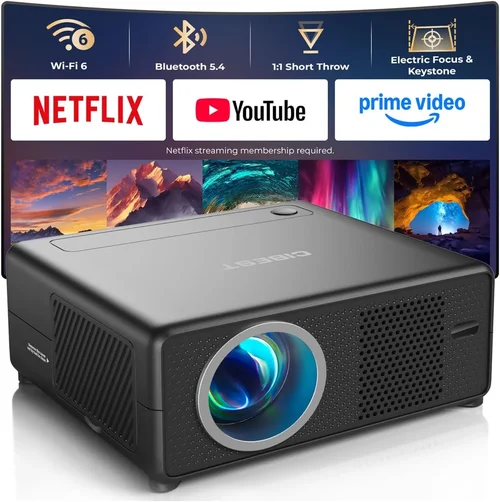
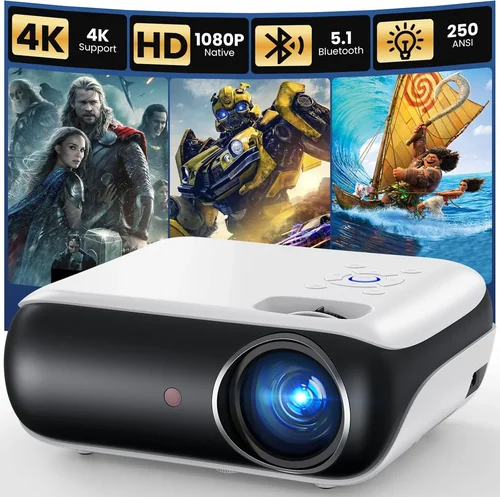
Finding a reliable projector that costs less than $100 can feel like hunting for a needle in a haystack. Yet, with the explosion of budget‑friendly models on Amazon, the task has become surprisingly doable. This guide cuts through the noise, helping you understand exactly what to look for, which compromises are acceptable, and which features will genuinely enhance your viewing experience.
By the end of this article you will know:
- Which specifications matter most at a sub‑$100 price point
- How to compare different projector types that fall under the same budget
- Common pitfalls that cause buyer’s remorse and how to avoid them
- Practical tips for snagging the best deal on Amazon
- Our top picks for every kind of user, from dorm‑room movie nights to casual gaming sessions
The $0‑$100 projector market has matured dramatically over the past three years. Advances in LED technology, more efficient optics, and tighter manufacturing tolerances have produced models that can deliver 100‑150 lumens, decent color accuracy, and built‑in speakers—all for less than the cost of a mid‑range Bluetooth speaker. While you won’t get 4K resolution or cinema‑grade brightness, you can still enjoy crisp 720p content, stream from a phone, or turn any wall into a portable screen.

What to Look for When Buying Buying Guide
1. Budget & Price Range
Even within the “under $100” segment, prices can vary from $45 to $99. The lower end typically offers basic DLP or LCD chips with minimal connectivity, while the higher end may include Wi‑Fi, Bluetooth, and better optics. Determine your absolute ceiling first, then allocate the remaining budget toward the features you can’t live without. Remember, a slightly higher price now can save you frustration (and a potential replacement) later.
2. Performance Specifications
Key specs to scrutinize include:
- Resolution: Most budget projectors cap at 720p (1280×720). Some claim “native 800×480” but upscale internally. Accept that true Full HD is out of reach.
- Brightness (Lumens): Expect 80‑150 ANSI lumens. Brightness is the most limiting factor; a darker room is essential for a decent image.
- Contrast Ratio: Higher ratios (e.g., 1500:1) produce deeper blacks. Many cheap units inflate this number, so treat it as a rough guide.
- Throw Distance: Determines how far the projector must sit from the screen. Short‑throw (≤1.5 m) is handy for small spaces.
- Aspect Ratio: 16:9 is standard for movies and most streaming content; 4:3 is more common in older presentations.
3. Build Quality & Durability
Low‑cost projectors are often made from lightweight plastic. Look for reinforced corners, a sturdy lens cover, and a reliable cooling fan. Models with metal heat sinks tend to run cooler and last longer. Check user photos for signs of warping or loose ports.
4. Features & Functionality
At this price point, you’ll find a mix of basic and “smart” features. Prioritize:
- Connectivity: HDMI (most important), USB‑C, micro‑USB, and a 3.5 mm audio jack. Some units add Bluetooth or Wi‑Fi for screen mirroring.
- Built‑in Speaker: Expect 1‑2 W; adequate for personal use but not a substitute for external speakers.
- Keystone Correction: Manual or digital correction (2‑10°) helps align the image without a tripod.
- Portable Power: A few models support DC input for car chargers, useful for on‑the‑go setups.
5. Brand Reputation
While big names like Epson and BenQ dominate higher price brackets, several lesser‑known brands have earned solid reputations on Amazon. Look for brands with consistent 4‑star ratings across multiple models, prompt customer service, and clear warranty terms. Some reliable budget players include Vankyo, DR. J, and APEMAN.
6. Warranty & Support
A 1‑year limited warranty is standard. Verify whether the seller offers a hassle‑free return window and if the warranty covers the lamp/LED module. Some manufacturers provide free replacement LEDs within the first year—a huge plus given that LED lifespan is a common failure point.
7. Size & Portability
If you plan to move the projector between rooms, dorms, or outdoors, weight matters. Most sub‑$100 units weigh between 1–2 kg and come with a carrying case. Compact dimensions (≈10 × 8 × 4 cm) make it easy to slip into a backpack.
8. User Reviews & Ratings
Beyond the star rating, read the first 50 reviews—both positive and negative. Look for recurring themes: “lamp died after 3 months,” “great for Netflix,” or “overheats on long movies.” Pay special attention to verified purchase reviews posted within the last six months, as they reflect the most recent production batch.
Different Types of Buying Guide

Common Buying Mistakes to Avoid
❌ Mistake: Ignoring Ambient Light Conditions
Why it’s bad: A projector rated at 100 lumens will look washed out in a lit living room, leading to disappointment.
What to do instead: Measure your typical viewing environment. If you cannot control lighting, consider a projector with at least 150 lumens or plan for blackout curtains.
❌ Mistake: Overlooking Input Compatibility
Why it’s bad: You might end up with HDMI‑only devices but a projector that only accepts USB‑C, requiring extra adapters.
What to do instead: List all devices you plan to connect (phone, laptop, gaming console) and match their ports to the projector’s inputs.
❌ Mistake: Assuming All “1080p” Labels Mean Native Full HD
Why it’s bad: Many budget projectors use “1080p support” to mean they can accept a 1080p signal but internally downscale to 720p.
What to do instead: Check the native resolution in the specifications; true 1080p is virtually unavailable under $100.
❌ Mistake: Forgetting About Heat Management
Why it’s bad: Continuous use can cause the fan to throttle, reducing brightness or triggering automatic shutdown.
What to do instead: Choose models with metal heat sinks and read reviews specifically mentioning long‑play sessions.
❌ Mistake: Skipping Warranty Details
Why it’s bad: A cheap projector with a vague “30‑day warranty” can leave you stranded if the LED fails after two months.
What to do instead: Verify the warranty length, what it covers, and how to claim it. Prefer sellers who handle returns directly through Amazon.
❌ Mistake: Buying Solely Based on Star Rating
Why it’s bad: A product can have a 4.5‑star rating from 20 reviews but a 2‑star rating from 200 reviews.
What to do instead: Dive into the review count, date, and content. Look for patterns rather than isolated praise.
Budget Guidelines: How Much Should You Spend?
Even within the sub‑$100 bracket, it helps to think in tiers. Your expectations should align with the money you’re willing to invest.
- Entry‑Level ($45‑$60): Expect basic 720p resolution, 80‑100 lumens, HDMI or micro‑USB only, and a simple plastic housing. Ideal for occasional movie nights in a dark room.
- Mid‑Range ($61‑$80): Slightly better brightness (110‑130 lumens), built‑in speaker, additional ports (USB‑C, audio out), and often a short‑throw lens. Good for dorms and small apartments.
- Premium ($81‑$100): Highest brightness in the category (140‑150 lumens), Wi‑Fi or Bluetooth, keystone correction, and sturdier construction. Best for users who want a semi‑permanent setup.
- Luxury (Above $100): While outside the guide’s scope, it’s worth noting that $120‑$150 models start offering 1080p support, higher contrast ratios, and genuine warranty extensions.
Expert Tips for Getting the Best Deal
- Timing is everything: Major sales events—Prime Day, Black Friday, and post‑Christmas clearance—often feature 20‑30% discounts on budget electronics.
- Use price‑tracking tools: Websites like CamelCamelCamel or Keepa let you view price history and set alerts for when a projector falls into your range.
- Consider refurbished units: Amazon’s “Renewed” program offers factory‑refurbished projectors with a 90‑day guarantee, often saving 15‑25%.
- Bundle for savings: Some sellers include a portable screen or HDMI cable at no extra cost—evaluate if the bundle adds value.
- Check the return policy: A 30‑day return window gives you time to test the projector in your own space. Ensure the seller honors it without restocking fees.
- Read the fine print on warranties: Some brands require you to register the product within 30 days to activate the warranty.
- Test before you commit: If possible, watch a video demo on the product page or order from a retailer with a physical showroom.

Frequently Asked Questions
Q: Can a projector under $100 display Full HD content?
A: Most budget models only have a native resolution of 720p. They can accept a 1080p signal but will downscale it, resulting in a softer image. For true Full HD you’ll need to look at $150‑$200 units.
Q: How loud is the fan on cheap projectors?
A: Fan noise typically ranges from 30‑38 dB, which is noticeable in a quiet room but usually masked by movie audio. Models with metal heat sinks tend to run quieter.
Q: Do I need a separate screen?
A: Not necessarily. A smooth, white wall works well in a dark room. However, a portable 80‑inch screen can improve brightness uniformity and reduce keystone distortion.
Q: What is the lifespan of the LED lamp?
A: Most LEDs are rated for 20‑30 000 hours, far exceeding the life of a typical household bulb. In practice, you’ll likely replace the projector before the lamp fails.
Q: Is Wi‑Fi really useful at this price?
A: Wi‑Fi enables screen mirroring from smartphones and built‑in streaming apps. If you already own a streaming stick (Roku, Fire TV), you might skip Wi‑Fi to save a few dollars.
Q: Can I use these projectors outdoors?
A: Yes, but only in low‑light conditions (dusk or night). Keep the unit away from moisture and use a portable screen to improve image quality.
Q: How do I mount a tiny projector?
A: Most budget units come with a standard 1/4‑20 thread. You can attach them to a ceiling mount, a tripod, or a simple shelf bracket.
Q: Are there any safety concerns?
A: Ensure proper ventilation; never cover the fan vents. Also, avoid shining the laser directly into eyes—most LEDs are safe, but prolonged exposure can be uncomfortable.
Our Final Recommendations
- Best for Budget‑Conscious Buyers: Vankyo Leisure 3 Mini Projector – $58 on Amazon, 720p support, 100 lumens, HDMI + USB‑C, lightweight design.
- Best Overall Value: DR. J Professional Mini Projector – $79, 130 lumens, built‑in speaker, keystone correction, and a 2‑year warranty.
- Best Premium Option (Just Under $100): APEMAN Mini Projector M4 – $95, 150 lumens, Wi‑Fi + Bluetooth, 720p native, and a metal heat sink.
- Best for Beginners: Elephas YG600 Portable Projector – $62, simple plug‑and‑play, HDMI, and an intuitive remote.
- Best for Advanced Users: WEMAX i8 Mini DLP Projector – $99, higher contrast (1500:1), manual focus, and a short‑throw lens for small rooms.
Conclusion: Making the Right Choice
Choosing a projector under $100 isn’t about finding a perfect cinema replica; it’s about matching a modest device to realistic expectations. Focus on the factors that truly affect your use case—brightness, connectivity, and durability—while keeping an eye on reputable brands and solid warranty terms. Use the tiered budget guide to set a clear spending limit, and apply the expert tips to capture the best possible discount.
Remember, the most satisfying purchase is the one that fits seamlessly into your lifestyle, whether that’s a dorm‑room movie marathon, a weekend camping trip, or a quick presentation in a coffee shop. Armed with this guide, you can confidently click “Add to Cart” on Amazon, knowing you’ve made an informed decision.