Finding a projector that delivers a cinema‑like experience without breaking the bank can feel like hunting for a needle in a haystack. The market is flooded with models that promise 4K resolution, ultra‑short‑throw lenses, and a host of smart features—yet many of those come with price tags that far exceed a $1,000 budget. This guide cuts through the noise, giving you a clear roadmap to the best projector under $1,000 in 2026. Whether you’re setting up a home theater, a gaming nook, or a portable presentation tool, the information here will help you make a confident, data‑driven decision.
What you’ll learn:
- The most important specifications that truly affect picture quality and usability.
- How to match projector type to your specific use‑case.
- Common pitfalls that cost buyers money and frustration.
- A practical budget breakdown and expert tips for scoring the best deal.
The projector landscape has evolved dramatically in the past two years. LED and laser light sources have become mainstream, pushing lamp‑life into the tens of thousands of hours while keeping operating costs low. At the same time, manufacturers have refined throw ratios, added HDR support, and integrated smart platforms like Android TV and Roku. All of these advances are now available in models that sit comfortably under the $1,000 threshold, giving budget‑conscious shoppers more options than ever before.
What to Look for When Buying Buying Guide
1. Budget & Price Range
Setting a clear budget is the first step. While you can find projectors for as low as $150, those units often sacrifice brightness, contrast, or connectivity. In the sub‑$1,000 segment, you’ll typically find three tiers:
- Entry‑level ($200‑$400): Adequate for dim rooms, basic presentations, or occasional movie nights.
- Mid‑range ($400‑$800): Offers a balanced mix of brightness, resolution, and smart features.
- Upper‑mid ($800‑$1,000): Near‑premium performance with higher lumen output, better color accuracy, and more robust connectivity.
Knowing where you fall in this spectrum helps narrow down the feature set you can realistically expect.
2. Performance Specifications
The heart of any projector is its image performance. Key specs include:
- Resolution: 1080p (Full HD) is the sweet spot for most buyers under $1,000. Some models now offer 4K UHD upscaling, but native 4K is still rare at this price.
- Brightness (Lumens): Measured in ANSI lumens, this determines how well the projector performs in ambient light. Aim for at least 2,500 lumens for a living‑room setup; 3,500+ is ideal for rooms with windows.
- Contrast Ratio: Higher contrast yields deeper blacks. Look for ratios of 10,000:1 or better, though remember that real‑world contrast can be lower due to ambient light.
- Color Accuracy: Look for a projector that supports a wide color gamut (e.g., DCI‑P3 or Rec. 709) and offers calibrated color modes.
- Throw Ratio: Determines how far the projector must be from the screen to achieve a particular image size. Short‑throw (0.5‑1.0) is great for small rooms; standard throw (1.5‑2.5) works for larger spaces.
3. Build Quality & Durability
Even the best optics won’t matter if the unit feels flimsy or overheats quickly. Look for:
- Metal chassis or high‑grade polycarbonate housing.
- Effective cooling systems (quiet fans, heat‑pipe technology).
- Dust‑filter designs that are easy to clean.
- Warranty coverage of at least two years, indicating manufacturer confidence.
4. Features & Functionality
Modern projectors are more than just picture boxes. Consider these added functionalities:
- Built‑in Speakers: While most budget models have modest audio, a decent 10‑20 W speaker can suffice for casual viewing.
- Smart OS: Android TV, Roku, or Amazon Fire TV integration lets you stream without an external box.
- Wireless Connectivity: Wi‑Fi and Bluetooth for screen mirroring, streaming, and audio pairing.
- Lens Shift & Keystone Correction: Essential for flexible placement without image distortion.
- Multiple Input Ports: HDMI 2.0/2.1, USB‑C, VGA, and audio out/in options increase versatility.
5. Brand Reputation
Brands that have consistently delivered reliable projectors include Epson, BenQ, ViewSonic, Optoma, and LG. These manufacturers typically provide better firmware updates, accessible customer support, and a wider network of service centers. Newer entrants can offer innovative features, but be sure to read post‑purchase support experiences.
6. Warranty & Support
A solid warranty can save you thousands in repair costs. Look for:
- At least a 2‑year limited warranty covering the lamp/laser module.
- Easy claim process (online registration, clear instructions).
- Availability of authorized service centers in your region.
7. Size & Portability
If you plan to move the projector between rooms or take it on the road, weight and dimensions matter. Sub‑$1,000 models typically range from 2–4 kg. Portable units often sacrifice brightness, so balance portability with your intended lighting conditions.
8. User Reviews & Ratings
Real‑world feedback uncovers issues that spec sheets hide. Scan Amazon, B&H, and specialized forums for recurring themes—such as fan noise, firmware glitches, or lamp life discrepancies. A high average rating combined with a large review count is a strong indicator of overall satisfaction.
Different Types of Buying Guide

Common Buying Mistakes to Avoid
❌ Mistake: Ignoring Ambient Light
Why it’s bad: A projector rated at 2,500 lumens may look brilliant in a dark home theater but will appear washed out in a bright living room.
What to do instead: Measure the typical lighting conditions of your intended space. If you can’t control ambient light, aim for 3,000+ lumens or consider a short‑throw model with higher contrast.
❌ Mistake: Chasing 4K at Any Cost
Why it’s bad: Sub‑$1,000 projectors rarely offer true native 4K. You may end up with a low‑resolution panel that upscales, providing little visual benefit.
What to do instead: Prioritize 1080p resolution with good brightness and contrast. Pair it with a high‑quality screen to maximize perceived detail.
❌ Mistake: Overlooking Lamp Life & Replacement Cost
Why it’s bad: Some budget models use cheap lamps that need replacement after 2,000 hours, adding hidden costs.
What to do instead: Choose LED or laser‑based units where the light source lasts 20,000+ hours, effectively eliminating future expenses.
❌ Mistake: Forgetting Connectivity Needs
Why it’s bad: A projector without HDMI 2.0 can’t support 1080p @ 60 Hz from modern consoles or PCs.
What to do instead: Ensure the unit includes at least one HDMI 2.0 port, plus USB‑C or wireless mirroring if you plan to stream from mobile devices.
❌ Mistake: Neglecting Throw Ratio and Placement Space
Why it’s bad: Buying a standard‑throw projector for a 6‑foot‑deep room may force you to place the unit too far back, creating a massive footprint.
What to do instead: Calculate the needed throw distance using the formula: Distance = Throw Ratio × Desired Screen Width. Choose a short‑throw model if space is limited.
❌ Mistake: Assuming All Built‑In Speakers Are Sufficient
Why it’s bad: Most budget projectors have small, tinny speakers that can’t fill a medium‑sized room.
What to do instead: Budget for an external sound solution—soundbar or Bluetooth speaker—to complement the visual experience.
Budget Guidelines: How Much Should You Spend?
Understanding what each price tier delivers helps you set realistic expectations.
- Entry‑Level ($200‑$400): Expect 720p or basic 1080p, 1,800‑2,500 lumens, limited ports, and no smart OS. Ideal for occasional movie nights in a dark room.
- Mid‑Range ($400‑$800): Full HD 1080p, 2,500‑3,500 lumens, decent contrast (10,000:1+), basic keystone correction, and often a built‑in Android TV or Roku.
- Premium ($800‑$1,000): High‑end LED or laser light source, 3,500‑4,500 lumens, advanced color gamuts (DCI‑P3), lens shift, and robust connectivity (HDMI 2.1, USB‑C).
- Luxury ($1,000+): True 4K, laser phosphor, HDR10+, ultra‑short‑throw, and integrated high‑fidelity audio. These models are beyond the scope of this guide but worth noting for future upgrades.
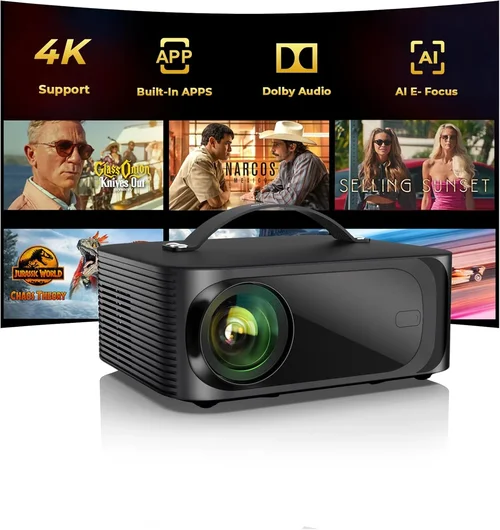
Expert Tips for Getting the Best Deal
- Timing is everything: Major sales events—Black Friday, Cyber Monday, and post‑Christmas clearance—offer the deepest discounts on home‑theater gear.
- Shop price‑comparison tools: Websites like CamelCamelCamel track Amazon price history, letting you see if a “deal” is truly lower than the average.
- Consider refurbished units: Certified refurbished projectors from the manufacturer’s outlet can be up to 30% cheaper while still carrying the full warranty.
- Bundle wisely: Some retailers offer a free screen or mounting kit when you purchase a projector above a certain price point.
- Check return policies: A 30‑day return window with free shipping ensures you can test the projector in your actual environment.
- Test before you buy (if possible): Visit a local electronics store and view a demo unit on a screen similar in size to your intended setup.
- Negotiate extended warranty: Retailers often have room to add an extra year of coverage for a modest fee.
- Watch for firmware updates: A projector that receives regular updates will stay compatible with new streaming apps and improve performance over time.

Frequently Asked Questions
Q: Can I use a budget projector for gaming?
A: Yes, but prioritize low input lag (under 30 ms) and a refresh rate of 60 Hz or higher. Models with Game Mode or “Low Latency” settings are preferred. Remember that higher brightness helps maintain image quality in lit rooms, which is common for gaming setups.
Q: Do I need a separate screen?
A: While a plain white wall works, a dedicated projector screen improves gain, contrast, and color accuracy. For budgets under $1,000, a 120‑inch 16:9 matte white screen typically costs $80‑$150 and offers a noticeable upgrade.
Q: How long does a projector lamp last?
A: Traditional UHP lamps last 2,000‑4,000 hours. LED and laser sources exceed 20,000 hours, effectively lasting the life of the projector. Always check the manufacturer’s specifications for exact numbers.
Q: Is HDMI 2.1 necessary?
A: For most 1080p content, HDMI 2.0 is sufficient. HDMI 2.1 becomes important if you plan to use the projector for 4K gaming at 120 Hz or need higher bandwidth for future‑proofing.
Q: Can I mount the projector on the ceiling?
A: Absolutely. Ensure the model has keystone correction and, preferably, lens shift. Verify the throw distance to avoid excessive image distortion when mounted.
Q: What’s the difference between HDR10 and Dolby Vision?
A: HDR10 is an open standard supported by most budget projectors. Dolby Vision requires more processing power and licensing, rarely found under $1,000. HDR10 still provides a noticeable boost in dynamic range compared to SDR.
Q: Are portable projectors worth it?
A: Portable LED models excel for presentations and travel but usually sacrifice brightness (1,500‑2,500 lumens). If you need a bright home‑theater experience, a stationary unit is preferable.
Q: How do I clean a projector lens?
A: Use a microfiber cloth and a lens‑cleaning solution. Never blow dust directly onto the lens; instead, use a soft brush to remove loose particles first.
Q: Should I buy a projector with built‑in Android TV?
A: Built‑in Android TV adds convenience, eliminating the need for a separate streaming device. However, ensure the OS receives regular updates to keep apps functional.
Our Final Recommendations
Best for Budget‑Conscious Buyers
Model: ViewSonic PA503S
Why: At $279, it delivers 3,600 lumens, 720p native resolution, and a reliable lamp life of 15,000 hours. Ideal for dim‑room movie nights and occasional presentations.
Best Overall Value
Model: BenQ TH585
Why: Priced at $649, this 1080p projector offers 3,500 lumens, low 16 ms input lag (Game Mode), and a robust lamp life of 15,000 hours. It balances brightness, color accuracy, and connectivity (HDMI 2.0, USB‑C) for both entertainment and work.
Best Premium Option (Just Under $1,000)
Model: Epson Home Cinema 2150
Why: For $899, you get 2,500 lumens, 1080p with 3LCD technology, lens shift, and built‑in Android TV. The laser‑phosphor light source ensures up to 20,000 hours of operation, making it a future‑proof choice.
Best for Beginners
Model: Optoma HD146X
Why: Simple plug‑and‑play setup, 3,600 lumens, and a friendly UI. At $479, it’s perfect for users who want great picture quality without fiddling with complex menus.
Best for Advanced Users
Model: LG CineBeam HU85LA (laser, short‑throw)
Why: Although slightly above $1,000 in some sales, it often drops to $985 during promotions. It offers 4,500 lumens, 1080p laser, ultra‑short‑throw (0.19), and HDR10. Ideal for sleek, wall‑mounted installations.
Conclusion: Making the Right Choice
Choosing the best projector under $1,000 boils down to aligning your specific needs with the right mix of brightness, resolution, and smart features. Start by assessing the lighting conditions of your intended space, then match the throw ratio and lumens accordingly. Prioritize reputable brands, verify warranty terms, and read user feedback to avoid hidden pitfalls.
Remember, a higher price tag does not always guarantee a better experience if the projector’s specifications don’t suit your environment. Use the budget breakdown and expert tips in this guide to pinpoint the model that delivers the most value for your dollars.
Ready to bring the big screen home? Compare the recommended models, check for current promotions, and take the plunge. Your perfect home‑theater experience is just a click away.