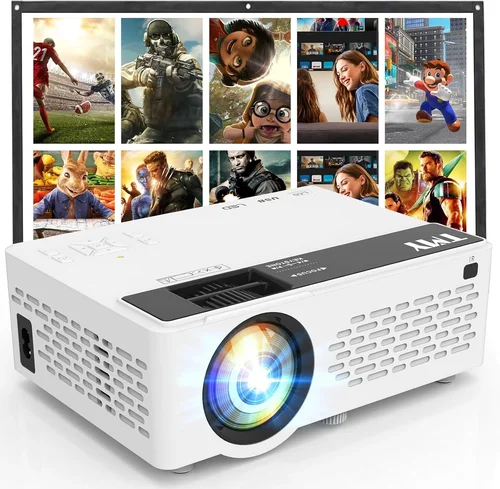
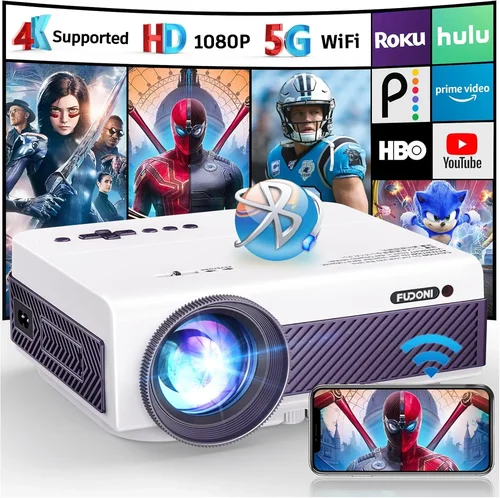
Choosing a projector that can deliver true 1080p resolution without breaking the bank is a challenge many home‑theater enthusiasts face. In 2026 the market is flooded with models that promise “Full HD” but often compromise on brightness, contrast, or longevity to stay under $500. This guide cuts through the hype, helping you understand which specifications truly matter, where you can save, and which models consistently deliver the performance you need for movies, gaming, and sports.
By the end of this article you will know exactly what to look for in a sub‑$500 1080p projector, how the different technologies compare, and which three or four units stand out for specific use‑cases. Whether you’re setting up a backyard cinema, a dorm‑room gaming station, or a portable office presentation tool, the information here will let you make a confident, data‑driven decision.
What to Look for When Buying Buying Guide
1. Budget & Price Range
While the headline “under $500” is clear, it’s important to understand what you actually get for every dollar spent. Lower‑priced units often shave brightness or use cheaper lamp technology, which can affect lifespan. Allocate your budget to prioritize the features that matter most to you – for example, a gamer might value low input lag over ultra‑high brightness, whereas a backyard cinema owner will need strong lumens for daylight viewing.
2. Performance Specifications
The core specs that define image quality are:
- Resolution: True 1920×1080 native pixels. Some “1080p” projectors upscale from lower native panels, which can soften fine detail.
- Brightness (lumens): Measured in ANSI lumens. For dim rooms, 1,500–2,000 lumens is adequate; for ambient light, aim for 2,500+ lumens.
- Contrast Ratio: Determines how deep blacks appear. Look for a native contrast of at least 10,000:1; higher is better for HDR content.
- Color Accuracy: A wide color gamut (Rec.709 or DCI‑P3 coverage) ensures vivid images without oversaturation.
- Input Lag & Refresh Rate: Gamers need ≤30 ms lag and at least 60 Hz refresh. Some models support 120 Hz for smoother motion.
3. Build Quality & Durability
A projector that feels cheap will likely develop issues faster. Look for metal or high‑grade plastic housings, sealed lamp chambers, and reliable cooling fans. Units with a sealed laser or LED light source often outlast traditional lamps, providing 20,000+ hours of operation – a huge advantage in the sub‑$500 segment.
4. Features & Functionality
Modern projectors pack a lot of convenience tools. Key features to evaluate include:
- Built‑in Speakers: Useful for portable setups, but rarely replace a dedicated sound system.
- Wireless Connectivity: Wi‑Fi or Bluetooth for screen mirroring from phones, tablets, or laptops.
- Lens Shift & Keystone Correction: Enables flexible placement without distortion.
- Multiple HDMI Ports: Essential for connecting a console, Blu‑ray player, and streaming device simultaneously.
- HDR Support: Limited in budget models, but an HDR10 flag can improve contrast in supported content.
5. Brand Reputation
Brands with a solid track record in projection tend to provide better firmware updates, more reliable customer service, and a wider selection of accessories. In the $500 space, Epson, BenQ, ViewSonic, and Optoma dominate, each offering distinct strengths – Epson excels in color accuracy, BenQ in gaming performance, ViewSonic in value‑for‑money, and Optoma in brightness.
6. Warranty & Support
Even the best‑engineered projector can encounter lamp failures or firmware bugs. A minimum one‑year warranty is standard; three years is a strong indicator of confidence from the manufacturer. Check whether the warranty covers the light source and whether on‑site repair is offered.
7. Size & Portability
If you plan to move the projector between rooms or take it on the road, weight and dimensions matter. Most sub‑$500 units weigh between 2–4 kg and feature a compact chassis. Some even include a built‑in battery for true portability, though battery life is typically limited to 2–3 hours of playback.
8. User Reviews & Ratings
Real‑world feedback uncovers issues that spec sheets hide. Look for consistent praise or criticism across multiple retailers. Pay attention to comments about lamp life, fan noise, and firmware stability – these are common pain points in budget projectors.
Different Types of Buying Guide

Common Buying Mistakes to Avoid
❌ Mistake: Focusing Solely on Resolution
Why it’s bad: A 1080p panel is meaningless if the projector can’t produce enough brightness or contrast to display the image clearly.
What to do instead: Balance resolution with lumens, contrast ratio, and color accuracy. In a dark room, 1,500 lumens may be fine; in a lit living room, aim for 2,500+ lumens.
❌ Mistake: Ignoring Lamp Life
Why it’s bad: Replacing a lamp can cost $80‑$150, eroding the savings of a cheap projector.
What to do instead: Choose LED or laser light sources for 20,000+ hour lifespans, or verify the lamp warranty and expected hours before purchase.
❌ Mistake: Overlooking Input Lag for Gaming
Why it’s bad: High lag (>40 ms) makes fast‑paced games feel sluggish.
What to do instead: Look for models that specifically advertise “Game Mode” with ≤30 ms lag, and check independent reviews for real‑world measurements.
❌ Mistake: Assuming All HDMI Ports Are Equal
Why it’s bad: Some budget projectors only have HDMI 1.3, limiting HDR and 4K‑upscaled content.
What to do instead: Verify that the HDMI ports support at least HDMI 1.4 for HDR10 and 3D, and that one port supports HDCP 2.2 for streaming services.
❌ Mistake: Neglecting Throw Distance Calculations
Why it’s bad: Buying a projector that can’t fit your room size leads to a tiny or overly stretched image.
What to do instead: Use the manufacturer’s throw ratio chart. For a 100‑inch screen, a 1.5:1 ratio needs ~3 ft from lens to screen; a 2.0:1 ratio needs ~4 ft.
❌ Mistake: Disregarding Fan Noise
Why it’s bad: Loud fans disrupt movies and gaming immersion.
What to do instead: Check dBA ratings; aim for ≤30 dB in quiet mode. Read user reviews for real‑world noise levels.
Budget Guidelines: How Much Should You Spend?
- Entry‑Level ($300‑$350): Expect 1,500 lumens, basic HDMI, and a traditional UHP lamp. Good for occasional movie nights in a dark room.
- Mid‑Range ($351‑$450): Better contrast (10,000:1+), LED or long‑life lamp, and added features like wireless mirroring and low‑lag gaming mode.
- Premium ($451‑$500): Laser or hybrid light source, 2,500+ lumens, HDR10 support, advanced keystone correction, and often a longer warranty.
- Luxury ($500+): While outside the scope of this guide, luxury units push brightness >3,000 lumens, 4K‑enhanced scaling, and premium build quality.
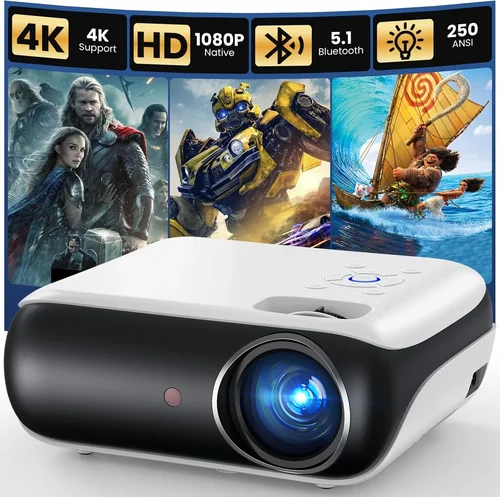
Expert Tips for Getting the Best Deal
- Timing: Major sales events (Black Friday, Cyber Monday, Amazon Prime Day, and back‑to‑school season) typically feature the deepest discounts on home‑theater gear.
- Retailer Choice: Compare prices on Amazon, Best Buy, B&H, and direct manufacturer sites. Some manufacturers offer “student discounts” or bundle deals that include a mounting kit.
- Bundle Savings: Look for packages that include a screen, HDMI cable, or extended warranty for a marginal extra cost.
- Refurbished Units: Certified refurbished models from the manufacturer can be up to 30% cheaper and come with a full warranty.
- Return Policies: Ensure a minimum 30‑day return window. Test the projector in your typical lighting conditions; many retailers accept returns even after opening.
- Warranty Extensions: If you plan heavy use (e.g., daily gaming), consider purchasing an extended lamp warranty – the cost is often less than a single lamp replacement.
- Firmware Updates: After purchase, check the brand’s website for the latest firmware. Updates can improve color accuracy, reduce lag, and fix connectivity bugs.
- Calibration: Use a free calibration app (e.g., CalMAN Home) or a basic grayscale chart to adjust brightness, contrast, and color temperature for optimal picture quality.

Frequently Asked Questions
Q: Can a $500 projector truly display HDR content?
A: Some models support HDR10, but the limited peak brightness (often 2,500 lumens max) means HDR will not be as punchy as on higher‑end units. You’ll still see a wider color range and better contrast than SDR, but true cinematic HDR may be muted.
Q: Do I need a special screen for a 1080p projector?
A: A white matte screen works fine in dark rooms. For ambient light, consider a gray or high‑gain screen (120–150% gain) to boost perceived brightness without increasing lamp power.
Q: How long does the lamp last on a typical budget projector?
A: Traditional UHP lamps last 2,000–4,000 hours. LED and laser sources exceed 20,000 hours, effectively “lamp‑free” for most users.
Q: Is keystone correction enough to fix placement issues?
A: Keystone can correct trapezoidal distortion, but it reduces resolution slightly. Whenever possible, use lens shift or physically adjust the projector’s position for the cleanest image.
Q: Will Bluetooth audio work with all projectors?
A: Only models that list Bluetooth audio output can stream to external speakers. Some only support Bluetooth for remote control, not sound.
Q: Can I connect a gaming console directly via HDMI?
A: Yes, ensure the projector has HDMI 1.4 or higher and supports HDCP 2.2 for consoles like PS5 or Xbox Series X.
Q: What is the best way to mount a projector under a ceiling?
A: Use a universal ceiling mount that matches the projector’s VESA pattern. Confirm the mount’s weight rating exceeds the projector’s weight by at least 20% for safety.
Q: Are there any health concerns with LED or laser projectors?
A: Both LED and laser light sources emit less heat and UV radiation than traditional lamps, making them safer for prolonged indoor use.
Q: How do I clean the projector lens?
A: Use a microfiber cleaning cloth and a lens‑safe cleaning solution. Never blow air directly into the lens; use a gentle brush to remove dust before wiping.
Our Final Recommendations
- Best for Budget‑Conscious Buyers: ViewSonic PA503W – 3,600 lumens, 1080p native, 6,000‑hour LED lamp, and a price tag around $329.
- Best Overall Value: BenQ TH671ST – 3,000 lumens, low‑lag gaming mode (16 ms), 10,000:1 contrast, and a solid 3‑year warranty at $449.
- Best Premium Option (still under $500): Optoma UHD12 – Laser light source, 2,800 lumens, HDR10, and a 2‑year warranty for $499.
- Best for Beginners: Epson Home Cinema 1060 – Easy setup, auto‑keystone, 3,200 lumens, and user‑friendly menu for $379.
- Best for Advanced Users: LG PF50KA – Portable, battery‑powered, 1080p, 600 lumens (ideal for small rooms), and built‑in smart TV platform for $489.
Conclusion: Making the Right Choice
Finding a 1080p projector under $500 is no longer a pipe‑dream. By prioritizing the factors that truly impact picture quality—lumens, contrast, lamp type, and input lag—you can select a unit that fits your specific viewing environment and usage pattern. Remember to balance price with long‑term costs like lamp replacements, and always test the projector in the lighting conditions you’ll use most.
Take the time to read user reviews, verify warranty terms, and compare the models listed above. With the right research, you’ll enjoy crisp, vibrant Full‑HD visuals without overspending. Happy viewing!