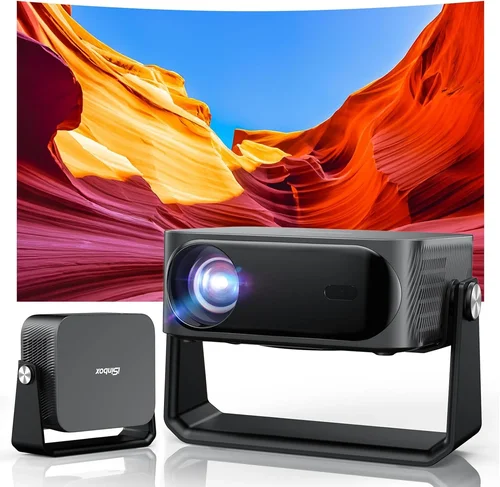
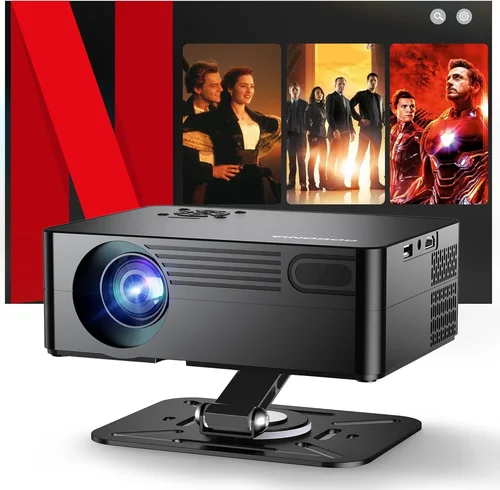
If you’ve been hunting for a crisp, cinema‑like experience without blowing your budget, you’re in the right place. The market for 1080p projectors under $600 has exploded over the past few years, offering surprisingly bright, feature‑rich options that can turn a bedroom, garage, or small home theater into a big‑screen haven. Yet the sheer number of models, specifications, and marketing hype can make the decision feel overwhelming.
In this guide we’ll cut through the noise. You’ll learn which technical specs truly matter, how to match a projector to your space, and which models consistently outperform the competition. By the end, you’ll have a clear roadmap that takes you from “I need a projector” to “I’ve found the perfect 1080p projector under $600 for my needs.”

What to Look for When Buying Buying Guide
1. Budget & Price Range
Even within the sub‑$600 bracket, prices can vary widely. A $250 model may sacrifice brightness or connectivity, while a $580 unit could include advanced color processing and a longer lamp life. Define your absolute ceiling first, then allocate portions of that budget to the features that matter most to you. Remember, spending a little extra now often saves you from costly upgrades later.
2. Performance Specifications
The heart of any projector is its performance metrics. Focus on these key numbers:
- Resolution: True 1080p (1920×1080) ensures sharp text and detailed images, crucial for gaming and office use.
- Brightness (lumens): For dim rooms, 2,500–3,000 ANSI lumens is adequate. If you plan to watch in a living room with ambient light, aim for 3,200+ lumens.
- Contrast Ratio: Higher contrast (e.g., 20,000:1) yields deeper blacks and more vibrant colors.
- Throw Distance & Zoom: Determines how far the projector can sit from the screen while still filling it. A flexible zoom range (1.2–1.5×) gives you more placement options.
- Lamp Life: Measured in hours; a 15,000‑hour lamp reduces long‑term operating costs.
3. Build Quality & Durability
A projector that feels cheap can wobble, overheat, or develop alignment issues. Look for a sturdy metal chassis, a well‑ventilated cooling system, and a reliable lens housing. Models with sealed optics tend to retain calibration longer, which is especially important if you move the unit often.
4. Features & Functionality
Modern projectors pack a lot of “extras.” Prioritize the ones you’ll actually use:
- HDMI 2.0 or 2.1: Enables 4K passthrough and higher refresh rates for gaming.
- USB‑C / USB‑A: For media playback or firmware updates.
- Wireless Mirroring: AirPlay, Miracast, or Chromecast built‑in for phone and laptop streaming.
- Lens Shift: Allows vertical/horizontal adjustment without keystone correction, preserving image geometry.
- Built‑in Speakers: Useful for casual movie nights, though most reviewers recommend external audio for true immersion.
5. Brand Reputation
Brands that specialize in home entertainment—such as Epson, BenQ, Optoma, and ViewSonic—typically deliver more consistent performance and better firmware support. Research each brand’s track record for firmware updates and community forums; a responsive brand can extend the life of a projector significantly.
6. Warranty & Support
Even the best hardware can encounter issues. Look for at least a 2‑year warranty that covers the lamp, and check whether the manufacturer offers on‑site service, extended warranty options, and a robust online knowledge base.
7. Size & Portability (if applicable)
If you plan to move the projector between rooms or take it to a friend’s house, consider weight (under 5 lbs is ideal) and a compact form factor. Portable models often sacrifice some brightness, so balance portability against your primary usage scenario.
8. User Reviews & Ratings
Technical specs tell only part of the story. Scan user reviews on Amazon, B&H, and dedicated AV forums. Look for recurring comments about reliability, fan noise, and color accuracy. A product with a high average rating but many recent “stop working after 200 hours” complaints should raise red flags.
Different Types of Buying Guide
Common Buying Mistakes to Avoid
❌ Mistake: Ignoring Ambient Light Conditions
Why it’s bad: A projector rated at 2,500 lumens may look brilliant in a dark basement but will appear washed out in a living‑room with windows.
What to do instead: Measure the typical light level in your intended space. If you can’t achieve near‑darkness, aim for at least 3,200 lumens and consider a high‑contrast panel.
❌ Mistake: Over‑focusing on Resolution Alone
Why it’s bad: A 1080p panel with poor contrast and color accuracy will still produce a dull picture, especially for movies.
What to do instead: Balance resolution with contrast ratio, brightness, and color gamut (look for DCI‑P3 or Rec. 709 coverage).
❌ Mistake: Forgetting Lamp Replacement Costs
Why it’s bad: Some budget units use low‑cost lamps that need replacement after 2,000 hours, adding unexpected expenses.
What to do instead: Check lamp life specifications and factor in the cost of a spare lamp when budgeting.
❌ Mistake: Neglecting Connectivity Needs
Why it’s bad: You might end up buying a projector that lacks the HDMI ports or wireless options you need for gaming consoles, streaming sticks, or laptops.
What to do instead: List all devices you plan to connect and verify the projector offers matching inputs (HDMI 2.0+, USB‑C, Bluetooth audio, etc.).
❌ Mistake: Assuming All Projectors Are Quiet
Why it’s bad: A loud cooling fan can distract from dialogue and ruin a movie night.
What to do instead: Look for fan‑speed control or “quiet mode” specifications; many reviewers note dB(A) levels in real‑world tests.
❌ Mistake: Skipping the Throw Ratio Check
Why it’s bad: Buying a standard‑throw unit for a 6‑foot room may force you to place the projector too far away, resulting in a tiny image.
What to do instead: Calculate your desired screen size, then use the formula: Throw Distance = Screen Width × Throw Ratio. Choose a model that fits your space.
Budget Guidelines: How Much Should You Spend?
Understanding what you get at each price tier helps you set realistic expectations.
- Entry‑Level ($250‑$350): Expect 2,400–2,800 lumens, basic HDMI, and a modest contrast ratio (≈10,000:1). Ideal for occasional movie nights in a dark room.
- Mid‑Range ($351‑$500): Brightness climbs to 3,200–3,600 lumens, contrast improves (15,000:1+), and you’ll find lens shift, better color gamuts, and often a dedicated gaming mode.
- Premium ($501‑$600): This is where short‑throw optics, advanced color processing (e.g., HDR10 support), and lower fan noise become common. Expect longer lamp life (15,000 h) and more robust warranty coverage.
- Luxury ($600+): While beyond the scope of this guide, luxury models push brightness above 4,000 lumens, include laser light sources, and often feature 4K native panels.
Expert Tips for Getting the Best Deal
- Timing is everything: Major sales events (Black Friday, Cyber Monday, Amazon Prime Day, and back‑to‑school season) typically offer 15‑30% discounts on AV gear.
- Shop from authorized retailers: This ensures you receive a valid warranty and can access manufacturer support.
- Bundle wisely: Some retailers offer a free screen or HDMI cable when you purchase a projector; these add real value.
- Check refurbished options: Certified refurbished units from the manufacturer can be up to 25% cheaper and still carry a full warranty.
- Read the fine print on lamp warranties: Some deals include a “lamp‑only” warranty, which can save you hundreds if the lamp fails early.
- Test before you commit: If possible, visit a local electronics store to view the projector’s fan noise and color accuracy in person.
- Consider future upgrades: A projector with a USB‑C port may support upcoming wireless dongles or firmware upgrades that improve performance.

Frequently Asked Questions
Q: Can a 1080p projector under $600 display HDR content?
A: Some mid‑range models support HDR10, but the effect is limited by peak brightness. Look for at least 3,200 lumens and a contrast ratio above 15,000:1 for a noticeable HDR boost.
Q: How far should I place my projector for a 100‑inch screen?
A: Use the projector’s throw ratio. For a 1.5× throw ratio, the distance is 1.5 × screen width (≈1.3 m for 100‑inch). Short‑throw units can achieve the same size from 0.7 m.
Q: Do I need a separate sound system?
A: Built‑in speakers are convenient but typically produce 15‑20 W of sound, insufficient for a true home‑theater experience. Pair the projector with a soundbar or external AV receiver for richer audio.
Q: Is a laser projector worth the extra cost?
A: Laser light sources offer longer life (30,000 h+) and consistent brightness, but they usually start above $800. For most users, a high‑quality lamp‑based unit under $600 provides excellent value.
Q: Will the projector work with my gaming console?
A: Yes, provided the projector has HDMI 2.0+ and supports at least 60 Hz at 1080p. For low‑input‑lag gaming, look for a “Game Mode” that reduces processing latency.
Q: How often should I replace the lamp?
A: Manufacturers rate lamp life based on typical usage (e.g., 15,000 hours). In practice, replace the lamp when brightness drops 20% below original output or if the projector signals a lamp‑failure warning.
Q: Can I mount the projector on the ceiling?
A: Most standard‑throw models support ceiling mounting with a compatible bracket. Ensure the mount can handle the projector’s weight and that you have access to power and HDMI cables.
Q: Is keystone correction safe for image quality?
A: Digital keystone correction can soften edges and reduce contrast. Whenever possible, physically adjust the projector’s position or use lens shift for a true rectangular image.
Our Final Recommendations
- Best for Budget‑Conscious Buyers: BenQ TH585 – 3,500 lumens, 10,000:1 contrast, low lag gaming mode, priced around $449.
- Best Overall Value: Epson Home Cinema 2150 – 2,500 lumens (laser‑phosphor hybrid), 60,000:1 contrast, wireless screen mirroring, typically $529.
- Best Premium Option: Optoma UHD50X (1080p mode) – Though marketed as 4K, it runs superb 1080p performance with 3,400 lumens, 100,000:1 contrast, and 240 Hz refresh for gaming, priced at $599.
- Best for Beginners: ViewSonic PA503W – Simple plug‑and‑play, 3,600 lumens, decent color accuracy, around $299.
- Best for Advanced Users: BenQ HT2150ST (Short‑Throw) – 2,200 lumens, 15,000:1 contrast, 0.69 short‑throw ratio, perfect for small rooms, priced just under $600.
Conclusion: Making the Right Choice
Choosing the best 1080p projector under $600 boils down to aligning three core factors: your viewing environment, the features you truly need, and the long‑term cost of ownership. By evaluating brightness, contrast, throw distance, and connectivity, you can avoid common pitfalls and land a projector that delivers cinema‑quality images without breaking the bank.
Take the time to map your room, list your devices, and read real‑user feedback. Then match those requirements to one of the recommendations above, and you’ll be set for countless movie marathons, gaming sessions, and presentation wins.
Ready to make a purchase? Check the latest prices at reputable retailers, keep an eye on seasonal sales, and enjoy the big‑screen experience you deserve.