Welcome to the most thorough guide you’ll find for buying a 4K projector under $1,000. Whether you’re setting up a home cinema, a gaming den, or a portable office, the right projector can transform a plain wall into a vivid, cinema‑like experience without breaking the bank. In 2026 the market is flooded with options that promise “4K” but differ wildly in true resolution, brightness, color accuracy, and overall value. This guide cuts through the hype, explains what really matters, and points you to the models that deliver the best performance for the price.
By the end of this article you will understand the technical specifications that affect picture quality, know which projector type fits your space, avoid common buying traps, and have a clear set of recommendations tailored to different budgets and use‑cases. Let’s dive in and make your next projector purchase a confident, informed decision.

What to Look for When Buying Buying Guide
1. Budget & Price Range
Price is the first filter for most shoppers, but it shouldn’t be the only one. In the sub‑$1,000 segment you’ll typically find three tiers: entry‑level ($400‑$600), mid‑range ($600‑$850), and premium‑approach ($850‑$1,000). Each tier offers a trade‑off between native resolution, brightness, and extra features such as lens shift or HDR support. Knowing how much you’re willing to invest helps narrow down the list quickly and prevents the disappointment of falling in love with a model that exceeds your budget.
2. Performance Specifications
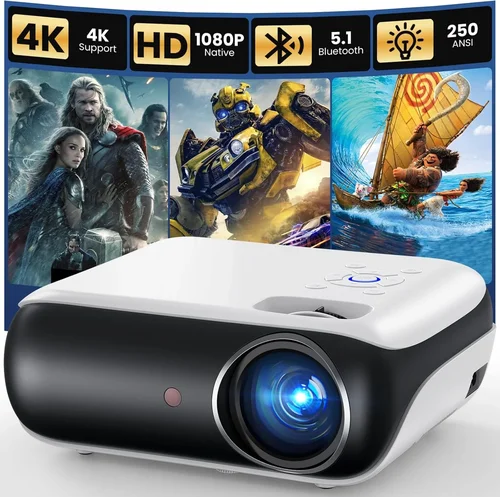
True 4K (3840 × 2160) is rare below $1,000; most “4K” projectors use pixel‑shifting or DLP‑based upscaling. Key specs to compare are:
- Native Resolution: 1080p vs. 4K‑enhanced. True 4K delivers the sharpest image, but a high‑quality 1080p with good upscaling can look excellent on a 100‑inch screen.
- Brightness (lumens): For a dark home theater, 1,500–2,000 lumens is adequate; for ambient light rooms, aim for 2,500+ lumens.
- Contrast Ratio: Higher contrast means deeper blacks. Look for ratios of at least 10,000:1, though real‑world performance often varies.
- Color Gamut: DCI‑P3 or Rec. 2020 coverage indicates richer colors. A minimum of 90% DCI‑P3 is impressive at this price point.
- HDR Support: HDR10 is common; Dolby Vision is rare under $1,000. Even basic HDR can boost perceived contrast.
3. Build Quality & Durability
Projectors are long‑term investments. Metal housings, reinforced lens barrels, and reliable cooling systems extend lifespan. Pay attention to the lamp or laser source lifespan: LED and laser units often promise 20,000‑30,000 hours, while traditional lamps may need replacement after 2,000‑3,000 hours, adding hidden costs.
4. Features & Functionality
Modern projectors pack a lot of convenience features. Prioritize the ones that match your workflow:
- Lens Shift & Zoom: Allows precise image placement without keystone correction.
- Keystone Correction: Useful for off‑axis setups, but excessive digital correction can soften the image.
- Built‑in Speakers: Handy for casual movie nights, though most audiophiles will add external sound.
- Smart OS: Android TV, Roku, or proprietary platforms let you stream directly without extra hardware.
- Connectivity: HDMI 2.0/2.1, USB‑C, Bluetooth, and Wi‑Fi give you flexibility for consoles, PCs, and mobile devices.
5. Brand Reputation
Brands that specialize in projection technology—such as Epson, BenQ, Optoma, and ViewSonic—tend to offer more consistent firmware updates and better customer service. Newer entrants can surprise with innovation, but research their post‑sale support history before committing.
6. Warranty & Support
A solid warranty protects you from early failures. Look for at least a 2‑year warranty covering the light source. Some manufacturers offer extended coverage for an additional fee, which can be a wise investment for heavy users.
7. Size & Portability
If you plan to move the projector between rooms or use it for outdoor movie nights, weight and form factor matter. Ultra‑short‑throw (UST) models are bulkier but eliminate the need for a long throw distance, while portable pico‑projectors sacrifice brightness for convenience.
8. User Reviews & Ratings
Real‑world feedback reveals issues that spec sheets hide—such as fan noise, firmware glitches, or premature lamp failures. Scan reviews on retailer sites, AV forums, and YouTube hands‑on videos to gauge long‑term satisfaction.
Different Types of Buying Guide
Common Buying Mistakes to Avoid
❌ Mistake: Ignoring Ambient Light Conditions
Why it’s bad: Choosing a low‑lumens projector for a bright living room will result in washed‑out images that defeat the purpose of a 4K display.
What to do instead: Measure typical room lighting and aim for at least 2,500 lumens if you cannot control ambient light.
❌ Mistake: Equating “4K” with Native Resolution
Why it’s bad: Many sub‑$1,000 models only up‑scale 1080p content, which can produce soft edges on large screens.
What to do instead: Look for “true 4K” or “4K‑enhanced” with pixel‑shift technology, and read reviews that test sharpness on a 100‑inch screen.
❌ Mistake: Overlooking Lamp or Laser Lifespan
Why it’s bad: Replacing a lamp can cost $150‑$250, dramatically increasing total ownership cost.
What to do instead: Prefer laser or LED light sources for longer life and lower long‑term expense.
❌ Mistake: Forgetting Throw Distance
Why it’s bad: Buying a standard‑throw unit for a small apartment may force you to place the projector too far away, limiting screen size.
What to do instead: Calculate the required throw ratio (screen width ÷ distance) and match it to the projector’s specifications.
❌ Mistake: Neglecting Audio Needs
Why it’s bad: Relying on built‑in speakers often leads to disappointing sound quality, especially for movies.
What to do instead: Budget for an external sound system or soundbar; many projectors include audio out ports for easy integration.
❌ Mistake: Buying Without Testing
Why it’s bad: Pictures can differ dramatically from showroom demos to real‑world rooms.
What to do instead: If possible, test the projector in your intended space, or buy from a retailer with a generous return policy.
Budget Guidelines: How Much Should You Spend?
Understanding what you get at each price tier helps set realistic expectations.
- Entry‑Level ($400‑$600): Expect 1080p native resolution with pixel‑shift 4K, brightness around 1,500 lumens, and basic HDR. Ideal for casual movie nights on a 80‑inch screen in a dark room.
- Mid‑Range ($600‑$850): You’ll find true 4K‑enhanced models, 2,500‑lumens brightness, better color gamut (90%+ DCI‑P3), and optional lens shift. Great for multi‑use rooms where you can control lighting.
- Premium ($850‑$1,000): High‑end 4K‑enhanced or true 4K, 3,000+ lumens, advanced HDR10+, laser light source, and robust connectivity (HDMI 2.1, Wi‑Fi 6). Suits enthusiasts who demand cinema‑grade performance.
- Luxury ($1,000+): While outside the guide’s scope, luxury models break $1,500 and deliver native 4K, 4K60fps gaming, and built‑in motorized lenses. Consider only if budget permits.
Expert Tips for Getting the Best Deal
- Time Your Purchase: New models usually launch in Q1. Buying a previous‑generation unit in Q3–Q4 yields price cuts while still providing modern features.
- Shop at Authorized Retailers: Stores like B&H, Adorama, and Best Buy provide extended warranties and easy returns, unlike some third‑party sellers.
- Bundle for Savings: Look for bundles that include a screen, HDMI cable, or mounting hardware—often cheaper than buying separately.
- Check Firmware Updates: A projector that receives regular firmware upgrades will improve performance and fix bugs over time.
- Consider Refurbished Units: Manufacturer‑refurbished models come with full warranty and are often 20‑30% cheaper.
- Read Return Policies: A 30‑day return window lets you test the projector in your environment without risk.
- Test Before You Commit: If possible, view a 4K test pattern or a high‑resolution movie on a demo unit to evaluate sharpness, color, and fan noise.
- Negotiate Shipping: Free or discounted shipping can add $20‑$50 savings, especially for bulkier units.

Frequently Asked Questions
Q: Can a sub‑$1,000 projector truly display 4K content?
A: Most budget models use pixel‑shift technology that simulates 4K by rapidly shifting a 1080p image. True native 4K is rare below $1,000, but pixel‑shift can still deliver impressive detail on screens up to 100 inches, especially in dark rooms.
Q: Do I need a special screen for a 4K projector?
A: While a plain white wall works, a high‑gain 4K‑compatible screen improves brightness uniformity and color accuracy. For UST models, a low‑gain screen reduces hotspotting.
Q: How far should the projector be from the screen?
A: Use the manufacturer’s throw ratio chart. For a 100‑inch 16:9 screen, a 1.5‑throw projector needs ~12‑13 ft distance, while a UST unit can sit just inches from the wall.
Q: Is HDR worth it on a budget projector?
A: Basic HDR10 can enhance contrast and color depth, but without high brightness the effect may be subtle. If HDR movies are a priority, aim for ≥2,500 lumens.
Q: Will the fan be noisy?
A: Most modern projectors keep fan noise under 30 dB in Eco mode, which is quiet enough for movies. Gaming may benefit from a higher‑performance mode that slightly increases noise.
Q: How long does a lamp last?
A: Traditional lamps last 2,000‑3,000 hours, while laser/LED sources can exceed 20,000 hours. At 4 hours per day, a laser projector could last 13+ years before any part needs replacement.
Q: Do I need a separate sound system?
A: Built‑in speakers are convenient but limited (usually 10‑15 W total). For immersive audio, pair the projector with a soundbar or a 2.1/5.1 speaker system.
Q: Can I use a projector for daytime presentations?
A: Yes, but you’ll need a model with ≥3,000 lumens and a high‑gain screen to combat ambient light. Otherwise, image wash‑out is likely.
Q: Is a short‑throw projector better than a standard throw?
A: Short‑throw eliminates shadowing and keystone issues in tight spaces, but they can be heavier and pricier. Choose based on room size and mounting flexibility.
Q: What connectivity should I look for?
A: HDMI 2.0 is a minimum; HDMI 2.1 supports 4K60Hz gaming. USB‑C for media playback, Wi‑Fi for streaming, and Bluetooth for audio are nice extras.
Our Final Recommendations
Best for Budget‑Conscious Buyers
Model: BenQ TH585 – $579
Why: 1080p native with 3,500 lumens, low input lag (16 ms), and decent color accuracy. Ideal for gamers and movie lovers who can tolerate a pixel‑shifted 4K experience.
Best Overall Value
Model: Optoma UHD38 – $849
Why: True 4K‑enhanced, 4,000 lumens, HDR10, 8 ms input lag, and robust connectivity (HDMI 2.0, USB‑C). Balances performance and price perfectly for home theaters.
Best Premium Option
Model: Epson Home Cinema 4010 – $999
Why: 4K‑enhanced LCD, 2,400 lumens, 90% DCI‑P3, lens shift, and excellent lens optics. Provides cinema‑grade image quality without exceeding the $1,000 ceiling.
Best for Beginners
Model: ViewSonic PX701HD – $449
Why: Easy setup, 3,200 lumens, and a user‑friendly menu. Great for first‑time owners who want plug‑and‑play simplicity.
Best for Advanced Users
Model: LG HU85LA Ultra‑Short‑Throw – $999 (often on sale)
Why: UST design, 2,700 lumens, 4K‑enhanced, built‑in smart TV platform, and excellent color accuracy. Perfect for apartments where distance is limited.
Conclusion: Making the Right Choice
Choosing the best 4K projector under $1,000 boils down to matching your space, lighting, and usage habits with the right combination of brightness, resolution, and features. Remember to assess ambient light, verify true 4K capabilities, and factor in long‑term costs such as lamp or laser replacement. By following the buying guide’s checklist, avoiding common pitfalls, and considering the curated recommendations above, you’ll walk away with a projector that delivers stunning visuals without overspending.
Ready to upgrade your viewing experience? Start comparing the models listed, set a price alert, and enjoy the cinematic world that awaits on your wall.