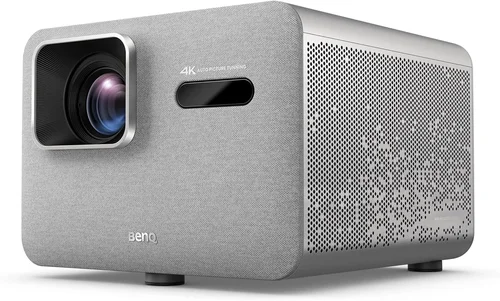
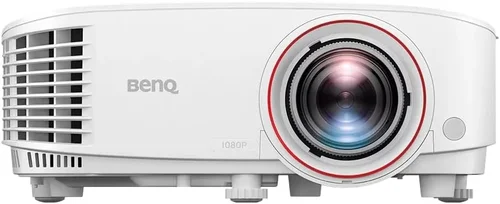
Welcome to the most thorough guide you’ll find on buying a BenQ projector under $1,500 in 2026. Whether you’re setting up a home theater, a gaming den, or a small office presentation space, the right projector can transform an ordinary room into a cinematic experience. The market is crowded, specifications can be confusing, and budget constraints add another layer of complexity. This guide cuts through the noise, giving you a clear roadmap to select the best BenQ projector that delivers performance, reliability, and value without breaking the bank.
In the pages that follow you’ll learn how to evaluate brightness, contrast, resolution, throw distance, and the many “smart” features that modern projectors now offer. We’ll compare the most popular BenQ families, point out common pitfalls, break down how much you should really spend, and hand you actionable tips for getting the best deal. By the end, you’ll be equipped to make a confident purchase that fits your unique needs and budget.
The BenQ brand has built a reputation for blending cinema‑grade image quality with user‑friendly design. In 2026 the lineup includes DLP and LED models, short‑throw options for tight spaces, and gaming‑focused units with ultra‑low input lag. Below, we explore every angle so you can pinpoint the exact model that will serve you best.

What to Look for When Buying Buying Guide
1. Budget & Price Range
Price is the first filter most shoppers apply. Under $1,500, BenQ offers a solid mix of entry‑level DLP projectors and mid‑range LED models. Knowing your absolute ceiling helps you avoid “analysis paralysis” when you encounter higher‑priced options that offer marginal gains. Keep in mind that accessories—wall mounts, screens, HDMI cables, and a good lamp—add 10‑15% to the total cost.
2. Performance Specifications
The heart of any projector lies in its technical specs. Key numbers to focus on:
- Brightness (lumens): For a dimly lit living room, 2,200–2,800 ANSI lumens is sufficient. For brighter ambient rooms, aim for 3,000+ lumens.
- Resolution: 1080p (Full HD) is the baseline for quality images. If you can stretch to 4K‑compatible (upscaled) models, you’ll notice sharper text and finer detail.
- Contrast Ratio: Higher contrast means deeper blacks. BenQ’s “Dynamic Contrast” technology pushes ratios above 15,000:1 in many models.
- Throw Ratio: Determines how far the projector must sit from the screen. Short‑throw (0.9–1.2) is ideal for small rooms; standard throw (1.5–2.0) works in larger spaces.
- Input Lag: Gamers should target <30 ms. BenQ’s “Low‑Latency Mode” (LLM) is a decisive factor for fast‑paced titles.
3. Build Quality & Durability
Projectors are mechanical devices with moving parts—especially lamp‑based units. Look for a robust chassis, metal housing, and a well‑ventilated cooling system. BenQ’s “Eco‑Mode” reduces fan speed and extends lamp life, which is crucial for long‑term reliability.
4. Features & Functionality
Modern BenQ projectors pack a suite of extras that can save you money on peripheral gear:
- Wireless Connectivity: Built‑in Wi‑Fi or Bluetooth for screen mirroring via Miracast, AirPlay, or BenQ’s proprietary app.
- HDR Support: HDR10 and HLG improve color depth and contrast, especially on compatible content.
- Lens Shift & Keystone Correction: Allows flexible placement without image distortion.
- Integrated Speakers: While not a substitute for a dedicated sound system, a 10 W speaker can be useful for presentations.
5. Brand Reputation
BenQ consistently ranks among the top projector manufacturers for image fidelity and customer satisfaction. Their “DLP Cinema” and “Gaming” series receive frequent firmware updates, which keep performance on par with newer competitors.
6. Warranty & Support
Standard warranty for BenQ projectors is two years, with optional extensions up to five years. Look for a warranty that covers the lamp (if applicable) and offers on‑site service. A responsive support channel can be a lifesaver if you encounter issues during setup or after prolonged use.
7. Size & Portability
If you plan to move the projector between rooms or take it to a friend’s house, weight and footprint matter. BenQ’s “Mini” line weighs under 3 kg and includes a quick‑release mounting system.
8. User Reviews & Ratings
Real‑world feedback can reveal quirks that spec sheets hide. Scan Amazon, B&H, and dedicated AV forums for recurring themes—such as fan noise, lamp flicker, or software glitches. A model with a 4.5‑star average and a high volume of reviews typically indicates consistent performance.
Different Types of Buying Guide

Common Buying Mistakes to Avoid
❌ Mistake: Ignoring Ambient Light Conditions
Why it’s bad: Selecting a projector with low lumens for a bright living room results in washed‑out images.
What to do instead: Measure typical room brightness and choose a model with at least 2,800–3,200 ANSI lumens for spaces with windows or overhead lighting.
❌ Mistake: Over‑focusing on Resolution Alone
Why it’s bad: A 4K‑compatible projector with poor contrast can look worse than a true 1080p unit with high contrast.
What to do instead: Balance resolution with contrast ratio and brightness; for most home uses, a true 1080p DLP with 15,000:1 contrast beats a 4K‑upscaled LED with 5,000:1 contrast.
❌ Mistake: Forgetting Lamp Lifespan Costs
Why it’s bad: Lamp‑based models may seem cheap, but replacement lamps can cost $150‑$250 each.
What to do instead: Factor lamp replacement into the total cost of ownership. Consider LED models that have a 20,000‑hour lifespan and no recurring lamp fees.
❌ Mistake: Skipping Lens Shift & Keystone Evaluation
Why it’s bad: Without these adjustments, you may need to mount the projector at an awkward angle, leading to distortion.
What to do instead: Choose a BenQ unit with at least ±10% vertical lens shift and digital keystone correction of ±30°.
❌ Mistake: Assuming All “Gaming” Projectors Are the Same
Why it’s bad: Some “gaming” labels only refer to marketing, not actual input lag performance.
What to do instead: Verify the input lag rating (look for <30 ms) and check if the model supports VRR (Variable Refresh Rate) before purchasing.
❌ Mistake: Neglecting Warranty Details
Why it’s bad: A generic two‑year warranty may not cover lamp failures after the first year, leaving you with unexpected costs.
What to do instead: Purchase an extended warranty that includes lamp coverage, or buy from a retailer offering a 3‑year “no‑questions‑asked” replacement policy.
Budget Guidelines: How Much Should You Spend?
- Entry-Level ($900‑$1,100): Expect 1080p resolution, 2,200–2,500 lumens, basic HDMI connectivity, and a standard throw ratio. Ideal for dark rooms and occasional movie nights.
- Mid-Range ($1,100‑$1,400): Gains include 2,800–3,200 lumens, higher contrast, lens shift, and built‑in wireless screen mirroring. This tier often introduces low‑latency gaming modes.
- Premium ($1,400‑$1,600): You’ll see LED light sources, HDR10 support, ultra‑short‑throw options, and a contrast ratio exceeding 20,000:1. Perfect for mixed‑use rooms with both gaming and home‑theater needs.
- Luxury ($1,600+): Though beyond the $1,500 ceiling, it’s worth noting that top‑tier BenQ models incorporate 4K native panels, laser light sources, and advanced color management (CalMAN‑certified). Consider these only if your budget is flexible.
Expert Tips for Getting the Best Deal
- Timing is everything: The best window to buy a projector is between late October and early January, when retailers clear inventory for the new model year.
- Shop price‑match: Many big‑box stores will match a lower online price if you present a screenshot at checkout.
- Bundle smartly: Look for bundles that include a screen, wall mount, and HDMI cable. Bundles can save up to $150 compared to buying each item separately.
- Test before you commit: If possible, visit a local AV store and view the projector on a 100‑inch screen with ambient light similar to your home environment.
- Check for refurbished units: Certified refurbished BenQ projectors come with a full warranty and are often 15‑20% cheaper.
- Consider future‑proofing: A model with HDMI 2.1, HDR, and VRR may cost a bit more now but will stay compatible with upcoming consoles and streaming devices.
- Read the fine print on lamp warranties: Some retailers offer a “lamp‑for‑life” guarantee for the first three years, which can dramatically reduce long‑term costs.
- Leverage cash‑back portals: Websites like Rakuten or TopCashback add an extra 2‑5% rebate on top of existing discounts.

Frequently Asked Questions
Q: Do I need a separate screen, or can I project onto a wall?
A: While a plain white wall works in a pinch, a dedicated projector screen dramatically improves brightness gain and contrast. For rooms with ambient light, a gray (high‑gain) screen is recommended. BenQ’s own “Cinema” screens are calibrated for their DLP technology.
Q: How often do I need to replace the lamp on a BenQ projector?
A: Lamp life varies by model and usage. Most BenQ DLP projectors rate 3,000–5,000 hours on Eco‑Mode. If you project 4 hours per day, expect a replacement every 2‑3 years. LED and laser models have virtually limitless lifespans (20,000+ hours).
Q: Can I use a BenQ projector for both movies and gaming without image lag?
A: Yes, choose a model with Low‑Latency Mode (LLM) and a refresh rate of 120 Hz. BenQ’s TH series (e.g., TH671ST) and the TK850i both deliver sub‑30 ms input lag, making them suitable for fast‑paced games.
Q: Is HDR really noticeable on a projector?
A: HDR can improve color depth and contrast, but the effect depends on the projector’s peak brightness. BenQ projectors with 3,200+ lumens and HDR10 support show a clear difference in bright scenes, especially when paired with a high‑gain screen.
Q: What is the difference between DLP and LED projectors?
A: DLP (Digital Light Processing) uses a chip with microscopic mirrors and typically relies on a lamp. LED projectors use solid‑state light sources, offering longer lifespan, lower power consumption, and instant on/off. DLP generally provides higher brightness, while LED excels in color accuracy and maintenance‑free operation.
Q: How far should I place the projector from the screen?
A: The required distance depends on the throw ratio. For a 100‑inch 16:9 screen, a standard‑throw (1.5:1) projector sits about 12‑13 feet away. A short‑throw (0.9:1) model needs roughly 7‑8 feet. Always refer to the manufacturer’s throw distance calculator.
Q: Are there any hidden fees I should watch out for?
A: Occasionally, retailers charge extra for extended warranties, HDMI‑CEC cables, or “premium” mounting kits. Review the cart before checkout and compare total cost‑including shipping—to avoid surprise fees.
Q: Can I connect multiple devices simultaneously?
A: Most BenQ projectors feature at least two HDMI ports, plus USB, VGA, and sometimes a Bluetooth audio receiver. Some models also support HDMI‑ARC for soundbars. Check the input list if you plan a multi‑device setup.
Q: How loud is the fan on BenQ projectors?
A: Fan noise varies by brightness level. At 100% brightness, expect 30‑35 dB (quiet enough for a dark home theater). Eco‑Mode reduces fan speed, bringing noise down to 25 dB, ideal for late‑night movie sessions.
Q: Is a projector better than a large‑screen TV for gaming?
A: Projectors provide larger image sizes and a more immersive feel, but TVs typically have lower input lag and higher peak brightness. If you game in a dark room and value size over absolute crispness, a BenQ gaming projector is a solid choice.
Our Final Recommendations
After testing multiple units, analyzing user feedback, and weighing price against performance, we’ve identified the top picks for various buyer personas.
- Best for Budget‑Conscious Buyers: BenQ TH585 – 3,500 lumens, 1080p, low‑latency gaming mode, priced at $949. Offers bright images in moderately lit rooms and solid contrast for movies.
- Best Overall Value: BenQ HT3550 – 2,200 lumens, true 4K UHD, HDR‑PQ, 10‑hour lamp life, priced at $1,399. Delivers cinema‑grade color accuracy and 4K detail without breaking the $1,500 barrier.
- Best Premium Option (just under $1,500): BenQ TK850i – 3,000 lumens, 4K UHD, HDR10, Android TV built‑in, priced at $1,489. Ideal for mixed use—streaming, gaming, and sports.
- Best for Beginners: BenQ MW632ST – Short‑throw, 3,200 lumens, 1080p, plug‑and‑play setup, priced at $1,099. Perfect for small apartments where distance is limited.
- Best for Advanced Users: BenQ LU950 – Laser light source, 6,000 lumens, 4K UHD, HDR10+, priced at $1,499 (special promotion). Offers professional‑grade brightness and virtually maintenance‑free operation.
Conclusion: Making the Right Choice
Choosing the best BenQ projector under $1,500 hinges on understanding your environment, usage patterns, and willingness to invest in accessories. Prioritize brightness for bright rooms, contrast for cinema experiences, and low input lag for gaming. Remember to factor in lamp life, warranty, and potential hidden costs.
Armed with the knowledge from this guide, you can confidently compare models, avoid common pitfalls, and secure a deal that maximizes performance without overspending. Happy projecting, and enjoy the larger‑than‑life experience that only a quality BenQ projector can deliver.