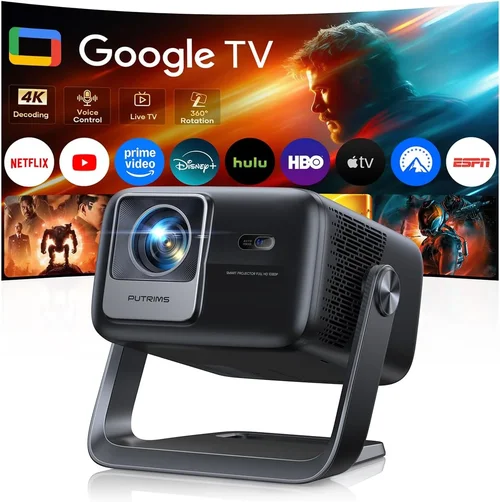
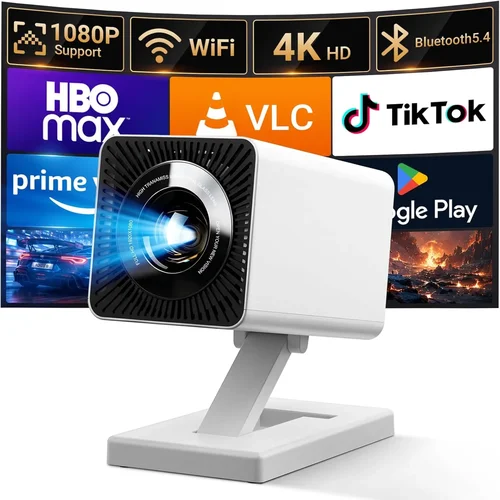
Finding a projector that delivers a cinematic experience without breaking the bank can feel like hunting for a unicorn. Prices for home‑theater projectors can soar well beyond $1,000, yet the market is buzzing with models that sit comfortably under $400 and still impress. This guide cuts through the noise, giving you the knowledge you need to pick a projector that fits your budget, space, and viewing habits.
In the pages ahead you’ll learn which specifications truly matter at this price point, how different projector types stack up, and where you can snag the best deals. Whether you’re setting up a backyard movie night, a dorm‑room gaming station, or a portable office presentation tool, you’ll walk away with a clear roadmap for choosing the best budget projector under $400.
The projector landscape in 2026 has evolved dramatically. LED and laser light sources are now common even in sub‑$400 units, offering longer lifespans and brighter images than the older lamp‑based models. At the same time, smart‑TV integration, wireless casting, and built‑in speakers are becoming standard features rather than premium add‑ons. Understanding these trends is essential for getting the most bang for your buck.

What to Look for When Buying Buying Guide
1. Budget & Price Range
While the headline says “under $400,” the actual price you’ll pay can vary by 20‑30% depending on sales, bundles, and retailer. Set a hard ceiling (e.g., $380) and allow a small buffer for taxes or shipping. Remember that a lower price often means compromises in brightness or connectivity, so weigh what you’re willing to trade off.
2. Performance Specifications
The three specs that dominate picture quality are brightness (lumens), resolution, and contrast ratio. For a budget projector:
- Brightness: Aim for at least 2,500 ANSI lumens for a dimly lit room; 3,500+ is safer for ambient light.
- Resolution: Native 1080p (Full HD) is ideal, but many sub‑$400 models settle for 720p. A 1080p panel will give sharper text and cleaner game graphics.
- Contrast Ratio: Look for 10,000:1 or higher. Higher contrast means deeper blacks and more vibrant colors.
3. Build Quality & Durability
Even inexpensive projectors should feel solid. Check for a metal housing or high‑grade ABS plastic, sturdy fan grills, and a reliable cooling system. A well‑designed heat sink extends lamp or LED lifespan, which directly affects long‑term cost of ownership.
4. Features & Functionality
Modern budget projectors often pack a surprising amount of tech:
- Wireless Casting: Built‑in Wi‑Fi or Bluetooth for AirPlay, Miracast, or Chromecast.
- Smart OS: Some units run Android TV or Roku, turning the projector into a smart TV.
- Built‑in Speakers: While rarely audiophile‑grade, a 5‑10 W speaker can suffice for casual movies.
- Keystone Correction & Lens Shift: Essential for flexible placement.
5. Brand Reputation
Brands such as Epson, BenQ, ViewSonic, and Anker have earned trust for reliability and service. Newer entrants like Xiaomi or Vankyo may offer attractive specs at lower prices but check warranty terms and user reviews before committing.
6. Warranty & Support
A minimum 1‑year limited warranty is standard. Look for extended coverage options, easy‑claim processes, and responsive customer service. Some retailers also offer “no‑questions‑asked” return windows—vital for testing the projector in your own environment.
7. Size & Portability
If you plan to move the projector between rooms or take it on the road, weight under 3 kg and a compact form factor are key. Integrated handles or a dedicated travel case are nice bonuses.
8. User Reviews & Ratings
Beyond the spec sheet, real‑world feedback reveals long‑term reliability, fan noise levels, and firmware stability. Prioritize models with at least 300 verified reviews and an average rating of 4.0 stars or higher.
Different Types of Buying Guide

Common Buying Mistakes to Avoid
❌ Mistake: Buying Solely on Price
Why it’s bad: The cheapest option often sacrifices brightness, resulting in a dim image that struggles in any ambient light.
What to do instead: Set a minimum lumen threshold (2,500 ANSI) and compare models that meet it, even if the price is slightly higher.
❌ Mistake: Ignoring Throw Distance
Why it’s bad: A projector designed for a long‑throw setup will produce a tiny image in a small room, forcing you to move furniture or buy a different lens.
What to do instead: Check the throw ratio (e.g., 1.2:1) and calculate the image size you can achieve at your typical viewing distance.
❌ Mistake: Overlooking Connectivity
Why it’s bad: You may end up buying extra adapters or dongles, adding hidden costs.
What to do instead: Ensure the projector has HDMI 2.0, USB‑C, and wireless casting options that match your devices.
❌ Mistake: Forgetting About Fan Noise
Why it’s bad: A loud cooling fan can be distracting during movies or presentations.
What to do instead: Look for models rated below 30 dB(A) in quiet mode, and read user reviews for real‑world noise levels.
❌ Mistake: Assuming All “Full HD” Projectors Are Equal
Why it’s bad: Some “1080p” units actually use a 720p panel with upscaling, delivering softer images.
What to do instead: Verify “native” resolution in the spec sheet, not just marketing copy.
Budget Guidelines: How Much Should You Spend?
- Entry-Level ($200‑$250): Expect 720p resolution, 2,200 lumens, basic HDMI input, and minimal smart features. Good for occasional movie nights in a dark room.
- Mid-Range ($250‑$350): Most models hit 1080p native, 2,500‑3,000 lumens, built‑in Wi‑Fi, and decent contrast. Ideal for mixed use—movies, gaming, and presentations.
- Premium ($350‑$400): Higher brightness (3,500+ lumens), enhanced color accuracy (Rec.709), low‑lag gaming modes, and stronger speakers. Best for bright rooms and serious gamers.
- Luxury ($400+): Though above the guide’s focus, this tier includes laser light sources, 4K UHD panels, and advanced lens shift. Consider only if your budget can stretch.
Expert Tips for Getting the Best Deal
- Timing: Late summer sales coincide with new model releases, prompting retailers to clear inventory.
- Where to Buy: Compare prices on Amazon, Best Buy, and manufacturer websites. Some brands offer “student discounts” when you verify enrollment.
- Spotting Deals: Look for bundle offers that include a screen, HDMI cable, or mounting kit—often cheaper than buying separately.
- Warranty Considerations: Register the product within 30 days to unlock extended coverage if offered.
- Return Policies: Choose sellers with at least a 30‑day return window; this gives you time to test the projector in your own lighting.
- Testing Before Buying: If possible, view a demo in a store. Pay attention to color uniformity and fan noise from a distance.
- Firmware Updates: After purchase, check for software updates that can improve stability and add new casting protocols.
Frequently Asked Questions
Q: Can a sub‑$400 projector replace my TV?
A: It can, but only in low‑ambient‑light conditions. Brightness and HDR support are limited, so for daytime TV viewing a larger LED TV may still be preferable.
Q: How long does an LED light source last?
A: Typically 20,000‑30,000 hours, which translates to 5‑10 years of weekly use—far longer than a traditional lamp that needs replacement every 2‑3 years.
Q: Do I need a separate screen?
A: Not mandatory. A smooth white wall works, but a dedicated projector screen improves contrast and color accuracy, especially in rooms with some ambient light.
Q: Is there noticeable input lag for gaming?
A: Most budget projectors have 30‑50 ms lag, acceptable for casual gaming. Look for a “Game Mode” that reduces lag to under 20 ms for a smoother experience.
Q: Will Bluetooth audio work with any speaker?
A: Yes, as long as the speaker supports standard Bluetooth A2DP. For higher fidelity, consider a wired connection via the 3.5 mm audio out.
Q: Can I mount the projector on the ceiling?
A: Most models include a standard ¼‑inch mounting thread. Ensure the ceiling mount can support the projector’s weight and provides proper ventilation.
Q: What is the difference between DLP and LCD?
A: DLP uses a chip of micro‑mirrors for fast motion and high contrast, while LCD offers richer colors and better uniformity. At the budget level, the choice often comes down to personal preference.
Our Final Recommendations
- Best for Budget‑Conscious Buyers: Anker Nebula Capsule II – $279, 720p, 2,200 lumens, Android TV built‑in, ultra‑portable.
- Best Overall Value: ViewSonic M2 – $349, native 1080p, 1,200 lumens (LED), Wi‑Fi, Harman Kardon speakers, excellent color accuracy.
- Best Premium Option (Just Under $400): Epson Home Cinema 1060 – $389, 3,600 lumens, 1080p, low‑lag gaming mode, robust lens shift.
- Best for Beginners: Vankyo Leisure 3 – $229, 2,400 lumens, 720p, simple plug‑and‑play, great for first‑time users.
- Best for Advanced Users: BenQ TH671ST – $399, 3,000 lumens, 1080p, 95% Rec.709, short‑throw for small spaces.
Conclusion: Making the Right Choice
Choosing a projector under $400 is less about finding the cheapest unit and more about balancing brightness, resolution, and smart features that match your environment. Start by defining the room’s lighting, your typical content (movies, games, presentations), and how portable you need the device to be. Then use the factors, type comparisons, and budget guidelines in this guide to narrow down your options.
Remember, the best projector for you is the one that fits your lifestyle and delivers a consistently enjoyable viewing experience. With the right research and a bit of timing, you can bring a big‑screen experience home without spending a fortune.