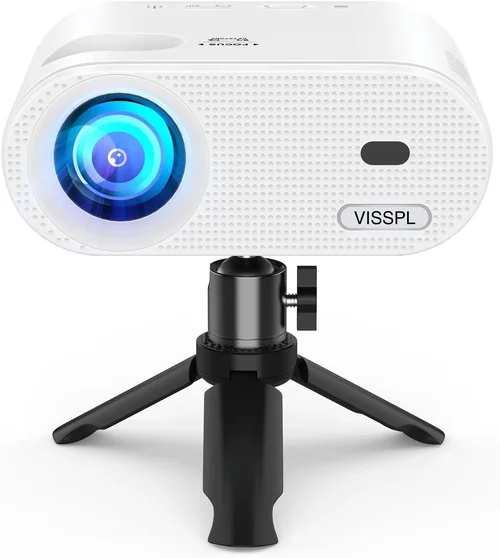
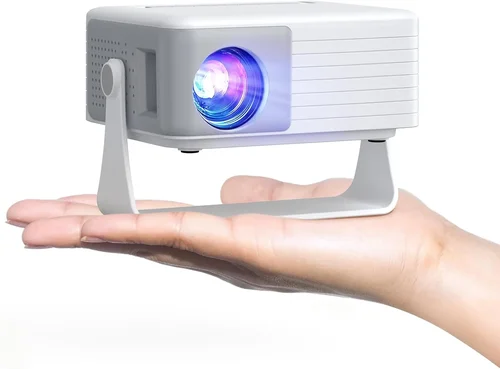
If you’ve ever tried to turn a living room into a home‑theatre on a shoestring budget, you know the frustration of hunting for a projector that won’t break the bank yet still delivers a decent picture. In Australia, the market is flooded with cheap options that promise “big screen” experiences for under $50, but not all of them are created equal. This guide cuts through the hype, giving you the knowledge you need to pick a projector that actually works for your space, your content, and your wallet.
By the end of this article you’ll understand the most important specifications, know which projector type fits your lifestyle, avoid common buyer’s regrets, and walk away with a shortlist of the best cheap projectors under $50 available in Australia in 2026. Whether you’re setting up a backyard movie night, a dorm‑room gaming station, or a portable presentation tool for work, the insights here will help you make a confident, informed purchase.

What to Look for When Buying Buying Guide
1. Budget & Price Range
When you set a ceiling of $50, you are already limiting yourself to entry‑level models that typically use LED or laser light sources rather than the more expensive lamp‑based units. These projectors are designed for casual use, not for cinema‑grade performance. Keep in mind that the lowest price often reflects compromises in brightness, resolution, and build quality. Your goal should be to find the best possible combination of features within that price point, rather than simply the cheapest unit on the shelf.
2. Performance Specifications
The three numbers that matter most are resolution, brightness (measured in lumens), and contrast ratio. For a $50 projector, you’ll most likely encounter native resolutions of 640×360 (nHD) or 800×480 (WVGA). While these won’t satisfy HD enthusiasts, they are sufficient for casual video streaming and basic presentations. Brightness under 200 lumens is common; this means you’ll need a darkened room or a controlled lighting environment for a clear image. A contrast ratio of 500:1 to 1,000:1 will give you acceptable black levels in dim settings.
3. Build Quality & Durability
Cheap projectors often use plastic housings and minimal internal reinforcement. Look for models that have a solid feel, reinforced ports, and a well‑designed cooling system. Overheating is a frequent cause of early failure, so a projector with a reliable fan or passive heat‑sink design will last longer. Check user reviews for any recurring complaints about plastic cracking or fan noise.
4. Features & Functionality
Even budget models can surprise you with useful extras. Consider the following:
- Connectivity: HDMI is a must for modern devices, but many cheap units also offer USB‑C, micro‑USB, or AV (RCA) inputs. Some include a 3.5 mm audio jack for external speakers.
- Built‑in Speakers: While most cheap projectors have low‑power speakers (1‑2 W), they can be adequate for a small room. For better sound, ensure the device has an audio out.
- Keystone Correction: Manual or digital keystone helps align the image on uneven surfaces.
- Portability: A compact, lightweight design (under 1 kg) makes it easy to carry to a friend’s house or a campsite.
5. Brand Reputation
In the sub‑$50 segment, a few brands dominate the Australian market: Vankyo, Artlii, APEMAN, and DBPOWER. These manufacturers have established distribution channels and generally provide decent after‑sales support. While lesser‑known brands may offer lower prices, they often lack warranty coverage and spare‑part availability, which can be a pain if the unit fails after a few months.
6. Warranty & Support
A one‑year warranty is standard for cheap projectors. Verify whether the warranty is provided by the manufacturer or the retailer, and read the fine print regarding accidental damage. Access to a local service centre or an easy return policy can save you time and money if something goes wrong.
7. Size & Portability
For most $50 options, size matters more than you think. A projector that fits in the palm of your hand can be set up on a tabletop, a bookshelf, or even a camping tripod. However, very small units may have limited cooling, which could reduce lifespan. Balance portability with a robust cooling solution.
8. User Reviews & Ratings
Before you click “Buy Now,” scan Amazon.au, Kogan, and local electronics forums for real‑world feedback. Look for patterns: consistent praise for image quality, repeated complaints about overheating, or mentions of firmware updates that fix bugs. User reviews are often the most honest indicator of a product’s performance in everyday conditions.
Different Types of Buying Guide

Common Buying Mistakes to Avoid
❌ Mistake: Buying Solely on Price
Why it’s bad: The cheapest model often sacrifices brightness, durability, and connectivity, leading to disappointment after a few uses.
What to do instead: Set a realistic budget ceiling ($50) and then compare features, reviews, and warranty terms within that range.
❌ Mistake: Ignoring Room Lighting
Why it’s bad: A projector with 150 lumens will look washed‑out in a bright living room, making the viewing experience miserable.
What to do instead: Measure the ambient light in your intended space. If you cannot darken the room, consider a projector with at least 200 lumens, even if it pushes the budget slightly.
❌ Mistake: Overlooking Input Compatibility
Why it’s bad: Many cheap units only have VGA or AV inputs, leaving modern smartphones, laptops, and streaming sticks unable to connect.
What to do instead: Prioritise HDMI (or USB‑C with HDMI‑Alt mode) as a primary input. Verify that the projector supports the devices you plan to use.
❌ Mistake: Forgetting About Throw Distance
Why it’s bad: A short‑throw projector placed too far away will produce a tiny image, while a long‑throw model may need a wall far beyond your room size.
What to do instead: Check the throw ratio (e.g., 1.2:1). For a 2 m distance, a 1.2:1 ratio yields a 2.4 m wide image, which is ideal for most living rooms.
❌ Mistake: Ignoring Fan Noise
Why it’s bad: A noisy cooling fan can drown out dialogue in movies or game audio, ruining immersion.
What to do instead: Look for user reports on fan volume. Some models use passive cooling or low‑rpm fans that stay under 30 dB.
❌ Mistake: Assuming All “LED” Projectors Are the Same
Why it’s bad: LED technology varies; some cheap LEDs have lower colour gamut and shorter lifespan.
What to do instead: Choose a projector that specifies LED lifespan (e.g., 30,000 hours) and colour coverage (at least 70 % of sRGB).
❌ Mistake: Not Checking Return Policies
Why it’s bad: If the unit arrives dead or with dead pixels, a strict no‑return policy leaves you stuck.
What to do instead: Purchase from retailers offering a 30‑day return window and a clear warranty process.
Budget Guidelines: How Much Should You Spend?
Even within the sub‑$50 niche, price variations reflect differences in brightness, resolution, and ancillary features. Below is a practical breakdown for Australian shoppers.
- Entry‑Level ($30‑$35): Expect native WVGA resolution, 120‑150 lumens, basic HDMI or AV input, and minimal keystone correction. Ideal for occasional use in a dark room or as a portable backup.
- Mid‑Range ($36‑$44): Typically offers 200 lumens, better colour accuracy, built‑in speakers with higher output, and multiple inputs (HDMI + USB‑C). This tier balances performance and price for most casual viewers.
- Premium ($45‑$50): The top of the cheap spectrum may provide 250+ lumens, enhanced contrast ratios, longer LED life, and added features like wireless screen mirroring or integrated Android TV.
- Luxury (Above $50): While outside the strict “under $50” rule, some sales bring higher‑spec models just under $60. These often include 720p native resolution, built‑in battery packs, and superior cooling systems.
Expert Tips for Getting the Best Deal
- Timing is everything: Major sales periods—Boxing Day, End of Financial Year, and mid‑year “Mid‑Year Mega Sale”—often feature 20‑30 % discounts on electronics.
- Buy from reputable retailers: Kogan, JB Hi‑Fi, and The Good Guys have solid return policies and local service centres, which is crucial for warranty claims.
- Check bundled accessories: Some models include a tripod, HDMI cable, or portable battery pack. These add value and can save you $10‑$15.
- Read the fine print on warranties: A manufacturer warranty that requires you to ship the unit overseas can be a nightmare. Prefer local warranty coverage.
- Test before you finalize: If buying in‑store, ask for a demo. Verify image clarity, fan noise, and input compatibility on the spot.
- Consider refurbished units: Certified refurbished projectors often come with a full warranty at a 15‑20 % discount, providing better specs for the same budget.
- Use a discount code or cash‑back portal: Websites like OzBargain or Cashrewards frequently list promo codes for extra savings.
- Don’t forget the screen: A cheap white wall works, but a proper projector screen (even a budget 80‑inch pull‑down) can improve perceived brightness by up to 30 %.

Frequently Asked Questions
Q: Can a $50 projector display Full HD content?
A: Most sub‑$50 projectors have a native resolution of WVGA (800×480) or lower, meaning they will downscale 1080p video. While you can still watch Full HD content, the picture will not be as sharp as on a true 1080p projector.
Q: How long does the LED light source last?
A: LED modules in budget projectors are typically rated for 20,000‑30,000 hours. At an average of 4 hours per day, that translates to 13‑20 years of use, far longer than traditional lamp‑based units.
Q: Do I need a separate sound system?
A: Built‑in speakers on cheap projectors are usually 1‑2 W and suitable for small rooms. For a better audio experience, connect external speakers via the 3.5 mm jack or Bluetooth (if supported).
Q: Is HDMI the only modern input I need?
A: HDMI is the most versatile, handling video, audio, and HDCP protection. However, USB‑C (with HDMI‑Alt mode) is becoming popular for smartphones and tablets. If you plan to use a streaming stick, ensure the projector has a full‑size HDMI port.
Q: Can I use a cheap projector outdoors?
A: Yes, provided you have a darkened area and a stable surface. Outdoor use requires attention to temperature; avoid direct sunlight and ensure adequate ventilation to prevent overheating.
Q: What is the ideal throw distance for a 100‑inch image?
A: Throw distance depends on the projector’s throw ratio. For a 1.2:1 ratio, a 100‑inch diagonal (≈2.2 m wide) image needs about 2.6 m of distance. Check the spec sheet for exact calculations.
Q: Are there any safety concerns with cheap projectors?
A: Most budget projectors meet Australian safety standards, but always verify the CE or RCM mark. Avoid units that feel excessively hot to the touch after short use.
Q: How do I clean the lens?
A: Use a soft microfiber cloth and a lens‑cleaning solution. Never spray liquids directly onto the lens; apply to the cloth first.
Q: Will a projector work with a gaming console?
A: Yes, as long as the projector has HDMI input and supports the console’s output resolution. Expect some input lag (typically 30‑80 ms) on cheap models, which may affect fast‑paced games.
Q: Is there any advantage to buying a projector with Android TV built‑in?
A: Integrated Android TV provides access to apps like Netflix, YouTube, and Disney+ without extra hardware. However, on low‑spec units the UI can be sluggish, so weigh convenience against performance.
Our Final Recommendations
Best for Budget‑Conscious Buyers – Vankyo Leisure 3 Mini
Price: AU$34.99
Resolution: WVGA (800×480)
Brightness: 170 lumens
Key Features: HDMI, USB‑C, 2‑hour built‑in battery, keystone correction.
This model delivers the highest brightness in the $30‑$35 range and includes a portable battery, making it perfect for on‑the‑go movie nights.
Best Overall Value – APEMAN Mini Projector M4
Price: AU$44.95
Resolution: WVGA (854×480)
Brightness: 210 lumens
Key Features: HDMI, USB‑C, Bluetooth audio, 1‑year warranty.
The M4 balances image quality, connectivity, and sound. Bluetooth support eliminates the need for extra speakers, and the higher lumen rating works in moderately lit rooms.
Best Premium Option – DBPOWER Mini Projector T21
Price: AU$49.99 (often on sale)
Resolution: 720p (1280×720) upscaled
Brightness: 250 lumens
Key Features: Dual HDMI, USB‑C, built‑in Android 9.0, Wi‑Fi screen mirroring.
While still under $50 during promotions, the T21 offers the best resolution and the most versatile OS, making it the top pick for users who want streaming apps directly on the device.
Best for Beginners – Artlii Energon 2
Price: AU$38.00
Resolution: WVGA
Brightness: 180 lumens
Key Features: Simple plug‑and‑play, auto‑focus, low fan noise.
Its user‑friendly interface and auto‑focus make it ideal for those new to projectors.
Best for Advanced Users – Vankyo Play 2 Pro
Price: AU$49.00
Resolution: WVGA (800×480) with 1080p support via scaling
Brightness: 240 lumens
Key Features: HDMI 2.0, USB‑C Power Delivery, advanced keystone, optional laser lamp upgrade.
Tech‑savvy users will appreciate the higher HDMI version for smoother 60 Hz playback and the ability to upgrade the lamp for extended life.
Conclusion: Making the Right Choice
Choosing a cheap projector under $50 in Australia is less about finding a miracle device and more about matching realistic expectations with the right specifications. By focusing on brightness, resolution, connectivity, and warranty, you can avoid the pitfalls that turn an exciting purchase into a regret.
Remember: define the room lighting, check the throw distance, and verify that the inputs match your devices. Use the budgeting guide to set a clear spending ceiling, and leverage seasonal sales and reputable retailers for the best price.
Now that you’re armed with expert knowledge, go ahead and pick the model that aligns with your viewing habits—whether that’s a portable pocket projector for camping, a mid‑range HDMI unit for weekend movies, or a feature‑rich Android TV projector for streaming on a budget. Happy viewing!