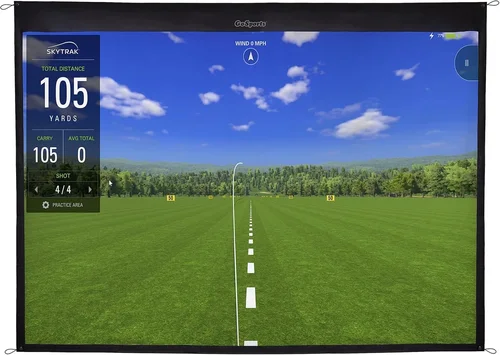
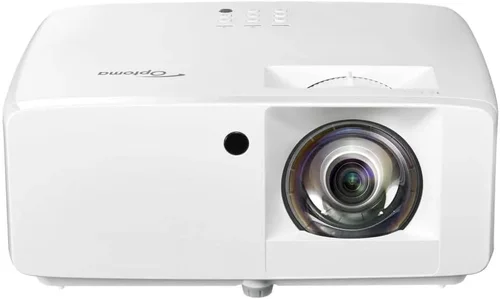
Welcome to the ultimate guide for anyone looking to bring a golf simulator into their home without breaking the bank. In the past few years, the market for indoor golf has exploded, and today you can find projectors that deliver crisp, bright images for under $1,000. Whether you’re a weekend warrior who wants to practice your swing after work, a parent looking for a fun family activity, or a coach seeking a reliable training tool, this guide will help you cut through the noise and pick the best golf simulator projector under $1,000.
What you’ll learn:
- Which performance specs truly matter for golf simulation.
- How to match a projector to your space, budget, and skill level.
- Common pitfalls that cause disappointment and how to avoid them.
- Real‑world recommendations, price tiers, and expert tips for getting the best deal.
The market today is crowded with options ranging from budget DLP models to higher‑end laser light sources. While many manufacturers tout “4K” or “HDR,” those buzzwords don’t automatically translate into a better golf experience. In the sections that follow we’ll break down the technical details, compare the main categories, and give you a clear roadmap to the projector that will make your virtual fairway look and feel as real as possible—all while staying under $1,000.

What to Look for When Buying Buying Guide
1. Budget & Price Range
Budget is the first gatekeeper. Projectors under $1,000 typically fall into the DLP or entry‑level LCD families. Knowing your absolute ceiling helps you filter out models that will require expensive accessories (like high‑gain screens or extra lenses) to perform adequately. Remember that the price of the projector is only part of the total cost; you’ll also need to account for a screen, mounting hardware, and possibly a short‑throw lens if space is limited.
2. Brightness (Lumens)
Brightness is measured in ANSI lumens. For a golf simulator you’ll be projecting onto a screen that may be illuminated by ambient light, especially in a garage or basement that isn’t fully darkened. Aim for at least 3,000 lumens for a clear image; anything below 2,500 will look washed out in a typical home environment. Higher lumens also mean the image stays vivid during daytime practice sessions.
3. Resolution
Resolution dictates how sharp the projected image appears. While 1080p (Full HD) is more than adequate for most simulators, 4K (UHD) offers finer detail, especially on the ball flight and green contours. However, 4K projectors under $1,000 are rare and often compromise on brightness. If your primary goal is realistic ball tracking, a crisp 1080p with high brightness is a better trade‑off than a dim 4K unit.
4. Throw Distance & Lens Type
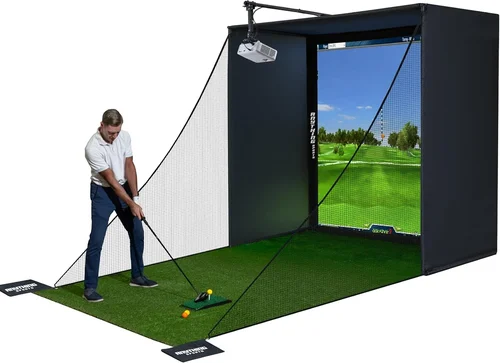
Throw distance is the space required between the projector and screen. A short‑throw projector (under 2 meters) is ideal for tight rooms, while a standard throw (3‑4 meters) works well in larger basements. Some models offer interchangeable lenses, giving you flexibility if you move the simulator later. Check the manufacturer’s throw‑ratio chart to ensure the projector fits your room dimensions.
5. Contrast Ratio & Black Levels
Contrast ratio measures the difference between the brightest whites and the deepest blacks. A high contrast ratio (10,000:1 or more) helps the simulated sky and shadows appear more realistic. DLP projectors often have better native contrast than LCD, but modern LCD units have closed‑gap technology that narrows the gap significantly.
6. Connectivity & Input Lag
Most golf simulation software runs on a PC or console, so you’ll need HDMI 2.0 or higher for 1080p/60Hz signals. Input lag—delay between the computer’s output and the projected image—should be under 30 ms for a smooth experience. Look for “gaming mode” or “low‑latency” settings that reduce processing delay.
7. Build Quality & Durability
Projectors used for simulators often run for several hours a day, especially during practice seasons. A robust chassis, reliable cooling system, and a long‑life lamp (or laser light source) are essential. Laser projectors, though slightly pricier, can exceed 20,000 hours of operation and require far less maintenance than traditional lamps.
8. Warranty & Support
A solid warranty (at least 2‑3 years) and responsive customer service can save you headaches. Some brands offer on‑site service or extended warranty packages that cover lamp replacement—a cost that can add up quickly.
Different Types of Buying Guide

Common Buying Mistakes to Avoid
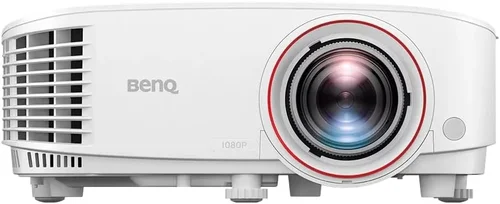
❌ Mistake: Ignoring Ambient Light Conditions
Why it’s bad: A projector that looks brilliant in a dark theater can appear dull in a garage with daylight streaming through windows.
What to do instead: Measure the typical lighting in your intended room and choose a lumen rating at least 25% higher than the ambient light level. If you can’t control ambient light, invest in a high‑gain screen to boost perceived brightness.
❌ Mistake: Over‑Prioritizing 4K Resolution
Why it’s bad: Sub‑$1,000 4K models often sacrifice brightness and use lower‑quality light sources, leading to a washed‑out image.
What to do instead: Opt for a bright 1080p projector and, if needed, upscale the image using your simulation software. The visual difference is negligible for most swing analysis tasks.
❌ Mistake: Forgetting Throw Distance
Why it’s bad: Buying a standard‑throw projector for a cramped basement forces you to place the unit too far away, creating shadows and reducing image size.
What to do instead: Measure the distance from where the projector will sit to the screen, then consult the manufacturer’s throw‑ratio chart. Short‑throw or ultra‑short‑throw models are worth the extra $100 if space is limited.
❌ Mistake: Neglecting Input Lag
Why it’s bad: High latency causes a noticeable lag between your swing and the ball’s flight on screen, breaking immersion.
What to do instead: Look for projectors with a “Game Mode” or “Low Latency” setting. Verify the latency specification (ideally <30 ms) on the product page or in user reviews.
❌ Mistake: Skipping Warranty Research
Why it’s bad: A cheap projector may have a one‑year warranty that doesn’t cover lamp replacement, leaving you with unexpected costs.
What to do instead: Choose brands that offer at least a two‑year warranty and include lamp or laser module coverage. Consider purchasing an extended warranty if you plan heavy usage.
❌ Mistake: Not Accounting for Screen Compatibility
Why it’s bad: Pairing a high‑brightness projector with a low‑gain screen reduces image quality and can cause hot‑spotting.
What to do instead: Match the projector’s brightness to a screen with a gain between 1.0 and 1.3 for balanced viewing. If you use a portable roll‑up screen, verify its gain rating before finalizing your purchase.
Budget Guidelines: How Much Should You Spend?
- Entry-Level ($600‑$800): Expect solid 1080p performance, 3,000‑3,500 lumens, and basic connectivity. Ideal for casual players who practice a few times a week.
- Mid-Range ($801‑$1,000): You’ll find higher contrast ratios, better color accuracy, and low‑latency gaming modes. This tier often includes short‑throw options.
- Premium ($1,001‑$1,500): Though slightly above the $1,000 threshold, premium models bring laser light sources, 4K support, and professional‑grade warranty packages. Consider this if you plan daily use.
- Luxury ($1,500+): Top‑of‑the‑line laser projectors with 6,000+ lumens, HDR, and built‑in speakers. Typically overkill for a home simulator unless you also use the projector for home theater.
Expert Tips for Getting the Best Deal
- Timing: Purchase between September and November when retailers clear out inventory for the holiday season.
- Where to Buy: Check both major e‑commerce sites (Amazon, B&H, Newegg) and specialty golf retailers (Golf Galaxy, Global Golf). Sometimes the latter offers exclusive bundles.
- Spotting Deals: Use price‑tracking extensions like Keepa or CamelCamelCamel to see historical price trends.
- Warranty Considerations: Register the product within 30 days to unlock extended warranty options offered by manufacturers.
- Return Policies: Verify a minimum 30‑day return window; this gives you time to test the projector in your actual setup.
- Testing Before Buying: If possible, visit a local electronics store and view the projector on a white wall to gauge brightness and color accuracy.
- Upgrade Path: Choose a model with interchangeable lenses if you anticipate moving the simulator or expanding the screen size later.

Frequently Asked Questions
Q: Do I need a 4K projector for a golf simulator?
A: Not necessarily. A bright 1080p projector provides sufficient detail for ball flight, swing analytics, and course visuals. 4K adds extra sharpness but often at the cost of lower brightness in the sub‑$1,000 segment.
Q: How far should the projector be from the screen?
A: It depends on the throw ratio. For a standard‑throw projector with a 1.5:1 ratio, a 10‑foot screen requires about 15 feet of distance. Short‑throw models can be placed as close as 4‑6 feet for the same screen size.
Q: Can I use a regular TV screen instead of a projection screen?
A: While possible, a TV will not provide the large image size needed for realistic depth perception. A dedicated projection screen also helps maintain consistent color and brightness across the surface.
Q: What is the ideal screen gain for a golf simulator?
A: A gain of 1.0‑1.3 is recommended. Higher gain screens increase brightness but can cause hotspotting, while lower gain screens may look dim in bright rooms.
Q: Will a projector’s lamp life affect my usage?
A: Yes. Traditional lamps last 2,000‑4,000 hours; at 2‑hour daily use, that’s 2‑5 years before replacement. Laser projectors exceed 20,000 hours, making them a low‑maintenance choice for heavy users.
Q: Do I need a special HDMI cable?
A: For 1080p at 60 Hz, a standard high‑speed HDMI cable is sufficient. If you opt for 4K, ensure the cable is HDMI 2.0 or higher to support the bandwidth.
Q: How important is input lag for golf simulation?
A: Input lag below 30 ms ensures the ball’s flight appears instantly after the swing, preserving realism. Higher lag can cause a disconnect between your motion and the visual feedback.
Our Final Recommendations
- Best for Budget‑Conscious Buyers: Optoma HD146X – 3,600 lumens, 1080p, 8,000‑hour lamp, excellent contrast, priced around $650.
- Best Overall Value: Epson Home Cinema 2150 – 2,500 lumens (laser light source), 1080p, low‑latency mode, built‑in speaker, typically $950.
- Best Premium Option (just above $1,000): BenQ TK800M – 3,000 lumens, 4K UHD, sports‑mode color, short‑throw lens available, priced $1,150.
- Best for Beginners: ViewSonic PA503S – 3,600 lumens, 800×600 native but upscales to 1080p, very easy setup, around $400.
- Best for Advanced Users: LG HU80KA – 2,500 lumens laser, 4K, ultra‑short‑throw, built‑in battery for portability, $1,299 (often on sale).
Conclusion: Making the Right Choice
Choosing the best golf simulator projector under $1,000 boils down to balancing brightness, resolution, and throw distance against your space and usage frequency. Start by measuring your room, decide whether you need a short‑throw model, and then prioritize lumens and low input lag. Remember that a brighter 1080p projector will usually outperform a dim 4K unit in a typical home setting.
Use the budget breakdown to set realistic expectations, avoid the common pitfalls listed above, and apply the expert tips to lock in the best price. With the right projector, your indoor golf experience will feel as authentic as stepping onto a real fairway—without ever leaving the comfort of your home.
Ready to swing? Browse the recommended models, double‑check your room dimensions, and enjoy countless rounds of virtual golf, rain or shine.