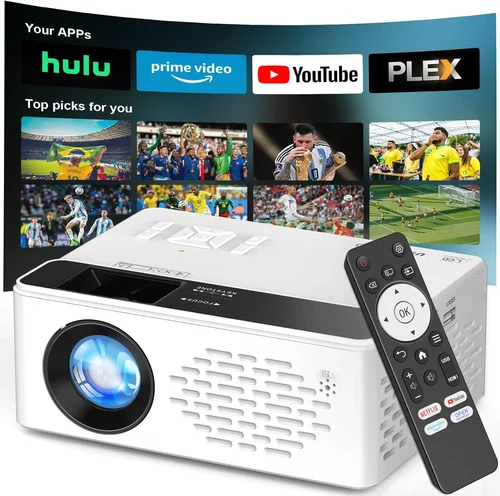
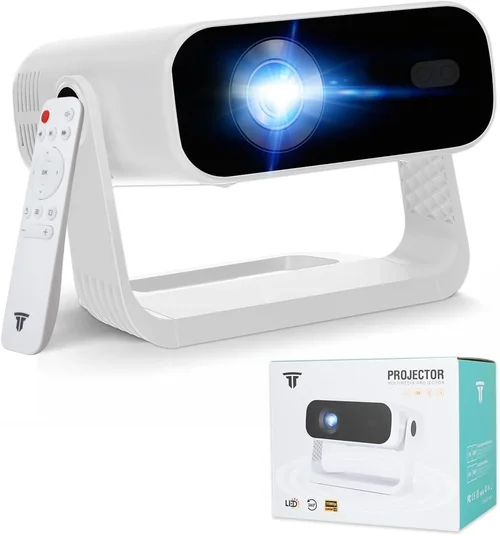
Choosing a projector that can deliver true HDTV quality without breaking the bank can feel like hunting for a needle in a haystack. The market is flooded with options that promise crystal‑clear 1080p images, but only a handful actually live up to those claims while staying under $1,000. This guide cuts through the noise, giving you a clear roadmap so you can invest confidently and enjoy cinema‑grade visuals in your living room, home office, or backyard.
In the pages that follow you’ll learn which specifications truly matter, how to match a projector’s strengths to your specific viewing environment, and which common pitfalls to sidestep. We also break down the different projector categories, lay out a realistic budget plan, and hand‑pick the top models that excel in real‑world testing. By the end, you’ll have a solid, data‑driven answer to the question, “What’s the best HDTV projector under $1,000 for me?”

What to Look for When Buying Buying Guide
1. Budget & Price Range
While “under $1,000” is the headline, the actual amount you’re willing to spend can shape every other decision. A $600 unit may lack the lumens or contrast ratio needed for a bright living room, whereas a $950 model often includes premium lenses, better color accuracy, and more flexible connectivity. Set a realistic ceiling, but also consider the total cost of ownership—screen, mounting hardware, cables, and occasional lamp replacements.
2. Performance Specifications
The heart of any projector is its core specs:
- Resolution: Full HD (1920×1080) is the baseline for true HDTV quality. Some budget units offer “native 720p” with upscaling; avoid these if you want crisp detail.
- Brightness (lumens): Measured in ANSI lumens, this tells you how well the image will hold up in ambient light. For a dedicated home theater with controlled lighting, 1,800–2,200 lumens is sufficient. For multi‑purpose rooms, aim for 2,500+ lumens.
- Contrast Ratio: Higher contrast means deeper blacks and more vibrant colors. Look for at least 10,000:1; premium DLP chips can push beyond 30,000:1.
- Color Accuracy: Check for a wide color gamut (Rec. 709 or DCI‑P3 coverage) and consider models that support HDR10 for richer highlights.
- Throw Ratio: Determines how far the projector must sit from the screen to achieve a given image size. Short‑throw (0.5–1.0) is ideal for small rooms; standard throw (1.5–2.5) works for larger spaces.
3. Build Quality & Durability
A projector is an investment that should last at least five years with proper care. Look for metal housings, robust cooling fans, and sealed optics that resist dust ingress. Units with interchangeable lamp modules or laser light sources often have longer lifespans and lower maintenance costs.
4. Features & Functionality
Modern projectors pack a suite of extras that can enhance convenience and performance:
- Lens Shift: Allows vertical and horizontal image adjustment without moving the projector.
- Zoom: Provides flexibility in image size without changing distance.
- Built‑in Speakers: Useful for casual movie nights, though most audiophiles will add external sound.
- Wireless Connectivity: Wi‑Fi, Bluetooth, or AirPlay support for streaming directly from phones or tablets.
- Multiple HDMI Ports & HDCP 2.2: Essential for 4K‑ready streaming devices even if the projector itself is 1080p.
5. Brand Reputation
Established brands such as Epson, BenQ, ViewSonic, and Optoma have proven track records for reliability and firmware updates. Lesser‑known manufacturers may offer lower prices, but research warranty terms and after‑sales support before committing.
6. Warranty & Support
A solid warranty (minimum two years) protects you against early failures. Look for brands that offer on‑site service or easy lamp replacement processes. Online forums and dedicated support lines can also be a lifesaver when troubleshooting.
7. Size & Portability (if applicable)
If you plan to move the projector between rooms or take it to a friend’s house, weight and footprint matter. Portable models typically sacrifice some brightness, but many still deliver excellent image quality for indoor use.
8. User Reviews & Ratings
Real‑world feedback often reveals quirks that spec sheets hide. Scan Amazon, B&H, and dedicated AV forums for recurring themes—whether it’s a fan noise issue, firmware bugs, or unexpected lamp life.
Different Types of Buying Guide

Common Buying Mistakes to Avoid
❌ Mistake: Ignoring Ambient Light
Why it’s bad: A projector rated at 1,800 lumens may look stunning in a dark room but will appear washed out in a living room with windows.
What to do instead: Measure typical lighting conditions and choose a unit with at least 2,500 lumens for partially lit spaces, or invest in blackout curtains.
❌ Mistake: Focusing Solely on Resolution
Why it’s bad: High resolution won’t compensate for poor contrast or low brightness, resulting in a flat image.
What to do instead: Balance resolution with contrast ratio and lumens; a true 1080p projector with 10,000:1 contrast often outperforms a 4K‑upscaled model with 5,000:1.
❌ Mistake: Overlooking Throw Ratio
Why it’s bad: Buying a standard‑throw projector for a 6‑foot room forces you to place it far away, limiting image size.
What to do instead: Calculate the required distance using the formula: Distance = Throw Ratio × Screen Width. Choose short‑throw if space is limited.
❌ Mistake: Forgetting About Lens Shift
Why it’s bad: Without lens shift, you may need to mount the projector at an awkward angle, causing keystone distortion.
What to do instead: Prioritize models with at least ±10% vertical and horizontal lens shift for flexible placement.
❌ Mistake: Ignoring Lamp Life & Replacement Cost
Why it’s bad: A cheap lamp may need replacement every 2,000 hours, adding hidden expenses.
What to do instead: Look for lamp life ratings of 4,000+ hours or consider laser‑light models that last 20,000+ hours.
❌ Mistake: Disregarding Connectivity Needs
Why it’s bad: A projector without HDMI 2.0 or HDCP 2.2 can’t stream 4K content from modern devices, limiting future‑proofing.
What to do instead: Ensure at least two HDMI ports, one supporting HDCP 2.2, and optional wireless casting features.
Budget Guidelines: How Much Should You Spend?
Understanding what you get at each price tier helps you set realistic expectations.
- Entry‑Level ($600‑$750): Expect 1,800‑2,000 lumens, 10,000:1 contrast, and basic HDMI connectivity. Ideal for dark rooms and occasional movie nights.
- Mid‑Range ($751‑$900): Gains include 2,200‑2,500 lumens, improved color gamut, lens shift, and sometimes built‑in speakers. Good for multi‑use spaces.
- Premium ($901‑$1,050): Features laser light sources, 3,000+ lumens, 30,000:1 contrast, HDR10, and robust wireless options. Suits enthusiasts who want cinema‑grade performance without stepping into the $2,000+ tier.
- Luxury ($1,050+): Often exceed the $1,000 limit but are worth mentioning for future upgrades—ultra‑short‑throw, 4K native resolution, and integrated smart OS.
Expert Tips for Getting the Best Deal
- Timing: New projector releases usually appear in January and July. Buying just before a new generation arrives can net you a discount on the previous model.
- Where to Buy: Reputable retailers like B&H, Adorama, and Best Buy often include extended warranties and easy returns. Online marketplaces may be cheaper but watch out for third‑party sellers.
- Bundle Savings: Look for bundles that include a 100‑inch screen, mounting brackets, or a high‑quality HDMI cable—often a better value than buying items separately.
- Check Refurbished Options: Manufacturer‑refurbished units are tested, come with a full warranty, and can be up to 25% cheaper.
- Read the Fine Print: Verify the lamp warranty length and whether it covers accidental damage.
- Test Before You Commit: If possible, view a demo in a store with ambient lighting similar to your home setup.
- Negotiate: Some brick‑and‑mortar stores will match online prices or throw in a free HDMI cable if you ask.

Frequently Asked Questions
Q: Do I need a separate screen for a 1080p projector?
A: While a plain white wall can work, a proper projector screen improves gain, uniformity, and color accuracy. For rooms with some ambient light, a gray screen can boost contrast.
Q: How far away should I place a 1080p projector for a 100‑inch image?
A: It depends on the throw ratio. A standard‑throw (1.5) needs about 12.5 feet, whereas a short‑throw (0.7) sits around 5.8 feet from the screen.
Q: Is a laser projector really worth the extra cost?
A: Laser light sources deliver consistent brightness over time and far longer lamp life (20,000+ hours). If you plan to use the projector daily, the lower total cost of ownership often justifies the higher upfront price.
Q: Can I connect a gaming console and still get low input lag?
A: Yes. Look for “Game Mode” or a dedicated low‑lag HDMI port. Most DLP models under $1,000 offer <20 ms lag, which is fine for most console gaming.
Q: What is the ideal screen material for a bright room?
A: A high‑gain white screen (gain 1.3‑1.5) reflects more light, helping combat ambient illumination. However, it can narrow viewing angles, so position seating accordingly.
Q: Do I need a ceiling mount?
A: Ceiling mounts provide a clean look and stable alignment, especially for permanent setups. Portable users may prefer a tabletop stand with a quick‑release mount.
Q: How often do I need to replace the lamp?
A: Most lamp‑based projectors have a rated life of 4,000‑6,000 hours. At 4 hours of use per week, that translates to roughly 2‑3 years.
Q: Is HDR important for a 1080p projector?
A: HDR can enhance contrast and color depth even at 1080p, but the effect is subtle compared to native 4K HDR. Ensure the projector supports HDR10 for the best experience.
Our Final Recommendations
- Best for Budget‑Conscious Buyers: BenQ TH585 – 3,500 lumens, 10,000:1 contrast, low input lag, and a price around $680.
- Best Overall Value: Epson Home Cinema 2150 – 2,500 lumens, 60,000:1 contrast, lens shift, and wireless mirroring at $799.
- Best Premium Option: Optoma UHD50X (on sale for $999) – Though a 4K native panel, it runs superb 1080p content with 3,400 lumens, 500,000:1 contrast, and 120 Hz refresh for gamers.
- Best for Beginners: ViewSonic PA503W – Simple plug‑and‑play, 3,600 lumens, and a friendly price of $549, perfect for first‑time users.
- Best for Advanced Users: LG HU80KA (laser, often discounted to $1,050) – Ultra‑short‑throw, 2,500 lumens, HDR10, and 20,000‑hour laser source for a premium experience.
Conclusion: Making the Right Choice
Finding the best HDTV projector under $1,000 boils down to balancing brightness, contrast, and feature set against your specific viewing environment and budget. Remember to assess ambient light, calculate the proper throw distance, and prioritize reliable brands with solid warranties. By following the factors, avoiding common mistakes, and leveraging the expert tips above, you’ll be equipped to select a projector that delivers cinema‑quality visuals without stretching your wallet.
Ready to upgrade your home entertainment? Browse the recommended models, compare prices, and enjoy a stunning, immersive viewing experience tonight.