Choosing the right LCD projector when you’re on a tight budget can feel like navigating a maze. You want a device that delivers clear images, reliable performance, and a set of features that won’t break the bank. This guide cuts through the noise, giving you a clear roadmap so you can pick the best LCD projector under $200 without second‑guessing your decision.
In the next sections you’ll learn which specifications truly matter, how different projector categories stack up, common pitfalls to avoid, and practical tips for snagging the best deal. By the end, you’ll be equipped to match a projector to your home‑theater, classroom, or office setup with confidence.

What to Look for When Buying Buying Guide
1. Budget & Price Range
When you set a ceiling of $200, every dollar counts. Look for models that offer the best value‑for‑money ratio—meaning solid brightness, decent resolution, and reliable build quality without unnecessary premium features. Remember that a lower price tag often means compromises in lamp life or connectivity options, so prioritize what matters most to you.
2. Performance Specifications
Key specs include native resolution, brightness (lumens), contrast ratio, and lamp lifespan. For an LCD projector under $200, expect a native resolution of 800×600 (SVGA) or 1280×720 (HD). Brightness should be at least 2,500 lumens for dim rooms; if you plan to use it in daylight, aim for 3,000+ lumens. A contrast ratio of 2,000:1 or higher will help keep blacks deep and colors vivid.
3. Build Quality & Durability
Even budget models benefit from a sturdy chassis and quality cooling. Metal housings dissipate heat better than cheap plastic, extending lamp life. Check user reviews for reports of overheating or premature failures—these are red flags.
4. Features & Functionality
Connectivity is king. HDMI is a must for modern devices; USB and VGA are nice extras. Built‑in speakers are useful for casual viewing, but don’t expect cinema‑level audio. Look for keystone correction (at least ±30°) and a decent zoom range (1.2–1.5×) to ease placement.
5. Brand Reputation
Established brands like Epson, BenQ, ViewSonic, and Optoma often provide better after‑sales support and firmware updates. While newcomers can surprise you with great products, a known brand usually means a more predictable experience.
6. Warranty & Support
Budget projects often come with a 1‑year limited warranty. Verify what’s covered—lamp replacement, parts, labor—and whether the manufacturer offers easy RMA processes. A responsive support team can save you headaches down the line.
7. Size & Portability
If you need a projector for on‑the‑go presentations, weight and form factor matter. Look for models under 2 kg with a compact footprint. Some ultra‑portable units fold into a briefcase‑like shape, making transport effortless.
8. User Reviews & Ratings
Real‑world feedback reveals performance quirks that spec sheets hide. Pay attention to recurring themes—e.g., “fan noise is loud” or “image stays sharp after 50 hours.” Aggregate scores on sites like Amazon and B&H give a quick health check.
Different Types of Buying Guide

Common Buying Mistakes to Avoid
❌ Mistake: Ignoring Brightness Requirements
Why it’s bad: A projector that’s too dim will look washed out in any ambient light, ruining the viewing experience.
What to do instead: Measure your typical room lighting and choose a model with at least 2,500 lumens for dim rooms or 3,000+ lumens for brighter spaces.
❌ Mistake: Over‑Focusing on Resolution Alone
Why it’s bad: High resolution means little if the projector can’t produce enough light or has a poor contrast ratio.
What to do instead: Balance resolution with brightness and contrast; for $200 budgets, 720p is a sweet spot.
❌ Mistake: Forgetting About Lamp Life
Why it’s bad: Replacing a lamp can cost $50‑$100, eroding your savings.
What to do instead: Look for lamp lifespans of 4,000‑6,000 hours and consider models with LED or laser light sources for longer life.
❌ Mistake: Neglecting Connectivity Options
Why it’s bad: Without the right ports, you’ll need adapters or may not be able to connect your favorite devices.
What to do instead: Ensure the projector has HDMI, at least one USB, and preferably VGA for older laptops.
❌ Mistake: Buying Based Solely on Brand Hype
Why it’s bad: Not every model from a top brand fits the $200 niche; some are overpriced.
What to do instead: Compare specs and reviews across brands; a lesser‑known model may outperform a famous one at the same price.
Budget Guidelines: How Much Should You Spend?
- Entry‑Level ($120‑$150): Expect SVGA resolution, 2,500 lumens, basic HDMI, and a plastic chassis. Good for occasional presentations.
- Mid‑Range ($151‑$180): Typically 720p resolution, 2,800‑3,200 lumens, better contrast, and added features like keystone correction.
- Premium ($181‑$200): Near‑full HD (1080p) or high‑quality 720p, 3,200+ lumens, longer lamp life, and robust connectivity (HDMI 2.0, USB‑C).
- Luxury ($200+): While rare under $200, some sales push higher‑end models into this bracket, offering laser light sources and advanced networking.
Expert Tips for Getting the Best Deal
- Buy during major sales events to maximize discount potential.
- Check reputable retailers (Amazon, B&H, Newegg) for bundled accessories—extra cables can add value.
- Read the fine print on warranties; some sellers offer extended coverage for a small fee.
- When possible, test the projector in‑store; bring a laptop to verify HDMI output and image quality.
- Consider refurbished units from manufacturer-certified programs; they’re often like‑new at a lower price.
- Look for open‑box deals; these are returns in perfect condition with full warranty.
- Verify the lamp warranty separately; a 2‑year lamp guarantee can save you money.
Frequently Asked Questions
Q: Can I use a cheap LCD projector for outdoor movie nights?
A: Yes, but you’ll need a model with at least 3,000 lumens and a high contrast ratio to combat ambient light. Pair it with a portable screen and a dark environment for the best result.
Q: How long does the lamp typically last on a $200 LCD projector?
A: Most budget LCD projectors use UHP lamps lasting 4,000‑6,000 hours. With moderate use (2‑3 hours per day), that translates to several years before replacement.
Q: Do I need a separate speaker system?
A: Built‑in speakers are adequate for casual viewing, but for movies or gaming, an external sound system or soundbar will dramatically improve audio quality.
Q: Is keystone correction essential?
A: If you can’t place the projector perfectly perpendicular to the screen, keystone correction helps eliminate trapezoidal distortion. Look for at least ±30° manual correction.
Q: What is the difference between LCD and DLP in this price range?
A: LCD generally offers better color accuracy and uniformity, while DLP may have higher contrast but can suffer from the “rainbow effect.” At sub‑$200 levels, LCD is often the preferred choice for home use.
Q: Can I connect my smartphone wirelessly?
A: Most budget LCD projectors lack native Wi‑Fi or Miracast. You can use a third‑party dongle (e.g., Chromecast) via HDMI to add wireless streaming.
Q: How do I maintain my projector?
A: Keep the air filter clean, avoid projecting in dusty environments, and let the lamp cool down before turning it off. Regular cleaning extends lamp life and maintains image quality.
Our Final Recommendations
- Best for Budget‑Conscious Buyers: ViewSonic PA503S – 3,600 lumens, SVGA resolution, 6,000‑hour lamp, solid build, $149.
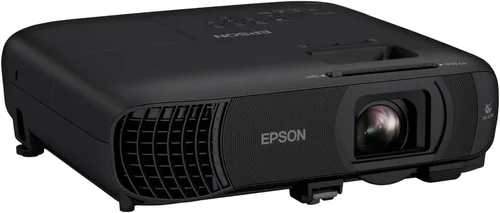
- Best Overall Value: Epson EX3260 – 3,300 lumens, 720p, HDMI & USB, 4,500‑hour lamp, $179.
- Best Premium Option: BenQ TH585 (often on sale for just under $200) – 3,500 lumens, 720p, low input lag for gaming, 5,000‑hour lamp.
- Best for Beginners: Optoma S334e – Easy‑setup, auto keystone, 3,600 lumens, SVGA, $139.
- Best for Advanced Users: ASUS S1 – Compact, 2,500 lumens, 720p, built‑in battery, HDMI‑MHL, $199.
Conclusion: Making the Right Choice
Finding the best LCD projector under $200 boils down to balancing brightness, resolution, and durability against your specific needs. Remember to assess the room lighting, required connectivity, and how often you’ll use the device. By avoiding common mistakes, leveraging seasonal sales, and focusing on reputable brands, you can secure a projector that delivers satisfying performance without draining your wallet.
Take the recommendations above as a starting point, compare the specs that matter most to you, and enjoy crisp, vibrant images wherever you decide to project.