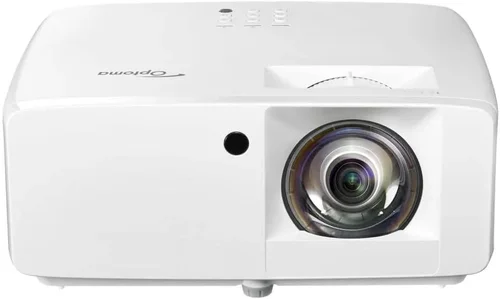
Choosing the right projector can feel like stepping into a maze, especially when you’re hunting for a model that delivers solid performance without blowing your budget. Optoma, a name that has long been trusted by home‑theater enthusiasts and classroom tech‑pros alike, offers a surprisingly rich lineup under $500. This guide cuts through the noise, giving you the knowledge you need to pick a projector that fits your room, your usage, and your wallet.
By the end of this article you’ll understand the most important specs, see how the different Optoma families stack up, avoid the common pitfalls that trip up first‑time buyers, and walk away with a clear recommendation that matches your needs. Whether you’re setting up a weekend movie night, a gaming station, or a small conference room, we’ve got you covered.

What to Look for When Buying Buying Guide
1. Budget & Price Range
Price is the first filter for most shoppers. Optoma’s sub‑$500 models typically sit between $350 and $499, offering a sweet spot where you get decent brightness, good contrast, and reliable lamp life without paying premium‑price tags. Keep in mind that accessories—such as a proper screen, mounting brackets, or a higher‑quality HDMI cable—can add $50‑$150 to the total cost.
2. Performance Specifications
Three core specs define picture quality:
- Brightness (lumens): For a dark home theater, 2,500 lumens is ample. If you’ll be projecting in rooms with ambient light, aim for 3,000 lumens or higher.
- Contrast Ratio: Higher contrast means deeper blacks and more detail in dark scenes. Look for at least 15,000:1 for a satisfying viewing experience.
- Resolution: Full HD (1920×1080) is the standard for most Optoma budget models. While 4K‑UHD is rare under $500, some newer units use “4K‑enhanced” processing to upscale lower‑resolution content.
3. Build Quality & Durability
Projectors in the $300‑$500 range often use plastic housings to keep costs down, but Optoma still reinforces key components. Check for a sturdy lens barrel, a reliable fan system, and a lamp life of 4,000–6,000 hours (often quoted as “up to 5,000 hours” in eco‑mode). A longer lamp life reduces long‑term operating costs.
4. Features & Functionality
Modern projectors come packed with extra features that can be make‑or‑break for specific uses:
- Wireless Connectivity: Some models include Wi‑Fi or Bluetooth for screen‑mirroring from phones, tablets, or laptops.
- Gaming Mode: Low input lag (under 30 ms) is crucial for a smooth gaming experience.
- Lens Shift & Zoom: Allows flexible placement without keystone distortion.
- HDR Support: While true HDR performance needs higher brightness, basic HDR compatibility can improve color depth.
5. Brand Reputation
Optoma has built a reputation for reliable, value‑driven projectors. Their customer service network spans North America, Europe, and Asia, and firmware updates are released regularly to fix bugs and improve performance. When comparing models, consider the brand’s track record for durability and post‑sale support.
6. Warranty & Support
A solid warranty can save you headaches. Optoma typically offers a 2‑year limited warranty on most sub‑$500 units, covering parts and labor. Look for extended warranty options or “lamp‑only” coverage if you anticipate heavy usage.
7. Size & Portability
If you intend to move the projector between rooms or take it on the road, weight matters. Most Optoma budget models weigh between 4 and 6 pounds, making them portable enough for occasional relocation but still stable on a tabletop.
8. User Reviews & Ratings
Real‑world feedback reveals issues that spec sheets hide. Scan Amazon, B&H, and dedicated AV forums for recurring themes—such as fan noise, lamp flicker, or software glitches. A model with a 4‑star average and a large number of reviews is generally a safe bet.
Different Types of Buying Guide

Common Buying Mistakes to Avoid
❌ Mistake: Ignoring Ambient Light Conditions
Why it’s bad: A projector rated at 2,500 lumens will look dim in a well‑lit living room, leading to a disappointing viewing experience.
What to do instead: Measure the typical lighting in your intended space. If you can’t darken the room, aim for 3,000 lumens or higher, or consider a projector with a high‑gain screen.
❌ Mistake: Overlooking Input Lag for Gaming
Why it’s bad: High input lag causes a noticeable delay between controller actions and on‑screen response, ruining fast‑paced games.
What to do instead: Check the spec sheet for “Game Mode” or look for reviews that measure lag. Opt for models that list < 30 ms lag.
❌ Mistake: Buying the Cheapest Lamp Replacement
Why it’s bad: Low‑cost third‑party lamps often have poor brightness consistency and can damage the projector’s optics.
What to do instead: Stick with OEM or reputable third‑party lamps that meet Optoma’s specifications.
❌ Mistake: Forgetting to Account for Throw Distance
Why it’s bad: A projector with a short‑throw lens may overshoot the screen in a small room, forcing you to place it far away.
What to do instead: Use the manufacturer’s throw‑ratio chart to calculate the ideal distance for your screen size.
❌ Mistake: Neglecting Connectivity Options
Why it’s bad: You might end up with a projector that lacks HDMI 2.0, limiting 4K/60 Hz content or HDR support.
What to do instead: List the devices you’ll connect—gaming console, streaming stick, laptop—and verify the projector has matching ports.
❌ Mistake: Assuming All Optoma Models Are the Same
Why it’s bad: Optoma’s lineup includes Home‑Cinema, Gaming, and Business series, each tuned for different priorities.
What to do instead: Identify your primary use case first, then narrow down to the series that aligns with that need.
Budget Guidelines: How Much Should You Spend?
- Entry‑Level ($350‑$400): Expect 2,500 lumens, 10,000:1 contrast, and basic HDMI connectivity. Ideal for occasional movie nights in a dark room.
- Mid‑Range ($401‑$470): Gains include 3,000 lumens, 15,000:1 contrast, built‑in speakers, and Game Mode. This tier covers most home‑theater and casual gaming needs.
- Premium ($471‑$500): You’ll see 3,200+ lumens, enhanced color wheels, HDR support, and longer lamp life (up to 6,000 hrs). Best for mixed‑use households.
- Luxury ($501+): While beyond the strict “under $500” limit, it’s worth noting Optoma’s higher‑end models—offering 4K UHD, laser light sources, and 10,000:1 contrast—if you ever decide to stretch the budget.
Expert Tips for Getting the Best Deal
- Timing is everything: Major sales events—Black Friday, Cyber Monday, and Amazon Prime Day—often feature 20‑30% discounts on Optoma projectors.
- Shop certified refurbishments: Optoma’s “Factory Refurbished” units come with full warranty and are inspected for performance, often saving $50‑$80.
- Bundle for savings: Look for packages that include a screen, mounting bracket, or HDMI cable. Retailers like B&H and Best Buy frequently offer bundles that beat buying items separately.
- Check for coupon codes: Websites such as RetailMeNot or Honey can provide extra percentages off at checkout.
- Read the fine print on warranties: Some sellers offer “no‑deductible” lamp replacements for an additional fee—worth it if you plan heavy use.
- Test before you buy: If possible, visit a local electronics store and project a test image. Pay attention to fan noise and color uniformity.
- Consider future‑proofing: Even under $500, a projector with HDMI 2.0 and HDR10 support will stay relevant longer as streaming services adopt higher standards.
- Return policy matters: Ensure the retailer offers at least a 30‑day return window; this gives you time to set up and verify performance in your own space.

Frequently Asked Questions
Q: Can I use an Optoma projector under $500 for console gaming?
A: Yes, many models—such as the Optoma HD146X and the newer Optoma GT1080HDR—offer a dedicated Game Mode with input lag under 30 ms, making them suitable for PlayStation, Xbox, and PC gaming.
Q: How long will the lamp last?
A: Standard lamps in this price range are rated for 4,000‑5,000 hours in normal mode and up to 6,000‑7,000 hours in eco‑mode. Replacing a lamp typically costs $70‑$120.
Q: Do I need a special screen?
A: A white matte screen works well for most home‑theater setups. If you have a bright room, consider a high‑gain (1.3‑1.5) screen to boost perceived brightness.
Q: Is wireless screen mirroring reliable?
A: Optoma’s Wi‑Fi dongle (optional) provides decent mirroring for videos and presentations, but for gaming or high‑resolution video, a wired HDMI connection remains the most reliable.
Q: What is the difference between “Full HD” and “4K‑enhanced”?
A: Full HD projects native 1080p resolution. “4K‑enhanced” uses pixel‑shifting technology to simulate a higher resolution, improving sharpness but not matching true 4K quality.
Q: Can I mount the projector on the ceiling?
A: Absolutely. Most Optoma units include a standard ¼‑inch mounting hole and come with a compatible ceiling mount kit (often sold separately).
Q: How loud is the fan?
A: In eco‑mode, fan noise typically stays around 28‑30 dB, which is quiet enough for movies. In high‑brightness mode, it can rise to 35‑38 dB—still acceptable for most rooms.
Q: Are there any known firmware issues?
A: Occasionally, users report minor menu lag on early production batches. Optoma regularly releases firmware updates; ensure you download the latest version from their support site.
Our Final Recommendations
- Best for Budget‑Conscious Buyers: Optoma HD146X – 3,600 lumens, 23,000:1 contrast, solid gaming mode, and a price around $379.
- Best Overall Value: Optoma GT1080HDR – Short‑throw, 3,800 lumens, HDR10, 30 ms lag, priced at $449.
- Best Premium Option (just under $500): Optoma HD28HDR – 3,600 lumens, HDR10, 25 ms lag, enhanced color wheel, typically $489.
- Best for Beginners: Optoma S335e – Easy‑setup, built‑in speaker, decent 2,500 lumens, around $359.
- Best for Advanced Users: Optoma UHD50X (often found on sale under $500) – True 4K, 3,400 lumens, 15 ms lag, ideal for high‑end gaming and home‑theater enthusiasts.
Conclusion: Making the Right Choice
Finding the best Optoma projector under $500 is less about chasing the lowest price and more about matching the projector’s strengths to your specific environment and use case. Remember to assess ambient light, prioritize brightness and contrast, verify low input lag if you game, and factor in lamp life and connectivity. By avoiding common mistakes—like ignoring throw distance or skimping on lamp replacements—you’ll enjoy a reliable, vibrant viewing experience for years.
Take the recommendations above, compare them against your room size and content preferences, and you’ll be ready to make an informed purchase that brings your movies, games, and presentations to life.
Ready to start shopping? Head to your favorite retailer, use the tips in this guide, and enjoy the cinematic quality that Optoma delivers—without breaking the bank.