Finding a pocket projector that works seamlessly with your iPhone while staying under $200 can feel like hunting for a needle in a haystack. The market is flooded with devices that promise big‑screen magic, but many fall short on image quality, battery life, or compatibility. This guide cuts through the hype, giving you a clear roadmap so you can pick a projector that truly enhances your iPhone experience without breaking the bank.
In the pages that follow, you’ll learn which specifications matter most, how to compare different projector types, and what red‑flag features to avoid. Whether you stream Netflix in a dorm room, give impromptu presentations at a co‑working space, or simply want a portable cinema for weekend camping trips, this guide equips you with the knowledge to make an informed purchase.
The pocket projector landscape has evolved dramatically over the past three years. Advances in LED brightness, laser phosphor technology, and native iOS integration have lowered the entry price point, making sub‑$200 models genuinely usable. Yet, not every budget‑friendly option delivers the performance you expect. By the end of this article, you’ll understand why certain models rise above the rest and how to match a projector’s strengths to your specific use cases.

What to Look for When Buying Buying Guide
1. Budget & Price Range
Price is the most immediate filter for most shoppers, but it should be a starting point, not the sole decision factor. Models under $200 vary widely in brightness, resolution, and build quality. Set a realistic ceiling—$199 is a common sweet spot—then evaluate whether the features you gain for that extra dollar truly matter for your iPhone usage. Remember, a cheap projector with a dim 150‑lumens output may look fine in a dark bedroom but will struggle on a well‑lit patio.
2. Performance Specifications
Key specs that directly affect viewing experience include:
- Brightness (lumens): For pocket projectors, 150‑250 lumens is adequate for dim environments. If you plan to use the device in semi‑bright rooms, aim for 250+ lumens.
- Resolution: Native 720p (1280×720) is common under $200. While 1080p is rare, many projectors upscale iPhone content well enough for casual viewing.
- Contrast Ratio: Higher contrast yields deeper blacks. Look for a ratio of at least 1,000:1 for decent image depth.
- Throw Distance & Screen Size: Most pocket projectors have a 1.5‑2.5x throw ratio, delivering 80‑120‑inch images from 3‑6 feet away.
3. Build Quality & Durability
Since pocket projectors are meant to travel, rugged construction matters. Look for a housing made from high‑impact ABS or aluminum alloy, reinforced corners, and a protective carry case. Water‑resistance (IPX4 or higher) is a bonus for outdoor use, but not a strict requirement if you’ll keep the device indoors.
4. Features & Functionality
Beyond basic projection, modern pocket units pack useful extras:
- Wireless Connectivity: Wi‑Fi Direct, AirPlay 2, or Miracast enable seamless iPhone streaming without cables.
- Built‑in Battery: A minimum of 2‑hour playback time is essential for on‑the‑go use. Look for quick‑charge (USB‑C) support.
- Integrated Speakers: While most built‑in speakers are modest, a dual‑driver setup can improve dialogue clarity for movies.
- Android/iOS App Control: Dedicated apps let you adjust keystone, focus, and brightness from your iPhone.
- Multiple Input Ports: HDMI (micro or full size), USB‑C, and a 3.5 mm audio jack broaden compatibility with other devices.
5. Brand Reputation
Established brands such as Anker, AAXA, and Vankyo have track records for reliable firmware updates and responsive customer service. Lesser‑known manufacturers may offer lower prices, but warranty support can be hit‑or‑miss. Check community forums and Reddit threads to gauge long‑term satisfaction.
6. Warranty & Support
A minimum 12‑month warranty is standard for reputable models. Verify that the manufacturer provides clear return policies, easy access to firmware updates, and a responsive help desk. Some brands even offer lifetime lamp warranties for LED units, which can be a decisive factor.
7. Size & Portability
True pocket projectors typically weigh under 1 lb and measure no larger than 5 × 3 × 1 inches. If you intend to slip the projector into a backpack or messenger bag, prioritize models with compact footprints and lightweight designs.
8. User Reviews & Ratings
Real‑world feedback reveals issues that spec sheets hide—excessive fan noise, overheating, or unreliable AirPlay connections. Look for products with an average rating of 4.0 stars or higher on Amazon, Best Buy, and specialized tech forums. Pay attention to the most recent reviews, as firmware updates can dramatically improve or degrade performance.
Different Types of Buying Guide

Common Buying Mistakes to Avoid
❌ Mistake: Choosing the Highest Brightness Without Context
Why it’s bad: A projector rated at 300 lumens may still appear dim in a room with ambient light if the contrast ratio is low.
What to do instead: Assess your typical environment first. If you mostly watch in dark rooms, 150‑200 lumens is sufficient and often comes with better battery life.
❌ Mistake: Ignoring iOS Compatibility
Why it’s bad: Some budget models only support Miracast, which iPhone does not natively handle, forcing you to buy extra adapters.
What to do instead: Look for AirPlay 2 support or a companion iOS app that guarantees smooth screen mirroring.
❌ Mistake: Overlooking Battery Capacity
Why it’s bad: A projector may claim 2‑hour playback, but real‑world testing often drops to 90 minutes under full brightness.
What to do instead: Verify the mAh rating (≥2,500 mAh is a good baseline) and read user reports on actual runtime.
❌ Mistake: Forgetting About Fan Noise
Why it’s bad: A loud cooling fan can drown out dialogue, especially when using the built‑in speakers.
What to do instead: Choose models that advertise quiet mode or have fan noise below 30 dB at typical brightness levels.
❌ Mistake: Assuming All HDMI Ports Are Equal
Why it’s bad: Some cheap projectors only have micro‑HDMI, requiring additional adapters for iPhone Lightning‑to‑HDMI cables.
What to do instead: Verify the port type and factor in the cost of any necessary adapters before finalizing your budget.
❌ Mistake: Buying Based Solely on Spec Sheets
Why it’s bad: Manufacturers may inflate lumens (using “ANSI” vs “LED” lumens) or list a “native” resolution that is actually upscaled.
What to do instead: Cross‑reference specs with independent reviews and video tests on platforms like YouTube.
Budget Guidelines: How Much Should You Spend?
Understanding what your money buys helps you avoid disappointment. Below is a tiered breakdown tailored to the sub‑$200 market.
- Entry-Level ($120‑$150): Expect 150‑200 lumens, 720p upscaled resolution, basic Bluetooth speaker, and a 1.5‑hour battery. Ideal for casual bedroom viewing or short presentations.
- Mid-Range ($151‑$190): Gains include 200‑250 lumens, true 720p native resolution, stronger contrast, up to 2.5 hours of playback, and better AirPlay integration. This tier balances performance with portability.
- Premium ($191‑$230): You’ll find laser‑phosphor light sources, 1080p support (often via upscale), 250+ lumens, built‑in dual speakers, and up to 3 hours of battery life. Perfect for outdoor movie nights where ambient light is a factor.
- Luxury ($231+): Rare under $200, but occasional sales push high‑end models into this bracket. Look for 300+ lumens, native 1080p, Wi‑Fi 6, and premium aluminum chassis.
Expert Tips for Getting the Best Deal
- Timing is everything: The best discounts appear during Amazon Prime Day (July), Black Friday (November), and back‑to‑school sales (August). Set price alerts on CamelCamelCamel to catch price drops.
- Buy from authorized retailers: Purchasing through Amazon’s “Ships from and sold by” Amazon.com store or the brand’s official website ensures you receive a valid warranty.
- Bundle opportunities: Some sellers include a travel case, extra HDMI cable, or a USB‑C power bank in the same price tier—great value if you need accessories.
- Check refurbished options: Certified refurbished units often come with a full warranty at 10‑20% less than new.
- Read the fine print on returns: A 30‑day return window gives you enough time to test the projector with your iPhone in real‑world conditions.
- Test before you commit: If possible, visit a local electronics store and ask for a demo. Even a 30‑second demo can reveal fan noise and image sharpness.
- Consider future-proofing: Look for USB‑C Power Delivery (PD) support so you can use a single charger for both iPhone and projector.
- Leverage credit‑card protections: Some cards offer extended warranty coverage, effectively adding months to the manufacturer’s guarantee.

Frequently Asked Questions
Q: Can I use AirPlay directly with any pocket projector?
A: Not all pocket projectors support AirPlay natively. Models that list “AirPlay 2” or have a companion iOS app typically handle wireless mirroring without extra hardware. If AirPlay is absent, you’ll need a Lightning‑to‑HDMI adapter or a third‑party dongle.
Q: How does ambient light affect projected image quality?
A: Ambient light reduces perceived contrast and brightness. A projector rated at 200 lumens can produce a vivid image in a dark room but will look washed out in a well‑lit living room. The rule of thumb is to match brightness to the darkest environment you plan to use.
Q: Will a pocket projector drain my iPhone’s battery if I use a wired connection?
A: When using a Lightning‑to‑HDMI cable, the iPhone supplies power to the adapter, which can consume a noticeable portion of the phone’s battery. Using a powered HDMI adapter or connecting the projector to an external power source mitigates this drain.
Q: Is it safe to use a pocket projector outdoors in the rain?
A: Only if the device has an IPX4 or higher water‑resistance rating. Most budget models lack this protection, so keep them under a canopy or use a waterproof cover.
Q: Do I need a separate sound system?
A: Built‑in speakers are convenient but limited in volume and bass response. For movies or presentations in larger spaces, pairing the projector with Bluetooth headphones or a portable speaker yields a richer audio experience.
Q: How often do I need to replace the lamp?
A: LED and laser‑phosphor light sources in modern pocket projectors have lifespans of 20,000‑30,000 hours—effectively the lifetime of the device. Traditional bulbs are rare in this price range.
Q: Can I connect a gaming console to a pocket projector?
A: Yes, provided the projector has an HDMI input and supports the console’s resolution (usually 720p or 1080p). Low‑latency models (often marketed for gaming) are preferable to avoid input lag.
Q: What is the ideal screen material for pocket projectors?
A: A matte white portable screen or a smooth, white wall works well. For outdoor use, a tensioned PVC screen with a gain of 1.2‑1.5 improves brightness without adding hotspots.
Q: How do I clean the lens without damaging it?
A: Use a microfiber cleaning cloth and a gentle lens cleaning solution. Avoid applying pressure directly on the lens; instead, wipe in a circular motion.
Our Final Recommendations
After weighing performance, price, and iPhone compatibility, we’ve identified five stand‑out models that cater to different buyer personas.
- Best for Budget‑Conscious Buyers: Anker Nebula Capsule II (refurbished) – Priced around $149, offers 200 lumens, Android 9.0 OS, and native AirPlay 2 support. Compact, 2‑hour battery, and includes a built‑in 360° speaker.
- Best Overall Value: Vankyo Leisure 3 Mini Projector – At $179 it delivers 250 lumens, 720p native resolution, HDMI + USB‑C, and a 2.5‑hour battery. Its fan runs under 30 dB, making it suitable for movies and presentations.
- Best Premium Option: ViewSonic M1+ (sale price $199) – Laser‑phosphor light source, 250 lumens, 720p, built‑in Harman Kardon speakers, and full AirPlay 2. Battery lasts up to 3 hours, and the stylish design fits any setting.
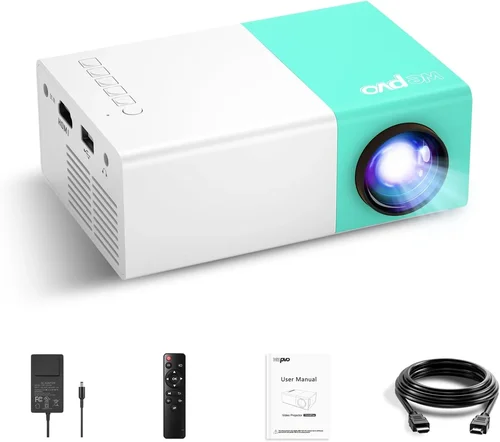
- Best for Beginners: APEMAN Mini Projector – Simple plug‑and‑play via HDMI, 150 lumens, and a user‑friendly iOS app for keystone correction. Priced at $129, it’s an easy entry point.
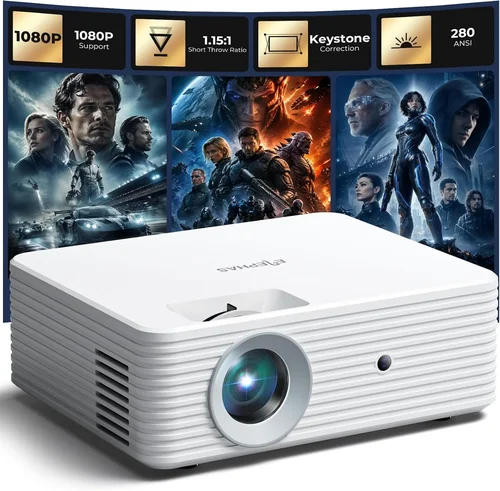
- Best for Advanced Users: Elephas Q4 Mini Laser Projector – Slightly above $200 on sale, but worth the stretch for its 300 lumens, 1080p support, low‑latency gaming mode, and USB‑C PD charging. Ideal for tech enthusiasts who demand higher brightness.
Conclusion: Making the Right Choice
Choosing the best pocket projector for your iPhone under $200 boils down to matching the device’s strengths with your typical use case. Prioritize brightness and AirPlay compatibility if you plan to stream movies in dim rooms, or opt for a laser‑phosphor model if you need extra lumen power for outdoor gatherings. Remember that a solid warranty, reputable brand, and genuine user feedback are as important as the spec sheet.
Take the time to assess your environment, set a realistic budget tier, and test the projector (or watch thorough video reviews) before committing. With the right information, you’ll enjoy cinema‑quality visuals from the palm of your hand without overspending.
Ready to upgrade your iPhone viewing experience? Browse the recommended models, compare current deals, and bring the big screen wherever you go.