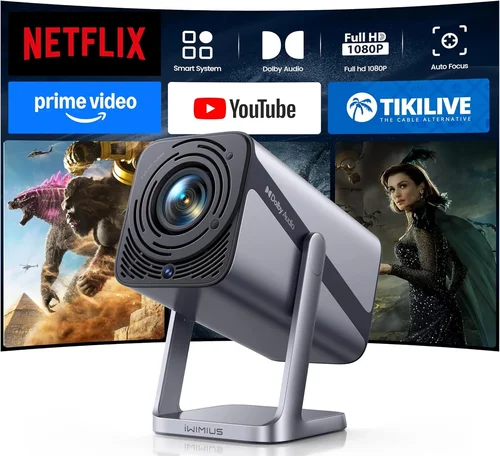
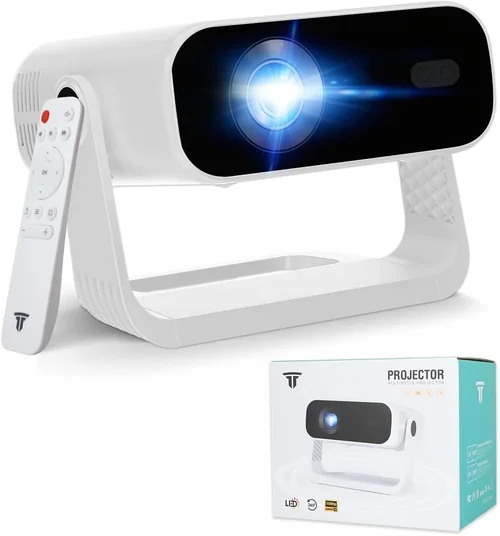
Choosing a projector that delivers a cinema‑like experience without breaking the bank can feel like navigating a maze. The market is flooded with options, each boasting brighter bulbs, higher resolutions, or smarter connectivity. This guide cuts through the noise, helping you understand exactly what to look for so you can pick the best projector under $1,000 for your home theater, gaming setup, or office presentation.
By the end of this article you will know which specifications truly matter, how different projector types stack up against each other, and where to find the sweet spot between price and performance. Whether you are a movie buff, a remote‑work professional, or a gamer craving massive screens, the insights below will equip you to make a confident, informed purchase.

What to Look for When Buying Buying Guide
1. Budget & Price Range
Even within the sub‑$1,000 segment, prices can vary dramatically. A $299 “budget” model may lack essential features like keystone correction or adequate brightness, while a $950 unit often includes 4K‑enhanced resolution, better contrast ratios, and more flexible connectivity. Define your absolute maximum spend first, then allocate portions of that budget to key features you cannot compromise on, such as resolution for movies or low‑input lag for gaming.
2. Performance Specifications
Resolution determines how sharp your image will appear. For most home‑theater uses, 1080p (Full HD) is the baseline; however, many newer models use “4K‑enhanced” or “pixel‑shift” technology to upscale content without true native 4K. If you plan to watch Blu‑ray or stream 4K services, a projector with at least 1080p native resolution and good upscaling is essential.
Brightness is measured in lumens. In a dimly lit living room, 1,500–2,000 lumens is generally sufficient. For rooms with ambient light or for daytime presentations, aim for 2,500+ lumens. Remember that laser‑phosphor or LED light sources maintain brightness longer than traditional lamps.
Contrast Ratio influences how deep the blacks appear. A contrast ratio of 10,000:1 or higher is desirable for cinematic black levels, though real‑world performance also depends on the projector’s internal processing and screen material.
3. Build Quality & Durability
Projectors built with metal chassis and robust cooling systems tend to last longer, especially if you use them frequently. Look for models that advertise a long lamp life (30,000+ hours for LED/Laser) or easy lamp replacement mechanisms. A sturdy tripod mount or a reliable keystone‑adjustable lens housing also adds to long‑term durability.
4. Features & Functionality
Smart connectivity has become a must‑have. Wi‑Fi, Bluetooth, and built‑in streaming apps (Netflix, YouTube, Amazon Prime) eliminate the need for external devices. HDMI 2.0 or 2.1 ports support higher bandwidth for 4K @ 60 Hz, while USB‑C can provide power and video from a laptop simultaneously. For gamers, a low‑input‑lag mode (under 30 ms) and a refresh rate of 120 Hz are valuable.
Additional conveniences include automatic lens shift, vertical/horizontal keystone correction, and a built‑in speaker system (though most audiophiles will pair the projector with a soundbar or AV receiver).
5. Brand Reputation
Established brands such as Epson, BenQ, Optoma, and ViewSonic have a track record of firmware updates, reliable customer service, and a wide network of authorized service centers. While newer entrants may offer attractive specs, they sometimes lack long‑term support. Research brand forums and read post‑purchase experiences to gauge reliability.
6. Warranty & Support
A solid warranty can save you thousands if a component fails. Look for at least a 2‑year limited warranty covering the lamp or laser module. Some manufacturers also provide extended coverage for an additional fee. Check whether on‑site repair, mail‑in service, or a local repair network is available in your region.
7. Size & Portability
If you need a projector for travel, presentations, or occasional backyard movie nights, weight and footprint matter. Portable pico‑projectors can be under 2 lb, but they often sacrifice brightness and resolution. Mid‑range units (around 5–7 lb) can balance portability with performance, especially when paired with a compact tripod.
8. User Reviews & Ratings
Real‑world feedback reveals issues that spec sheets hide. Look for reviews that mention lamp longevity, heat management, and firmware stability. Pay special attention to recurring complaints—if multiple users report the same problem, it’s likely a genuine concern.
Different Types of Buying Guide

Common Buying Mistakes to Avoid
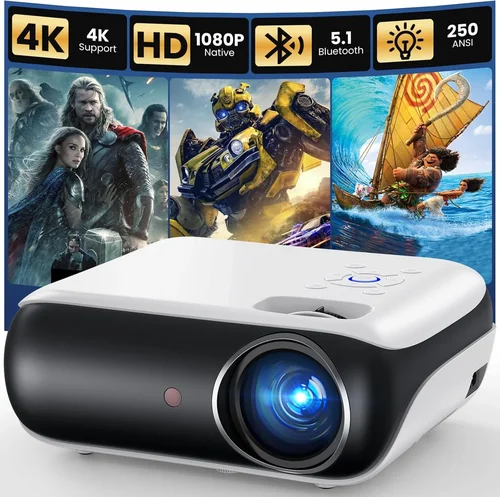
❌ Mistake: Ignoring Ambient Light Conditions
Why it’s bad: A projector rated at 1,500 lumens will look fantastic in a dark theater but appear washed out in a bright living room.
What to do instead: Measure the typical lighting in your intended space. If you can’t control ambient light, aim for a projector with at least 2,500 lumens or consider a high‑gain screen to boost perceived brightness.
❌ Mistake: Over‑Prioritizing Resolution Over Brightness
Why it’s bad: A 4K‑native projector with only 1,200 lumens will struggle to deliver a clear picture in anything but total darkness.
What to do instead: Balance resolution with lumens. For most under‑$1,000 models, 1080p with 2,000+ lumens offers a more versatile experience than a low‑brightness 4K‑enhanced unit.
❌ Mistake: Forgetting About Lamp Life & Replacement Cost
Why it’s bad: A cheap lamp may need replacement after 2,000 hours, costing $150‑$200 each time.
What to do instead: Choose LED or laser light sources when possible; they often exceed 30,000 hours and have lower long‑term costs.
❌ Mistake: Neglecting Input Lag for Gaming
Why it’s bad: High input lag (above 60 ms) can make fast‑paced games feel sluggish, ruining the experience.
What to do instead: Look for a dedicated game mode or a projector that advertises under 30 ms input lag. Verify with third‑party reviews that the claim holds up.
❌ Mistake: Assuming All HDMI Ports Are Equal
Why it’s bad: An older HDMI 1.4 port cannot carry 4K @ 60 Hz, limiting future‑proofing.
What to do instead: Ensure the unit has HDMI 2.0 or higher, especially if you plan to connect next‑gen consoles or 4K streaming sticks.
❌ Mistake: Skipping the Throw Distance Calculation
Why it’s bad: Placing a projector too close or too far can result in an image that’s either too small or pixelated.
What to do instead: Use the manufacturer’s throw ratio chart. For a 100‑inch screen, a short‑throw model (0.5–0.8) may be ideal if you have limited space.
Budget Guidelines: How Much Should You Spend?
Entry‑Level ($250 – $450)
- Typically LCD or basic DLP units.
- Resolution caps at 720p or 1080p with limited brightness (1,200‑1,500 lumens).
- Best for occasional movie nights in a dark room or portable presentations.
Mid‑Range ($451 – $750)
- Full HD (1080p) native resolution becomes standard.
- Lumens rise to 2,000‑2,500, suitable for modest ambient light.
- Features like keystone correction, multiple HDMI ports, and basic smart apps appear.
- Ideal for most home‑theater setups and casual gamers.
Premium ($751 – $1,000)
- Often includes 4K‑enhanced or true 4K models, laser or LED light sources.
- Brightness exceeds 2,500 lumens, contrast ratios improve dramatically.
- Advanced features: low‑input‑lag gaming mode, HDR support, wireless screen mirroring.
- Best for enthusiasts who want cinema‑grade performance without crossing the $1,000 barrier.
Luxury ($1,001+)
- Professional‑grade optics, ultra‑high contrast, and full HDR10+ support.
- Often priced well above $1,000, but worth mentioning for future upgrades.
Expert Tips for Getting the Best Deal
- Timing is everything: The best discounts appear in January (post‑holiday clearance) and July (mid‑year sales). Plan your purchase around these windows.
- Shop price‑comparison sites: Use tools like Google Shopping, CamelCamelCamel, or PriceSpy to track historical price trends.
- Consider refurbished units: Certified refurbished projectors from reputable sellers often come with a full warranty and can save 15‑30%.
- Bundle for savings: Some retailers offer a free screen, HDMI cable, or mounting bracket when you buy a projector above a certain price.
- Check return policies: A 30‑day return window with free shipping lets you test the projector in your home environment.
- Warranty extensions: If you plan heavy usage, an extended warranty covering the lamp or laser module can be cost‑effective.
- Test before you buy: Visit a local electronics store to view the projector’s motion handling and color accuracy in person.

Frequently Asked Questions
Q: Do I need a special screen for a projector under $1,000?
A: While a dedicated projector screen improves image uniformity and gain, a smooth white wall works fine for most budget units. If you want deeper blacks, consider a gray‑gain screen, which is affordable and enhances contrast in rooms with some ambient light.
Q: Can I use a projector as a primary TV?
A: Yes, provided you have a darkened room and a screen that matches your desired image size. Modern projectors with low input lag and 1080p resolution can handle streaming services and gaming, but they won’t match a high‑refresh‑rate LED TV for fast sports.
Q: How long do LED or laser light sources actually last?
A: Most LED and laser projectors boast 20,000–30,000 hours of rated life, which translates to over 10 years of daily 3‑hour use. This far exceeds the 2,000–5,000 hour lifespan of traditional lamps.
Q: What is the difference between DLP and LCD technology?
A: DLP (Digital Light Processing) uses tiny mirrors for each pixel, delivering higher contrast and smoother motion, but may exhibit a “rainbow effect” for some viewers. LCD (Liquid Crystal Display) offers richer color saturation and is generally easier on the eyes, though it can suffer from slightly lower contrast.
Q: Is a short‑throw projector worth the extra cost?
A: If you have limited distance between the projector and screen (e.g., a small apartment), a short‑throw model prevents image distortion and eliminates the need for ceiling mounting. They usually cost $100‑$200 more than standard throw units.
Q: Do I need external speakers?
A: Built‑in speakers are convenient but often lack the power and clarity for a true home‑cinema experience. Pairing the projector with a soundbar or a 2.1/5.1 speaker system dramatically improves immersion.
Q: How do I calculate the ideal screen size?
A: Measure the distance from the projector lens to the screen and multiply by the throw ratio range (e.g., 1.5‑2.0). For a 10‑foot throw distance with a 1.8 throw ratio, the optimal screen width is about 180 inches; the height follows the 16:9 aspect ratio.
Q: Will a projector work with a gaming console?
A: Absolutely, as long as the projector supports HDMI 2.0 (or higher) and offers a low‑input‑lag mode. Many gamers prefer a 120 Hz refresh rate for smoother motion, which is now available on several sub‑$1,000 models.
Q: How important is HDR support?
A: HDR (High Dynamic Range) expands color depth and contrast. While budget projectors may only support HDR10, they often lack the peak brightness to fully realize HDR’s potential. If HDR is a priority, aim for a model with at least 2,500 lumens and a high contrast ratio.
Our Final Recommendations
Best for Budget‑Conscious Buyers
Model: BenQ TH585 – $549
Why: 1080p resolution, 3,500 lumens, low‑input‑lag gaming mode, and solid built‑in speakers. Perfect for movie nights and casual gaming without exceeding $600.
Best Overall Value
Model: Epson Home Cinema 2150 – $799
Why: True 1080p, 2,500 lumens, 2,500:1 contrast, wireless screen mirroring, and a long‑life lamp. Balances performance and price for most households.
Best Premium Option
Model: Optoma UHD38 – $999
Why: 4K‑enhanced, 4,000 lumens, 120 Hz refresh, 8 ms input lag, and HDR10 support. Ideal for gamers and cinephiles who demand top‑tier specs without crossing the $1,000 line.
Best for Beginners
Model: ViewSonic M2 – $699
Why: Portable LED, built‑in Harman Kardon speakers, Wi‑Fi/Bluetooth, and easy setup wizard. Great for users new to projectors who want a plug‑and‑play experience.
Best for Advanced Users
Model: LG HU85LA Laser Mini‑Throw – $999 (on sale)
Why: Ultra‑short‑throw, laser light source, 2,700 lumens, 4K resolution, and AI‑enhanced image processing. Suits tech‑savvy buyers who want a TV‑like setup with a projector’s screen size.
Conclusion: Making the Right Choice
Choosing the best projector under $1,000 boils down to matching your environment, viewing habits, and budget priorities. Start by assessing ambient light, desired screen size, and whether you’ll use the unit for movies, gaming, or presentations. Then weigh resolution against brightness, verify low‑input‑lag specifications for gaming, and confirm that the warranty and brand support align with your expectations.
Remember, the most expensive model isn’t always the best fit for your home. A well‑chosen mid‑range projector can deliver a cinema‑quality experience that rivals higher‑priced rivals, especially when paired with a proper screen and sound system. Use the buying guide above as a checklist, keep an eye on seasonal promotions, and you’ll walk away with a projector that turns every night into a blockbuster event.