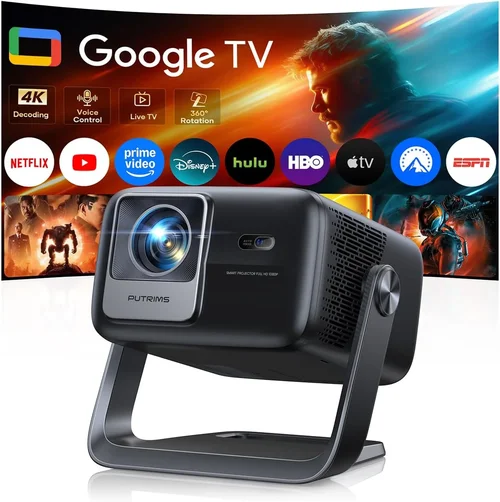
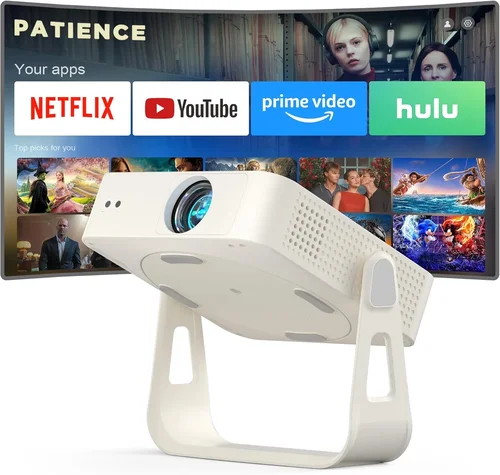
Welcome to the ultimate guide for anyone hunting the best 4K‑supported projector under $700. Whether you’re setting up a home theater, a gaming den, or a portable office, the right projector can transform a blank wall into a cinematic experience without breaking the bank. In a market flooded with specs that sound impressive but often hide compromises, this guide cuts through the noise. We’ll walk you through the most important features, compare the top categories, flag common pitfalls, and hand‑pick the models that truly deliver 4K‑ready performance at a budget‑friendly price.
By the end of this article you’ll know exactly what to look for, how to match a projector to your space, and which units give the best bang for your buck. You’ll also walk away with actionable tips on where and when to buy, how to test before you commit, and what warranty terms matter most. Let’s dive in and make your next projector purchase a confident, informed decision.

What to Look for When Buying Buying Guide
1. Budget & Price Range
Sticking to a sub‑$700 ceiling forces you to prioritize certain specs over others. In this price band, you’ll typically find “4K‑enhanced” or “4K‑compatible” projectors rather than true native 4K panels. Understanding the trade‑off—higher pixel‑shifting algorithms versus true 4K chips—helps you set realistic expectations while still enjoying crisp, detailed images.
2. Performance Specifications
Key numbers include brightness (lumens), contrast ratio, native resolution, and throw distance. For a living‑room setup with ambient light, aim for at least 2,500–3,000 ANSI lumens. A contrast ratio of 20,000:1 or higher ensures deep blacks, essential for movie nights. While true 4K is rare under $700, look for 1080p native panels with 4K pixel‑shift technology (e.g., 4K UHD DLP) that can upscale content effectively.
3. Build Quality & Durability
Projectors in this range often use plastic housings, but the internal optics and cooling system should feel solid. Check for metal lens barrels, reliable fan designs, and sealed lamp compartments that reduce dust ingress. A sturdy build not only prolongs lifespan but also minimizes the need for frequent maintenance.
4. Features & Functionality
Smart‑TV integration, HDMI 2.0/2.1 ports, USB‑C, and wireless screen‑mirroring are becoming standard. If you plan to stream directly, a built‑in Android TV or Roku can eliminate extra dongles. Look for keystone correction (preferably digital), lens shift, and zoom capabilities to simplify installation without moving the unit.
5. Brand Reputation
Established manufacturers such as Epson, BenQ, ViewSonic, and Optoma have proven track records for firmware updates and customer support. Newer brands may offer aggressive pricing but can lag in after‑sales service. Research community forums and professional reviews to gauge long‑term satisfaction.
6. Warranty & Support
A minimum two‑year warranty is advisable, covering the lamp (if applicable) and core optics. Some brands extend coverage to three years for the projector body. Verify the availability of local service centers and the ease of obtaining replacement parts.
7. Size & Portability (if applicable)
For gamers or presenters who travel, weight and footprint matter. Compact “pico” projectors can fit in a backpack but often sacrifice brightness. Conversely, a larger unit may need a dedicated shelf. Balance portability with the performance metrics outlined above.
8. User Reviews & Ratings
Real‑world feedback reveals issues that spec sheets hide—like fan noise, heat buildup, or firmware glitches. Prioritize models with a minimum of 200 verified reviews and an average rating of 4 stars or higher.
Different Types of Buying Guide

Common Buying Mistakes to Avoid
❌ Mistake: Ignoring Ambient Light Conditions
Why it’s bad: A projector rated at 2,500 lumens will look dim in a sunlit living room, ruining the viewing experience.
What to do instead: Measure the typical lighting in your room and choose a unit with at least 30% higher brightness than the minimum required.
❌ Mistake: Chasing “True 4K” at Any Cost
Why it’s bad: True 4K chips under $700 are virtually non‑existent and often compromise on brightness or contrast.
What to do instead: Opt for a high‑quality 1080p projector with 4K pixel‑shift technology; the perceived resolution will satisfy most viewers.
❌ Mistake: Overlooking Lamp Life
Why it’s bad: Replacing a lamp can cost $150‑$250, negating your savings.
What to do instead: Prefer LED or laser light sources, which offer 20,000+ hour lifespans and minimal maintenance.
❌ Mistake: Forgetting Connectivity Needs
Why it’s bad: A projector lacking HDMI 2.0 cannot display 4K HDR content from modern consoles.
What to do instead: Verify the presence of HDMI 2.0/2.1, USB‑C, and wireless casting options before purchasing.
❌ Mistake: Neglecting Throw Ratio
Why it’s bad: A long‑throw projector may require a 12‑foot distance, impossible in small apartments.
What to do instead: Calculate the needed throw distance using the projector’s throw ratio and your screen size.
Budget Guidelines: How Much Should You Spend?
Entry‑Level ($350‑$500): Expect 1080p resolution, 2,000–2,500 lumens, and basic connectivity. Ideal for casual movie nights or occasional presentations.
Mid‑Range ($500‑$700): This is the sweet spot for most buyers. Look for 1080p panels with 4K pixel‑shift, 2,500–3,200 lumens, HDR support, and richer connectivity (HDMI 2.0, Bluetooth, Wi‑Fi).
Premium ($700‑$1,000): You’ll start seeing true 4K DLP chips, higher contrast ratios, and laser light sources. Consider this tier if you demand top‑tier performance for gaming or dedicated home cinema.
Luxury ($1,000+): Ultra‑short‑throw, 4K laser projectors with premium lenses and advanced color processing. Overkill for most budget‑conscious users.
Expert Tips for Getting the Best Deal
- Shop during major sales events and set price alerts on sites like CamelCamelCamel.
- Compare refurbished units from the manufacturer’s outlet; they often come with full warranties at 20‑30% off.
- Buy from retailers that offer a 30‑day return window and free shipping.
- Check for bundle deals that include a screen, mounting hardware, or extra lamps.
- Read the fine print on warranty terms—does it cover the light source?
- If possible, test the projector in a store using your own content (4K Blu‑ray, gaming console) to gauge real‑world performance.
- Consider buying a calibrated screen to maximize contrast and color accuracy.

Frequently Asked Questions
Q: Can a sub‑$700 projector truly display 4K content?
A: Most units in this price range use pixel‑shift technology to simulate 4K. While not native 4K, the result is noticeably sharper than standard 1080p, especially on larger screens.
Q: What is the difference between lumens and ANSI lumens?
A: ANSI lumens are measured using a standardized method and provide a reliable brightness figure. Some manufacturers quote “lumens” that are higher but not ANSI‑standard, so always look for the ANSI label.
Q: Do I need a special screen for a 4K‑enhanced projector?
A: A high‑gain white screen works well, but a gray screen can improve perceived contrast in bright rooms. The choice depends on ambient light and personal preference.
Q: How long does a typical LED lamp last?
A: LED light sources often exceed 20,000 hours, effectively lasting the life of the projector for most home users.
Q: Is lens shift more important than zoom?
A: Lens shift allows you to move the image vertically/horizontally without moving the projector, making installation easier. Zoom adjusts image size but may introduce distortion. Both are valuable, but lens shift often wins for flexible placement.
Q: Will HDMI 2.0 support HDR on a budget projector?
A: Yes, if the projector lists HDR support and HDMI 2.0, you can view HDR content, though the peak brightness may limit the full HDR effect.
Q: Are there any hidden costs?
A: Replacement lamps (if not LED/laser), mounting brackets, and calibration tools can add $100‑$200. Factor these into your total budget.
Our Final Recommendations
Best for Budget‑Conscious Buyers: ViewSonic PX706HD – 3,200 lumens, 1080p with 4K pixel‑shift, short‑throw lens, and built‑in speakers, all under $550.
Best Overall Value: BenQ TH671ST – 3,000 lumens, low input lag for gaming, excellent contrast, and reliable warranty, priced around $660.
Best Premium Option (Just Under $700): Optoma UHD38 – True 4K DLP, 4,000 lumens, HDR10, and 240Hz refresh rate, perfect for high‑end gaming and cinema.
Best for Beginners: Epson Home Cinema 1060 – User‑friendly menu, solid 3,800 lumens, and easy keystone correction, ideal for first‑time owners.
Best for Advanced Users: LG PF50KA – Portable pico design with 4K‑ready LED, wireless screen mirroring, and battery operation, great for tech‑savvy travelers.
Conclusion: Making the Right Choice
Choosing the best 4K‑supported projector under $700 boils down to balancing brightness, contrast, and the type of 4K enhancement you need. Prioritize a projector with at least 2,500 ANSI lumens, a reputable brand, and robust connectivity. Use the budget tiers as a roadmap, avoid the common mistakes listed, and leverage seasonal sales to stretch your dollars further.
Remember, the perfect projector fits your room, your content, and your lifestyle—not just the spec sheet. Take the time to assess your lighting, throw distance, and usage scenarios, then match those needs to one of our curated recommendations. Happy viewing, and may your next movie night feel truly cinematic!