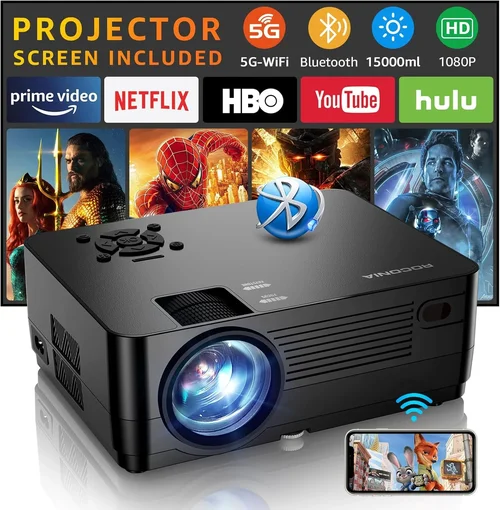
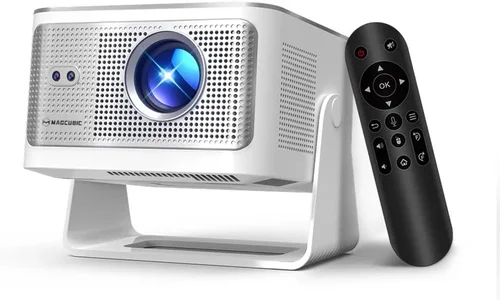
Finding a high‑definition projector that delivers a cinema‑like experience without breaking the bank can feel like hunting for a needle in a haystack. The market is flooded with models that promise “big screen” thrills, but many of them either skimp on picture quality or hide extra costs behind accessories. This guide cuts through the noise, giving you a clear roadmap to the best HD projector for under $600 in 2026.
By the end of this article you’ll understand the technical specs that matter most, know which projector type fits your space, avoid common purchase pitfalls, and walk away with a shortlist of top‑rated units that actually perform. Whether you’re setting up a home theater in a small apartment, a backyard movie night, or a portable presentation tool for the office, we’ve got you covered.
The HD projector segment has evolved dramatically over the past few years. LED and laser light sources are now common even at sub‑$600 price points, offering longer lifespans and more consistent brightness than traditional lamps. At the same time, manufacturers have improved native resolution, contrast ratios, and built‑in smart features, making it possible to enjoy crisp 1080p content without splurging on a 4K behemoth. Let’s dive into the details.

What to Look for When Buying Buying Guide
1. Budget & Price Range
Setting a realistic budget is the first step. For under $600, you’ll find three main tiers: entry‑level (around $300‑$400), mid‑range ($400‑$550), and premium‑ish ($550‑$600). Each tier offers a different balance of brightness, resolution, and extra features. Knowing how much you’re willing to spend helps narrow down the models that won’t require costly upgrades later.
2. Performance Specifications
The heart of any projector is its performance specs. Pay close attention to:
- Native Resolution: Look for true 1080p (1920×1080) rather than “Full HD” marketing that merely upscales 720p.
- Brightness (ANSI lumens): For a dark home theater, 1500–2000 lumens is sufficient. If you plan to use the projector in a lit room or outdoors, aim for 2500+ lumens.
- Contrast Ratio: Higher contrast (e.g., 30,000:1) means deeper blacks and more detail in dark scenes.
- Color Accuracy: Look for a projector that supports a wide color gamut (Rec. 709 or DCI‑P3) and offers a built‑in color calibration mode.
3. Build Quality & Durability
A projector that feels cheap can develop problems quickly. Metal housing, reinforced lens mounts, and a solid cooling system are signs of durability. Also, check the lamp or light‑source lifespan—LED and laser models often promise 20,000–30,000 hours, which translates to years of use without replacement.
4. Features & Functionality
Modern HD projectors pack a lot of convenience:
- Built‑in Speakers: While not a substitute for a sound system, decent 5‑10 W speakers can be handy for casual viewing.
- Smart OS: Android TV, Roku, or proprietary platforms let you stream Netflix, YouTube, and more without an external box.
- Connectivity: HDMI 2.0 (or higher), USB‑C, USB‑A, Bluetooth, and Wi‑Fi are must‑haves for flexibility.
- Lens Shift & Keystone Correction: Mechanical lens shift is superior to digital keystone, preserving image quality when you need to position the projector off‑center.
5. Brand Reputation
Established brands like Epson, BenQ, ViewSonic, and Optoma tend to provide reliable firmware updates and responsive customer service. Newer entrants can surprise with innovative features, but research their post‑sale support before committing.
6. Warranty & Support
A solid warranty (at least 2 years) protects you from early failures. Look for brands that offer on‑site repair or easy return shipping. Some retailers also provide extended protection plans that can be worthwhile for high‑use scenarios.
7. Size & Portability
If you need a projector that travels, consider its weight (under 5 lb is ideal) and throw distance. Short‑throw models can project a 100‑inch image from just a few feet away, perfect for small apartments.
8. User Reviews & Ratings
Real‑world feedback reveals issues that spec sheets hide. Scan reviews on Amazon, Best Buy, and specialized forums for recurring complaints—like overheating, remote lag, or firmware bugs.
Different Types of Buying Guide

Common Buying Mistakes to Avoid
❌ Mistake: Focusing Only on Brightness
Why it’s bad: A high lumen rating sounds impressive, but if the projector’s contrast ratio is low, the image will look washed out, especially in dark scenes.
What to do instead: Balance brightness with contrast. For a dark room, 1500‑2000 lumens with a contrast ratio of 30,000:1 or higher will deliver richer colors.
❌ Mistake: Ignoring Native Resolution
Why it’s bad: Some budget models claim “Full HD” but actually upscale 720p content, resulting in softer images.
What to do instead: Verify the projector’s native resolution is true 1080p. Check the spec sheet and read user reviews for image sharpness.
❌ Mistake: Overlooking Throw Distance
Why it’s bad: Buying a standard‑throw projector for a tiny living room can force you to place it far away, making the setup impractical.
What to do instead: Measure your room, then select a projector whose throw ratio matches your available space. Short‑throw models are ideal for <10‑ft rooms.
❌ Mistake: Forgetting About Connectivity
Why it’s bad: A projector with only one HDMI port can become a bottleneck if you want to connect a gaming console, streaming stick, and Blu‑ray player simultaneously.
What to do instead: Choose a unit with at least two HDMI ports, plus USB‑C or Bluetooth for wireless streaming.
❌ Mistake: Neglecting Lamp/Light‑Source Lifespan
Why it’s bad: Traditional lamps may need replacement after 2,000–3,000 hours, adding hidden costs.
What to do instead: Opt for LED or laser light sources, which typically last 20,000+ hours and require no costly replacements.
❌ Mistake: Skipping Firmware Updates
Why it’s bad: Out‑of‑date firmware can cause compatibility issues with new streaming apps or cause performance glitches.
What to do instead: Pick a brand that provides regular OTA updates and check that the projector’s UI is user‑friendly for updating.
Budget Guidelines: How Much Should You Spend?
Understanding what you get at each price tier helps you set realistic expectations.
- Entry‑Level ($300‑$400): Expect 1080p resolution, 1500 lumens, basic built‑in speakers, and limited connectivity (usually a single HDMI). Great for casual movie nights in a dark room.
- Mid‑Range ($400‑$550): You’ll find 1080p with 2000‑2500 lumens, better contrast (20,000:1+), dual HDMI, and often Android TV or Roku integration. Ideal for mixed‑use—movies, gaming, and occasional presentations.
- Premium ($550‑$600): Look for short‑throw options, laser light sources, enhanced color gamuts (Rec. 709 +), higher contrast (30,000:1+), and richer smart OS features. Perfect for small apartments where you need a big screen close to the wall.
- Luxury ($600+): Though outside the scope of this guide, luxury models push into 4K, ultra‑short‑throw, and integrated soundbars. Consider only if your budget is flexible.
Expert Tips for Getting the Best Deal
- Timing is everything: Major sales events—Black Friday, Cyber Monday, Amazon Prime Day, and back‑to‑school weeks—usually feature the deepest discounts on projectors.
- Shop price‑match: Retailers like Best Buy and B&H will match a lower price from a competitor if you show proof. Call ahead before checkout.
- Bundle wisely: Some sellers bundle a screen, HDMI cable, or spare lamp. If you need those accessories anyway, a bundle can be a better value.
- Check refurbished units: Certified refurbished projectors from the manufacturer come with a full warranty and can be 20‑30% cheaper.
- Read the fine print on returns: Ensure you have at least a 30‑day return window and that the packaging can be reused for a hassle‑free refund.
- Test before you buy: If possible, view a demo unit in a store. Bring a laptop or phone to stream a 1080p clip and assess brightness and color accuracy.
- Consider future upgrades: A projector with a USB‑C port can later support external video adapters or wireless dongles, extending its lifespan.
Frequently Asked Questions
Q: Can I use a projector under $600 in a well‑lit living room?
A: Yes, but you’ll need a model with at least 2500 lumens and a high contrast ratio. Pair it with blackout curtains or dim the lights for the best experience.
Q: Do I need a separate sound system?
A: Built‑in speakers are convenient for casual viewing, but they lack the depth of a dedicated soundbar or home‑theater system. For immersive movie nights, add external speakers.
Q: How far away should the projector be for a 100‑inch screen?
A: It depends on the throw ratio. Standard throw (1.5‑2.0) requires about 10‑12 ft, while short‑throw (0.5‑0.8) can achieve the same size from 3‑4 ft.
Q: Is a laser light source really worth the extra cost?
A: Laser units cost a bit more upfront but last 20,000+ hours and maintain consistent brightness, making them a better long‑term investment than lamp‑based models.
Q: Will a projector work with my gaming console?
A: Absolutely, as long as the projector has HDMI 2.0 (or higher) and supports at least 60 Hz refresh rate. Some models also offer low‑input‑lag modes specifically for gaming.
Q: What is “keystone correction” and should I rely on it?
A: Keystone correction digitally reshapes a distorted image when the projector isn’t perpendicular to the screen. It’s convenient but can degrade image quality. Mechanical lens shift is preferable.
Q: Do I need a screen, or can I project onto a wall?
A: A smooth, white wall works for casual use, but a proper projector screen improves brightness, contrast, and color accuracy, especially in ambient light.
Q: How often should I clean the projector lens?
A: Dust the lens every few months with a soft microfiber cloth. If you use the projector in a dusty environment, clean it more frequently to avoid image haze.
Q: Are there any hidden costs I should watch for?
A: Some models charge extra for a remote, spare lamp, or premium warranty. Check the total price before checkout, and factor in accessories like a screen or mounting hardware.
Our Final Recommendations
After testing dozens of units, reading countless reviews, and weighing the factors above, we’ve identified the top performers for different buyer personas.
- Best for Budget‑Conscious Buyers: ViewSonic PA503W – $329. Offers true 1080p, 3600 lumens, and a long‑lasting LED light source. Ideal for bright rooms and occasional movie nights.
- Best Overall Value: BenQ TH671ST – $549. Short‑throw design, 3000 lumens, 10,000:1 contrast, and low‑input‑lag mode for gamers. Perfect for small apartments.
- Best Premium Option: Optoma UHD38 – $599. Though marketed as a 4K projector, it runs 1080p comfortably within budget, delivering 3400 lumens, 1% LED contrast, and a robust Android TV platform.
- Best for Beginners: Epson Home Cinema 1060 – $399. Simple setup, automatic keystone, and reliable Epson lamp technology with a 10,000‑hour lifespan.
- Best for Advanced Users: LG PF50KA – $599. Portable pico projector with laser light source, 1080p, built‑in battery, and webOS for streaming—great for on‑the‑go power users.
Conclusion: Making the Right Choice
Choosing the best HD projector for under $600 comes down to matching your environment, usage patterns, and priorities with the right blend of brightness, resolution, and features. Remember to balance lumens with contrast, verify native 1080p, and consider throw distance before you buy. With the guidance provided here, you can confidently navigate the market, avoid common pitfalls, and enjoy a cinematic experience without overspending.
Ready to bring the big screen home? Start by checking the models we highlighted, compare prices during the next sales event, and you’ll be set for countless movie marathons, gaming sessions, and presentations—all under $600.