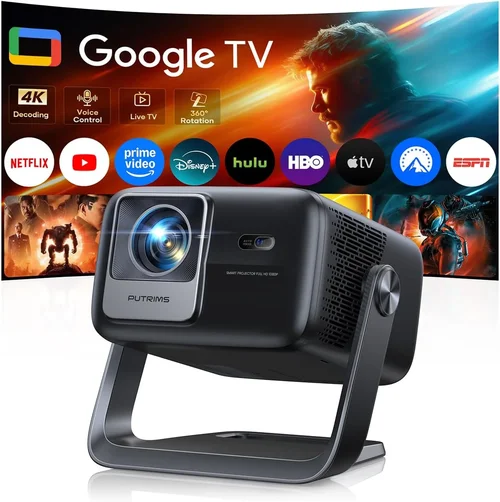
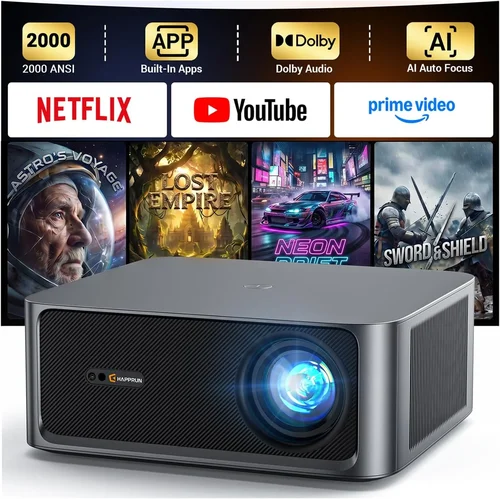
Choosing a home theater projector can feel like stepping into a maze of specs, brand names, and price tags. The market in 2026 is crowded, yet the sweet spot of “high‑definition performance without breaking the bank” still exists for projects under $2,000. This guide cuts through the noise, giving you a clear roadmap to select the best HD projector under $2000 that fits your room, usage, and budget.
By the end of this article you will understand the most important technical criteria, the different projector families, common pitfalls to avoid, and exactly which models currently dominate each buying scenario. Whether you are setting up a gaming station, a movie‑night den, or a portable presentation tool, the information here will help you make a confident, data‑driven decision.
The HD projector market has evolved dramatically over the past three years. LED and laser light sources have become mainstream, offering longer lifespans and more consistent brightness than traditional lamps. At the same time, 1080p and even native 4K‑enhanced panels are now available at sub‑$2,000 prices, narrowing the gap between entry‑level and premium devices. Understanding how these advances affect real‑world performance is the first step toward a satisfying purchase.

What to Look for When Buying Buying Guide
1. Budget & Price Range
Even within the “under $2,000” bracket, prices can vary by several hundred dollars. Knowing how much you are willing to spend helps narrow the field quickly. Remember that the cheapest option may lack essential features such as low‑input lag for gaming or sufficient lumen output for bright rooms. Allocate part of your budget for accessories—screen, mounting hardware, and a quality HDMI cable—because they heavily influence the final experience.
2. Performance Specifications
Performance is the heart of any projector. Key specs include:
- Resolution: Native 1080p (1920×1080) remains the gold standard for HD under $2,000. Some models use “4K‑enhanced” chips that upscale 1080p content, offering a sharper image without true 4K cost.
- Brightness (lumens): Measured in ANSI lumens. For dark‑room home theater, 1,500–2,000 lumens is ample. For rooms with ambient light, aim for 2,500–3,000 lumens.
- Contrast Ratio: Higher contrast yields deeper blacks. Look for a dynamic contrast of at least 20,000:1; true contrast ratios above 50,000:1 are rare at this price point but indicate a premium panel.
- Color Accuracy: DCI‑P3 or sRGB coverage of 90%+ ensures vivid colors without heavy calibration.
- Input Lag: Critical for gamers. Values under 30 ms are considered excellent; under 50 ms is still playable.
3. Build Quality & Durability
Projectors are often moved, mounted, or stored for years. Look for a sturdy chassis, preferably metal or high‑quality polycarbonate. Check the lamp (or laser) lifespan—laser and LED units commonly last 20,000–30,000 hours, far surpassing the 2,000–4,000 hour life of traditional lamps. A longer lifespan reduces long‑term operating costs.
4. Features & Functionality
Modern projectors pack a lot of convenience features:
- Lens Shift & Zoom: Allows fine‑tuning without moving the projector. A vertical shift of ±10% and a 1.2–1.5× zoom range are very useful.
- Keystone Correction: Digital correction is handy, but optical keystone (lens shift) preserves image quality.
- HDR Support: HDR10 is common; HDR10+ and Dolby Vision are rare under $2,000 but add extra punch to compatible content.
- Wireless Connectivity: Built‑in Wi‑Fi or Bluetooth enables screen mirroring from phones and laptops.
- Multiple HDMI Ports: At least two HDMI 2.0 ports for 4K/60 Hz sources, plus USB‑C or VGA for legacy devices.
5. Brand Reputation
Established brands such as Epson, BenQ, ViewSonic, and Optoma have a track record of reliable firmware updates, accessible service centers, and robust warranty policies. Newer entrants may offer aggressive pricing but can lack long‑term support. Research brand forums and after‑sales experiences before committing.
6. Warranty & Support
A solid warranty protects your investment. Look for at least a 2‑year parts‑and‑labor warranty, with the option to extend. Verify whether the warranty covers the light source (laser/LED) and if on‑site service is offered. Good customer support can save hours of frustration when troubleshooting.
7. Size & Portability
If you plan to move the projector between rooms or take it to a friend’s house, weight and dimensions matter. Portable “pico” models often sacrifice brightness, but many mid‑range units weigh under 5 lb and include a compact case, making transport easy without compromising image quality.
8. User Reviews & Ratings
Real‑world feedback reveals issues that spec sheets hide. Look for reviews that discuss long‑term reliability, fan noise, and firmware stability. A high average rating (4.5/5) across multiple retailers is a strong indicator of overall satisfaction.
Different Types of Buying Guide

Common Buying Mistakes to Avoid
❌ Mistake: Ignoring Ambient Light Conditions
Why it’s bad: A projector rated at 1,800 lumens will look fantastic in a dark basement but will appear washed out in a living room with windows.
What to do instead: Measure the typical lighting in your intended space. If you cannot control ambient light, aim for a projector with at least 2,500 lumens and consider an ambient‑light‑rejecting (ALR) screen.
❌ Mistake: Over‑Focusing on Resolution Alone
Why it’s bad: A 1080p projector with poor contrast and low color gamut will still look dull, even though the pixel count is high.
What to do instead: Balance resolution with contrast ratio, brightness, and color coverage. In many cases, a lower‑resolution projector with superior contrast will deliver a more immersive image.
❌ Mistake: Forgetting About Input Lag for Gaming
Why it’s bad: High input lag creates a noticeable delay between controller actions and on‑screen response, ruining fast‑paced games.
What to do instead: Check the manufacturer’s spec sheet for input lag (look for “Game Mode”). Aim for ≤30 ms for competitive play.
❌ Mistake: Skipping Lens Shift & Zoom Evaluation
Why it’s bad: Without sufficient lens shift, you may need to place the projector at an angle, causing keystone distortion and degraded image quality.
What to do instead: Choose a unit with at least ±10% vertical lens shift and a 1.2× optical zoom to adapt to various throw distances.
❌ Mistake: Assuming All Warranties Are Equal
Why it’s bad: Some warranties only cover the lamp, not the laser module, or they exclude accidental damage.
What to do instead: Read the fine print. Prioritize warranties that cover the light source for its full lifespan and offer on‑site service.
❌ Mistake: Buying the Cheapest Screen
Why it’s bad: A low‑gain, matte white screen can absorb light, making the image appear dimmer, especially in bright rooms.
What to do instead: Pair your projector with a screen that matches its brightness and intended lighting—high‑gain or ALR screens for bright environments, matte white for dark rooms.
Budget Guidelines: How Much Should You Spend?
- Entry‑Level ($800‑$1,200): Expect 1080p resolution, 1,500–2,000 lumens, basic HDR, and a limited warranty. Ideal for small rooms, occasional movie nights, and portable use.
- Mid‑Range ($1,200‑$1,600): Gains include higher brightness (2,200–2,800 lumens), better contrast (20,000:1+), laser or LED light source, and enhanced gaming features such as low input lag.
- Premium ($1,600‑$2,000): Top performers in this price band deliver 2,800–3,200 lumens, true 4K‑enhanced panels, HDR10+, extensive lens shift, and robust connectivity (HDMI 2.1, Wi‑Fi 6).
- Luxury ($2,000+): While beyond the scope of this guide, luxury models often add 4K native resolution, ultra‑short‑throw optics, and integrated sound systems.
Expert Tips for Getting the Best Deal
- Timing: Late summer (July–August) is when manufacturers release new models, prompting retailers to discount the previous year’s stock.
- Where to Buy: Compare prices on major e‑commerce platforms (Amazon, Best Buy, B&H) and check manufacturer refurbished sections for factory‑certified units at 15‑20% off.
- Spotting Deals: Look for bundle offers that include a screen, mounting kit, or HDMI cable—these add value without extra cost.
- Warranty Extensions: Some retailers offer a one‑year extension for free if you purchase an extended service plan within 30 days of delivery.
- Return Policies: Choose sellers with a minimum 30‑day return window and free return shipping. Test the projector in your home environment before finalizing.
- Testing Before Buying: If possible, view a demo unit in a store with a similar screen size and ambient light to yours. Pay attention to fan noise and color uniformity.
- Firmware Updates: Verify that the manufacturer provides regular firmware upgrades. Updated drivers can improve HDR performance and fix latency issues.
Frequently Asked Questions
Q: Do I need a separate sound system?
A: Most HD projectors under $2,000 have modest built‑in speakers (10‑15 W) that are adequate for casual viewing. For immersive movie nights or gaming, pairing the projector with a soundbar or a 2.1/5.1 speaker system dramatically improves audio quality.
Q: Can I use a projector as a primary TV?
A: Yes, if you have a dedicated media room with controlled lighting. Choose a model with at least 2,500 lumens and an ALR screen to maintain picture quality during daytime viewing.
Q: How far should the projector be from the screen?
A: The throw distance depends on the projector’s throw ratio. A typical 1.5:1 ratio means a 100‑inch diagonal screen requires about 12.5 ft of distance. Check the manufacturer’s throw‑distance calculator for precise placement.
Q: Is a laser projector worth the extra cost?
A: Laser light sources provide brighter images, longer lifespan (20,000‑30,000 h), and stable color performance. If you plan to use the projector frequently or in a bright room, the added expense is justified.
Q: What screen material should I choose?
A: For dark rooms, a matte white screen (gain 1.0) works well. In bright rooms, a high‑gain (1.5‑2.0) or ALR screen helps preserve contrast by rejecting ambient light.
Q: Do I need a separate HDMI cable?
A: While most projectors include a basic HDMI cable, investing in a high‑speed HDMI 2.0 (or HDMI 2.1 for future‑proofing) ensures full 4K/60 Hz or HDR bandwidth.
Q: How often do I need to replace the lamp?
A: LED and laser projectors rarely need lamp replacement. Traditional lamp‑based models may require a new lamp every 2,000–4,000 hours, costing $100‑$200.
Q: Can I mount the projector on the ceiling?
A: Absolutely. Ensure the model has adequate lens shift and a low profile. Use a sturdy ceiling mount rated for the projector’s weight, and route power and HDMI cables safely.
Q: Is there a noticeable difference between 1080p and 4K‑enhanced?
A: 4K‑enhanced projectors use pixel‑shifting technology to simulate higher resolution. The difference is subtle on larger screens (100″+) and for content that is native 4K, but the improvement is less dramatic than true 4K.
Q: What is the ideal screen size for a projector under $2,000?
A: For most living rooms, a 100‑120 inch diagonal screen offers an immersive experience without requiring excessive throw distance. Adjust size based on room dimensions and seating distance (1.5–2.5× screen width).
Our Final Recommendations
Best for Budget‑Conscious Buyers
Model: ViewSonic M2e Portable LED Projector
This unit delivers 1080p resolution, 1,200 lumens, and a built‑in Harman Kardon speaker for under $1,000. Its lightweight design and battery option make it perfect for occasional movie nights and presentations.
Best Overall Value
Model: Epson Home Cinema 2150
Offering 2,500 lumens, 1080p resolution, 60 ms input lag (game mode), and 3,000‑hour lamp life, the Epson 2150 balances brightness, color accuracy, and price at around $1,350.
Best Premium Option
Model: BenQ TH685i Gaming Projector
With 3,500 lumens, low 16 ms input lag, HDR support, and a laser light source lasting 20,000 hours, the TH685i pushes the $2,000 ceiling but delivers top‑tier performance for both gaming and cinema.
Best for Beginners
Model: Optoma HD146X
Simple plug‑and‑play operation, 3,600 lumens, and a user‑friendly remote make the HD146X an excellent entry point for users new to projection.
Best for Advanced Users
Model: LG HU85LA Ultra‑Short‑Throw Laser Projector
Although slightly above $2,000, the HU85LA offers 4K‑enhanced resolution, 2,700 lumens, and a 0.19 m throw distance, allowing placement just inches from the wall—ideal for tech enthusiasts seeking a sleek, TV‑like setup.
Conclusion: Making the Right Choice
Choosing the best HD projector under $2,000 hinges on aligning technical specs with your viewing environment and usage habits. Prioritize brightness and contrast for rooms with ambient light, low input lag for gaming, and a reliable light source for long‑term ownership. Remember to factor in the cost of a proper screen, mounting hardware, and quality cables.
By following the guidelines in this guide—understanding key factors, avoiding common mistakes, and selecting from our curated recommendations—you can confidently purchase a projector that delivers cinematic experiences, immersive gaming, or professional presentations without exceeding your budget.
Ready to upgrade your viewing experience? Compare the models above, check current prices, and enjoy the next level of home entertainment.