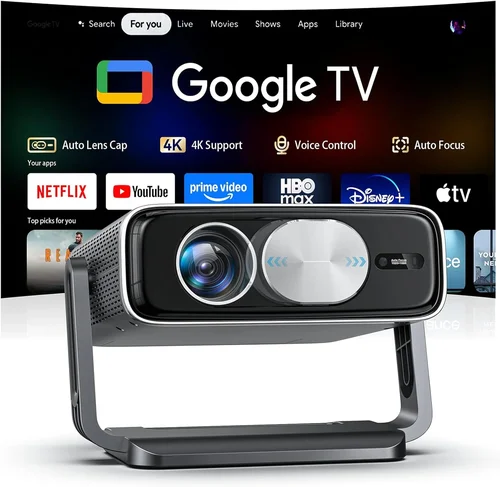
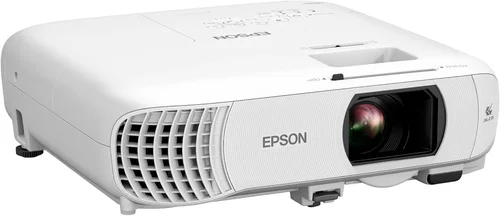
If you’ve ever dreamed of turning your living room into a private theater, you’re not alone. The surge in streaming services, 4K Blu‑ray releases, and high‑definition gaming has made home cinema more appealing than ever. Yet, the biggest hurdle for most households is finding a projector that delivers cinema‑grade performance without breaking the bank. That’s why this guide exists – to cut through the jargon, compare the most important specs, and point you toward the best home cinema projector under $1000 in 2026.
In the pages that follow, you’ll learn which technical features truly matter, how to match a projector to your room’s lighting and size, and where to spot the best deals. We’ll also highlight common pitfalls that can turn an exciting purchase into a disappointment, and we’ll give you actionable tips for getting the most bang for your buck. By the end, you’ll be equipped to make a confident, informed decision and enjoy blockbuster‑level picture quality without spending a fortune.
The projector market has evolved dramatically over the past few years. LED and laser light sources have become more affordable, contrast ratios have climbed, and smart‑TV integration is now standard on many mid‑range models. This means that, even with a $1000 ceiling, you can expect 1080p or even true 4K‑enhanced resolution, low input lag for gaming, and a lifespan that rivals traditional TVs. Let’s dive into the specifics.

What to Look for When Buying Buying Guide
1. Budget & Price Range
Even within the sub‑$1000 bracket, there’s a wide spread of price points. Entry‑level models often sit around $400‑$600, while premium mid‑range units can approach $950. Your budget will dictate compromises – for example, a lower price may mean a shorter lamp life or fewer built‑in speakers. Establish a clear ceiling and consider whether you’re willing to stretch a little for a key feature like 4K enhancement.
2. Performance Specifications
The heart of any projector is its performance specs. Pay close attention to:
- Resolution: Native 1080p (1920×1080) is common, while many models use pixel‑shifting to claim “4K‑enhanced.” True 4K is rare under $1000 but pixel‑shifting can still deliver a noticeably sharper image.
- Brightness (lumens): Measured in ANSI lumens, higher numbers mean better performance in ambient light. For a dedicated home theater with light control, 1500‑2500 lumens is ample; brighter rooms may require 3000+ lumens.
- Contrast Ratio: A higher ratio (e.g., 30,000:1) yields deeper blacks and more detail in dark scenes.
- Throw Ratio: Determines how far the projector must be from the screen. Short‑throw models (0.8‑1.2:1) are ideal for smaller rooms.
- Input Lag: Critical for gamers; look for <20 ms for a fluid experience.
3. Build Quality & Durability
A projector is an investment that should last several years. Look for sturdy chassis, metal heat sinks, and reputable cooling systems. Models with sealed optical engines and longer lamp life (often 20,000‑30,000 hours for LED/Laser) reduce maintenance costs.
4. Features & Functionality
Modern projectors pack a lot of convenience features:
- Built‑in Speakers: While most audiophiles will add external sound, decent 10‑20 W speakers can suffice for casual watching.
- Smart OS: Android TV, Roku, or proprietary platforms allow streaming without extra devices.
- Connectivity: HDMI 2.0/2.1, USB‑C, Wi‑Fi, Bluetooth, and Ethernet ports give flexibility.
- Lens Shift & Keystone Correction: Essential for precise image placement without physically moving the projector.
- 3‑D Support: Optional but still a fun feature for certain users.
5. Brand Reputation
Brands with a track record of reliable home‑cinema projectors tend to offer better firmware updates, easier access to replacement parts, and more responsive customer service. Epson, BenQ, Optoma, and ViewSonic consistently rank high in consumer satisfaction surveys.
6. Warranty & Support
A solid warranty can save you money and headaches. Look for at least a 2‑year limited warranty that covers the lamp or light source. Some manufacturers also provide extended service plans or on‑site repairs for an additional fee.
7. Size & Portability (if applicable)
If you plan to move the projector between rooms or take it to a friend’s house, weight and dimensions matter. Portable models often sacrifice brightness but can be a great solution for small gatherings.
8. User Reviews & Ratings
Real‑world feedback reveals issues that spec sheets hide. Scan Amazon, B&H, and dedicated AV forums for recurring themes – be it fan noise, color accuracy, or firmware bugs. Prioritize products with a minimum 4‑star average and a healthy volume of reviews.
Different Types of Buying Guide

Common Buying Mistakes to Avoid
❌ Mistake: Ignoring Ambient Light Conditions
Why it’s bad: A projector rated at 1500 lumens will look brilliant in a dark theater but may appear washed out in a living‑room with sunlight.
What to do instead: Measure your room’s typical light level. If you can’t fully darken the space, aim for 2500‑3000 lumens or choose a model with high contrast and a dynamic iris.
❌ Mistake: Choosing Native 1080p Over “4K‑Enhanced” Without Understanding
Why it’s bad: Some shoppers assume “4K‑enhanced” is the same as true 4K and feel short‑changed.
What to do instead: Research the pixel‑shifting technology. In many cases, the perceived sharpness is a noticeable upgrade over standard 1080p, especially on screens 100‑120 inches.
❌ Mistake: Overlooking Throw Ratio
Why it’s bad: Buying a standard‑throw projector for a 6‑foot room forces you to place it too far back, resulting in a tiny image.
What to do instead: Calculate the required throw distance (Screen Width × Throw Ratio). If space is limited, pick a short‑throw or ultra‑short‑throw model.
❌ Mistake: Forgetting About Lens Shift
Why it’s bad: Without lens shift, you may need to angle the projector, causing keystone distortion.
What to do instead: Opt for a projector with at least 10% vertical and horizontal lens shift for flexible mounting.
❌ Mistake: Assuming All Built‑In Speakers Are Sufficient
Why it’s bad: Most integrated speakers lack the power and clarity for a true cinema experience.
What to do instead: Budget for an external sound system – a soundbar or a 2.1/5.1 speaker setup.
❌ Mistake: Neglecting Warranty and Service Options
Why it’s bad: A cheap projector may fail after the first year, leaving you with expensive repairs.
What to do instead: Choose brands that offer at least a 2‑year warranty covering the light source, and consider an extended plan if you plan heavy use.
❌ Mistake: Not Testing Before Purchase
Why it’s bad: Color accuracy, fan noise, and motion handling can vary widely.
What to do instead: Visit a local AV store or attend a home‑theater expo where you can view the projector in action.
Budget Guidelines: How Much Should You Spend?
- Entry‑Level ($400‑$600): Expect native 1080p, 1500‑2000 lumens, basic HDMI ports, and limited smart features. Ideal for casual movie nights in a dark room.
- Mid‑Range ($600‑$850): Offers 4K‑enhanced resolution, 2500‑3000 lumens, higher contrast, and better connectivity (Wi‑Fi, Bluetooth). This tier delivers the best value for most home theaters.
- Premium ($850‑$1000): Includes laser or high‑end LED light sources, advanced color processing, low input lag (<15 ms), and robust build quality. Perfect for gamers and audiophiles who also care about picture fidelity.
- Luxury ($1000+): True 4K native panels, HDR10+ support, ultra‑short‑throw optics, and integrated high‑end audio. While outside the scope of this guide, these models set the benchmark for future upgrades.
Expert Tips for Getting the Best Deal
- Shop during major sales events (Black Friday, Cyber Monday, post‑Christmas). Retailers typically shave 15‑30% off MSRP.
- Compare prices across multiple platforms – Amazon, B&H Photo, Best Buy, and direct manufacturer sites sometimes run exclusive promos.
- Look for “open‑box” or “refurbished” units with a full warranty. They can be up to 25% cheaper.
- Check for coupon codes on sites like RetailMeNot or Honey before checkout.
- Consider buying a slightly older model when a new generation launches; performance differences are often marginal.
- Read the fine print on return policies – a 30‑day hassle‑free return is ideal for testing the projector in your home environment.
- If you’re a frequent gamer, prioritize low input lag and HDMI 2.1 support for higher refresh rates.
- Invest in a proper screen (gain 1.0‑1.1) rather than relying on a white wall; it dramatically improves perceived contrast.

Frequently Asked Questions
Q: Can I use a projector in a bright living room?
A: Yes, but you’ll need a model with at least 2500‑3000 lumens and a high contrast ratio. Adding blackout curtains or a dedicated screen with a higher gain can also help.
Q: Do I need a separate sound system?
A: While built‑in speakers are convenient, they rarely match the dynamic range of a dedicated soundbar or surround‑sound setup. For true cinema immersion, budget for external audio.
Q: How far should the projector be from the screen?
A: It depends on the throw ratio. For a 100‑inch diagonal screen (≈88‑inch width) and a throw ratio of 1.5:1, you’ll need about 11 feet of distance. Use the formula: Distance = Screen Width × Throw Ratio.
Q: What is the difference between LED and laser light sources?
A: Both offer longer lifespans than traditional lamps. Laser typically provides higher brightness and better color accuracy, while LED may be slightly more affordable and produce less heat.
Q: Is 4K‑enhanced worth it over native 1080p?
A: For screen sizes above 100 inches, 4K‑enhanced can deliver a perceptible improvement in sharpness. However, true 4K is still limited to higher‑priced models.
Q: How often do I need to replace the lamp?
A: LED and laser light sources can last 20,000‑30,000 hours, effectively “lifetime” for most users. Traditional lamps in budget models may need replacement every 2‑3 years.
Q: Can I mount the projector on the ceiling?
A: Absolutely. Ensure the model has adequate lens shift and a low profile mount. Verify the ceiling height can accommodate the required throw distance.
Q: Do I need a special screen?
A: A white matte screen works, but a gray or high‑gain screen can improve contrast in rooms with some ambient light. Choose a screen size that matches your throw distance.
Q: What HDMI version do I need?
A: HDMI 2.0 supports 4K @ 60 Hz, which is sufficient for most movies. If you plan to game at 120 Hz or use HDR10+, look for HDMI 2.1.
Q: Is there a difference between “throw ratio” and “zoom lens”?
A: Throw ratio determines distance for a given image size. A zoom lens lets you adjust the image size without moving the projector, offering flexibility within the throw ratio range.
Our Final Recommendations
- Best for Budget‑Conscious Buyers: BenQ TH585 – 1080p, 3500 lumens, 10,000‑hour lamp, low input lag, excellent value at $549.
- Best Overall Value: Optoma UHD38 – 4K‑enhanced, 2400 lumens, 20 ms input lag, HDR10, priced around $799.
- Best Premium Option: Epson Home Cinema 3800 – True 4K (pixel‑shift), 3000 lumens, 2.2K resolution, lens shift, $979.
- Best for Beginners: ViewSonic M2 – Portable LED, 1080p, built‑in Harman Kardon speakers, Wi‑Fi/Chromecast, $599.
- Best for Advanced Users: LG HU85LA Ultra Short Throw (just over $1000 but often on sale) – 4K, laser, 2500 lumens, sits inches from wall, ideal for sleek setups.
Conclusion: Making the Right Choice
Choosing the best home cinema projector under $1000 boils down to matching your room’s lighting, size, and usage habits with the right blend of brightness, contrast, and smart features. Remember to prioritize lumens and contrast for ambient‑light rooms, consider throw ratio and lens shift for placement flexibility, and never underestimate the impact of a good sound system.
Take the time to read user reviews, test the projector if possible, and keep an eye on seasonal sales. With the information in this guide, you’re now equipped to select a projector that delivers theater‑quality visuals without emptying your wallet. Happy viewing!