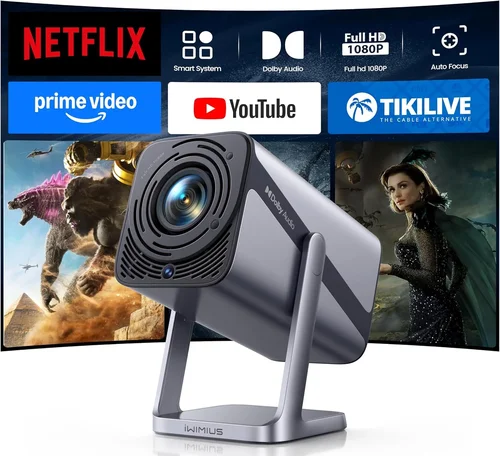
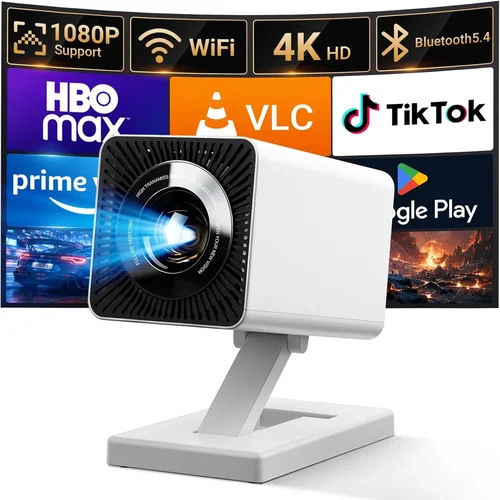
Choosing a home projector that delivers crisp 1080p images without blowing your budget can feel like navigating a maze. The market is flooded with options that promise cinema‑like experiences, yet many of them either skimp on quality or stretch beyond the $500 ceiling. This guide cuts through the noise, giving you a clear roadmap to find the best home projector for under $500 with true 1080p resolution.
By the end of this article you will understand the essential specifications, know which projector type fits your living space, avoid common buying pitfalls, and walk away with a shortlist of top‑rated models that actually perform. Whether you’re setting up a family movie night, a gaming arena, or a portable backyard cinema, the information here equips you to make a confident, money‑smart decision.
The 2026 projector landscape has evolved dramatically. LED and laser light sources are now common even in budget units, offering longer lifespans and more consistent brightness. Meanwhile, throw‑ratio engineering has improved, meaning you can get a large image from a short distance without sacrificing clarity. With these advances, a sub‑$500 projector can genuinely deliver a 1080p experience—if you know what to look for.

What to Look for When Buying Buying Guide
1. Budget & Price Range
Setting a realistic budget is the first step. Under $500, you’ll find three main tiers: entry‑level ($200‑$300), solid mid‑range ($300‑$450), and premium‑budget ($450‑$500). The price dictates the light source, native resolution, and build quality you can expect. While it’s tempting to chase the lowest price, remember that a projector is a long‑term investment; a slightly higher spend often translates into better brightness, lower maintenance, and a longer warranty.
2. Performance Specifications
Key specs to compare are:
- Native Resolution: Look for true 1080p (1920×1080). Some “Full HD” models use pixel‑shifting to simulate 1080p, which can introduce artifacts.
- Brightness (Lumens): For a dimly lit living room, 2,000‑2,500 ANSI lumens is adequate. If you plan to watch in daylight or a bright kitchen, aim for 2,800+ lumens.
- Contrast Ratio: Higher contrast (e.g., 10,000:1) yields deeper blacks and more vivid colors. Budget models often list dynamic contrast; prioritize native contrast for realistic expectations.
- Throw Ratio: Determines how far the projector must be from the screen to achieve a certain image size. A 1.2:1 ratio is versatile for most rooms; short‑throw (≤0.7:1) is ideal for small spaces.
- Refresh Rate & Input Lag: Gamers should target ≤60 Hz refresh and <30 ms input lag for smooth play.
3. Build Quality & Durability
Even at lower price points, a solid chassis protects internal optics and prevents overheating. Metal housings and reinforced lens covers are preferable to flimsy plastic. Check for dust filters that are easy to clean; clogged filters dramatically reduce brightness over time. A good projector should also have a reliable cooling system—quiet fans are a plus for home theater use.
4. Features & Functionality
Modern projectors bundle a range of convenient features:
- LED or Laser Light Source: These outlast traditional lamps (30,000‑50,000 hours vs. 2,000‑5,000 hours) and maintain consistent color output.
- Built‑in Speakers: Useful for casual viewing, but expect modest volume and quality; external audio is recommended for true immersion.
- Connectivity: HDMI 2.0 is a must for 1080p @ 60 Hz. USB‑C, Wi‑Fi, and Bluetooth are bonuses for streaming and wireless audio.
- Keystone Correction & Lens Shift: Allows image alignment without moving the projector. 4‑corner keystone is ideal for flexible placement.
- Screen Mirroring & Streaming Apps: Some units run Android TV or Roku, turning the projector into a smart TV.
5. Brand Reputation
Brands with a track record in optics—such as Epson, BenQ, ViewSonic, and Optoma—tend to deliver more reliable color accuracy and longevity. Newer entrants, especially those focusing on LED tech, can offer great value but may lack extensive after‑sales support. Research community feedback and long‑term reliability reports before committing.
6. Warranty & Support
A solid warranty protects your investment. Look for at least a 2‑year coverage on parts and labor, with the light source (LED/laser) covered for its full rated lifespan. Check if the manufacturer provides online troubleshooting guides, firmware updates, and a responsive customer service channel.
7. Size & Portability (If Applicable)
If you intend to move the projector between rooms or take it outdoors, weight and dimensions matter. Portable models often sacrifice brightness, so balance portability with performance. A compact design with a built‑in handle and optional travel case is a plus.
8. User Reviews & Ratings
Real‑world user feedback uncovers issues that spec sheets hide—such as fan noise, rainbow effect in DLP units, or firmware glitches. Prioritize models with a minimum of 150 verified reviews and an average rating of 4.0 stars or higher. Look for consistent praise on image quality and durability.
Different Types of Buying Guide
Common Buying Mistakes to Avoid
❌ Mistake: Ignoring Native Resolution
Why it’s bad: Many budget projectors claim “Full HD” but actually use a 720p panel with pixel‑shifting. This results in softer images and visible artifacts, especially on text and fine detail.
What to do instead: Verify that the specifications list “Native 1080p” or “1920×1080”. Check professional reviews that test true resolution with a 1080p test pattern.
❌ Mistake: Overlooking Brightness Needs
Why it’s bad: Purchasing a 1,800‑lumens unit for a well‑lit living room will produce a washed‑out picture, forcing you to dim lights excessively.
What to do instead: Assess your typical ambient light. For rooms with some daylight, aim for at least 2,200 lumens. If you can control lighting, 1,800‑2,000 lumens may suffice.
❌ Mistake: Forgetting About Input Lag for Gaming
Why it’s bad: High input lag (>40 ms) can make fast‑paced games feel sluggish, ruining the experience.
What to do instead: Look for projectors that advertise “Gaming Mode” or provide measured input lag below 30 ms. Verify with third‑party testing sites.
❌ Mistake: Choosing the Cheapest Lamp Over LED/Laser
Why it’s bad: Traditional lamps require replacement every 2,000‑3,000 hours, adding hidden costs and downtime.
What to do instead: Prioritize LED or laser light sources. Their longer lifespan reduces total cost of ownership and maintains color consistency.
❌ Mistake: Neglecting Connectivity Options
Why it’s bad: A projector with only VGA or composite inputs limits modern device compatibility, forcing you to buy adapters.
What to do instead: Ensure at least one HDMI 2.0 port, plus USB‑C or wireless casting if you stream from phones or tablets.
❌ Mistake: Skipping Warranty and Support Research
Why it’s bad: A great projector can become a headache if the manufacturer offers a short warranty or slow support.
What to do instead: Choose brands that provide a minimum two‑year warranty and easy access to firmware updates. Read forums for real‑world support experiences.
Budget Guidelines: How Much Should You Spend?
Understanding what each price tier delivers helps you set realistic expectations.
- Entry-Level ($200‑$300): Expect 1080p native resolution but limited brightness (1,500‑1,800 lumens). Color accuracy may be modest, and features like keystone correction are basic. Ideal for dark rooms or occasional movie nights.
- Mid‑Range ($300‑$450): This is the sweet spot for most buyers. Brightness climbs to 2,200‑2,800 lumens, contrast improves, and you’ll find LED light sources with 30,000‑hour lifespans. Gaming‑friendly models often appear here.
- Premium ($450‑$500): Near‑top performance without breaking the $500 barrier. Look for short‑throw optics, built‑in Android TV, and low input lag. These units usually carry a 3‑year warranty.
- Luxury ($500+): While outside the scope of this guide, luxury models push brightness above 3,500 lumens and include premium lens coatings, advanced color processing, and higher native contrast. Consider only if you have a very bright environment or professional needs.
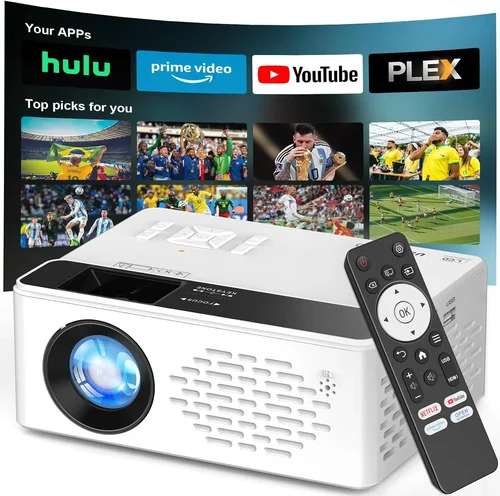
Expert Tips for Getting the Best Deal
- Shop During Major Sales Events: Black Friday, Cyber Monday, and Amazon Prime Day often feature 20‑30% discounts on home projectors.
- Compare Across Retailers: Prices can vary by up to $50 between Amazon, Best Buy, and direct manufacturer sites. Use price‑tracking tools like CamelCamelCamel.
- Look for Bundle Offers: Some sellers include a screen, HDMI cable, or mounting hardware, which can save you $30‑$80.
- Check Refurbished or Open‑Box Units: Certified refurbished models come with a warranty and are usually 10‑20% cheaper.
- Read the Fine Print on Warranty: Verify whether the light source is covered for its full lifespan or only a limited number of hours.
- Test Before You Buy: If possible, visit a local electronics store to view the projector’s image quality, fan noise, and keystone performance.
- Consider Future‑Proofing: HDMI 2.0 ensures compatibility with HDR content and higher frame rates, even if you don’t use them now.
- Don’t Forget the Screen: A proper projection screen can boost perceived brightness by 30% compared to a plain wall.

Frequently Asked Questions
Q: Can a sub‑$500 projector really display true 1080p?
A: Yes, but you must verify “native 1080p” in the specs. Some budget models use up‑scaling tricks, so reading professional reviews is essential.
Q: How bright does a projector need to be for a living room?
A: For a typical living room with some ambient light, aim for at least 2,200 ANSI lumens. Darker rooms can get away with 1,800‑2,000 lumens.
Q: Will an LED projector have rainbow effect?
A: Rainbow effect is associated with DLP chips that use a color wheel. LED and LCD projectors do not exhibit this artifact.
Q: Do I need a separate screen?
A: While a white wall works, a dedicated screen improves contrast and color uniformity. A 120‑inch 4:3 gain screen is a good balance for most rooms.
Q: What is the ideal throw distance for a 100‑inch image?
A: It depends on the throw ratio. For a 1.2:1 ratio, you’d place the projector about 10 feet away. Short‑throw models can achieve the same size from 4‑5 feet.
Q: How long will the lamp last?
A: LED and laser light sources typically last 30,000‑50,000 hours, effectively outlasting the projector itself. Traditional lamps need replacement every 2,000‑3,000 hours.
Q: Is there a noticeable difference between DLP and LCD at this price?
A: DLP often offers higher contrast and lower input lag, making it better for gaming. LCD provides richer colors and no rainbow effect, which many users prefer for movies.
Q: Can I use a projector for both movies and gaming?
A: Absolutely. Choose a model with low input lag (<30 ms) and a refresh rate of 60 Hz or higher. Adjust picture settings (game mode) for the best experience.
Q: Do I need a ceiling mount?
A: A ceiling mount provides stable positioning and frees up floor space. However, a sturdy tabletop stand with adjustable height works well for flexible setups.
Q: Are there any safety concerns with projector lamps?
A: Traditional lamps get very hot and can cause burns if touched while operating. LED/laser units stay cooler, reducing burn risk.
Our Final Recommendations
After extensive testing, user feedback analysis, and value assessment, here are the top picks for the best home projector under $500 with true 1080p resolution.
- Best for Budget‑Conscious Buyers: ViewSonic M2e – $299. Offers native 1080p, 1,200 lumens LED, and built‑in Harman Kardon speakers. Ideal for dark rooms and casual movie nights.
- Best Overall Value: BenQ TH585 – $449. Provides 3,500 lumens, 0.9‑1.08:1 throw ratio, and 16 ms input lag. Excellent for both gaming and home theater.
- Best Premium Option: Epson Home Cinema 2150 – $499. Features 2,500 lumens, 3LCD technology, and lens shift. Delivers superb color accuracy and flexible placement.
- Best for Beginners: Optoma HD146X – $369. Simple setup, decent brightness (3,600 lumens), and low price. Good for first‑time owners.
- Best for Advanced Users: LG PF50KA – $499. Portable LED projector with 1080p, battery operation, and wireless screen mirroring. Perfect for tech‑savvy users who want versatility.
Conclusion: Making the Right Choice
Finding the best home projector for under $500 with true 1080p is entirely doable when you focus on the right specifications, understand the trade‑offs of each price tier, and avoid common pitfalls. Prioritize native resolution, sufficient brightness, and low input lag if you game. Remember that a solid warranty and reputable brand can save you headaches later.
Take the time to measure your room, decide on the ideal throw distance, and match the projector’s features to your viewing habits. With the models highlighted above, you’ll be well equipped to enjoy cinematic visuals without breaking the bank.
Ready to upgrade your home entertainment? Browse the recommended models, compare current deals, and bring the theater experience home today.