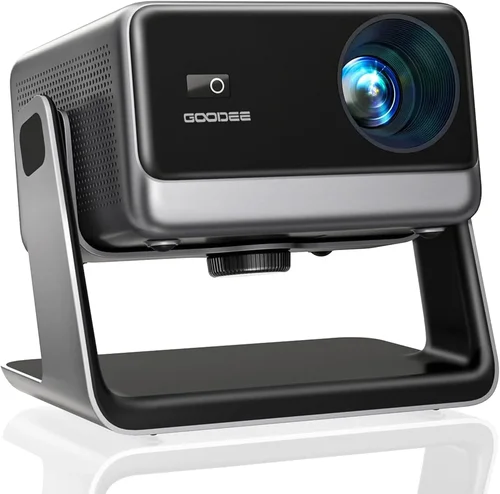
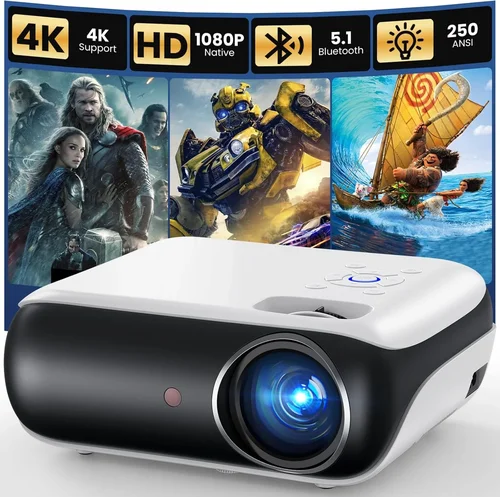
If you’re scrolling through Netflix, gaming on a console, or watching a family slideshow, the picture size can make or break the experience. A good home projector can turn a modest living‑room wall into a cinema‑sized screen without breaking the bank. Yet the market is flooded with models that promise “big‑screen glory” while costing more than a mid‑range TV. That’s why this guide zeroes in on the sweet spot: the best home projector under $600.
In the pages that follow you’ll learn exactly what specifications matter, which projector types fit different rooms, and how to avoid the common pitfalls that leave buyers with dim images or noisy fans. By the end, you’ll be equipped to pick a projector that delivers vivid colors, crisp detail, and reliable performance—without stretching your budget.
The $600 segment has exploded in 2026 thanks to advances in LED and laser light sources, higher native resolutions, and smarter connectivity options. Brands that once catered only to corporate or classroom environments are now offering consumer‑friendly models that rival higher‑priced rivals. This guide captures those trends, distills them into actionable advice, and showcases the top picks that truly stand out.

What to Look for When Buying Buying Guide
1. Budget & Price Range
Even within the under‑$600 bracket, prices can vary widely. A $199 “budget” unit may lack essential features like HDMI‑2.0, while a $579 model might include a laser light source and built‑in speakers. Define your absolute ceiling first, then allocate portions of that budget to the features you value most (e.g., resolution vs. portability). Remember that accessories—screen, mounting brackets, and cables—add to the total cost.
2. Performance Specifications
Resolution, brightness, contrast ratio, and throw distance are the core performance metrics.
- Resolution: For true HD (1080p) within $600, look for native 1920×1080 panels. Some “Full‑HD” labels actually refer to upscaled 720p, which can look soft on larger screens.
- Brightness: Measured in lumens. A living‑room with ambient light needs at least 2,500–3,000 ANSI lumens. Darker home theaters can get away with 1,500–2,000.
- Contrast Ratio: Higher contrast means deeper blacks. While manufacturers often quote inflated numbers, a practical contrast of 10,000:1 or better is a good target.
- Throw Ratio: Determines how far the projector must sit from the screen to achieve a certain image size. Short‑throw models (≤0.8) are ideal for small rooms; standard throw (1.2–2.0) works in larger spaces.
3. Build Quality & Durability
Projectors that stay cool under prolonged use are built with better heat sinks and fans. Look for metal housings rather than cheap plastic, and check if the lamp (or LED/laser module) is sealed against dust. A sturdy design reduces wobble when you adjust the lens or tilt the unit.
4. Features & Functionality
Modern projectors are more than just image makers. Key features to scout for include:
- Connectivity: HDMI 2.0 (or higher) for 4K/60Hz passthrough, USB‑C for media playback, and Wi‑Fi or Bluetooth for streaming.
- Built‑in Speakers: While not a substitute for a sound system, a 5‑10 W speaker can be handy for casual viewing.
- Lens Shift & Keystone Correction: Allows you to fine‑tune the image without moving the projector.
- Gaming Mode: Low input lag (≤20 ms) is essential for a smooth gaming experience.
- Smart OS: Some units run Android TV or Roku, turning the projector into an all‑in‑one entertainment hub.
5. Brand Reputation
Brands with a strong after‑sales network tend to provide more reliable firmware updates and easier access to replacement parts. In the sub‑$600 arena, Epson, BenQ, ViewSonic, and Optoma have consistently earned high marks for durability and support.
6. Warranty & Support
A minimum 2‑year warranty is standard; however, some manufacturers extend to 3 years for LED/Laser models because the light source lasts longer than traditional lamps. Verify what the warranty covers—lamp life, accidental damage, and firmware updates are all worth checking.
7. Size & Portability (if applicable)
If you plan to move the projector between rooms or take it outdoors, weight and footprint matter. Portable pico‑projectors can fit in a backpack but often sacrifice brightness. A mid‑size unit (around 5–7 lb) offers a balance between portability and performance.
8. User Reviews & Ratings
Real‑world feedback uncovers issues that spec sheets hide. Look for reviews that mention long‑term reliability, fan noise, and ease of setup. A product with a 4.5‑star average across multiple retail sites is usually a safe bet.
Different Types of Buying Guide

Common Buying Mistakes to Avoid
❌ Mistake: Ignoring Ambient Light Conditions
Why it’s bad: A projector rated at 2,000 lumens may look brilliant in a dark room but will appear washed out in a lit living room.
What to do instead: Measure typical room lighting and aim for a brightness level at least 30% higher than the ambient lux level. If you can’t control light, consider a short‑throw model with a higher lumen rating.
❌ Mistake: Over‑Focusing on Resolution Alone
Why it’s bad: A 1080p projector with poor contrast and low brightness will still look dull, even on a large screen.
What to do instead: Balance resolution with brightness, contrast, and color accuracy. For most home use, 1080p with at least 2,500 lumens and a 10,000:1 contrast ratio is the sweet spot.
❌ Mistake: Forgetting About Throw Distance
Why it’s bad: Placing a standard‑throw projector too close to the wall forces you to zoom in, reducing image quality.
What to do instead: Calculate the required throw distance using the projector’s throw ratio chart. If space is limited, choose a short‑throw or ultra‑short‑throw unit.
❌ Mistake: Neglecting Input Lag for Gaming
Why it’s bad: High input lag (≥40 ms) creates a noticeable delay between controller action and on‑screen response, ruining fast‑paced games.
What to do instead: Look for “Game Mode” or a documented input lag of ≤20 ms. Many manufacturers list this in the spec sheet.
❌ Mistake: Skipping the Warranty Fine Print
Why it’s bad: Some warranties only cover the lamp, not the LED module or fan, leading to unexpected out‑of‑pocket repairs.
What to do instead: Read the warranty terms carefully. Prefer models that cover the entire light source for the full warranty period.
❌ Mistake: Assuming All HDMI Ports Are Equal
Why it’s bad: An HDMI 1.4 port cannot pass 4K at 60 Hz, limiting future‑proofing.
What to do instead: Verify the projector has at least one HDMI 2.0 or higher port, especially if you plan to connect a 4K Blu‑ray player or next‑gen console.
❌ Mistake: Not Accounting for Fan Noise
Why it’s bad: A projector that sounds like a hair dryer can distract from movies and games.
What to do instead: Check decibel (dB) ratings in reviews. Aim for ≤30 dB in normal operation; many modern LED models stay under 25 dB.
Budget Guidelines: How Much Should You Spend?
- Entry‑Level ($200‑$300): Expect 720p resolution, 1,500‑2,000 lumens, basic HDMI, and limited lens shift. Good for occasional movie nights in dark rooms.
- Mid‑Range ($300‑$450): Native 1080p, 2,500‑3,000 lumens, better contrast, built‑in speakers, and at least one HDMI 2.0. Ideal for most living rooms.
- Premium ($450‑$600): High‑brightness LED or laser light source, advanced color processing (Rec. 709 or DCI‑P3), low input lag, and robust connectivity (Wi‑Fi, Bluetooth, multiple HDMI). Suits gamers and small home theaters.
- Luxury ($600+): 4K‑native panels, ultra‑short‑throw optics, HDR10+ support, and premium build. Rare in the sub‑$600 market, but occasional sales dip into this range.
Expert Tips for Getting the Best Deal
- Seasonal Timing: Major discounts appear during Black Friday, Cyber Monday, and after‑Christmas clearance. Early spring also sees “home‑theater” promotions.
- Retailer Comparison: Check both Amazon and specialized AV stores (e.g., B&H, Adorama). Sometimes the same model is $30 cheaper with a bundle that includes a screen.
- Bundle Smartly: If you need a screen, look for bundle offers that include a 100‑inch matte screen; it’s cheaper than buying separately.
- Warranty Extension: Consider a third‑party protection plan only if the manufacturer’s warranty is under 2 years. Many credit cards already extend coverage.
- Return Policies: Choose sellers with a 30‑day return window and free return shipping. This gives you time to test for fan noise and image uniformity.
- Test Before You Buy: If possible, visit a local electronics store and view the projector’s image on a white wall. Bring a smartphone with a YouTube video to gauge color accuracy.
- Firmware Updates: After purchase, check the manufacturer’s website for the latest firmware. Updates can improve lamp life, reduce lag, and fix connectivity bugs.
- Screen vs. Wall: A proper projection screen (gain 1.0‑1.2) dramatically improves contrast compared to plain paint, especially in rooms with some ambient light.

Frequently Asked Questions
Q: Can I use a home projector in a bright living room?
A: Yes, but you need a model with at least 3,000 ANSI lumens and a high contrast ratio. Adding an ambient‑light rejecting (ALR) screen helps maintain deep blacks.
Q: How long does the LED or laser light source last?
A: Most LED and laser modules are rated for 20,000‑30,000 hours, which translates to 5‑8 years of typical weekend use. This far exceeds the 2,000‑hour lifespan of traditional lamps.
Q: Do I need a separate sound system?
A: Built‑in speakers are convenient for casual viewing, but they rarely deliver cinema‑level audio. Pairing the projector with a soundbar or a small AV receiver greatly enhances the experience.
Q: Is a ceiling‑mount necessary?
A: Not mandatory, but a ceiling mount provides stable positioning and reduces keystone correction. If you prefer floor placement, ensure the projector has sufficient lens shift.
Q: What screen size can I achieve with a $600 projector?
A: With 2,500‑3,000 lumens, you can comfortably project 100‑120 inches at a 16:9 aspect ratio in a dimmed room. Short‑throw models can reach 80‑100 inches from just a few feet away.
Q: Does HDMI ARC work with projectors?
A: Some newer models include HDMI ARC or eARC, allowing you to send audio back to a soundbar through the same cable. Verify this feature if you plan to use a soundbar.
Q: Are there any health concerns with LED projectors?
A: LED projectors emit far less heat and UV radiation than lamp‑based units, making them safer for prolonged viewing. Still, avoid staring directly at the light source.
Q: Can I connect a gaming console?
A: Absolutely. Look for HDMI 2.0, low input lag (≤20 ms), and a “Game Mode” that disables image processing to keep latency minimal.
Q: What is the difference between HDR10 and HDR10+?
A: HDR10 is a static metadata standard, while HDR10+ adds dynamic metadata per scene, offering better contrast and color accuracy. Some $600 projectors support HDR10+, but HDR10 is more common.
Q: Should I buy a projector with a built‑in media player?
A: If you want a clutter‑free setup, a projector with Android TV or Roku built‑in can replace a separate streaming box. However, dedicated media players often receive faster updates and have more apps.
Our Final Recommendations
- Best for Budget‑Conscious Buyers: Epson Home Cinema 1060 – 3,200 lumens, 1080p, HDMI‑2.0, and a solid 2‑year warranty at just $329.
- Best Overall Value: BenQ TH585 – 3,500 lumens, low 16 ms input lag, excellent color accuracy, and a sleek design for $489.
- Best Premium Option: Optoma UHD50X – Although it pushes $599, it offers 4K UHD, 3,400 lumens, and a 15 ms game mode, making it the most future‑proof choice.
- Best for Beginners: ViewSonic M2 – Compact LED, 1,200 lumens, wireless screen mirroring, and built‑in Harman Kardon speakers at $449.
- Best for Advanced Users: LG CineBeam HU80KA – Laser light source, 2,500 lumens, 4K, and extensive connectivity, often found on sale for just under $600.
Conclusion: Making the Right Choice
Choosing the best home projector under $600 boils down to matching your room’s lighting, desired screen size, and usage patterns with the right mix of brightness, resolution, and features. By focusing on the key factors outlined above—budget, performance specs, build quality, and smart connectivity—you’ll avoid common pitfalls and land a projector that feels like a personal cinema.
Take the time to measure your space, read user reviews, and compare specifications side by side. When you find a model that ticks the boxes for brightness, contrast, and low input lag, you’ll be ready to enjoy movies, games, and sports on a screen that truly fills the room.
Ready to make your purchase? Use the tips in this guide to hunt for the best deal, and don’t forget to pair your new projector with a quality screen for the ultimate viewing experience.