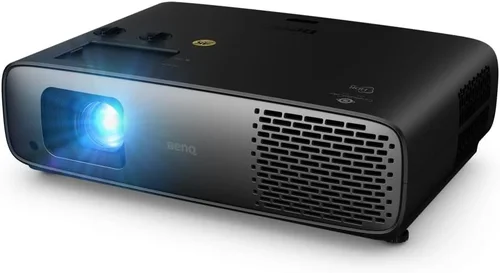
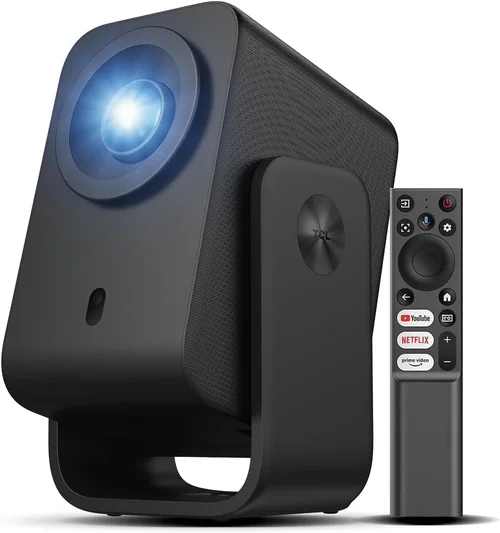
Choosing a home theater projector can feel like stepping into a maze of technical jargon, price tags, and endless options. Yet, with the right guidance, you can turn that maze into a clear, straight path toward a cinematic experience that fits comfortably within a budget of ₹50,000. This guide is designed to demystify the process, helping you understand what truly matters, avoid common pitfalls, and confidently select a projector that delivers big‑screen thrills without breaking the bank.
In the pages that follow, you will learn how to evaluate key specifications such as brightness, resolution, and contrast, discover which projector types align with different room setups, and explore practical budgeting tips. Whether you are setting up a dedicated home theater, a cozy bedroom cinema, or a versatile living‑room entertainment hub, the insights here will empower you to make an informed purchase that lasts for years.
The Indian home theater market has exploded over the past few years, with a surge of locally available models that blend performance and affordability. Brands like Epson, BenQ, ViewSonic, and Xiaomi now offer projectors that sit comfortably under ₹50,000 while still delivering 1080p resolution, respectable lumens, and smart connectivity. This guide captures the latest trends and highlights the models that stand out in this price segment.
What to Look for When Buying Buying Guide
1. Budget & Price Range
Setting a clear budget is the first step. While the ceiling for this guide is ₹50,000, you’ll find a wide spread of prices within that limit. Entry‑level units may hover around ₹20,000, offering basic features suitable for ambient‑light rooms. Mid‑range options, typically priced between ₹35,000 and ₹45,000, often provide higher brightness, better contrast, and enhanced connectivity. Knowing your exact spending limit helps narrow down models quickly and prevents you from being swayed by unnecessary add‑ons.
2. Performance Specifications
Three specs dominate projector performance: brightness (measured in lumens), resolution, and contrast ratio. For a home theater, aim for at least 2,200–2,800 ANSI lumens to combat typical household lighting. Full HD (1920×1080) resolution is now the baseline for a crisp picture; 4K is rare under ₹50,000 but some models use pixel‑shifting technology to approximate it. A contrast ratio of 10,000:1 or higher ensures deep blacks and vibrant colors, essential for movie nights.
3. Build Quality & Durability
A projector is an investment that should endure years of use. Look for sturdy chassis, metal lens housings, and reliable cooling systems. Check user reviews for reports of overheating or premature lamp failures. Models with sealed optics and fan‑controlled temperature management tend to last longer, especially in Indian climates where ambient temperatures can rise.
4. Features & Functionality
Modern projectors pack a suite of features that enhance convenience. Key functionalities to consider include:
- LED or Laser Light Source: Offers longer life (20,000–30,000 hours) and stable brightness compared to traditional lamps.
- Built‑in Speakers: Useful for small rooms; however, external audio systems still deliver superior sound.
- Smart OS / Streaming Apps: Some models run Android TV or Roku, allowing direct access to Netflix, YouTube, and more.
- Wireless Connectivity: Wi‑Fi or Bluetooth for screen mirroring from smartphones and laptops.
- Lens Shift & Keystone Correction: Enables flexible placement without distorting the image.
5. Brand Reputation
Established brands typically provide better after‑sales service, more reliable firmware updates, and wider availability of spare parts. Epson, BenQ, and ViewSonic have strong dealer networks across India, making warranty claims and repairs smoother. Newer entrants like Xiaomi may offer attractive pricing but verify their service coverage before committing.
6. Warranty & Support
A robust warranty can save you from unexpected repair costs. Look for at least a 2‑year warranty covering the light source, with the option to extend. Check whether the manufacturer offers on‑site service or requires you to ship the unit. Good customer support, responsive helplines, and an active online community are valuable assets.
7. Size & Portability (if applicable)
If you plan to move the projector between rooms or use it for outdoor movie nights, size and weight matter. Compact “pico” projectors can fit in a backpack, but they often sacrifice brightness. For a fixed home theater, a slightly larger unit with a robust cooling system is preferable.
8. User Reviews & Ratings
Peer feedback provides real‑world insight into performance, reliability, and ease of use. Browse Indian e‑commerce sites, tech forums, and YouTube reviews. Pay attention to recurring themes—both positive and negative—to gauge whether a model truly lives up to its specifications.
Different Types of Buying Guide

Common Buying Mistakes to Avoid
❌ Mistake: Ignoring Ambient Light Conditions
Why it’s bad: Purchasing a low‑lumens projector for a bright living room results in washed‑out images that ruin the viewing experience.
What to do instead: Measure the typical light level in your room and aim for at least 2,500–2,800 ANSI lumens if you cannot fully darken the space.
❌ Mistake: Overlooking Throw Distance
Why it’s bad: A projector with a short‑throw lens may not fill a 100‑inch screen if placed too far away, leading to a smaller image than expected.
What to do instead: Check the throw ratio (e.g., 1.2:1) and calculate the required distance for your desired screen size before buying.
❌ Mistake: Forgetting About Audio Needs
Why it’s bad: Relying solely on built‑in speakers often leaves you with tinny sound, especially for action movies.
What to do instead: Plan for an external sound system—soundbars or a modest AV receiver—when budgeting.
❌ Mistake: Choosing the Cheapest Lamp Replacement
Why it’s bad: Low‑cost replacement lamps can have shorter life spans and inconsistent brightness, increasing long‑term costs.
What to do instead: Stick with OEM or reputable third‑party lamps that guarantee performance and longevity.
❌ Mistake: Ignoring Connectivity Options
Why it’s bad: A projector lacking HDMI 2.0 or Wi‑Fi can limit streaming 4K content or screen mirroring from modern devices.
What to do instead: Verify that the unit offers at least one HDMI 2.0 port, USB‑C (if needed), and wireless casting support.
❌ Mistake: Not Checking Warranty Coverage
Why it’s bad: A limited warranty that excludes the light source can leave you paying hefty repair fees.
What to do instead: Choose models with a minimum 2‑year warranty covering the lamp or laser module.
Budget Guidelines: How Much Should You Spend?
Understanding what each price tier delivers helps you align expectations with reality.
- Entry‑Level (₹20,000‑₹30,000): Expect 2,200 lumens, 720p to 1080p resolution, basic HDMI connectivity, and possibly a lamp‑based light source. Suitable for dark rooms and occasional movie nights.
- Mid‑Range (₹30,000‑₹45,000): Usually offers 2,500‑2,800 lumens, full HD, improved contrast, and LED or laser light sources. Features like lens shift, keystone correction, and built‑in Android TV become common.
- Premium (₹45,000‑₹60,000): Though slightly above the guide’s ceiling, premium models deliver 3,000+ lumens, superior color accuracy, low input lag for gaming, and robust build quality. Consider stretching the budget if you need top performance.
- Luxury (₹60,000+): These units may include true 4K resolution, HDR10+, and professional‑grade optics. They are typically aimed at home‑theater enthusiasts willing to invest heavily.
Expert Tips for Getting the Best Deal
- Timing is everything: Purchase during major Indian festivals (Diwali, Navratri) or year‑end clearance sales for the deepest discounts.
- Compare online and offline: Physical stores let you see the image quality firsthand, while online platforms often have better pricing and extended warranties.
- Bundle wisely: Look for packages that include a screen, mounting bracket, or HDMI cable; the combined value can be higher than buying separately.
- Check for extended warranty offers: Some retailers provide an extra year of coverage at a nominal price—worth considering for peace of mind.
- Read the fine print on return policies: Ensure you have at least a 7‑day window to test the projector and return it if it doesn’t meet expectations.
- Test before you buy: If possible, project a high‑resolution video onto a white wall to evaluate brightness, color, and focus.
- Negotiate accessories: Retail staff may throw in a free HDMI cable or a discount on a ceiling mount if you ask.
- Utilize price‑tracking tools: Websites like Keepa or Pricebaba alert you when a model drops below your target price.

Frequently Asked Questions
Q: Do I need a separate screen, or can I project onto a wall?
A: While a smooth, white wall works for casual viewing, a dedicated projector screen improves brightness gain, contrast, and color accuracy. For budgets under ₹50,000, a 120‑inch matte white screen costs around ₹5,000‑₹8,000 and is a worthwhile investment.
Q: How long does the lamp or light source last?
A: LED and laser sources typically last 20,000‑30,000 hours, effectively outlasting the projector itself. Traditional UHP lamps may need replacement after 2,000‑4,000 hours, adding to long‑term costs.
Q: Can I use the projector for gaming?
A: Yes, but prioritize low input lag (under 30 ms) and a refresh rate of 60 Hz or higher. DLP projectors often have the best gaming performance in this price range.
Q: Is 1080p enough, or should I wait for 4K?
A: Full HD delivers excellent clarity on screen sizes up to 120‑150 inches. True 4K models are rare under ₹50,000; however, some projectors use pixel‑shifting to simulate 4K, which can be a good compromise.
Q: What distance do I need to place the projector from the screen?
A: It depends on the throw ratio. For a 1.2:1 throw ratio, a 100‑inch screen requires roughly 10 feet of distance. Always consult the manufacturer’s throw distance chart.
Q: Do I need a special ceiling mount?
A: A standard universal ceiling mount works for most projectors. Ensure the mount’s weight rating exceeds the projector’s weight and that it allows tilt and swivel adjustments.
Q: How important is HDR support?
A: HDR enhances contrast and color depth, but its impact is limited by the projector’s native contrast ratio. In the sub‑₹50,000 segment, HDR is often a marketing term with modest real‑world benefit.
Q: Can I connect my smartphone directly?
A: Yes. Most modern projectors support Miracast, AirPlay, or have a USB‑C port for screen mirroring. Some also offer a dedicated app for wireless streaming.
Q: What is the best way to clean the lens?
A: Use a soft microfiber cloth and a lens‑cleaning solution. Avoid harsh chemicals and never blow dust directly onto the lens; use a gentle air blower first.
Q: Is a projector louder than a TV?
A: Projectors have fans for cooling, which can produce noise ranging from 20 dB (very quiet) to 35 dB (noticeable). Choose models with low‑noise fans if you are sensitive to sound.
Our Final Recommendations
After evaluating specifications, user feedback, and price points, we have identified the top performers under ₹50,000 for various user profiles.
- Best for Budget‑Conscious Buyers: Xiaomi Mi Laser Projector 150in – Offers laser light source, 2,500 lumens, and Android TV at around ₹34,000.
- Best Overall Value: Epson EB‑X05 – Provides 3,600 lumens, 1080p resolution, and excellent color accuracy for approximately ₹44,000.
- Best Premium Option: BenQ TH585 – A DLP projector with 3,500 lumens, low input lag (16 ms), and sports‑mode enhancements, priced near ₹48,000.
- Best for Beginners: ViewSonic M1 Mini Plus – Compact LED projector with built‑in Harman Kardon speakers, ideal for casual use at ₹22,000.
- Best for Advanced Users: Optoma UHD30 – Although slightly above the budget at ₹52,000, it delivers true 4K, HDR, and 240 Hz gaming mode, making it a future‑proof choice for enthusiasts.
Conclusion: Making the Right Choice
Choosing the best home theater projector under ₹50,000 boils down to balancing brightness, resolution, and feature set against your specific viewing environment and budget. Remember to assess ambient light, calculate throw distance, and prioritize a reliable light source. By avoiding common mistakes—such as neglecting connectivity or underestimating sound needs—and leveraging seasonal sales, you can secure a high‑quality projector that transforms your living space into a cinematic haven.
Take the time to read user reviews, test the image if possible, and ensure the warranty covers the critical components. With the knowledge from this guide, you are now equipped to make a confident, informed purchase that will deliver unforgettable movie nights for years to come.