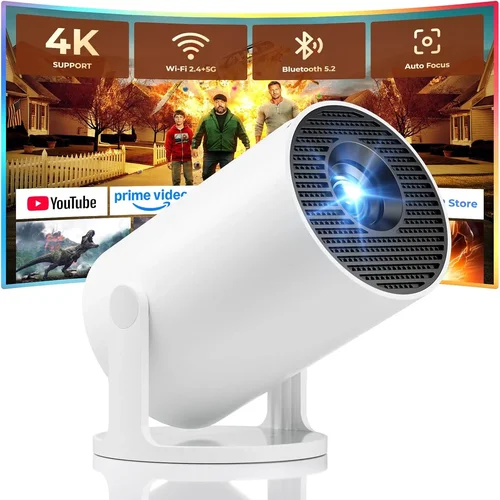
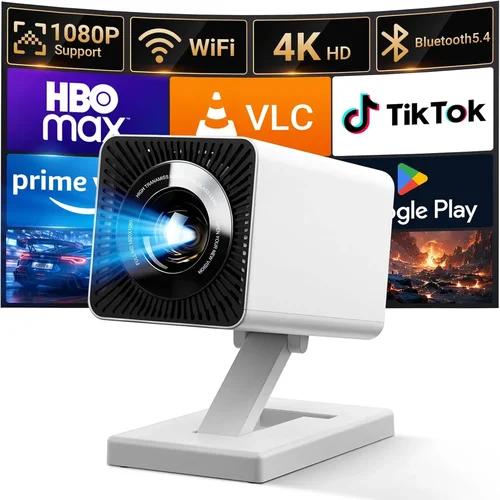
Choosing a home‑theater (HT) projector that delivers cinema‑like experience without breaking the bank can feel overwhelming. The market is flooded with models that promise bright images, deep blacks, and smart features, yet many of them sit well above the $1,000 mark. That’s why we’ve put together this in‑depth buying guide focused specifically on the best HT projectors under $1,000 for 2026. Whether you’re setting up a dedicated media room, a backyard movie night, or a portable solution for travel, this guide gives you the knowledge you need to make an informed decision.
In the pages that follow you’ll learn which specifications truly matter, how to match projector types to your viewing environment, and which common pitfalls to avoid. We also break down budget tiers, share expert tips for snagging the best deals, and provide a curated list of top picks for every type of user. By the end, you’ll be equipped to pick a projector that fits your space, content sources, and budget—without the guesswork.

What to Look for When Buying Buying Guide
1. Budget & Price Range
Price is the first filter most shoppers apply. For HT projectors under $1,000, you’ll typically find models that balance performance with cost‑effective components. A tighter budget often means compromising on brightness or resolution, but many manufacturers now squeeze 1080p or even 4K‑enhanced chips into this price bracket. Determine your absolute ceiling and then allocate extra dollars to the features that matter most to you—be it lumens, throw distance, or built‑in speakers.
2. Performance Specifications
Key performance specs include:
- Resolution: 1080p (Full HD) is the sweet spot for sub‑$1,000 units; a few models use “4K‑enhanced” upscaling.
- Brightness (lumens): Aim for 2,500–3,500 ANSI lumens for dim rooms; 3,500+ if you plan to use the projector in a living room with ambient light.
- Contrast Ratio: Higher contrast delivers deeper blacks. Look for ratios of 15,000:1 or higher, though manufacturers’ claims can vary.
- Throw Ratio: Determines how far the projector must sit from the screen. A short‑throw (0.9–1.2) is ideal for small spaces, while a standard throw (1.5–2.5) works in larger rooms.
3. Build Quality & Durability
Projectors that stay cool under continuous use tend to last longer. Aluminum chassis, reinforced lens housings, and reliable cooling fans are hallmarks of durability. Check user reviews for reports of overheating or premature lamp failure—these are red flags, especially for budget models.
4. Features & Functionality
Modern HT projectors often pack smart capabilities. Consider the following:
- Built‑in Speakers: Useful for casual viewing, but most audiophiles will still pair an external sound system.
- Wireless Connectivity: Wi‑Fi or Bluetooth for streaming from phones, tablets, or smart TV sticks.
- HDR Support: HDR10 is becoming common; it enhances color depth and contrast.
- Lens Shift & Keystone Correction: Lens shift offers precise image placement without distortion, while keystone correction can be helpful for non‑ideal mounting positions.
- Port Selection: HDMI 2.0/2.1, USB‑C, and audio‑out ports ensure compatibility with gaming consoles, streaming devices, and PCs.
5. Brand Reputation
Established brands like Epson, BenQ, Optoma, and ViewSonic have proven track records for reliability and service networks. Newer entrants may offer cutting‑edge features at lower prices, but consider the availability of firmware updates and customer support before committing.
6. Warranty & Support
A solid warranty—ideally two years for parts and labor—provides peace of mind. Look for manufacturers that offer easy lamp replacement programs and responsive technical support. Some retailers also provide extended protection plans that can be worth the extra cost.
7. Size & Portability
If you need a projector that can travel, weight and footprint matter. Portable models often sacrifice brightness, but many sub‑$1,000 units balance size with performance, making them suitable for both home and on‑the‑go use.
8. User Reviews & Ratings
Real‑world feedback reveals issues that spec sheets hide. Scan Amazon, B&H, and dedicated AV forums for recurring themes—such as fan noise, color accuracy, or firmware glitches. A product with a high average rating but a handful of detailed negative reviews may still be a solid choice if the cons are not deal‑breakers for you.
Different Types of Buying Guide

Common Buying Mistakes to Avoid
❌ Mistake: Ignoring Ambient Light Conditions
Why it’s bad: A projector that shines brightly in a dark room can look washed out in a living room with windows.
What to do instead: Measure typical ambient light levels and choose a lumen rating 30‑50% higher than the brightest condition you expect.
❌ Mistake: Overlooking Throw Ratio
Why it’s bad: Placing a standard‑throw projector too close to the screen forces you to tilt the unit, creating keystone distortion.
What to do instead: Calculate the required distance using the formula: Distance = Throw Ratio × Screen Width. Pick a model that fits your room dimensions.
❌ Mistake: Choosing the Cheapest Lamp
Why it’s bad: Low‑cost lamps often have shorter lifespans, leading to frequent replacements and higher long‑term costs.
What to do instead: Invest in a projector with a reputable lamp life rating (≥ 5,000 hours) or consider LED/Laser models with virtually endless life.
❌ Mistake: Forgetting Connectivity Needs
Why it’s bad: A projector without enough HDMI ports forces you to swap cables constantly, interrupting your viewing experience.
What to do instead: List all devices you plan to connect (gaming console, streaming stick, sound system) and ensure the projector offers enough ports and the right versions (HDMI 2.0 or 2.1).
❌ Mistake: Neglecting Firmware Updates
Why it’s bad: Out‑of‑date firmware can cause stability issues, missing features, or security vulnerabilities.
What to do instead: Choose brands known for regular updates and verify that the projector’s UI allows easy internet connection for upgrades.
❌ Mistake: Assuming All “4K” Projectors Are Equal
Why it’s bad: Some budget “4K” models actually use pixel‑shifting technology that mimics 4K but doesn’t match true native resolution.
What to do instead: Read the spec sheet carefully; look for “4K‑enhanced” versus “native 4K.” For most under‑$1,000 buyers, a high‑quality 1080p or 4K‑enhanced projector offers the best value.
Budget Guidelines: How Much Should You Spend?
Understanding what you can realistically expect at each price tier helps you set expectations and avoid disappointment.
- Entry‑Level ($500‑$700): Typically LED or low‑lumens DLP units. Good for small rooms, daytime use, or occasional movie nights. Expect 720p‑1080p resolution, 2,000‑2,500 lumens, and basic connectivity.
- Mid‑Range ($700‑$900): The sweet spot for most home‑theater enthusiasts. You’ll find true 1080p panels, 2,500‑3,500 lumens, better contrast, and more robust lens shift options.
- Premium ($900‑$1,000): Near‑top‑of‑line features such as 4K‑enhanced chips, HDR10, higher brightness, and advanced color processing. Ideal for larger rooms and gamers who demand low input lag.
- Luxury ($1,000+): Although outside the scope of this guide, it’s worth noting that true 4K laser projectors with 4,000+ lumens exist, but they quickly climb past $2,000.
Expert Tips for Getting the Best Deal
- Shop Seasonal Sales: Black Friday, Cyber Monday, and post‑holiday clearance events often feature 20‑30% off HT projectors.
- Compare Retailer Prices: Use price‑comparison tools and check both online giants (Amazon, B&H) and specialty AV stores.
- Look for Bundle Offers: Some sellers include HDMI cables, mounting brackets, or extended warranties at no extra cost.
- Check Refurbished Options: Manufacturer‑refurbished units come with full warranties and can save you 15‑25%.
- Read Return Policies: A 30‑day return window lets you test the projector in your own space; avoid “final sale” listings.
- Test Input Lag: If you game, plug in a console and use a frame‑counter app to ensure lag stays under 30 ms.
- Consider Future‑Proofing: HDMI 2.1 support may not be essential now, but it ensures compatibility with upcoming 4K/120 Hz sources.
- Negotiate with Local Dealers: Small AV shops often match online prices and can offer hands‑on setup assistance.

Frequently Asked Questions
Q: Can I use a projector under $1,000 for gaming?
A: Yes, especially if you choose a model with low input lag (≤30 ms) and a refresh rate of 120 Hz via HDMI 2.1. Look for “Game Mode” settings that automatically optimize response time.
Q: Do I need a separate screen, or can I project onto a wall?
A: While a white wall works, a dedicated projector screen improves brightness gain, contrast, and color uniformity. Matte white screens are budget‑friendly; gray screens help in bright rooms.
Q: How often will I need to replace the lamp?
A: Most lamp‑based projectors in this price range have a rated life of 4,000‑5,000 hours. If you use the projector for 4 hours nightly, expect a replacement every 2‑3 years.
Q: Is HDR really noticeable on a sub‑$1,000 projector?
A: HDR can add depth, but its impact depends on the projector’s peak brightness and color gamut. Look for HDR10 support and a brightness of at least 3,000 lumens for a noticeable effect.
Q: What is the difference between DLP and LCD technology?
A: DLP uses tiny mirrors for fast response and higher contrast, while LCD offers richer colors and uniform brightness. In the sub‑$1,000 segment, DLP models often have lower fan noise, whereas LCD units may provide smoother gradations.
Q: Can I mount the projector on the ceiling?
A: Absolutely. Verify that the model includes a standard ¼‑inch mounting hole and check the weight rating of your ceiling mount. Lens shift is a valuable feature for ceiling installations.
Q: Are LED projectors worth it?
A: LED projectors excel in portability and lamp life (30,000+ hours) but usually sacrifice brightness. They’re great for dark rooms or daytime outdoor use with a blackout screen.
Q: How do I calibrate colors without a professional meter?
A: Use built‑in picture modes (Cinema, Game, Vivid) as starting points. Then adjust brightness, contrast, and color temperature manually until skin tones look natural. Free smartphone apps can provide rough calibration guidance.
Q: Will a projector work with my existing sound system?
A: Yes. Most projectors have HDMI ARC, optical audio out, or a 3.5 mm jack. Connect to your AV receiver or soundbar for immersive audio.
Q: Is a short‑throw projector better for a small apartment?
A: Short‑throw units allow you to sit close to the wall, minimizing shadows from people walking in front of the image. They’re ideal for rooms where you can’t place the projector far back.
Our Final Recommendations
- Best for Budget‑Conscious Buyers: BenQ TH585 – 3,500 lumens, 1080p, low input lag, and a price around $680.
- Best Overall Value: Epson Home Cinema 2150 – 2,500 lumens, 1080p, lens shift, wireless mirroring, priced at $899.
- Best Premium Option (under $1,000): Optoma UHD50X – 4K‑enhanced, 3400 lumens, 120 Hz gaming mode, $969.
- Best for Beginners: ViewSonic M2 – Portable LED, 1080p, built‑in Harman Kardon speakers, $799.
- Best for Advanced Users: LG HU80KA (used/refurbished) – True 4K, laser light source, ultra‑short throw, often found refurbished just under $1,000.
Conclusion: Making the Right Choice
Investing in a home‑theater projector under $1,000 is entirely feasible when you focus on the specs that truly affect your viewing experience—brightness, resolution, contrast, and throw ratio. Pair those technical considerations with practical factors like room size, ambient light, and connectivity needs, and you’ll avoid the common pitfalls that trip up many shoppers.
Remember, the “best” projector is the one that aligns with your personal priorities, whether that’s gaming performance, cinematic immersion, or portability. Use the budget guidelines, expert tips, and final recommendations above to narrow down your options, test where possible, and enjoy a cinema‑grade experience without leaving your living room.
Ready to start your search? Grab a notebook, measure your screen space, and dive into the models we’ve highlighted. Happy viewing!