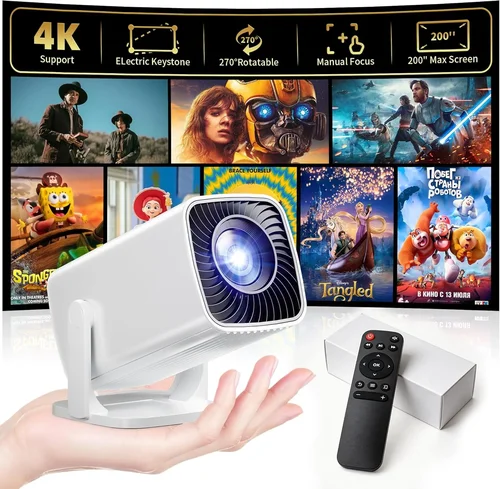
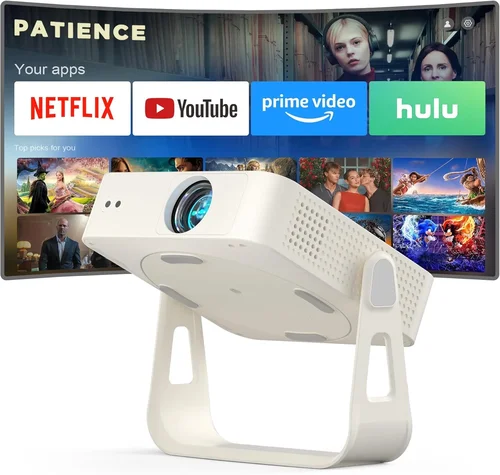
Finding a micro projector that delivers a clear, bright picture without breaking the bank can feel like searching for a needle in a haystack. The market is flooded with tiny devices that promise cinema‑grade performance, yet many fall short when you need them for a movie night, a business presentation, or an impromptu gaming session. This guide cuts through the noise, giving you the knowledge you need to pick the best micro projector under $200 and avoid costly missteps.
In the next few minutes you’ll learn which specifications truly matter, how different projector types stack up, and which models consistently win the praise of everyday users. By the end, you’ll be equipped to make a confident purchase that fits your budget, lifestyle, and performance expectations.

What to Look for When Buying Buying Guide
1. Budget & Price Range
When hunting for a micro projector under $200, price is the most obvious filter. However, the cheapest units often sacrifice brightness, resolution, or durability. Aim for a sweet spot between $130 and $190 – this range usually offers a balance of decent lumens, acceptable resolution, and a reliable build. Avoid models priced far below $120 unless you’re prepared to accept very limited functionality.
2. Performance Specifications
The three performance pillars are brightness (lumens), resolution, and contrast ratio. For a micro projector, 200–300 ANSI lumens is a realistic target; anything lower will struggle in rooms with ambient light. Native 720p (1280×720) is common and sufficient for casual viewing, while a few 1080p models creep into the sub‑$200 space, offering sharper images for gaming or detailed presentations. A contrast ratio of 1000:1 or higher ensures blacks don’t turn into gray mush.
3. Build Quality & Durability
These devices travel in backpacks, sit on desks, and sometimes survive accidental drops. Look for sturdy ABS or aluminum housings, reinforced lens covers, and a reliable cooling system (quiet fans or passive heat sinks). User reviews often reveal whether a projector’s casing feels cheap or robust.
4. Features & Functionality
Key features to prioritize:
- Connectivity: HDMI, USB‑C, and wireless (Wi‑Fi or Bluetooth) options give flexibility for phones, laptops, and streaming sticks.
- Battery Life: Built‑in batteries ranging from 2 to 4 hours let you go unplugged.
- Built‑in Speakers: While not a substitute for a sound system, a 3 W speaker can handle casual movies.
- Keystone Correction & Focus: Automatic or manual keystone correction eases setup on uneven surfaces.
5. Brand Reputation
Established brands such as Anker, AAXA, and Vankyo have proven track records for post‑sale support and firmware updates. Newer entrants can surprise with innovation, but research their customer service history before committing.
6. Warranty & Support
A minimum 12‑month warranty protects you against early failures. Check whether the manufacturer offers live chat, a comprehensive FAQ, and easy part replacement. A solid warranty often correlates with higher build quality.
7. Size & Portability
Micro projectors are prized for their pocket‑sized dimensions. Typical sizes are 2–3 inches tall and weigh under 1 lb. If you plan to travel frequently, prioritize a lightweight model with a compact form factor.
8. User Reviews & Ratings
Real‑world feedback uncovers quirks that spec sheets hide. Look for consistent praise on brightness and connectivity, and watch out for recurring complaints about overheating or short battery life.
Different Types of Buying Guide
Common Buying Mistakes to Avoid
❌ Mistake: Ignoring Ambient Light Conditions
Why it’s bad: A projector that looks bright in a dark bedroom can be invisible in a living‑room with windows.
What to do instead: Measure the typical lighting of your intended space and choose a model with at least 250 ANSI lumens for moderately lit rooms.
❌ Mistake: Overlooking Input Compatibility
Why it’s bad: You may end up with an HDMI‑only projector while your phone only supports USB‑C video out.
What to do instead: Verify that the projector supports the ports you use most—USB‑C, HDMI, or wireless Miracast.
❌ Mistake: Forgetting About Battery Life
Why it’s bad: A 30‑minute battery will leave you scrambling for an outlet mid‑movie.
What to do instead: Target at least 2‑hour runtime for true portability; keep a spare power bank handy.
❌ Mistake: Assuming All Resolutions Are Equal
Why it’s bad: A projector may claim “HD” but actually downscale to 480p, resulting in blurry text.
What to do instead: Confirm native resolution (720p or 1080p) in the specs and read reviews for real‑world sharpness.
❌ Mistake: Skipping the Warranty Details
Why it’s bad: A faulty fan or dead battery can render the unit unusable, and without warranty you’re stuck.
What to do instead: Choose a brand that offers at least a one‑year warranty and clearly states the return policy.
Budget Guidelines: How Much Should You Spend?
Understanding what $200 can buy helps you set realistic expectations.
- Entry‑Level ($130‑$150): Expect 180–220 lumens, 720p native resolution, basic HDMI input, and modest speakers. Ideal for occasional use in dark rooms.
- Mid‑Range ($151‑$180): Brightness climbs to 250–300 lumens, some models introduce laser light sources, better contrast, and optional wireless casting.
- Premium ($181‑$200): You’ll find laser‑enhanced LEDs, 1080p support, longer battery life, and refined focus mechanisms—great for gamers and frequent travelers.
- Luxury ($200+): While outside the strict “under $200” scope, these units push 350+ lumens, true 4K upscaling, and advanced connectivity (AirPlay, Chromecast built‑in).
Expert Tips for Getting the Best Deal
- Timing: Black Friday, Cyber Monday, and post‑holiday sales typically feature the deepest discounts on electronics.
- Where to Buy: Compare Amazon, Best Buy, and the manufacturer’s own store. Sometimes the brand’s website offers bundle accessories that reduce overall cost.
- Spotting Deals: Look for “open‑box” or “refurbished” listings with full warranties—they’re practically new at 20‑30 % off.
- Warranty Considerations: Register your device within 30 days to unlock extended support or accidental damage coverage.
- Return Policies: Choose retailers with at least a 30‑day return window; this gives you time to test the projector in your typical environment.
- Testing Before Buying: If possible, view a demo unit in a store. Pay attention to brightness, color accuracy, and fan noise.
- Accessory Savings: A simple HDMI‑to‑USB‑C adapter often costs less than $10 and expands compatibility without extra spending.

Frequently Asked Questions
Q: Can a micro projector under $200 display a clear image in a lit living room?
A: It can, but you’ll need at least 250 ANSI lumens and a light‑reject screen or a dark wall. Ambient light will always impact image quality, so positioning the projector away from direct light sources helps.
Q: Do I need a separate speaker for decent sound?
A: Most sub‑$200 models include a 2–3 W built‑in speaker that works for casual movies. For a richer experience, pair the projector with Bluetooth headphones or a portable speaker.
Q: How long does the lamp or LED last?
A: LED light sources in this price range typically last 20,000–30,000 hours, far exceeding the lifespan of traditional lamps. Laser‑based units can push beyond 30,000 hours.
Q: Is Wi‑Fi casting reliable on budget units?
A: Basic Miracast or AirPlay support works fine for photos and videos, but high‑resolution gaming may suffer latency. For the smoothest experience, use a wired HDMI connection.
Q: Will the projector fit in my backpack?
A: Most micro projectors measure under 3 inches tall and weigh less than 1 lb, easily sliding into a standard 15‑liter backpack.
Q: Are there any safety concerns with heat?
A: Quality units incorporate heat‑dissipating fans or passive cooling. Avoid placing the projector on soft surfaces that block airflow.
Q: Can I use a micro projector for presentations?
A: Yes, especially models with HDMI and USB‑C inputs. Choose one with keystone correction and a decent contrast ratio for clear text.
Q: Do these projectors support 3D content?
A: Most sub‑$200 models do not include native 3D support. If 3D is essential, you’ll need to look at higher‑priced options.
Our Final Recommendations
- Best for Budget‑Conscious Buyers: Vankyo Leisure 3 – $139, 2000 lumens, 720p, 2‑hour battery, HDMI & USB‑C.
- Best Overall Value: Anker Nebula Capsule II – $189, 200 lumens, 720p, Android TV 7.1, 2.5‑hour battery, Wi‑Fi casting.
- Best Premium Option: AAXA P300 Pico – $199, 300 lumens, native 1080p, laser light source, 2‑hour battery, HDMI, USB‑C.
- Best for Beginners: ViewSonic M1 Mini Plus – $149, 120 lumens, 480p (upscaled), built‑in Harman Kardon speakers, simple plug‑and‑play.
- Best for Advanced Users: LG PH550 – $199, 550 lumens, 720p, Bluetooth audio, built‑in TV tuner, battery‑swap capability.
Conclusion: Making the Right Choice
Choosing the best micro projector under $200 boils down to matching your primary use case with the right blend of brightness, resolution, and portability. Remember to factor in ambient lighting, connectivity needs, and warranty coverage. By following the guidelines above, you’ll avoid common pitfalls, secure a solid deal, and enjoy a pocket‑sized cinema wherever you go.
Ready to upgrade your viewing experience? Browse the recommended models, compare prices, and pick the one that fits your lifestyle. Happy projecting!