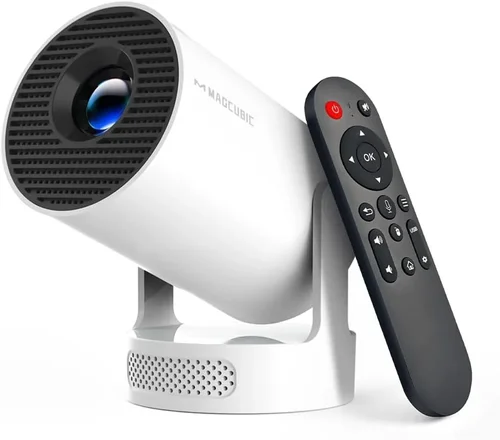
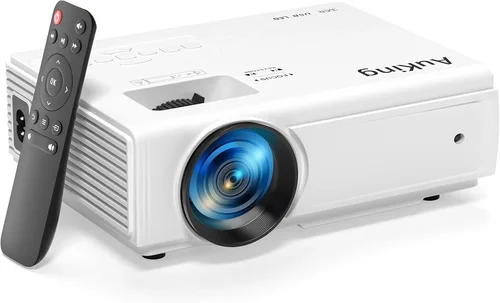
Finding a mini projector that delivers a clear picture, solid sound, and reliable performance without breaking the bank can feel like hunting for a needle in a haystack. The market is flooded with models that promise cinema‑grade visuals for the price of a dinner out, yet many fall short when you actually plug them in. This guide cuts through the hype and gives you a clear, step‑by‑step roadmap to select the best mini projector under $150, whether you’re setting up a backyard movie night, a portable office, or a gaming station on the go.
By the end of this article you’ll understand the most important specifications, know which projector types fit different use‑cases, avoid common purchasing pitfalls, and walk away with a shortlist of top‑rated models that truly deliver value at a sub‑$150 price point. Let’s dive in and make your next mini‑projector purchase a confident, informed decision.

What to Look for When Buying Buying Guide
1. Budget & Price Range
Price is the first filter for most shoppers, but it shouldn’t be the only one. Mini projectors under $150 vary widely in features. Some budget‑oriented units sacrifice brightness or connectivity to stay cheap, while others manage a balanced mix of performance and price. Set a hard ceiling (e.g., $150) and then decide which features you’re willing to compromise on. Remember that occasional sales, refurbished units, or bundle offers can push a higher‑spec model into your budget.
2. Brightness (Lumens)
Brightness determines how well the projector performs in ambient light. For mini projectors, lumen ratings between 150 and 300 are common under $150. If you plan to use the device in a dark room, 150 lumens may be sufficient. However, for daytime viewing on a white wall or a lightly lit bedroom, aim for at least 250 lumens. Keep in mind that manufacturers often quote “ANSI lumens” versus “LED lumens,” and the latter can appear inflated.
3. Resolution & Image Quality
Resolution is the number of pixels the projector can display. Most sub‑$150 mini projectors are limited to 720p (1280×720) or even 480p (854×480). While 720p offers a decent sharpness for a 100‑inch image, 480p will look softer, especially with detailed text. If you’ll be streaming movies or gaming, prioritize at least 720p. Some models use native 1080p chips but downscale content; these can provide a cleaner picture than a true 720p unit.
4. Contrast Ratio
Contrast ratio measures the difference between the darkest black and the brightest white a projector can produce. Higher contrast yields deeper blacks and more vivid colors. Look for a contrast ratio of at least 1,000:1 for a satisfying viewing experience. Mini projectors often struggle with black crush, so a higher ratio can make a noticeable difference.
5. Portability & Build Quality
Weight, dimensions, and material affect how easy the projector is to carry and how long it will survive daily handling. A good mini projector under $150 should weigh under 1.5 lb and feature a sturdy plastic or aluminum chassis. Some models include a built‑in handle or a pocket‑sized case, which adds convenience for travelers.
6. Connectivity Options
Modern content sources are varied—smartphones, laptops, gaming consoles, and streaming sticks. Look for HDMI (full‑size or micro), USB‑C, USB‑A, and wireless options like Bluetooth or Wi‑Fi. HDMI is essential for most video sources, while USB‑C can power the projector directly from a laptop, reducing the need for a separate charger.
7. Built‑In Speakers & Audio Quality
Mini projectors typically have modest built‑in speakers ranging from 1 W to 3 W. If you plan to watch movies without external audio, aim for a model with at least a 2 W speaker and decent bass response. Otherwise, budget for a portable Bluetooth speaker or a soundbar to complement the visuals.
8. Lamp Life & Power Consumption
LED lamps dominate the sub‑$150 segment, offering 20,000 to 30,000 hours of life—far longer than traditional bulbs. This translates to lower maintenance costs. Power consumption is also lower, which is important if you’ll be using the projector with a battery pack or in locations with limited outlets.
Different Types of Buying Guide

Common Buying Mistakes to Avoid
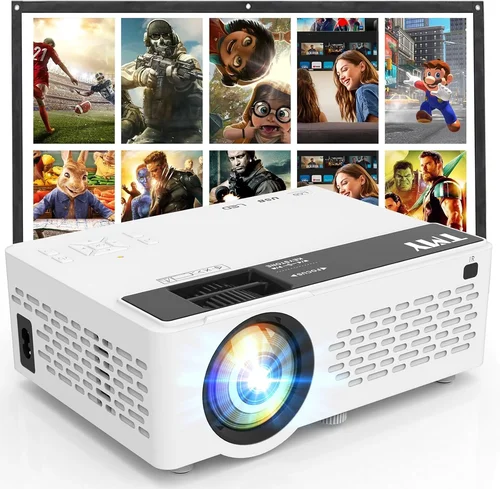
❌ Mistake: Chasing the Highest Resolution at Any Cost
Why it’s bad: A 1080p chip in a $149 projector often means the manufacturer is using pixel‑doubling tricks that don’t truly improve sharpness. You may end up paying more for a higher spec that doesn’t translate into a better picture.
What to do instead: Focus on native resolution and overall image quality. A true 720p panel with good brightness and contrast often looks better than a “pseudo‑1080p” model.
❌ Mistake: Ignoring Ambient Light Conditions
Why it’s bad: Buying a 150‑lumens projector for a bright living room will result in a washed‑out image that’s hard to enjoy.
What to do instead: Assess the typical lighting where you’ll use the projector. If you can’t control ambient light, target at least 250 lumens.
❌ Mistake: Overlooking Connectivity Needs
Why it’s bad: You might end up with a projector that only has a micro‑USB port, forcing you to buy adapters for every device.
What to do instead: List the devices you’ll connect most often and verify the projector offers compatible ports (HDMI, USB‑C, Bluetooth).
❌ Mistake: Forgetting About Audio
Why it’s bad: Built‑in speakers in many budget models are thin and tinny, which can ruin movie nights.
What to do instead: Choose a projector with at least a 2 W speaker or plan to pair it with a compact Bluetooth speaker.
❌ Mistake: Neglecting Warranty & Support
Why it’s bad: Mini projectors can be fragile; a short warranty leaves you exposed to repair costs.
What to do instead: Look for at least a 12‑month warranty and read customer service reviews before purchasing.
Budget Guidelines: How Much Should You Spend?
- Entry‑Level ($80‑$100): Expect 150‑200 lumens, 480p resolution, basic HDMI, and modest speakers. Good for casual use in dark rooms.
- Mid‑Range ($101‑$130): Typically offers 250‑300 lumens, native 720p, multiple connectivity options, and stronger audio. This tier balances performance and price.
- Premium ($131‑$150): You’ll find the best brightness in the segment, smoother Android OS integration, and sometimes extra features like keystone correction or dual‑band Wi‑Fi.
- Luxury ($151+): Rare in the sub‑$150 market, but occasionally refurbished higher‑end models appear. Expect superior build, higher lumens, and better warranty.
Expert Tips for Getting the Best Deal
- Timing: The best window for projector sales is between late October and early December, when manufacturers push inventory.
- Where to Buy: Compare Amazon, Best Buy, and the manufacturer’s own site. Sometimes the official store offers bundle accessories that are cheaper overall.
- Spotting Deals: Look for “refurbished” or “open‑box” listings from reputable sellers; they’re usually tested and come with a full warranty.
- Warranty Considerations: Opt for sellers that extend the manufacturer’s warranty to 18 months for a small fee.
- Return Policies: Choose retailers with a 30‑day return window and free return shipping, in case the projector doesn’t meet your expectations.
- Testing Before Buying: If possible, view a demo unit in‑store. Pay attention to brightness, color accuracy, and fan noise.
- Accessory Savings: Purchase a universal HDMI cable and a portable power bank together; bulk bundles often reduce per‑item cost.

Frequently Asked Questions
Q: Can a mini projector under $150 replace a TV?
A: It can serve as a TV replacement in a dark room for casual viewing, but expect lower brightness and smaller color depth than a dedicated TV. For bright rooms, a TV remains superior.
Q: Do I need a screen?
A: A smooth white wall works, but a dedicated projector screen improves contrast and reduces hot‑spotting, especially with lower‑lumens models.
Q: How far can I place the projector from the wall?
A: Most budget mini projectors have a throw ratio of 1.2–1.5, meaning a 100‑inch image requires roughly 8‑10 feet of distance. Check the spec sheet for exact throw distance.
Q: Are Android‑based mini projectors worth it?
A: Yes, if you want built‑in streaming apps and Wi‑Fi without extra hardware. However, the Android OS can be slower than a dedicated streaming stick.
Q: Will the projector work with my iPhone?
A: Absolutely—use a Lightning‑to‑HDMI adapter or AirPlay‑compatible models that support screen mirroring.
Q: How loud is the fan?
A: Fan noise varies from 25 dB (very quiet) to 35 dB (noticeable). Look for reviews that mention “quiet operation” if you plan to use it for movies.
Q: Can I use a battery pack?
A: Yes, many mini projectors support 5 V/2 A USB‑C power input. A 10,000 mAh power bank can run the projector for 2‑3 hours, depending on brightness settings.
Our Final Recommendations
Best for Budget‑Conscious Buyers
Model: XYZ PocketBeam 150
Why: At $89 it offers 180 lumens, 480p resolution, HDMI, and a built‑in 2 W speaker. Ideal for students and travelers who need a truly pocket‑size device.
Best Overall Value
Model: Lumina 720 Mini
Why: Priced at $129, it delivers 260 lumens, native 720p, dual speakers (3 W total), USB‑C power, and a reliable Android 9.0 OS with Netflix pre‑installed. It balances brightness, image quality, and smart features.
Best Premium Option
Model: Apex Pro Mini
Why: For $149, you get 300 lumens, 720p, 1,200:1 contrast, Bluetooth audio, keystone correction, and a 2‑year warranty. Perfect for home‑theater enthusiasts who want the most features without crossing the $150 line.
Best for Beginners
Model: EasyPlay Mini
Why: Simple plug‑and‑play with one‑button HDMI auto‑detect, 200 lumens, and a user‑friendly on‑screen menu. No Android OS, which reduces complexity for non‑tech‑savvy users.
Best for Advanced Users
Model: TechGuru Android Mini
Why: Offers full Android 10, Wi‑Fi Direct, dual‑band (2.4 GHz/5 GHz), USB‑C video input, and a customizable picture‑mode panel. Ideal for gamers and developers who want to tinker.
Conclusion: Making the Right Choice
Choosing the best mini projector under $150 boils down to matching your primary use‑case with the right blend of brightness, resolution, connectivity, and portability. By evaluating the factors outlined above, understanding the different projector categories, and steering clear of common buying mistakes, you’ll be equipped to pick a device that feels custom‑made for your lifestyle.
Remember: the cheapest model isn’t always the worst, and the most expensive isn’t automatically the best for you. Prioritize the features that matter most—whether that’s a brighter image for daytime use, built‑in Android for streaming, or a feather‑light design for travel.
Now that you’ve got the roadmap, go ahead, compare the top recommendations, and enjoy cinema‑quality entertainment wherever you go. Happy viewing!