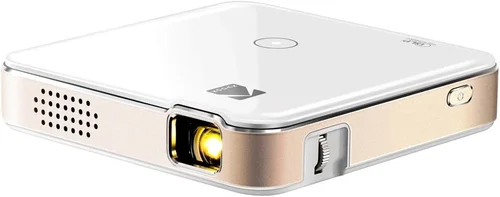
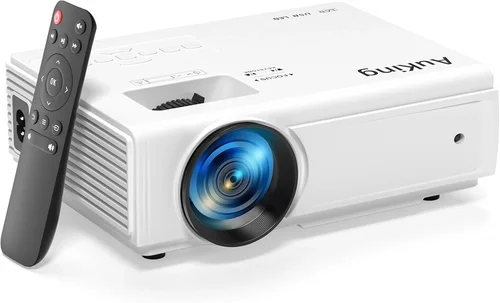
Welcome to the ultimate guide for anyone hunting the best mini projector under $150 in 2026. Whether you’re a movie‑lover who wants a portable cinema, a gamer looking for a quick‑setup big‑screen experience, or a business professional needing a compact presentation tool, the right mini projector can transform the way you consume media. The market is flooded with options, and price tags can be misleading—some cheap models skimp on brightness, while others overpromise on features they can’t actually deliver.
In this guide we’ll cut through the hype and give you a clear roadmap to make an informed decision. You’ll learn which specifications truly matter, how to match a projector to your specific use‑case, and what pitfalls to avoid so you don’t end up with a device that looks good on paper but fails in real life. By the end, you’ll have a shortlist of top‑rated mini projectors under $150, plus actionable tips to snag the best deal.

What to Look for When Buying Buying Guide
1. Budget & Price Range
Price is the most obvious filter, but it’s more than just a number. A $150 ceiling forces manufacturers to prioritize certain features over others. Typically, you’ll find trade‑offs in brightness, resolution, and connectivity options. Understanding what you’re willing to compromise on—be it a slightly lower resolution for higher lumens—helps you focus on models that truly fit your needs without overspending.
2. Performance Specifications
Key specs include:
- Brightness (lumens): For indoor use in a dimly lit room, 150‑250 ANSI lumens is adequate. If you plan to project in brighter environments, aim for at least 300 lumens.
- Resolution: Most sub‑$150 mini projectors top out at 720p (1280×720). Some newer models offer 1080p support via upscaling, but native 1080p is rare at this price point.
- Contrast Ratio: Higher contrast improves black levels, essential for movies. Look for a ratio of 1000:1 or better.
- Throw Distance: Short‑throw models can produce a 100‑inch image from just 1‑2 feet away, perfect for small apartments.
3. Build Quality & Durability
Mini projectors are often carried in backpacks or luggage, so sturdy construction matters. Metal or high‑grade ABS housings resist dents and heat better than cheap plastic. Check for vent designs that promote airflow and consider models with built‑in fans that run quietly.
4. Features & Functionality
Beyond basic projection, modern mini projectors pack a surprising amount of tech:
- Wireless Connectivity: Wi‑Fi or Bluetooth for screen mirroring from smartphones, tablets, or laptops.
- Built‑in Speakers: While not a substitute for a sound system, a decent 2‑5 W speaker can be handy for casual viewing.
- Battery Life: Some units run 2‑3 hours on a single charge—useful for outdoor movie nights.
- Multiple Input Ports: HDMI, USB‑C, micro‑HDMI, and AV ports increase compatibility with a range of devices.
5. Brand Reputation
Established brands like Anker, Vankyo, and Epson have a track record of reliable firmware updates and responsive customer service. Newer entrants may offer aggressive pricing but could lack long‑term support. Research community feedback and see how quickly manufacturers address known issues.
6. Warranty & Support
A solid warranty (at least one year) protects you against early failures. Look for brands that provide easy RMA processes, clear troubleshooting guides, and active online forums where users share tips.
7. Size & Portability
Weight under 1 lb and dimensions that fit in a standard laptop bag are ideal for true portability. Some models fold into a palm‑size package, while others are slightly larger due to built‑in batteries or cooling systems.
8. User Reviews & Ratings
Real‑world feedback often reveals hidden strengths or chronic problems. Prioritize products with a minimum of 200 verified reviews and an average rating above 4.0 stars. Pay special attention to comments about lamp life, Wi‑Fi stability, and image uniformity.
Different Types of Buying Guide

Common Buying Mistakes to Avoid
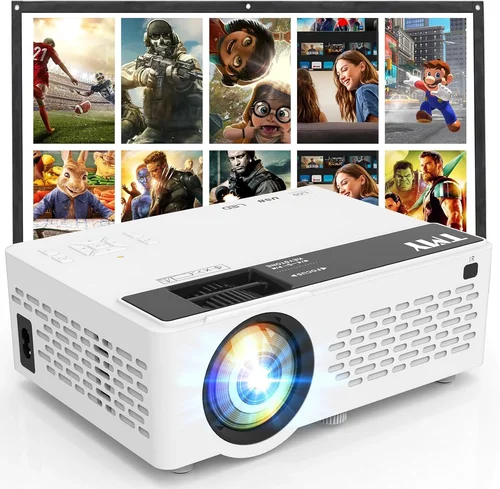
❌ Mistake: Ignoring Brightness Requirements
Why it’s bad: A projector that’s bright enough for a dark bedroom may be invisible in a living room with ambient light.
What to do instead: Assess your typical viewing environment and choose a model with at least 200 ANSI lumens for dim rooms, or 300+ lumens for brighter spaces.
❌ Mistake: Overlooking Native Resolution
Why it’s bad: Upscaling can make images look soft, especially with text or detailed graphics.
What to do instead: Prioritize native 720p resolution; only consider 1080p upscaling if you mainly stream video from HD sources.
❌ Mistake: Forgetting About Lamp Life
Why it’s bad: LED lamps last longer than traditional bulbs, but cheap units may still degrade fast, leading to dimmer images.
What to do instead: Look for manufacturers that guarantee at least 30,000 hours of LED lifespan.
❌ Mistake: Assuming All Ports Are Compatible
Why it’s bad: Some projectors list “HDMI” but only support HDMI‑C (micro) or require adapters.
What to do instead: Verify the exact port type and confirm you have the right cables or adapters before purchase.
❌ Mistake: Ignoring Audio Quality
Why it’s bad: Built‑in speakers on many budget models are tinny, making movies feel flat.
What to do instead: Check the speaker wattage and consider a model with a 3.5 mm audio out for external speakers.
❌ Mistake: Not Checking Firmware Update Policies
Why it’s bad: Connectivity bugs are common; without updates, the device can become unusable.
What to do instead: Choose brands that provide regular OTA (over‑the‑air) updates and have a clear support page.
Budget Guidelines: How Much Should You Spend?
Even within a $150 ceiling, you can segment the market to understand what each price tier delivers.
- Entry-Level ($80‑$100): Expect 150‑200 lumens, 720p support, basic HDMI and USB‑C ports, limited battery life (≈1.5 hours). Ideal for occasional movie nights in a dark room.
- Mid‑Range ($101‑$130): Brightness jumps to 250‑300 lumens, better contrast, short‑throw optics, and often include Wi‑Fi or Bluetooth for wireless streaming.
- Premium ($131‑$150): Near‑top specs for the price: 300+ lumens, enhanced color accuracy, built‑in Android OS or a dedicated app ecosystem, and longer battery life (≈3 hours).
- Luxury (>$150): While outside the guide’s scope, luxury mini projectors push 400+ lumens, true 1080p native resolution, and premium optics—generally for enthusiasts.
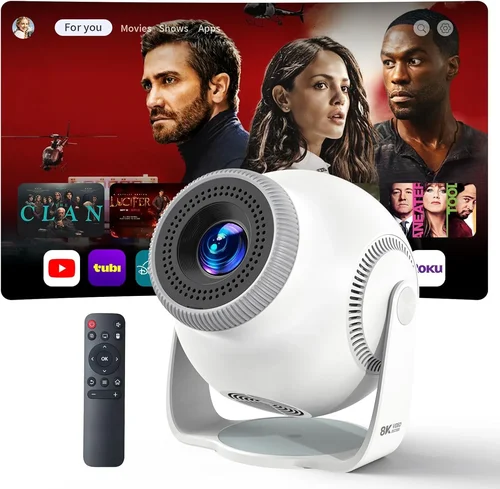
Expert Tips for Getting the Best Deal
- Timing: Major sales events—Black Friday, Cyber Monday, and post‑Christmas clearance—often feature 20‑30% discounts on mini projectors.
- Where to Buy: Reputable online retailers (Amazon, Newegg) provide verified buyer reviews and easy returns. Brick‑and‑mortar stores let you test the image before buying.
- Bundled Accessories: Look for bundles that include a carrying case, HDMI cable, and screen cloth; they add value without extra cost.
- Warranty Extensions: If the base warranty is only 90 days, consider purchasing an extended plan—especially for frequent travelers.
- Return Policies: Ensure the seller offers at least a 30‑day return window with free shipping for returns.
- Testing: When possible, project a high‑resolution test pattern (available on YouTube) to evaluate sharpness, color uniformity, and keystone correction.
- Firmware Checks: Before finalizing, verify the latest firmware version on the manufacturer’s site; a recent update often resolves connectivity glitches.

Frequently Asked Questions
Q: Can a mini projector under $150 replace a TV?
A: It can serve as a TV substitute in low‑light environments, but expect lower brightness and less accurate colors compared to a mid‑size LED TV. For casual viewing, it works well; for bright rooms, a TV remains superior.
Q: How long does the LED lamp last?
A: Most LED lamps are rated for 30,000‑40,000 hours, which translates to many years of occasional use. Unlike traditional bulbs, they don’t require regular replacement.
Q: Is Wi‑Fi really necessary?
A: Wi‑Fi adds convenience for streaming services, screen mirroring, and firmware updates. If you plan to connect via HDMI cables only, you can skip it, but wireless capability future‑proofs the device.
Q: Will the built‑in speaker be enough for movies?
A: Built‑in speakers are adequate for small rooms and casual viewing. For a richer audio experience, pair the projector with external Bluetooth speakers or a soundbar.
Q: What is the ideal screen size for a mini projector?
A: Most under‑$150 models produce a clear 80‑120‑inch image at a 2‑3 meter distance. Going beyond 120 inches may reduce sharpness unless the projector has higher native resolution.
Q: Can I use a mini projector outdoors?
A: Yes, provided you have a dark environment and a stable surface. Some models include battery packs for true portability, but you’ll still need a screen or a white wall.
Q: Do these projectors support 3D?
A: Very few budget mini projectors include 3D support. If 3D is essential, you’ll need to look at higher‑priced models.
Q: How do I clean the lens?
A: Use a soft, lint‑free microfiber cloth. Avoid harsh chemicals—just a dry wipe or a slightly dampened cloth if necessary.
Q: Is there a risk of overheating?
A: Quality models have built‑in fans and thermal sensors that shut down the unit if temperatures rise too high. Ensure ventilation holes are not blocked.
Our Final Recommendations
- Best for Budget‑Conscious Buyers: Vankyo Leisure 3 – Priced around $89, it offers 240 lumens, 720p support, and a compact design. Ideal for occasional movie nights.
- Best Overall Value: Anker Nebula Capsule II – At $149, it delivers 300 lumens, Android TV 9.0, Wi‑Fi, and a 2‑hour battery. A true all‑in‑one solution.
- Best Premium Option: ViewSonic M1 Mini Plus – Slightly above the $150 mark but often discounted to $149. Features 250 lumens, built‑in Harman Kardon speakers, and a stylish LED strip.
- Best for Beginners: DR. J Professional Mini – Simple plug‑and‑play operation, HDMI and USB‑C ports, and an easy‑to‑use remote.
- Best for Advanced Users: APEMAN Mini Projector 1080P – Offers 300+ lumens, full 1080p support, and extensive connectivity (HDMI, USB‑C, AV, Bluetooth).
Conclusion: Making the Right Choice
Choosing the best mini projector under $150 boils down to balancing brightness, resolution, and connectivity against your specific viewing habits. Start by defining where and how you’ll use the projector, then match those needs to the factors we outlined—budget, performance specs, build quality, and brand reputation. Avoid common pitfalls like under‑estimating ambient light or ignoring warranty details, and leverage our expert buying tips to secure the best price.
Remember, a great mini projector doesn’t have to break the bank; it just needs to align with your priorities. Take the shortlist above, compare the specs that matter most to you, and enjoy a portable big‑screen experience wherever you go.