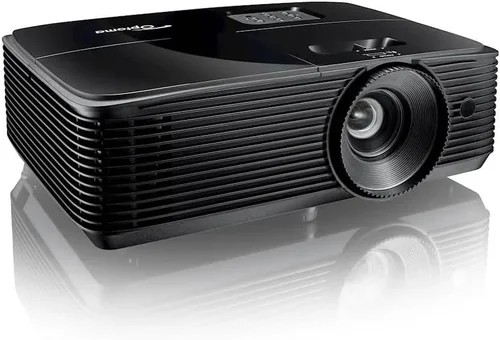
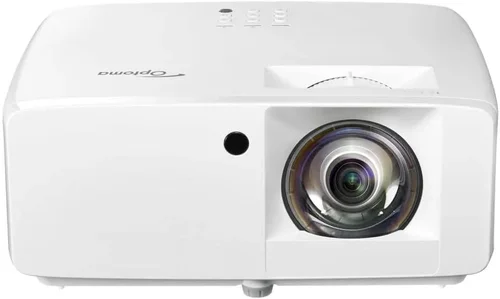
Choosing the right projector can feel like navigating a maze of specs, brand promises, and price tags. With the surge of home‑theater setups, gaming rigs, and portable office solutions, the market is flooded with options that can overwhelm even seasoned tech enthusiasts. This guide cuts through the noise, focusing specifically on Optoma projectors that sit comfortably under $1,000—a sweet spot where performance meets affordability.
By the end of this article you will know exactly which factors matter most, how different Optoma models stack up against each other, and which unit will give you the best bang for your buck in 2026. Whether you are setting up a dedicated home cinema, a multi‑purpose gaming room, or a portable presentation tool, the insights here will help you make a confident, informed purchase.

What to Look for When Buying Buying Guide
1. Budget & Price Range
Price is often the first filter shoppers apply. Optoma offers a diverse lineup under $1,000, but not all units deliver equal value. A lower price usually means compromises in brightness, contrast, or connectivity. Identify your absolute ceiling and then allocate the remaining budget toward the features that matter most to you—be it 4K resolution, low input lag, or a long lamp life.
2. Performance Specifications
Key performance metrics include lumens, contrast ratio, native resolution, and refresh rate. For a bright living‑room with ambient light, aim for at least 3,000 ANSI lumens. If you plan to use the projector in a dark home‑theater, a higher contrast ratio (30,000:1 or more) will deliver deeper blacks. Native resolution determines crispness; under $1,000 Optoma’s most common offerings are 1080p (Full HD) and a handful of 4K UHD models that use pixel‑shifting technology.
3. Build Quality & Durability
Optoma projectors are known for robust chassis and reliable cooling systems. Look for metal housings, sealed optics, and a reputable lamp life (typically 5,000–10,000 hours). A longer lamp life reduces long‑term operating costs, especially if you plan to use the projector frequently.
4. Features & Functionality
Modern projectors come packed with extras: wireless screen mirroring, built‑in speakers, lens shift, keystone correction, and multiple HDMI ports. If you intend to stream directly from a phone or tablet, prioritize models with Wi‑Fi or Bluetooth. For gamers, low input lag (under 20 ms) and support for high refresh rates (120 Hz) are essential.
5. Brand Reputation
Optoma has built a solid reputation for balancing price and performance. Their projectors are widely used in classrooms, small‑venue cinemas, and home setups. Checking community forums, professional reviews, and Optoma’s own warranty policies can give you confidence that you’re buying a reliable product.
6. Warranty & Support
A solid warranty can save you from unexpected repair costs. Optoma typically offers a 2‑year limited warranty, with options to extend for an additional fee. Verify the coverage details—does it include the lamp, power supply, or accidental damage? Also, assess the availability of local service centers or authorized repair shops.
7. Size & Portability
While many users keep a projector permanently mounted, others need a portable device for on‑the‑go presentations or backyard movie nights. Weight, dimensions, and the presence of a built‑in speaker system become crucial for mobile use. Optoma’s “mini” series often weighs under 2 kg and includes a compact carry case.
8. User Reviews & Ratings
Real‑world feedback can reveal issues that spec sheets hide. Look for patterns in reviews—consistent complaints about fan noise, remote reliability, or software glitches should raise red flags. Conversely, praise for consistent color accuracy and easy setup often indicates a well‑engineered product.
Different Types of Buying Guide

Common Buying Mistakes to Avoid
❌ Mistake: Ignoring Ambient Light Conditions
Why it’s bad: Choosing a dim projector for a bright living room leads to washed‑out images and frustration.
What to do instead: Measure the typical light level in your room. If you cannot darken the space, target a projector with 3,000 lumens or more.
❌ Mistake: Overlooking Lamp Life
Why it’s bad: Replacing a lamp can cost $150‑$250, quickly adding to total ownership cost.
What to do instead: Prioritize models that advertise ≥7,000‑hour lamp life or consider laser‑phosphor units, which have even longer lifespans.
❌ Mistake: Forgetting Input Lag for Gaming
Why it’s bad: High input lag creates a noticeable delay between controller actions and on‑screen response, ruining fast‑paced games.
What to do instead: Look for a projector that lists input lag under 20 ms in Game Mode. Optoma’s “UHD30” series, for example, hits 15 ms.
❌ Mistake: Assuming All HDMI Ports Are Equal
Why it’s bad: Some HDMI ports only support 1080p, limiting 4K or HDR content.
What to do instead: Verify that at least one HDMI port is HDMI 2.0 or higher and supports HDR10/HLG.
❌ Mistake: Neglecting Throw Distance
Why it’s bad: A projector with a long throw ratio may not fit in a small room, forcing you to sit far away.
What to do instead: Calculate the required throw distance (screen width ÷ throw ratio). Choose a short‑throw or ultra‑short‑throw model if space is limited.
❌ Mistake: Skipping Firmware Updates
Why it’s bad: Out‑of‑date firmware can cause compatibility issues with new streaming devices.
What to do instead: Check Optoma’s support site for the latest firmware and follow the update instructions before first use.
Budget Guidelines: How Much Should You Spend?
- Entry‑Level ($500‑$700): Expect 1080p resolution, 2,500‑3,000 lumens, basic connectivity (HDMI, VGA). Ideal for occasional movie nights or small conference rooms.
- Mid‑Range ($700‑$900): Gains include 3,000‑3,500 lumens, higher contrast (30,000:1+), built‑in speakers, and often a low‑lag gaming mode.
- Premium ($900‑$1,000): Features such as pixel‑shift 4K UHD, laser light source, advanced lens shift, and robust wireless options become standard.
- Luxury ($1,000+): While beyond the scope of this guide, ultra‑short‑throw models with true laser engines and 4K native panels live here.
Expert Tips for Getting the Best Deal
- Buy during the back‑to‑school season (July‑August). Retailers push bundles that include projection screens or mounting kits.
- Consider refurbished units directly from Optoma’s outlet. They come with a full warranty and are tested to factory standards.
- Check for coupon codes on tech forums; a 5‑10% discount can push a $950 model into the sub‑$900 sweet spot.
- When buying in‑store, request a demo in a dimmed room. Verify brightness, color accuracy, and fan noise before committing.
- Read the fine print on the warranty. Some retailers offer “no‑questions‑asked” lamp replacements within the first year.
- If you need a wall‑mount, purchase a compatible Optoma‑branded mount to avoid alignment issues.
- Test the remote and on‑screen menu navigation; a laggy interface can be a daily annoyance.

Frequently Asked Questions
Q: Can I use an Optoma projector under $1,000 for true 4K content?
A: Yes, Optoma’s pixel‑shift technology (e.g., the UHD30) creates a perceived 4K image by rapidly shifting a 1080p chip. While not native 4K, the result is sharp enough for most home‑theater users and far cheaper than true 4K laser models.
Q: Do I need a separate sound system?
A: Optoma’s built‑in speakers are adequate for casual viewing, but for immersive movie nights or gaming, pair the projector with a soundbar or a modest AV receiver.
Q: How far should the projector be from the screen?
A: It depends on the throw ratio. A standard 1.5:1 throw ratio on a 100‑inch screen (width ≈ 87 in) requires about 13 ft of distance. Short‑throw models can sit just a foot or two away.
Q: Is a laser projector worth the extra cost?
A: Laser light sources offer longer life (20,000+ hours) and consistent brightness, but they push the price above $1,000. If you plan heavy daily use, the lower total‑cost‑of‑ownership may justify the premium.
Q: Will the projector work with my gaming console?
A: All modern Optoma models include HDMI 2.0 ports, supporting 4K@60 Hz from PS5 or Xbox Series X. Ensure you enable Game Mode to reduce input lag.
Q: How do I maintain the projector?
A: Keep the air filters clean (once every 3‑6 months), avoid direct sunlight on the lens, and follow the lamp‑reset procedure after each lamp replacement.
Q: Can I mount the projector ceiling‑mounted?
A: Absolutely. Most Optoma units have a standard ¼‑inch mounting hole and support vertical lens shift, which eases ceiling installations.
Q: What is the difference between HDR10 and HLG?
A: HDR10 is a static metadata format, ideal for movies and Blu‑ray. HLG (Hybrid Log‑Gamma) is designed for broadcast TV and works well with live sports. Optoma projectors that support both give you flexibility across content types.
Our Final Recommendations
- Best for Budget‑Conscious Buyers: Optoma HD146X – 3,600 lumens, 1080p, 22,000:1 contrast, priced around $579. Great for dark rooms and casual gaming.
- Best Overall Value: Optoma UHD30 – 3,400 lumens, pixel‑shift 4K, 30 ms input lag, HDR10 support, typically $899. Balances image quality, gaming performance, and price.
- Best Premium Option: Optoma CinemaX P2 (just under $1,000 during sales) – True 4K laser, 3,000 lumens, 2,500,000:1 contrast, ultra‑short‑throw. Ideal for dedicated home theaters.
- Best for Beginners: Optoma GT1080HDR – Short‑throw, 3,800 lumens, 1080p, built‑in speaker, easy setup for first‑time owners.
- Best for Advanced Users: Optoma UHD50X – 4K UHD, 240 Hz refresh, 22 ms input lag, 3,600 lumens, perfect for competitive gaming and high‑end home cinema.
Conclusion: Making the Right Choice
Finding the best Optoma projector under $1,000 comes down to matching the projector’s strengths with your specific viewing environment and use case. Prioritize lumens for bright rooms, contrast for dark theaters, and low input lag for gaming. Remember to factor in lamp life, warranty, and portability.
Take the time to read user reviews, test the unit if possible, and keep an eye on seasonal sales. With the guidance in this article, you’re equipped to select a projector that delivers vivid images, reliable performance, and lasting value—without breaking the bank.