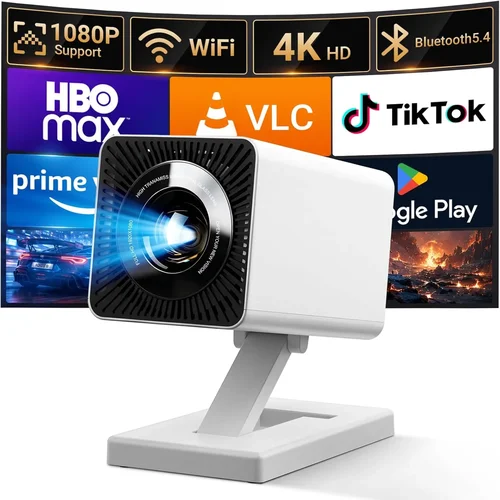
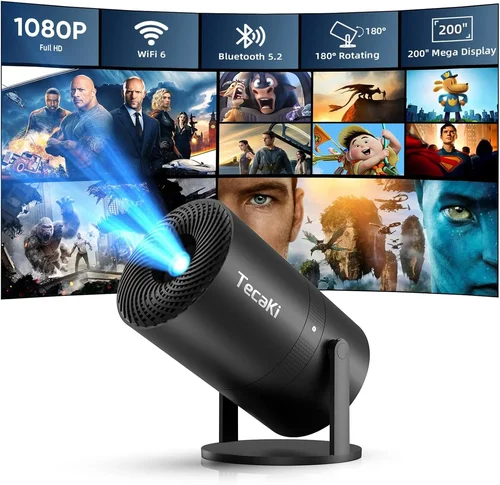
Finding a pocket‑sized projector that delivers a clear, bright image without breaking the bank can feel like hunting for a needle in a haystack. The market is flooded with models that promise “cinema‑grade” performance at the price of a coffee maker, yet many fall short when you actually need them for a movie night, a business presentation, or a quick gaming session.
This guide cuts through the hype. We’ll walk you through the most important specs, explain the different types of pico projectors, flag common pitfalls, and give you a clear roadmap for spending your money wisely. By the end, you’ll know exactly which device fits your lifestyle, budget, and performance expectations.
In 2026 the pico projector segment has matured significantly. Advances in LED and laser light sources, battery chemistry, and Android integration mean you can now buy a sub‑$200 unit that projects 100‑inch images, streams apps directly, and lasts several hours on a single charge. Let’s dive into the details that separate the truly usable devices from the “nice‑to‑have” gimmicks.

What to Look for When Buying Buying Guide
1. Budget & Price Range
The first filter is always your budget. Pico projectors under $200 vary widely in brightness, resolution, and feature set. Setting a clear ceiling helps you avoid the temptation to chase every new spec and keeps the comparison process manageable. Remember that a lower price often means compromises in lamp life, native resolution, or connectivity options, so weigh what you’re willing to trade off.
2. Performance Specifications
Three core specs dictate real‑world performance:
- Brightness (lumens): Measured in ANSI or LED lumens. For indoor use in dim rooms, 80‑120 lumens is adequate. If you plan to project in ambient light, aim for 150+ lumens.
- Resolution: Most sub‑$200 models cap at 720p (1280×720). Some newer units push 1080p, but often via upscaling rather than true native pixels. Higher resolution yields sharper text and finer detail.
- Contrast Ratio: Determines depth of blacks. Look for at least 1,000:1 for decent image depth; anything lower will look washed out.
3. Build Quality & Durability
Pico projectors are meant to travel. A robust chassis, reinforced lens housing, and a scratch‑resistant exterior protect the device from daily bumps. Aluminum bodies add weight but improve heat dissipation, while high‑grade plastics keep the unit light. Check for reinforced ports that won’t loosen after repeated cable swaps.
4. Features & Functionality
Modern pico projectors double as media hubs. Key features to consider include:
- Built‑in speakers: Useful for casual viewing, but rarely replace a dedicated sound system.
- Android/Fire OS integration: Allows direct streaming from Netflix, YouTube, or Twitch without a separate dongle.
- Wireless casting: Miracast, AirPlay, or Chromecast support simplifies screen sharing from phones and laptops.
- Battery life: Look for at least 2‑3 hours of continuous playback; higher capacity cells often increase weight.
- Port selection: HDMI‑Mini, USB‑C (for power and video), and a 3.5 mm audio jack give flexibility.
5. Brand Reputation
Established manufacturers such as Anker, AAXA, and ViewSonic typically provide more reliable firmware updates and better after‑sale support. Newer entrants may offer innovative specs at lower prices, but research their track record for firmware stability and community feedback before committing.
6. Warranty & Support
A solid warranty (minimum 12 months) signals confidence in product durability. Look for brands that offer easy RMA processes, responsive email or chat support, and readily available replacement parts like lenses or batteries.
7. Size & Portability
While all pico projectors are compact, dimensions still matter if you plan to slip one into a backpack or pocket. Aim for a device under 6 inches tall, weighing less than 1 lb. Some models include a built‑in kickstand, while others rely on a separate accessory.
8. User Reviews & Ratings
Real‑world usage often uncovers quirks not listed in spec sheets. Scan Amazon, B&H, and dedicated AV forums for recurring themes—such as overheating, firmware bugs, or unexpected dimming. Prioritize products with a minimum 4‑star average and a substantial number of reviews.
Different Types of Buying Guide
Common Buying Mistakes to Avoid
❌ Mistake: Focusing Only on Brightness
Why it’s bad: A high lumen rating sounds impressive, but if the projector uses a low‑efficiency laser diode, the image may still look grainy. Brightness without good contrast yields a washed‑out picture.
What to do instead: Balance lumens with contrast ratio and native resolution. For indoor use, 80‑120 lumens paired with at least 1,000:1 contrast is a safer bet.
❌ Mistake: Ignoring Battery Capacity
Why it’s bad: Many reviewers overlook battery specs, only to discover the unit lasts 45 minutes on a full charge.
What to do instead: Look for a minimum of 2 hours of continuous playback, and verify whether the battery is user‑replaceable.
❌ Mistake: Overlooking Connectivity Options
Why it’s bad: A projector with only a micro‑USB port forces you to buy adapters for HDMI, limiting compatibility with laptops and game consoles.
What to do instead: Prioritize models with HDMI‑Mini or USB‑C video input and wireless casting support.
❌ Mistake: Assuming All Built‑In Speakers Are Sufficient
Why it’s bad: Most pico projectors ship with 1‑2 W speakers that sound tinny in larger rooms.
What to do instead: If audio matters, plan for external Bluetooth or wired speakers.
❌ Mistake: Buying the Cheapest Option Without Reading Reviews
Why it’s bad: Low‑priced units often suffer from firmware bugs, overheating, or subpar lenses.
What to do instead: Check at least 30 user reviews, focusing on recurring issues.
❌ Mistake: Neglecting Warranty and Return Policies
Why it’s bad: A faulty unit can become a costly headache if the seller offers only a 30‑day return window.
What to do instead: Choose retailers that provide a 90‑day return period and at least a one‑year manufacturer warranty.
Budget Guidelines: How Much Should You Spend?
Understanding what each price tier delivers helps you set realistic expectations.
- Entry‑Level ($100‑$130): Expect 80‑100 lumens, 720p upscaled resolution, basic Android 7.0 or no OS, and 1‑hour battery life. Ideal for occasional presentations or short videos.
- Mid‑Range ($131‑$170): Brightness climbs to 120‑150 lumens, true 720p native panels, Android 9+ with app store, and 2‑hour battery. This tier offers the best balance of performance and price.
- Premium ($171‑$200): Laser‑diode sources push 150‑180 lumens, some units reach true 1080p, include Wi‑Fi/BT 5.0, and provide up to 3‑hour battery. Targeted at gamers and frequent travelers.
- Luxury ($200+): While beyond the scope of this guide, luxury models break the $200 barrier, delivering 200+ lumens, HDR support, and premium build metals.
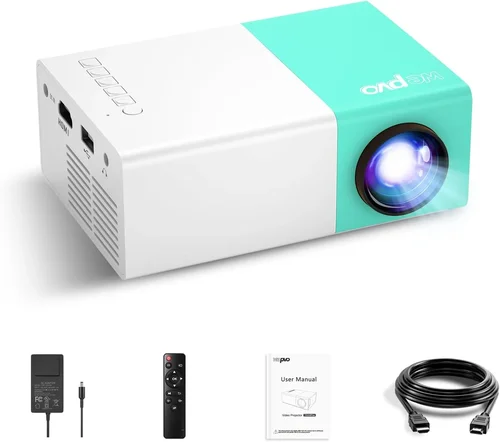
Expert Tips for Getting the Best Deal
- Shop during major sales events (Black Friday, Cyber Monday, Amazon Prime Day) when manufacturers bundle extra accessories.
- Consider refurbished units from the manufacturer’s outlet; they often come with a full warranty at 30‑40% off.
- Compare the same model across multiple retailers; price differentials of $10‑$20 are common.
- Read the fine print on return policies—especially for international sellers.
- Test the projector in a dimly lit room before finalizing; most brick‑and‑mortar stores allow a quick demo.
- Check firmware update frequency; a device that receives quarterly updates stays compatible with streaming apps.
- When buying a battery‑heavy model, verify if the battery is user‑replaceable to extend lifespan.

Frequently Asked Questions
Q: Can I use a pico projector outdoors in daylight?
A: Most sub‑$200 pico projectors are designed for low‑ambient lighting. In direct sunlight, even a 180‑lumen unit will struggle. For daytime use, choose a shaded area or a model with at least 200 lumens and a high contrast ratio.
Q: Do I need a separate remote control?
A: Many units include a small infrared remote, but Bluetooth or Wi‑Fi enabled apps on your phone can also serve as a controller. Check if the remote is included or if you’ll need to purchase one.
Q: How long does the lamp last?
A: LED and laser diodes typically last 20,000‑30,000 hours, far exceeding the lifespan of traditional lamps. This translates to years of use even with daily operation.
Q: Is Android built‑in better than using a Chromecast dongle?
A: Built‑in Android removes the need for extra hardware and offers a unified interface, but a Chromecast can provide smoother casting and more frequent updates. Choose based on your preference for simplicity versus flexibility.
Q: What is the difference between ANSI lumens and LED lumens?
A: ANSI lumens are measured using a standardized method for traditional lamps. LED lumens are a marketing term that can be higher on paper but don’t always translate to perceived brightness. For pico projectors, focus on user‑reported performance in real rooms.
Q: Can I connect a gaming console?
A: Yes, if the projector has an HDMI‑Mini or USB‑C video input. Some consoles may require an adapter; ensure the projector supports the console’s resolution (720p/1080p).
Q: Is it safe to use a pico projector for prolonged periods?
A: Modern units have efficient cooling systems, but they can become warm after an hour of continuous use. Place the projector on a heat‑dissipating surface and avoid covering vents.
Q: Do pico projectors need a screen?
A: A smooth, white wall works, but a portable projection screen improves color accuracy and contrast, especially in rooms with ambient light.
Our Final Recommendations
Best for Budget‑Conscious Buyers: Anker Nebula Capsule II (Mini) – Priced around $149, it offers 100 lumens, 720p resolution, Android 9.0, and a 2‑hour battery. The built‑in speaker is decent for casual viewing, and the compact design fits in a backpack.
Best Overall Value: ViewSonic M2 Mini – At $179, the M2 delivers 120 lumens, true 1080p, a laser light source, and Wi‑Fi/BT 5.0. Battery life reaches 2.5 hours, and the USB‑C port supports both power and video.
Best Premium Option: AAXA P7 Mini – Slightly above $200 but often on sale for $190, this laser‑diode unit pushes 150 lumens, native 1080p, and includes a built‑in 5‑W speaker. The battery lasts up to 3 hours, making it ideal for gamers.
Best for Beginners: Vankyo Leisure 3 Mini – At $119, it’s simple to set up, includes HDMI‑Mini, USB‑C, and a 1‑hour battery. The 720p upscaled display is sufficient for occasional movie nights.
Best for Advanced Users: BenQ GS2 – Though marketed as a “portable projector,” it sits at $199 with 200 lumens, 720p, Bluetooth speakers, and a rugged, splash‑proof body. Perfect for outdoor enthusiasts who need durability.
Conclusion: Making the Right Choice
Choosing a pico projector under $200 boils down to three questions: How bright do you need it to be? How long must it run without charging? And which extra features—Android, Wi‑Fi, or ruggedness—matter most to you?
Remember that no sub‑$200 model will replace a full‑size home theater projector, but the right pico device can deliver surprisingly vivid images for movies, presentations, and gaming on the go. Use the factors, comparisons, and budget guidelines in this guide to narrow your list, avoid common traps, and land a projector that feels tailor‑made for your lifestyle.
Ready to upgrade your viewing experience? Browse the recommended models, check current pricing, and enjoy the freedom of cinema‑quality entertainment wherever you are.