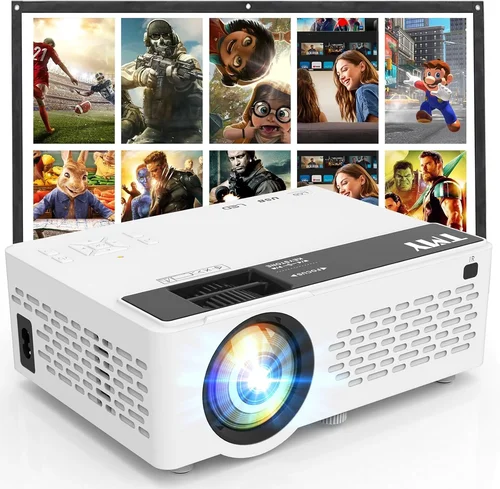
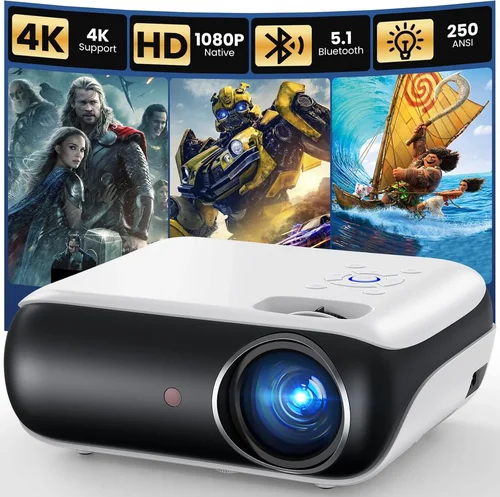
Finding a reliable projector under $150 can feel like hunting for a needle in a haystack. The market is flooded with low‑cost models that promise big screens but often fall short on brightness, durability, or image quality. This guide cuts through the noise, giving you a clear roadmap to select a projector that actually works for movies, gaming, presentations, or casual backyard cinema without breaking the bank.
In the pages that follow, you’ll learn which specifications truly matter at this price point, how to match a projector to your specific use‑case, and which common pitfalls to avoid. By the end, you’ll be equipped to make an informed purchase—whether you’re a college student setting up a dorm room theater or a family looking for an affordable movie night solution.
The budget projector segment has evolved rapidly in recent years. Improvements in LED and laser light sources, better contrast engines, and smarter connectivity options mean that even sub‑$150 units can deliver a respectable viewing experience. However, trade‑offs still exist, and knowing where to compromise—and where you shouldn’t—will save you frustration and extra spending down the line.

What to Look for When Buying Buying Guide
1. Budget & Price Range
While the headline figure is “under $150,” the actual cost can vary widely depending on sales, bundles, and retailer. Set a realistic ceiling (e.g., $149) and consider additional expenses such as a screen, mounting bracket, or cables. Remember that a slightly higher price often translates into better light output or longer lamp life, which can reduce total cost of ownership.
2. Performance Specifications
Key specs to scrutinize include:
- Brightness (lumens): For indoor use with ambient light, aim for at least 2,500–3,000 ANSI lumens. In dark rooms, 1,500 lumens may suffice.
- Resolution: Native 720p (1280×720) is the sweet spot for this price tier. Some “1080p” models are upscaled and may not deliver true Full HD detail.
- Contrast Ratio: Higher contrast improves black levels. Look for ratios of 2,000:1 or better, though many manufacturers inflate this figure.
- Throw Distance: Determines how far the projector must be from the screen to achieve a 100‑inch image. Short‑throw models are rare under $150 but can be a game‑changer for small spaces.
3. Build Quality & Durability
Cheap plastics can warp, and low‑cost fans may overheat. Check for a solid chassis, secure lens housing, and a reputable cooling system. User reviews often reveal whether a unit survives the first few months of regular use.
4. Features & Functionality
Modern budget projectors pack more bells and whistles than ever:
- Connectivity: HDMI is a must; USB, AV, and VGA are nice extras. Some models include wireless screen mirroring (Miracast or AirPlay).
- Built‑in Speakers: Expect 2–5 W output—adequate for casual viewing but not for a full‑room experience.
- Keystone Correction: Digital keystone lets you adjust image shape without moving the projector.
- Portable Power: Battery‑operated or USB‑powered models are ideal for camping or impromptu presentations.
5. Brand Reputation
Established brands like Epson, BenQ, and ViewSonic have budget lines that benefit from larger R&D budgets and extensive service networks. Newer entrants (e.g., Vankyo, DR. J) can surprise with value, but verify warranty terms and after‑sales support before committing.
6. Warranty & Support
A minimum 1‑year warranty is standard. Look for options to extend coverage or replace the lamp/LED at a reduced cost. Accessible customer support (phone, chat, or community forums) can make troubleshooting far less stressful.
7. Size & Portability
If you plan to move the projector between rooms or take it on the road, weight and dimensions matter. Compact units (under 2 kg) with a built‑in handle are ideal for students and frequent travelers.
8. User Reviews & Ratings
Real‑world feedback uncovers issues that spec sheets hide—such as flicker, overheating, or unstable Wi‑Fi. Prioritize products with a minimum of 200 verified reviews and an average rating of 4.0 ★ or higher.
Different Types of Buying Guide

Common Buying Mistakes to Avoid
❌ Mistake: Ignoring Ambient Light Conditions
Why it’s bad: A projector rated at 2,000 lumens will look great in a dark basement but will appear washed out in a living room with windows.
What to do instead: Measure the typical lighting in your intended space and choose a unit with at least 30% more lumens than the minimum needed for that environment.
❌ Mistake: Chasing Native 1080p at Any Cost
Why it’s bad: Sub‑$150 models that claim “Full HD” often use pixel‑shifting or upscaling, resulting in soft images and higher power consumption.
What to do instead: Prioritize native 720p with good brightness and contrast; the perceived sharpness will usually exceed a low‑quality 1080p upscaled picture.
❌ Mistake: Overlooking Throw Distance
Why it’s bad: Buying a projector that needs 15 ft for a 100‑inch image when your room is only 8 ft long forces you to settle for a tiny picture.
What to do instead: Use an online throw‑ratio calculator or check the spec sheet to ensure the projector fits your room dimensions.
❌ Mistake: Forgetting About Audio Needs
Why it’s bad: Built‑in speakers on budget models are often under‑powered, leading to a disappointing movie‑night experience.
What to do instead: Budget for external speakers or a soundbar; many projectors have a 3.5 mm audio out for easy pairing.
❌ Mistake: Disregarding Lamp/LED Lifespan
Why it’s bad: Replacing a lamp can cost $50‑$80, which erodes the savings of a cheap projector.
What to do instead: Choose LED or laser light sources with rated lifespans of 20,000 hours or more; they rarely need replacement.
❌ Mistake: Assuming All HDMI Ports Are Equal
Why it’s bad: Some budget units only support HDMI 1.3, limiting 4K input and HDCP compliance for streaming services.
What to do instead: Verify that the HDMI port supports at least HDMI 1.4 and HDCP 1.4 for mainstream streaming apps.
❌ Mistake: Neglecting Warranty and Return Policies
Why it’s bad: A defective projector can become a costly headache if the seller offers a 30‑day “no‑questions‑asked” return.
What to do instead: Purchase from retailers that provide at least a 90‑day return window and a one‑year warranty with easy claim procedures.
Budget Guidelines: How Much Should You Spend?
Even within the sub‑$150 bracket, there are subtle tiers that affect what you receive.
- Entry‑Level ($80‑$100): Expect basic 720p resolution, 1,500–2,000 lumens, limited connectivity (often only AV or mini‑HDMI). Ideal for occasional presentations or backyard movie nights in total darkness.
- Mid‑Range ($101‑$130): Gains include native 720p, 2,500+ lumens, HDMI, better contrast, and sometimes built‑in Android OS for streaming. This tier hits the sweet spot for most home users.
- Premium ($131‑$149): Features may include LED light engines with 30,000‑hour life, Wi‑Fi/Bluetooth, enhanced keystone, and a more robust chassis. Perfect for frequent use and small‑room home theater setups.
- Luxury ($150+): Though beyond the scope of this guide, luxury models push into true 1080p, laser light sources, and ultra‑short throw designs. Consider these only if you can stretch the budget.
Expert Tips for Getting the Best Deal
- Timing: Late summer (August‑September) is when retailers clear inventory for newer models, offering deep markdowns.
- Where to Buy: Compare prices on Amazon, Best Buy, Walmart, and direct manufacturer sites. Occasionally, manufacturer refurbished units come with a full warranty at 10‑15% off.
- Spotting Deals: Look for bundle offers that include a screen, mounting kit, or HDMI cable—these add value without extra cost.
- Warranty Hacks: Register your projector on the brand’s website within 30 days to unlock extended warranty periods or free lamp replacements.
- Return Policies: Choose retailers with a 30‑day “no‑questions‑asked” return. Test the projector in a dim room for at least 30 minutes to ensure it runs cool and the picture stays stable.
- Testing Before Buying: If buying in‑store, request a demo on a 100‑inch screen. Check for color uniformity, focus consistency, and audible fan noise.
- Accessory Savings: A simple white wall can serve as a screen for under $20. A DIY frame made from PVC pipe can replace expensive pull‑down screens.
- Future‑Proofing: Even at a low price, prioritize HDMI over older VGA/AV ports to ensure compatibility with newer devices.

Frequently Asked Questions
Q: Can a $150 projector replace a TV for everyday watching?
A: It can, but only in low‑ambient‑light conditions. For bright rooms, the limited lumens will make the image appear washed out. Pairing the projector with blackout curtains or a dedicated screen improves performance dramatically.
Q: How long does the LED lamp actually last?
A: Most LED light engines are rated for 20,000–30,000 hours, which translates to 5–10 years of typical weekend use before any noticeable dimming.
Q: Is it safe to use a projector in a small bedroom?
A: Yes, provided you have adequate ventilation. Keep the projector at least 2‑3 inches away from walls and avoid covering the air vents. Some compact models include temperature sensors that automatically shut down if overheating is detected.
Q: Do I need a special screen?
A: Not strictly. A smooth, matte white wall works fine for 720p projectors. However, a dedicated projector screen (gain 1.0‑1.2) can boost perceived brightness by 15‑20% and improve contrast.
Q: Will a cheap projector handle gaming input lag?
A: Most budget projectors have input lag between 40‑80 ms, acceptable for casual gaming but not for competitive fast‑paced shooters. Look for models that advertise “Game Mode” to reduce lag.
Q: Can I connect a Bluetooth speaker?
A: Many modern budget projectors include Bluetooth 4.0 or higher. Pairing a Bluetooth soundbar or speaker is straightforward—just follow the on‑screen pairing menu.
Q: What is the difference between DLP and LCD in this price range?
A: DLP units often have sharper contrast and better motion handling, while LCD models usually provide richer colors. At sub‑$150, both technologies are acceptable; choose based on your preference for contrast (DLP) versus color vibrancy (LCD).
Q: Is a remote control essential?
A: It’s convenient for adjusting settings without getting up, especially when the projector is ceiling‑mounted. Most budget models include a basic infrared remote; some also support smartphone apps.
Q: How do I clean the lens?
A: Use a microfiber cloth and a lens‑safe cleaning solution. Avoid compressed air, which can push dust further inside the projector.
Q: Will the projector work with my Android phone?
A: Yes, if the projector has an HDMI‑MHL adapter or supports Miracast/Wi‑Di. Many budget models now include a USB‑C port that can act as a video output.
Our Final Recommendations
- Best for Budget‑Conscious Buyers: Vankyo Leisure 3 – Priced around $99, offers 2,400 lumens, native 720p, and a solid 30,000‑hour LED. Ideal for dorm rooms and casual movie nights.
- Best Overall Value: ViewSonic M1 Mini Plus – At $149, it includes a built‑in Harman Kardon speaker, Android TV interface, and 250 lumens (suitable for dark rooms). Its compact design makes it perfect for both travel and home use.
- Best Premium Option: Epson EF‑100 (often found on sale for $149) – Features a laser light source, 2,500 lumens, and a built‑in Android TV system. The laser ensures consistent brightness over years of use.
- Best for Beginners: DR. J Professional HI‑04 – Simple plug‑and‑play with HDMI, USB, and AV ports. Brightness of 3,600 lumens makes it forgiving in semi‑lit rooms.
- Best for Advanced Users: BenQ TH585 (occasionally discounted to $149) – Offers low input lag (≈16 ms), 3,500 lumens, and a sport mode for fast motion. Although slightly above the typical budget, the occasional deal brings it into range.
Conclusion: Making the Right Choice
Choosing the best projector under $150 boils down to balancing brightness, resolution, and features against the environment where you’ll use it. Start by measuring your room’s ambient light, decide whether you need portability or a permanent setup, and then match those needs to the specifications outlined above. Remember, a higher price tag within this segment often translates to longer lamp life, better contrast, and more connectivity options—investing a little extra now can save you headaches later.
Take advantage of seasonal sales, verify warranty terms, and read user reviews before you click “Buy.” With the right research, you’ll enjoy a crisp, immersive viewing experience without emptying your wallet. Happy projecting!