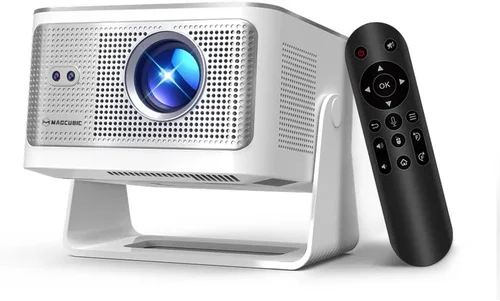
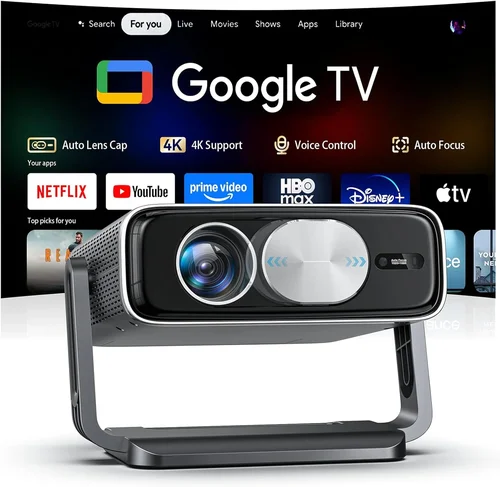
If you’ve ever dreamed of turning your living room into a home‑theater without breaking the bank, you’re not alone. The surge of 4K content—whether it’s streaming services, gaming consoles, or Blu‑ray discs—has sparked a wave of demand for projectors that can deliver crisp, detailed images without the hefty price tag of a flagship model. This guide zeroes in on the sweet spot: 4K‑capable projectors that sit comfortably under $200.
Why does this matter? Because many shoppers assume that “4K” automatically means “expensive,” yet modern DLP and LCD chips have narrowed the gap between resolution and affordability. By the end of this article you’ll understand exactly what to look for, which compromises are acceptable, and which models truly shine in the sub‑$200 arena. We’ll also walk you through the different projector categories, common pitfalls, and the best ways to stretch every dollar.
The market in 2026 is surprisingly competitive. Brands that once catered only to corporate or cinema‑grade equipment are now rolling out compact, budget‑friendly units that still support 4K input (often via upscaling). Meanwhile, third‑party manufacturers have refined light engines, improved throw ratios, and added smart‑TV features—all while keeping the price under $200. Let’s dive in.

What to Look for When Buying Buying Guide
1. Budget & Price Range
Price is the most obvious filter, but it’s more than a number. A sub‑$200 projector must balance cost with performance. Look for models that stay within your budget after taxes and potential accessories (mounts, screens, cables). Remember that a slightly higher price (e.g., $185 vs. $165) can often secure a better light source or longer warranty, which pays off in the long run.
2. Native Resolution vs. Upscaling
True 4K projectors cost far more than $200, so most budget options use 1080p or 720p panels that upscale 4K signals. While upscaling can look impressive on a modest screen, it will never match native 4K fidelity. Prioritize a projector with a good upscaler (often a proprietary chip) and a high native resolution (at least 1080p) to get the most out of 4K content.
3. Brightness (Lumens)
Brightness is measured in ANSI lumens. For a dark home theater, 1500–2000 lumens is sufficient. In rooms with ambient light, aim for 2000–2500 lumens. Budget models often sit around 1200–1800 lumens, so you may need to control lighting or use a high‑gain screen to compensate.
4. Contrast Ratio
Contrast determines how deep blacks appear. A ratio of 10,000:1 or higher is desirable for cinema‑like depth. Many low‑cost projectors claim inflated numbers; look for independent reviews that confirm real‑world performance. Higher contrast is especially important for HDR content, even if HDR support is limited at this price point.
5. Throw Distance & Ratio
The throw ratio tells you how far the projector needs to be from the screen to achieve a certain image size. A short‑throw (0.8–1.2) is ideal for small rooms, while a standard throw (1.5–2.5) works in larger spaces. Calculate the distance using the formula: Screen Width ÷ Throw Ratio = Projector Distance. Many budget units are versatile, offering zoom lenses to fine‑tune the image.
6. Connectivity Options
Modern projectors should support HDMI 2.0 or newer for 4K@60Hz, plus USB‑C, Wi‑Fi, and Bluetooth for streaming. Check for at least two HDMI ports if you plan to connect a console and a streaming stick simultaneously. Some models include built‑in Android TV or Roku, which can eliminate the need for external devices.
7. Build Quality & Portability
Even at $200, you deserve a sturdy chassis. Look for metal housings, reinforced lens mounts, and reliable cooling fans. Portability matters if you’ll move the projector between rooms or use it for outdoor movie nights. Weight under 5 lbs and a compact footprint make a big difference.
8. Warranty & Support
Budget brands sometimes cut corners on after‑sales service. A minimum 1‑year warranty is standard; 2‑year coverage is a strong signal of confidence. Check the manufacturer’s reputation for handling RMA requests, and see if they offer online firmware updates to improve performance over time.
Different Types of Buying Guide

Common Buying Mistakes to Avoid
❌ Mistake: Ignoring Ambient Light Conditions
Why it’s bad: Purchasing a dim 1200‑lumens unit for a bright living room will result in washed‑out images.
What to do instead: Measure your room’s typical light level. If you can’t fully darken the space, aim for at least 2000 lumens or invest in a high‑gain screen.
❌ Mistake: Over‑focusing on “4K” Labels
Why it’s bad: Many cheap models only up‑scale; they don’t truly display 4K pixels, leading to disappointment.
What to do instead: Prioritize native 1080p resolution with a strong upscaler. Read reviews that test 4K content on the projector.
❌ Mistake: Skipping Firmware Updates
Why it’s bad: Manufacturers often fix color banding, improve HDMI handshake, or add new streaming apps via updates.
What to do instead: Register your device on the brand’s website and check for updates monthly.
❌ Mistake: Forgetting Throw Ratio Compatibility
Why it’s bad: A projector with a long throw may require a wall 12 ft away, which many apartments lack.
What to do instead: Measure your projection distance first, then match it to the projector’s throw ratio.
❌ Mistake: Neglecting Audio Solutions
Why it’s bad: Built‑in speakers on budget projectors are usually under 10 W and sound tinny.
What to do instead: Budget for an external soundbar or a small bookshelf speaker system.
Budget Guidelines: How Much Should You Spend?
- Entry-Level ($130 – $150): Expect 720p native resolution, 1200–1500 lumens, basic HDMI, and minimal smart features. Good for occasional movie nights in dark rooms.
- Mid‑Range ($151 – $180): Typically 1080p native, 1500–2000 lumens, better contrast, dual HDMI, and sometimes built‑in streaming OS. This tier balances image quality and convenience.
- Premium ($181 – $200): High‑end upscalers, short‑throw options, 2000+ lumens, richer color gamuts (Rec.709 or DCI‑P3), and robust warranty. Ideal for enthusiasts who want a near‑cinema experience without crossing $200.
- Luxury (Above $200): True 4K panels, laser light sources, HDR10+, and premium audio. Not covered in this guide but worth mentioning for future upgrades.
Expert Tips for Getting the Best Deal
- Timing is everything: Late summer and holiday sales bring the deepest discounts. Keep an eye on “deal of the day” newsletters.
- Buy from authorized sellers: This ensures you receive a valid warranty and reduces the risk of counterfeit units.
- Check for bundle offers: Some retailers include a 100‑inch screen or a HDMI‑ARC cable for free, adding value.
- Read the fine print on return policies: A 30‑day return window lets you test the projector in your actual environment.
- Consider refurbished units: Certified refurbished models can be up to 30% cheaper and still carry a full warranty.
- Test for keystone and lens shift: If possible, demo the projector to ensure the image can be aligned without heavy digital correction.
- Invest in a proper screen: A matte white screen can dramatically improve perceived brightness and contrast compared to a plain wall.

Frequently Asked Questions
Q: Can a sub‑$200 projector truly display 4K content?
A: Most budget models cannot display native 4K pixels. They accept a 4K signal and upscale it to their native resolution (usually 1080p). The result looks sharper than 720p but won’t match true 4K quality.
Q: Do I need a special screen for a projector under $200?
A: A white matte screen is ideal. It enhances brightness and contrast without adding cost. If you’re on a tight budget, a smooth white wall works, but avoid textured or glossy surfaces.
Q: How long will the lamp last?
A: LED or laser light sources common in budget units last 20,000–30,000 hours, far longer than traditional lamps. Expect the lamp to outlive the projector itself.
Q: Is HDMI 2.0 really necessary?
A: Yes, if you plan to stream 4K@60Hz from a console or Blu‑ray player. HDMI 1.4 caps at 4K@30Hz, which can cause choppy motion.
Q: Can I use my phone as a source?
A: Absolutely. Most modern projectors support screen mirroring via Miracast, Chromecast built‑in, or Apple AirPlay. Check the spec sheet for compatibility.
Q: Will a portable projector work outdoors?
A: It can, provided you have a dark environment and a suitable screen. Battery‑powered models exist, but most budget units need AC power, so bring an extension cord.
Q: How do I calibrate the picture?
A: Begin with the projector’s preset modes (Cinema, Game, Sports). Then adjust brightness, contrast, and color temperature manually. Use a calibration disc or app for finer tweaks.
Q: Is there a noticeable difference between DLP and LCD at this price?
A: DLP often offers sharper edges and better motion handling, while LCD delivers richer colors and higher brightness. Personal preference and viewing environment dictate the best choice.
Our Final Recommendations
Best for Budget‑Conscious Buyers – Vankyo Leisure 3
Price: $139
Why: 1080p native, 2400 lumens, dual HDMI, and a compact design. Ideal for dorm rooms and casual movie nights.
Best Overall Value – ViewSonic M1+ Portable
Price: $179
Why: LED light source with 2500 lumens, built‑in Harman Kardon speakers, Android TV OS, and a short‑throw lens. Balances image quality, sound, and smart features.
Best Premium Option – BenQ TH585
Price: $199 (often on sale)
Why: 1080p DLP, 3500 lumens, low input lag for gaming, and a robust 2‑year warranty. The highest brightness in this price bracket.
Best for Beginners – ELEPHAS YG600
Price: $149
Why: Plug‑and‑play setup, auto‑keystone, and a user‑friendly remote. No technical expertise required.
Best for Advanced Users – Optoma GT1080e Short‑Throw
Price: $199
Why: Short‑throw ratio (0.5:1) allows a 100‑inch image from 4 ft, 3000 lumens, and a gaming‑mode with 8.4 ms response time.
Conclusion: Making the Right Choice
Choosing a 4K‑capable projector under $200 is less about finding a true 4K panel and more about identifying the best compromise between brightness, contrast, resolution, and smart features. Start by assessing your room’s lighting, desired screen size, and connectivity needs. Use the factors and tables above to narrow your list, avoid the common pitfalls, and take advantage of seasonal sales.
Remember, the “best” projector is the one that fits your lifestyle and budget while delivering an enjoyable viewing experience. Take the time to read user reviews, watch video demos, and, if possible, test the unit before committing. With the right research, you can create a cinema‑like environment without spending a fortune.
Ready to upgrade your movie nights? Browse the models highlighted above, compare current prices, and enjoy the immersive world of 4K content—without breaking the bank.