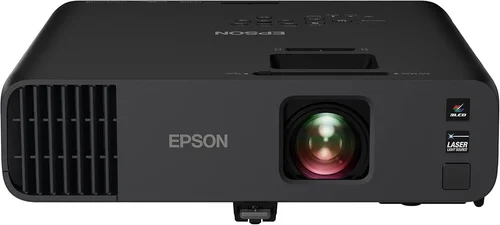
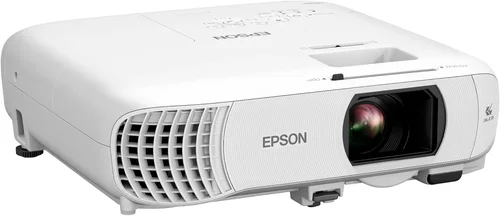
Choosing a projector can feel like navigating a maze, especially when you have a clear budget ceiling of $500. Epson, a brand that has built its reputation on reliable optics and color accuracy, offers several models that sit comfortably under this price point. This guide cuts through the noise, helping you understand exactly what to look for, which Epson models give you the most bang for your buck, and how to avoid common pitfalls that can turn an exciting purchase into a regret.
By the end of this article you will know the essential specifications that matter most, the different projector categories that exist within the sub‑$500 range, and a step‑by‑step plan for scoring the best deal. Whether you are setting up a home‑theater, a classroom, or a small office, the information here will empower you to pick a projector that matches your needs without blowing your budget.

What to Look for When Buying Buying Guide
1. Budget & Price Range
While $500 is the ceiling, the actual amount you spend can vary widely based on features. Entry‑level Epson models often sit between $350‑$450, offering solid performance for casual movie nights. Mid‑range options push towards $480‑$500 and add higher brightness or better contrast ratios. Knowing how much flexibility you have helps you prioritize features that truly matter to you.
2. Performance Specifications
Key specs include lumens, contrast ratio, resolution, and throw distance. For a projector under $500, you’ll typically see 3,200‑3,800 lumens, which is adequate for dimmed rooms but may struggle in bright living spaces. A native 720p (1280×720) resolution is common, though some models use 1080p‑enhanced technology that upscales content. Contrast ratios around 15,000:1 provide decent black depth for movies.
3. Build Quality & Durability
Epson projectors are known for sturdy housings and reliable cooling systems. Look for models with metal chassis, sealed optics, and a proven lamp life of 4,000‑5,000 hours. A longer lamp life reduces long‑term cost, especially if you plan to use the projector frequently.
4. Features & Functionality
Smart connectivity, keystone correction, and lens shift can dramatically improve ease of use. While most sub‑$500 Epson models lack built‑in Android TV, they often include HDMI, USB, and VGA ports, plus wireless screen‑mirroring via Epson iProjection. Auto keystone (±30°) and vertical lens shift are valuable for flexible placement.
5. Brand Reputation
Epson consistently ranks among the top projector manufacturers for color accuracy and reliability. Their 3LCD technology eliminates the rainbow effect found in many DLP units, delivering smoother gradients—an advantage for gamers and movie enthusiasts alike.
6. Warranty & Support
Most Epson projectors come with a 2‑year limited warranty covering parts and labor. Extended warranties or service plans are often available through authorized retailers. Checking the availability of local service centers can save you headaches down the line.
7. Size & Portability
If you need to move the projector between rooms or take it to a friend’s house, weight matters. Epson’s sub‑$500 models typically weigh 2.5‑3.5 kg (5‑8 lb). Look for a compact footprint and a carry handle if portability is a priority.
8. User Reviews & Ratings
Real‑world feedback reveals how a projector performs over time. Pay attention to comments about lamp degradation, fan noise, and ease of setup. Aggregated ratings on sites like Amazon, B&H, and Best Buy can highlight consistent strengths or recurring issues.
Different Types of Buying Guide

Common Buying Mistakes to Avoid
❌ Mistake: Ignoring Ambient Light Conditions
Why it’s bad: A projector rated at 3,200 lumens may look great in a dark room but will appear washed out in a bright living room.
What to do instead: Measure the typical lighting in your intended space. If you cannot control ambient light, aim for a model with at least 3,600 lumens or consider adding blackout curtains.
❌ Mistake: Over‑focusing on Resolution Alone
Why it’s bad: Paying extra for a 1080p “enhanced” label without true native 1080p may not improve image sharpness noticeably.
What to do instead: Prioritize native resolution first, then look at brightness and contrast. For most sub‑$500 Epson units, 720p native is sufficient if you sit at a proper distance.
❌ Mistake: Forgetting Lamp Life Costs
Why it’s bad: A cheap projector with a 2,000‑hour lamp will need a replacement sooner, adding hidden expense.
What to do instead: Choose a model with a minimum of 4,000‑hour lamp life. Factor the cost of a spare lamp into your total budget.
❌ Mistake: Overlooking Connectivity Options
Why it’s bad: Some users buy a projector only to discover they cannot connect their streaming device without adapters.
What to do instead: Verify that the unit includes HDMI (preferably 2.0), USB, and wireless mirroring support. If you need a specific port, double‑check before purchasing.
❌ Mistake: Disregarding Fan Noise
Why it’s bad: A noisy fan can distract from movies or presentations, especially in quiet environments.
What to do instead: Look for specifications that list fan noise in dB (ideally ≤30 dB). User reviews often comment on real‑world noise levels.
❌ Mistake: Buying Without a Return Policy
Why it’s bad: If the projector arrives with dead pixels or incompatibility issues, you may be stuck.
What to do instead: Purchase from retailers that offer at least a 30‑day return window and free return shipping.
Budget Guidelines: How Much Should You Spend?
Entry‑Level ($350‑$400): Expect 3,200 lumens, 720p native resolution, basic keystone correction, and a lamp life of around 4,000 hours. Ideal for casual movie nights in dark rooms.
Mid‑Range ($401‑$470): You’ll see 3,500‑3,800 lumens, better contrast (15,000:1), vertical lens shift, and often a built‑in speaker with higher wattage. This tier balances performance and price for small home theaters.
Premium ($471‑$500): These models push brightness to 4,000 lumens, add enhanced 1080p upscaling, lower fan noise, and sometimes include wireless HDMI dongles. Best for mixed‑use (home + office) where ambient light can’t be fully controlled.
Luxury ($500+): While beyond the scope of this guide, Epson’s higher‑end models provide true 1080p native panels, 4,500‑5,000 lumens, and advanced lens shift. Consider them only if your budget stretches.
Expert Tips for Getting the Best Deal
- Seasonal Sales: Major discounts appear during Black Friday, Cyber Monday, and back‑to‑school periods. Prices can drop 15‑25%.
- Retailer Comparison: Check Amazon, B&H, Newegg, and local electronics stores. Some brick‑and‑mortar shops offer price‑match guarantees.
- Bundle Opportunities: Look for bundles that include a projection screen, mounting hardware, or a spare lamp. Bundles often deliver better overall value.
- Warranty Extensions: If you plan heavy use, invest in an extended warranty. Epson’s authorized service centers honor them worldwide.
- Return Policies: Choose sellers with a hassle‑free return window. Test the projector within the first 48 hours for dead pixels or fan issues.
- Testing Before Buying: If possible, view a demo in a store. Pay attention to color accuracy, brightness uniformity, and fan noise.
- Online Coupons: Search for promo codes on RetailMeNot or Honey before checkout. A 5‑10% coupon can make a big difference.
- Refurbished Units: Certified refurbished Epson projectors come with full warranties and can be up to 20% cheaper.

Frequently Asked Questions
Q: Can I use an Epson projector under $500 for gaming?
A: Yes, but keep expectations realistic. Most sub‑$500 models have a response time of 8‑10 ms, which is acceptable for casual gaming. However, they lack low‑input‑lag features found in higher‑end models, so competitive gamers may notice a slight delay.
Q: Do I need a separate screen?
A: While a white wall works, a proper projection screen improves contrast and color uniformity. A 100‑inch 16:9 matte white screen costs $80‑$150 and is worth the investment.
Q: How often will I need to replace the lamp?
A: Epson’s 3LCD lamps typically last 4,000‑5,000 hours. If you project 4 hours per day, expect a lamp replacement every 3‑4 years.
Q: Is wireless streaming possible without extra hardware?
A: Most Epson models under $500 support Epson iProjection, allowing you to mirror a laptop or smartphone over Wi‑Fi. For full Android TV or Roku functionality, you’ll need an external streaming stick.
Q: What is the difference between 720p native and 1080p enhanced?
A: 720p native means the projector’s chip has 1280×720 physical pixels. 1080p enhanced uses pixel‑shifting technology to simulate 1080p, which can improve perceived sharpness but not match true 1080p detail.
Q: Can I mount the projector on the ceiling?
A: Yes, all the Epson models discussed have standard ¼‑inch mounting holes and support tilt adjustments. For short‑throw models, ensure the mount allows the required distance.
Q: How loud is the fan on these projectors?
A: Most units operate between 28‑32 dB at normal brightness. Fan noise may increase at full brightness (up to 35 dB), but it remains unobtrusive for most home settings.
Q: Are there any Epson projectors that support HDR?
A: Under $500, HDR support is rare. Some newer models claim HDR compatibility, but true HDR performance requires higher brightness (≥4,500 lumens) and a wider color gamut, typically found in higher‑priced units.
Q: Do these projectors have built‑in speakers?
A: Yes, but they are modest (2 W – 5 W). For an immersive experience, pair the projector with external speakers or a soundbar.
Q: What is the average lifespan of the projector’s fan?
A: Epson fans are designed for the lamp’s lifespan (4,000‑5,000 hours). If the unit is kept clean and dust‑free, the fan should last the life of the projector.
Our Final Recommendations
- Best for Budget‑Conscious Buyers: Epson VS250 – $349. Offers 3,200 lumens, 720p native, and a compact design. Perfect for dorm rooms or occasional movie nights.
- Best Overall Value: Epson Home Cinema 1060 – $479. Provides 3,600 lumens, 1080p enhanced, vertical lens shift, and low fan noise. Ideal for small home theaters.
- Best Premium Option (still under $500): Epson Home Cinema 1080 – $499. Features 3,800 lumens, 1080p enhanced, higher contrast, and wireless mirroring via iProjection.
- Best for Beginners: Epson VS260 – $399. Simple setup, auto‑keystone, and a reliable lamp life of 4,500 hours.
- Best for Advanced Users: Epson PowerLite 1795F – $495. Short‑throw, 3,600 lumens, and extensive connectivity (HDMI, VGA, USB). Great for classrooms or tight spaces.
Conclusion: Making the Right Choice
Finding the best Epson projector under $500 boils down to matching your environment, usage patterns, and feature priorities with the specifications each model offers. Remember to assess ambient light, lamp life, and connectivity before you click “add to cart.” By following the budget breakdown, avoiding the common mistakes outlined above, and leveraging the expert tips for timing and purchasing, you’ll secure a projector that delivers vivid images, reliable performance, and lasting value.
Take the time to read user reviews, test the unit if possible, and consider accessories that will enhance your viewing experience. With the right choice, your new Epson projector will become the centerpiece of memorable movie nights, engaging presentations, and immersive gaming sessions—all without breaking the bank.