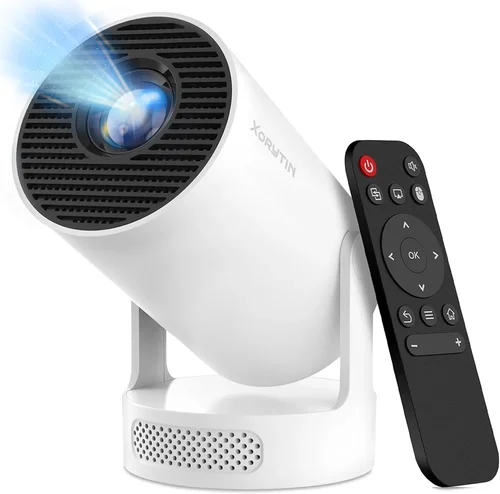
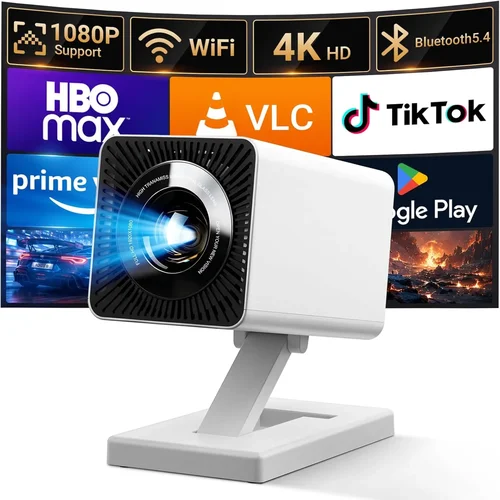
Choosing a gaming projector under $700 can feel like navigating a maze of specs, brand promises, and price tags. The market has exploded in the past few years, and today you can find devices that deliver cinema‑like immersion without breaking the bank. This guide cuts through the noise, giving you a clear roadmap so you can focus on what truly matters for a smooth, lag‑free gaming experience.
In the pages that follow you’ll learn which technical specs matter most for fast‑paced shooters, why certain features can make or break a multiplayer session, and how to match a projector’s strengths with your play space. Whether you’re setting up a dedicated gaming den, a bedroom lounge, or a portable “gaming on the go” rig, we’ve distilled the essential information you need to make a confident purchase.
The projector landscape in 2026 is defined by three main trends: brighter LED light sources, lower input lag, and smarter connectivity options. Manufacturers are pushing the envelope to offer 1080p and even 4K‑enhanced resolutions at sub‑$700 price points, while also integrating wireless screen‑mirroring and built‑in speakers. Understanding how these trends translate into real‑world performance is the key to getting the best value for your money.

What to Look for When Buying Buying Guide
1. Budget & Price Range
Setting a realistic budget is the first step. While $700 may seem modest, it actually opens the door to a surprisingly capable class of projectors. The sweet spot usually lies between $500 and $700, where you can find a balanced mix of brightness, resolution, and low input lag. Going significantly below $500 often means compromising on key performance metrics, whereas spending above $700 pushes you into premium territory with diminishing returns for most gamers.
2. Performance Specifications
Performance is the heart of any gaming projector. Focus on three core specs:
- Resolution: 1080p (Full HD) is the baseline for crisp images. Some models use pixel‑shifting to simulate 4K, which can be acceptable for casual play but may not satisfy competitive gamers.
- Brightness: Measured in lumens. For a dimly lit room, 1,500–2,500 lumens is sufficient. If you plan to game with some ambient light, target 2,500+ lumens.
- Input Lag: The delay between controller input and on‑screen action. Aim for 30 ms or lower; anything above 60 ms can feel sluggish, especially in fast FPS titles.
3. Build Quality & Durability
A projector that feels cheap will likely suffer from overheating, misaligned lenses, or a short lamp life. Look for metal housings, a robust cooling system (dual fans or a heat‑pipe design), and a reputable lamp or LED lifespan rating—ideally 20,000 hours for LED units.
4. Features & Functionality
Modern projectors pack a suite of extras. Prioritize the following:
- Refresh Rate: 120 Hz support ensures smoother motion, especially for console gaming.
- HDR Compatibility: HDR10+ or Dolby Vision can boost color depth, but only if your source device supports it.
- Connectivity: HDMI 2.0 or 2.1, USB‑C, and wireless options (Miracast, AirPlay, Chromecast) give you flexibility.
- Built‑in Speakers: While not a substitute for a proper sound system, decent 5‑10 W speakers can be handy for quick sessions.
5. Brand Reputation
Brands with a strong track record in home cinema often translate that expertise into gaming‑friendly models. Companies such as Epson, BenQ, Optoma, and ViewSonic have dedicated gaming lines, backed by firmware updates that address input lag and color accuracy.
6. Warranty & Support
Gaming projectors are an investment. Look for at least a 2‑year warranty covering the lamp/LED, and check whether the manufacturer offers on‑site service or easy part replacement. Good customer support can save you time and money if a unit develops a dead pixel or fan issue.
7. Size & Portability
If you plan to move the projector between rooms or take it to a friend’s house, weight and footprint matter. A sub‑$700 model that weighs under 5 lb and includes a quick‑release lens cap is far more convenient than a bulkier counterpart.
8. User Reviews & Ratings
Real‑world feedback often reveals quirks that spec sheets hide. Scan reviews on retailer sites, Reddit gaming threads, and YouTube hands‑on videos. Pay attention to recurring themes—such as “fan noise spikes during intense scenes” or “great HDR performance but limited lens shift.”
Different Types of Buying Guide

Common Buying Mistakes to Avoid
❌ Mistake: Ignoring Input Lag
Why it’s bad: High input lag creates a noticeable delay between your controller actions and on‑screen response, ruining fast‑paced games.
What to do instead: Check independent lag tests (e.g., RTINGS.com) and aim for 30 ms or less. Prioritize projectors marketed as “gaming” or “low‑lag.”
❌ Mistake: Overlooking Brightness Needs
Why it’s bad: A projector that’s too dim will struggle in rooms with ambient light, leading to a washed‑out image.
What to do instead: Assess your typical lighting conditions. For a dark bedroom, 1,500 lumens may suffice; for a living room with windows, target 2,500 lumens or higher.
❌ Mistake: Assuming 4K is Necessary
Why it’s bad: True 4K projectors under $700 are rare and often compromise on brightness or lag.
What to do instead: Stick with native 1080p for reliable performance. If you crave a “4K‑feel,” consider a pixel‑shift model with good reviews.
❌ Mistake: Forgetting About Throw Distance
Why it’s bad: Without checking throw ratio, you may need a room that’s too large or end up with a tiny image.
What to do instead: Measure your space, then choose a projector with a suitable throw ratio (e.g., 1.2–1.5 for 100‑inch screens in a 10‑ft room).
❌ Mistake: Neglecting Lamp/LED Lifespan
Why it’s bad: Replacing a lamp can cost $150‑$200, offsetting the initial savings.
What to do instead: Prefer LED or laser light sources for 20,000+ hour lifespans and lower long‑term costs.
❌ Mistake: Skipping Firmware Updates
Why it’s bad: Manufacturers often release updates that improve lag, add gaming modes, or fix color issues.
What to do instead: Choose a brand with a clear update process and check community forums for the latest firmware versions.
Budget Guidelines: How Much Should You Spend?
Understanding how price correlates with performance helps you avoid overpaying while still getting a solid gaming experience.
- Entry-Level ($400‑$500): Expect 1080p resolution, 1,500–2,000 lumens, and input lag around 45‑60 ms. Good for casual gamers who play in dark rooms.
- Mid-Range ($501‑$700): This is the sweet spot. You’ll find 1080p or 4K‑enhanced models, 2,500+ lumens, lag under 30 ms, and HDR support. Ideal for most gamers.
- Premium ($701‑$900): Higher brightness (3,000+ lumens), true 4K (rare), and advanced color engines. Suitable for enthusiasts with dedicated gaming spaces.
- Luxury ($901+): Ultra‑high brightness, laser light sources, and professional‑grade color accuracy. Overkill for most home gamers but perfect for hybrid home‑theater/gaming setups.
Expert Tips for Getting the Best Deal
- Timing: The best sales windows are late November, mid‑July (Amazon Prime Day), and end‑of‑quarter clear‑outs from manufacturers.
- Where to Buy: Compare prices on Amazon, Best Buy, and the manufacturers’ own websites. Refurbished units from the official outlet can provide extra savings with a full warranty.
- Spotting Deals: Use price‑tracking tools like CamelCamelCamel or Keepa. Set alerts for a 10‑15% dip on your target model.
- Warranty Considerations: Some retailers offer extended protection plans at a modest price—use them if you plan heavy usage.
- Return Policies: Verify a minimum 30‑day return window. A hassle‑free return makes it safe to test the projector in your own environment.
- Testing Before Buying: If possible, visit a local store to view the projector’s image quality, fan noise, and connectivity options.
- Bundle Savings: Look for “gaming bundle” packages that include a short‑throw screen, mounting hardware, and a premium HDMI cable.

Frequently Asked Questions
Q: Do I need a special screen for gaming projectors?
A: While a plain white wall works, a dedicated projector screen improves brightness uniformity and contrast. For rooms with ambient light, a gray‑gain screen can boost perceived contrast without needing extra lumens.
Q: Can I use a gaming projector for movies?
A: Absolutely. Most modern projectors support HDR10 and have decent color accuracy, making them suitable for both gaming and home‑theater use. Just switch to the “Cinema” mode for richer blacks.
Q: How far should I sit from a 1080p projector?
A: The optimal viewing distance is roughly 1.5–2.5 times the diagonal screen size. For a 100‑inch image, sit about 12‑20 feet away for a comfortable field of view.
Q: Will a portable pico projector handle fast‑paced games?
A: Most pico projectors prioritize portability over performance. Expect higher input lag (70‑100 ms) and lower brightness, making them better suited for casual or turn‑based games.
Q: Is a higher refresh rate always better?
A: Yes, if your source (PC or console) can output at that rate. A 120 Hz projector paired with a 120 Hz console will deliver smoother motion, but the benefit diminishes if you’re limited to 60 Hz content.
Q: Do I need a separate sound system?
A: Built‑in speakers are convenient, but most gamers prefer a dedicated soundbar or headphones for immersive audio. Projectors often lack the power to drive a full‑range speaker system.
Q: How often do I need to replace the lamp?
A: LED and laser light sources last 20,000‑30,000 hours, effectively a lifetime for most users. Traditional lamps may need replacement every 2,000‑3,000 hours.
Q: Is HDMI 2.1 necessary for next‑gen consoles?
A: HDMI 2.1 enables 4K@120 Hz and variable refresh rate (VRR). For a sub‑$700 projector, HDMI 2.0 is common and still supports 4K@60 Hz, which is adequate for most current titles.
Our Final Recommendations
- Best for Budget‑Conscious Buyers: BenQ TH585 – 1080p, 3,500 lumens, 16 ms input lag, priced at $529. Excellent brightness for bright rooms and a dedicated gaming mode.
- Best Overall Value: Optoma UHD38 – 4K‑enhanced, 4,000 lumens, 22 ms lag, HDR10, $679. Combines near‑4K clarity with low lag, making it versatile for both gaming and movies.
- Best Premium Option: Epson Home Cinema 4010 – 4K Pro-UHD, 2,500 lumens, 33 ms lag, excellent color accuracy, $699. Ideal for enthusiasts who also want a home‑theater experience.
- Best for Beginners: ViewSonic PX706HD – Short‑throw, 1080p, 2,800 lumens, 30 ms lag, $489. Easy setup in small spaces, no need for a distant wall.
- Best for Advanced Users: LG HU80KA (refurbished) – 4K, 2,500 lumens, 50 ms lag, laser light source, $699 refurbished. Offers premium features and a sleek design for serious gamers.
Conclusion: Making the Right Choice
Finding the best gaming projector under $700 boils down to balancing brightness, input lag, and resolution against your specific play environment. Start by defining your budget tier, then focus on the core performance specs that matter most for your game genre. Remember to verify real‑world reviews, check warranty terms, and time your purchase for seasonal discounts.
By following the guidelines in this guide, you’ll be equipped to select a projector that delivers immersive, lag‑free gameplay without overspending. Happy gaming, and enjoy the massive screen experience that only a projector can provide!