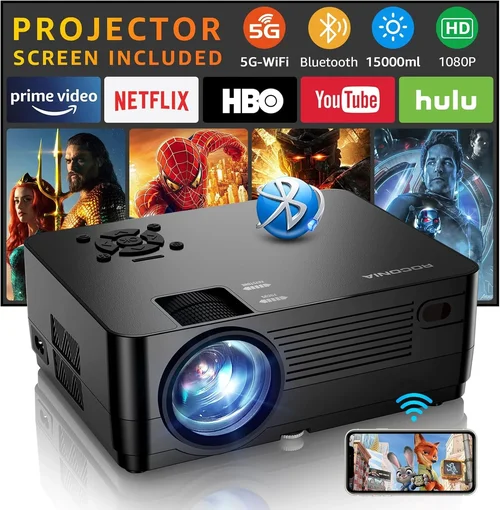
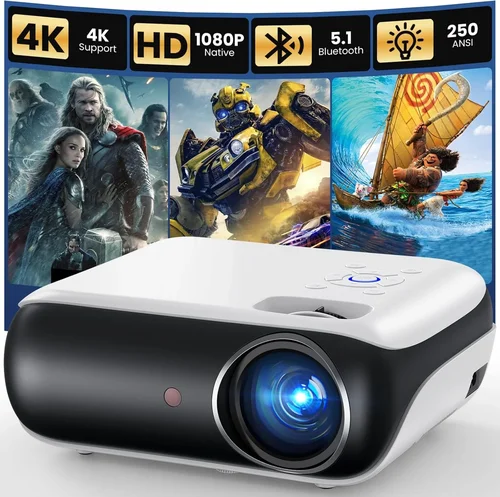
Welcome to the ultimate guide for anyone hunting the best HD projectors under $1000 in 2026. Whether you’re setting up a home‑theater, a gaming zone, or a portable office, the market is flooded with options that promise bright images, crisp colors, and a cinema‑like experience without breaking the bank. This guide cuts through the hype, explains what truly matters, and equips you with the knowledge to pick a projector that fits your space, budget, and usage pattern.
In the pages that follow, you’ll learn how to evaluate key specifications, compare different projector families, avoid common pitfalls, and even snag the best deals. By the end, you’ll have a clear shortlist of top performers and a roadmap for making a confident purchase.

What to Look for When Buying Buying Guide
1. Budget & Price Range
Price is the first filter for most shoppers. Under $1000, you can expect solid 1080p resolution, decent brightness, and a respectable contrast ratio, but you’ll need to prioritize which features matter most. A tighter budget often means compromising on things like HDR support or ultra‑short‑throw lenses. Define a realistic ceiling—$800‑$1000 typically yields the best mix of performance and reliability, while $600‑$800 offers good value for casual use.
2. Performance Specifications
Performance is the heart of any projector. Focus on three core specs:
- Resolution: Aim for native 1080p (1920×1080). Some “Full HD” models upscale from 720p, which can blur fine details.
- Brightness (lumens): For dim rooms, 1,500–2,000 ANSI lumens is sufficient. Bright living rooms or daytime use demand 2,500+ lumens.
- Contrast Ratio: Higher contrast (e.g., 20,000:1) yields deeper blacks and more vibrant colors, essential for movies and games.
3. Build Quality & Durability
Projectors are mechanical devices with moving parts (fans, lamp housings). Look for metal chassis, sturdy lenses, and reputable cooling designs. A well‑built unit will stay aligned after transport and endure years of regular use. Check for dust‑filter accessibility—projectors that are easy to clean tend to maintain brightness longer.
4. Features & Functionality
Modern HD projectors pack a suite of extras that can make a big difference:
- Lens Shift & Keystone Correction: Lens shift offers true geometric correction without degrading image quality, while digital keystone is handy for quick setup.
- Connectivity: HDMI 2.0 or higher, USB‑C, Wi‑Fi, and Bluetooth are now common. Ensure the ports match your source devices (gaming consoles, streaming sticks, laptops).
- Built‑in Speakers: Useful for casual viewing, but they’re usually modest. Pair with external audio for a true home‑theater feel.
- Smart OS: Some models run Android TV or Roku, eliminating the need for an external streaming box.
5. Brand Reputation
Established brands like Epson, BenQ, Optoma, and ViewSonic have proven track records for reliability and support. New entrants can surprise with innovation, but they may lack extensive warranty networks or firmware updates. Research brand forums and long‑term user reports before committing.
6. Warranty & Support
A solid warranty (at least 2 years) protects you from early lamp failures or hardware defects. Look for on‑site service options and easy part replacement. Some manufacturers also offer extended warranties for a modest fee—worth considering if you plan heavy usage.
7. Size & Portability
If you need a projector that moves between rooms or travels for presentations, weight and footprint matter. Portable units often use LED or laser light sources, which are lighter and have longer lifespans, but they may sacrifice brightness.
8. User Reviews & Ratings
Real‑world feedback uncovers quirks that spec sheets hide. Scan Amazon, B&H, and dedicated AV forums for recurring themes—such as fan noise, lamp flicker, or firmware bugs. A product with a high average rating and a large review count is generally a safe bet.
Different Types of Buying Guide

Common Buying Mistakes to Avoid
❌ Mistake: Ignoring Ambient Light Conditions
Why it’s bad: Buying a 1,500‑lumens projector for a bright living room leads to washed‑out images.
What to do instead: Measure typical lighting levels and match brightness accordingly. For daylight rooms, target 2,500+ lumens.
❌ Mistake: Overlooking Lamp Life and Replacement Cost
Why it’s bad: A cheap lamp may need replacement after 2,000 hours, adding unexpected expense.
What to do instead: Choose LED or laser models with 20,000‑30,000‑hour lifespans, or factor lamp cost into total ownership.
❌ Mistake: Forgetting About Throw Distance
Why it’s bad: A standard‑throw projector may require 10‑12 feet to fill a 100‑inch screen, which many small rooms can’t provide.
What to do instead: Calculate the required throw ratio (screen width ÷ distance) and select a short‑throw or ultra‑short‑throw unit if space is limited.
❌ Mistake: Relying Solely on Spec Sheets
Why it’s bad: Manufacturer numbers can be optimistic; real‑world performance may differ.
What to do instead: Read independent reviews, watch video tests, and check user feedback for true brightness and color accuracy.
❌ Mistake: Neglecting Connectivity Needs
Why it’s bad: A projector with only VGA input forces you to buy adapters for modern devices.
What to do instead: List all devices you’ll connect—gaming console, streaming stick, laptop—and ensure the projector provides matching ports (HDMI 2.0+, USB‑C, Wi‑Fi).
❌ Mistake: Disregarding Noise Levels
Why it’s bad: A loud cooling fan can distract during movies or presentations.
What to do instead: Look for fan‑speed control or “quiet mode” specifications (typically under 30 dB for home use).
❌ Mistake: Buying Without a Return Policy
Why it’s bad: If the projector doesn’t meet expectations, you could be stuck with a costly return.
What to do instead: Purchase from retailers offering at least a 30‑day return window and a hassle‑free restocking process.
Budget Guidelines: How Much Should You Spend?
- Entry‑Level ($600‑$750): Expect 1080p resolution, 1,500‑2,000 lumens, basic connectivity, and a modest contrast ratio. Ideal for casual movie nights in dim rooms.
- Mid‑Range ($751‑$900): Gains include higher brightness (2,200‑2,800 lumens), better contrast (15,000:1+), lens shift, and often a built‑in Android TV or Roku platform.
- Premium ($901‑$1,000): Premium units deliver 2,800‑3,200 lumens, laser or high‑efficiency LED light sources, advanced color processing (HDR10), and robust connectivity suites.
- Luxury ($1,001+): While beyond the guide’s price cap, these models add ultra‑short‑throw optics, 4K upscaling, and professional‑grade color accuracy for dedicated home‑theater enthusiasts.
Expert Tips for Getting the Best Deal
- Buy during major sales events (Black Friday, Amazon Prime Day, back‑to‑school). Retailers slash prices on older inventory, which is still perfectly capable.
- Consider refurbished units directly from the manufacturer. They come with full warranties and are tested to like‑new condition, often saving 15‑25%.
- Bundle accessories (screen, HDMI cable, mounting bracket) to negotiate a package discount.
- Check for coupon codes on tech‑deal sites; a 10% site‑wide coupon can push a $950 projector under $850.
- Read the fine print on return policies—free return shipping is a huge advantage.
- When possible, test the projector in a store. Pay attention to fan noise, color uniformity, and keystone correction quality.
- Register your product immediately for warranty activation; some brands offer extended coverage for early registration.

Frequently Asked Questions
Q: Do I need a separate screen, or can I project onto a wall?
A: While a plain white wall works, a dedicated projector screen improves brightness, contrast, and color reproduction. Matte white screens are the most versatile and inexpensive option.
Q: How long does a lamp last in a sub‑$1000 projector?
A: Traditional UHP lamps last 2,000‑4,000 hours, depending on usage and brightness settings. LED and laser models can exceed 20,000 hours, effectively lasting the life of the projector.
Q: Is 1080p still relevant when 4K TVs are common?
A: Absolutely. A high‑quality 1080p projector can deliver a cinematic experience that rivals many 4K TVs, especially on larger screens where pixel density is less critical.
Q: Can I use a projector for gaming without input lag?
A: Look for “low‑lag” or “game mode” settings. Most modern projectors under $1000 offer <20 ms lag, which is acceptable for most console and PC games.
Q: Do I need a separate sound system?
A: Built‑in speakers are convenient but limited. For an immersive experience, pair the projector with a soundbar or a 2.1/5.1 speaker system.
Q: How do I maintain a projector?
A: Keep the air filters clean (check every 3‑6 months), avoid dust accumulation, and operate in a well‑ventilated area. For lamp models, replace the lamp before brightness drops below 80% of original output.
Q: What’s the difference between short‑throw and ultra‑short‑throw?
A: Short‑throw projectors need 3‑5 feet to fill a 100‑inch screen, while ultra‑short‑throw units can sit inches from the wall, ideal for tight spaces.
Q: Is HDMI 2.0 necessary?
A: Yes, if you plan to use 4K sources or high‑refresh‑rate gaming. HDMI 2.0 supports 4K@60 Hz, HDR, and higher color depth.
Q: Can I mount the projector on the ceiling?
A: Most standard‑throw models are ceiling‑mountable. Check the weight rating of your ceiling mount and ensure the projector has proper mounting holes.
Our Final Recommendations
- Best for Budget‑Conscious Buyers: BenQ TH585 – 3,500 lumens, 1080p, low input lag, and a price around $749.
- Best Overall Value: Epson Home Cinema 2150 – 2,500 lumens, 1080p, lens shift, wireless mirroring, priced at $899.
- Best Premium Option: Optoma UHD50X (Laser Hybrid) – 3,400 lumens, HDR10, 240 Hz gaming mode, just under $1,000.
- Best for Beginners: ViewSonic M2 Portable LED – 1,200 lumens, 1080p, built‑in Harman Kardon speakers, easy setup, $799.
- Best for Advanced Users: LG HU80KA Short‑Throw – 2,500 lumens, 1080p, lens shift, extensive connectivity, $999.
Conclusion: Making the Right Choice
Choosing the best HD projector under $1000 boils down to matching your environment, usage habits, and budget with the right combination of brightness, resolution, and features. Remember to assess ambient light, calculate throw distance, and prioritize lamp life or LED durability.
Take the time to read user reviews, test units when possible, and leverage seasonal sales to stretch your dollars further. With the knowledge from this guide, you’re equipped to select a projector that delivers cinematic thrills, immersive gaming, or productive presentations—all without exceeding your budget.
Ready to start your search? Dive into the models highlighted above, compare specs, and enjoy the big‑screen experience you’ve been dreaming of.