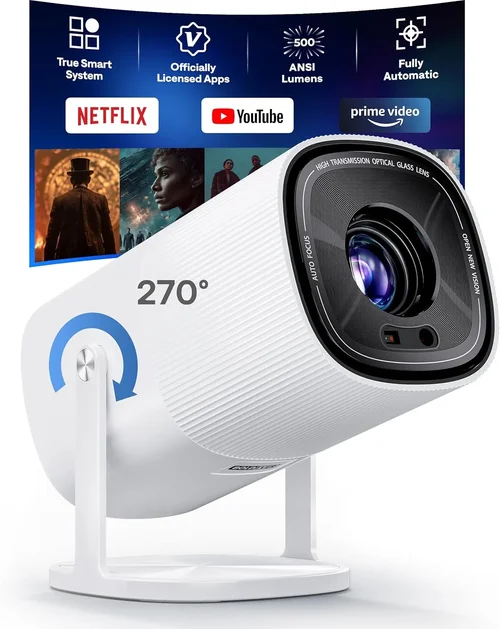
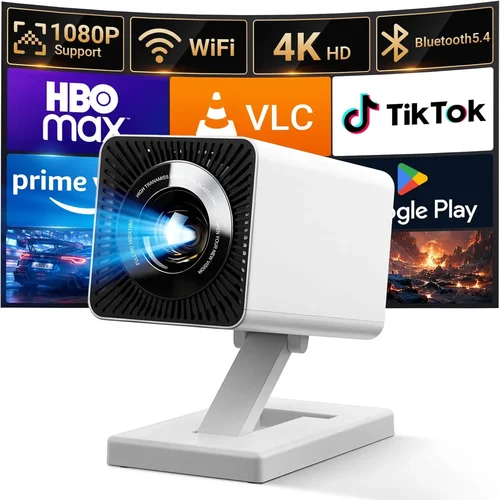
Choosing an HD projector under $500 can feel like navigating a maze of specs, brand promises, and endless reviews. The market is crowded, and the temptation to chase the lowest price often leads to disappointment—poor image quality, short lamp life, or missing essential features. This guide cuts through the noise, giving you a clear roadmap so you can buy with confidence and enjoy cinema‑quality viewing without breaking the bank.
In the next few sections you’ll learn exactly what to look for, how different projector types stack up, common pitfalls to avoid, and where to find the best deals. By the end, you’ll know which models deliver true HD performance at a sub‑$500 price point and how to match a projector to your specific needs—whether it’s a family movie night, a home‑office presentation, or a gaming setup.
The HD projector segment has evolved dramatically over the past five years. LED and laser light sources are becoming more common, contrast ratios have improved, and manufacturers now offer built‑in speakers and smart‑TV functionality at budget prices. Understanding these trends helps you separate hype from real value.

What to Look for When Buying Buying Guide
1. Budget & Price Range
Even within the “under $500” bracket, prices can vary widely based on features, brand, and lamp technology. Set a clear ceiling—$300, $400, or $500—and decide what you’re willing to compromise on. Remember that a slightly higher upfront cost often translates into a longer lamp life or better connectivity, which can save money in the long run.
2. Performance Specifications
Key specs that truly impact picture quality include:
- Resolution: Look for native 1080p (1920×1080) or at least 720p with good upscaling. Native 1080p ensures crisp detail.
- Brightness (lumens): For dim rooms, 2,000–2,500 lumens is sufficient. If you plan to use the projector in a living room with some ambient light, aim for 3,000 lumens or higher.
- Contrast Ratio: Higher contrast means deeper blacks. A ratio of 10,000:1 or better is desirable for movie watching.
- Throw Distance & Ratio: Determines how far the projector must be from the screen to achieve a certain image size. Short‑throw models are great for small spaces.
3. Build Quality & Durability
Budget projectors often use plastic housings, but look for reinforced corners and a sturdy lens cover. A well‑built projector resists accidental drops and maintains alignment over time. Check user reviews for any recurring issues like overheating or lens fogging.
4. Features & Functionality
Modern projectors pack more than just image output. Consider these add‑ons:
- Built‑in Speakers: While they won’t replace a sound system, 5‑10 W speakers are handy for casual viewing.
- Wireless Connectivity: Wi‑Fi or Bluetooth for screen mirroring, streaming apps, or connecting to headphones.
- HDR Support: True HDR is rare under $500, but HDR‑compatible models can still improve color depth.
- Keystone Correction & Lens Shift: Essential for flexible placement without distortion.
5. Brand Reputation
Established brands like Epson, BenQ, ViewSonic, and Optoma have proven track records for reliability and support. Newer entrants may offer attractive specs at lower prices, but research warranty length and post‑sale service before committing.
6. Warranty & Support
A solid warranty (minimum 2 years) protects you against early failures. Look for manufacturers that provide easy lamp replacement policies and responsive customer service. Some retailers also offer extended protection plans—evaluate whether the added cost is worth the peace of mind.
7. Size & Portability
If you plan to move the projector between rooms or take it on the road, weight and dimensions matter. Portable models typically weigh under 5 lb and include a compact stand or carry case.
8. User Reviews & Ratings
Real‑world feedback is invaluable. Pay attention to recurring themes—consistent praise for brightness, repeated complaints about remote lag, etc. Filter reviews by “verified purchase” to avoid biased marketing.
Different Types of Buying Guide

Common Buying Mistakes to Avoid
❌ Mistake: Ignoring Ambient Light Conditions
Why it’s bad: A projector rated at 2,500 lumens may look great in a dark basement but will appear washed out in a living room with windows.
What to do instead: Measure the typical lighting in your primary viewing area. If you can’t control ambient light, aim for at least 3,000 lumens and consider a high‑contrast panel.
❌ Mistake: Overlooking Lamp Type & Replacement Costs
Why it’s bad: Some budget models use cheap mercury lamps that need replacement every 2,000 hours, adding $80‑$120 to ownership cost.
What to do instead: Choose LED or laser‑based projectors where possible—they have lamp lives of 20,000+ hours and lower long‑term expenses.
❌ Mistake: Assuming All 1080p Projectors Are Equal
Why it’s bad: Native 1080p is critical, but some “Full HD” models actually upscale 720p, resulting in softness.
What to do instead: Verify the spec sheet for “native 1920×1080”. If the resolution is listed as “1920×1080 (upscaled)”, look elsewhere.
❌ Mistake: Forgetting About Connectivity
Why it’s bad: A projector with only VGA input forces you to buy adapters for modern devices, cluttering your setup.
What to do instead: Prioritize HDMI (preferably 2.0), USB‑C, and wireless options like Miracast or AirPlay.
❌ Mistake: Skipping the Test Run
Why it’s bad: Image uniformity, fan noise, and keystone correction quality can’t be judged from specs alone.
What to do instead: Test the unit in a store or buy from a retailer with a generous return window. Project a high‑resolution image and watch for hotspots or color banding.
❌ Mistake: Choosing the Cheapest Model Without Considering Warranty
Why it’s bad: A $180 projector may lack a warranty, leaving you responsible for any defects.
What to do instead: Ensure at least a 2‑year warranty and read the fine print about lamp replacement coverage.
Budget Guidelines: How Much Should You Spend?
- Entry‑Level ($200‑$300): Expect 720p resolution, 2,000 lumens, basic HDMI, and a plastic chassis. Good for occasional movie nights in dark rooms.
- Mid‑Range ($300‑$400): Native 1080p, 2,500‑3,000 lumens, better contrast, and added features like wireless mirroring. This tier offers the best value for most households.
- Premium ($400‑$500): Higher brightness (3,000+ lumens), short‑throw options, built‑in speakers, and enhanced color processing. Ideal for mixed‑use (movies, gaming, presentations).
- Luxury ($500+): While above the guide’s scope, this range includes laser light sources, true HDR, and professional‑grade lenses.
Expert Tips for Getting the Best Deal
- Timing: New projector releases usually happen in Q2. Buying a few weeks later can net you a discount on the previous generation.
- Where to buy: Compare prices between Amazon, Best Buy, and manufacturer websites. Some brands offer refurbished units with full warranties at 15% off.
- Spotting deals: Look for bundle offers that include a screen, mounting hardware, or extended warranty—often cheaper than buying separately.
- Warranty considerations: Register your projector immediately to activate the warranty and receive firmware updates.
- Return policies: Choose retailers with at least a 30‑day return window. Test the projector in your own space, not just the store.
- Testing before buying: Bring a laptop with a 1080p video file. Check for color uniformity, lag, and fan noise at your intended brightness level.
- Cable upgrades: Investing in a high‑speed HDMI 2.0 cable ensures you can enjoy full 1080p @ 60 Hz without compression artifacts.

Frequently Asked Questions
Q: Can a projector under $500 display true 1080p without upscaling?
A: Yes, but you must verify the spec sheet. Look for “Native 1920×1080”. Some budget models claim “Full HD” while actually upscaling a 720p panel, which results in softer images.
Q: How long does the lamp last on an LED projector?
A: LED lamps typically last 20,000–30,000 hours, which translates to 10+ years of occasional use. This far exceeds traditional mercury lamps that need replacement every 2,000–3,000 hours.
Q: Do I need a separate screen?
A: Not mandatory. A smooth, white wall works for casual viewing, but a dedicated screen improves brightness uniformity and color accuracy, especially in rooms with ambient light.
Q: Is there a noticeable input lag for gaming?
A: Many sub‑$500 models have 30‑50 ms lag, acceptable for most casual gamers. Look for “Game Mode” or a projector marketed specifically for gaming if low lag is critical.
Q: Will a short‑throw projector fit in my 8‑ft living room?
A: Yes. Short‑throw units can produce a 100‑inch image from as close as 2‑3 ft, making them perfect for tight spaces.
Q: How important is contrast ratio?
A: Very. Higher contrast (10,000:1 or more) delivers deeper blacks and more detail in dark scenes. Pair this with a dark room for the best cinematic experience.
Q: Can I connect my smartphone wirelessly?
A: Many modern budget projectors support Miracast, AirPlay, or a proprietary app for screen mirroring. Check the connectivity list before purchase.
Q: Do I need a separate sound system?
A: Built‑in speakers are convenient but usually lack depth. For movies or games, a small soundbar or Bluetooth speaker enhances the experience dramatically.
Q: Is it worth paying extra for a projector with lens shift?
A: Lens shift adds flexibility in placement without keystone distortion. If you can’t place the projector directly centered on the screen, it’s a valuable feature.
Q: How do I maintain my projector?
A: Keep vents dust‑free, use a microfiber cloth for the lens, and avoid exposing the unit to extreme temperatures. For lamp‑based models, follow the manufacturer’s cleaning schedule.
Our Final Recommendations
- Best for Budget‑Conscious Buyers: ViewSonic PA503S – 3,600 lumens, native 720p, HDMI, and a price under $250. Ideal for bright rooms and occasional movie nights.
- Best Overall Value: BenQ TH585 – True 1080p, 3,500 lumens, 16 ms low‑lag gaming mode, and a robust lamp life, priced around $450.
- Best Premium Option: Epson Home Cinema 1080 – 3,200 lumens, high contrast, lens shift, and built‑in speakers, typically found for $495 during sales.
- Best for Beginners: Optoma HD146X – User‑friendly menu, auto‑keystone, and reliable performance at $399.
- Best for Advanced Users: LG PF50KA – Portable LED, 1080p, 2,600 lumens, wireless screen sharing, and 30,000‑hour lamp life, priced near $480.
Conclusion: Making the Right Choice
Finding the best HD projector under $500 hinges on balancing brightness, resolution, and extra features against your specific viewing environment. Start by assessing ambient light, decide on a throw distance, and then narrow down models using the factors outlined above. Remember, the cheapest option isn’t always the most satisfying in the long run—consider lamp life, warranty, and brand support.
Armed with this guide, you can confidently compare specifications, avoid common pitfalls, and seize the best deals when they appear. Happy viewing, and may your next movie night feel like a personal cinema experience!