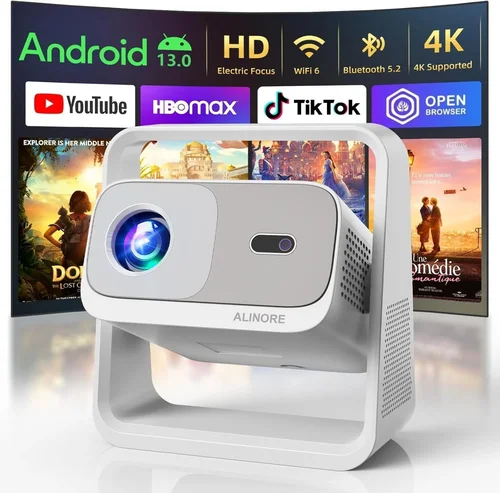
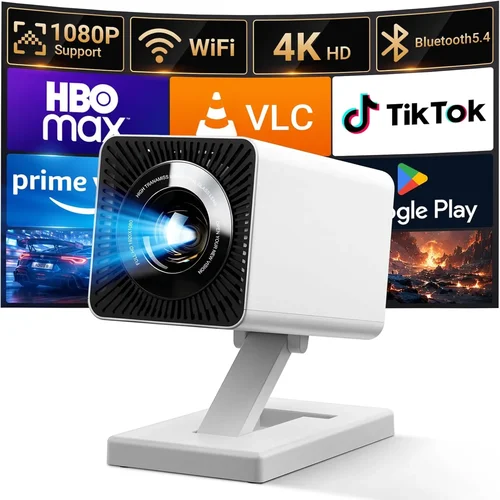
Choosing a home projector under $500 can feel like navigating a maze of specs, brands, and price tags. You want a picture that feels cinematic, a device that fits your living room or bedroom, and a price that doesn’t break the bank. This guide cuts through the noise, giving you the knowledge you need to make an informed purchase without spending a fortune.
In the pages that follow you will learn which technical specifications truly matter, how different projector types stack up against each other, and where you can find the best deals. We also walk through common pitfalls, budget breakdowns, and expert tips so you can avoid costly mistakes and enjoy a brilliant viewing experience from day one.
The budget‑friendly projector market has exploded in the last three years. Advances in LED and laser light sources, higher native resolutions, and smarter connectivity options mean that even models under $500 can deliver crisp 1080p images, low lag gaming, and built‑in streaming. Armed with the right information, you can pick a unit that matches your space, content preferences, and lifestyle.

What to Look for When Buying Buying Guide
1. Budget & Price Range
Price is the most obvious gatekeeper, but it’s also a proxy for the technology you’ll get. In the sub‑$500 segment you’ll generally find three tiers:
- Entry‑level ($150‑$250): Basic DLP or LCD chips, 720p native resolution, limited brightness.
- Mid‑range ($250‑$400): True 1080p or 1080p‑enhanced panels, brighter LEDs, better contrast.
- Upper‑mid ($400‑$500): Higher lumen output, improved color accuracy, optional features like keystone correction and wireless streaming.
Set a hard ceiling for your budget, then decide which tier offers the features you can’t live without.
2. Performance Specifications
Three specs dominate projector performance:
- Resolution: Native 1080p (1920×1080) is ideal for HD streaming and gaming. Some budget models use 720p panels with pixel‑shifting to simulate 1080p; these can look softer.
- Brightness (lumens): Measured in ANSI lumens, higher numbers mean a clearer picture in brighter rooms. For a dark home theater, 1,500‑2,000 lumens is ample; for a living room with ambient light, aim for 2,500 lumens.
- Contrast Ratio: This indicates the depth of blacks versus whites. A ratio of 10,000:1 or higher delivers richer images, especially for movies with dark scenes.
3. Build Quality & Durability
Even a mid‑budget projector should feel solid. Look for a metal or high‑grade plastic chassis, a sturdy lens housing, and a reliable cooling system. A noisy fan can ruin the cinematic experience, so check user reviews for decibel (dB) levels—ideally below 30 dB in operation.
4. Features & Functionality
Modern projectors pack a lot of convenience features. Prioritize the ones that matter to you:
- Keystone Correction: Automatic or manual correction for trapezoid distortion when the projector isn’t perfectly centered.
- Lens Shift: Physical adjustment that moves the image without distortion—more precise than keystone.
- Connectivity: HDMI (minimum 2.0), USB‑C, VGA, and wireless options like Wi‑Fi or Bluetooth. Some models include built‑in Chromecast or AirPlay.
- Speakers: Integrated sound is handy, but expect modest output. Pair with external speakers for true home‑theater audio.
- Gaming Mode: Low input lag (under 30 ms) is crucial for responsive gameplay.
5. Brand Reputation
Brands with a history of projector innovation—such as Epson, BenQ, ViewSonic, and Optoma—often provide better firmware updates, more reliable customer service, and easier access to replacement parts. Newer entrants can surprise with value, but research their warranty and support policies thoroughly.
6. Warranty & Support
A solid warranty (at least 2 years) protects you against early failures. Check whether the manufacturer covers the lamp or LED module, and whether on‑site service is offered. Good support can save you time and money if something goes wrong.
7. Size & Portability
If you plan to move the projector between rooms or take it to a friend’s house, weight and footprint matter. Portable “pico” projectors are ultra‑light but often sacrifice brightness and resolution. A balance between size and performance is key.
8. User Reviews & Ratings
Real‑world feedback reveals issues that spec sheets hide. Look for consistent praise or criticism about image quality, fan noise, and software stability. A product with a high average rating (4 stars or above) across multiple retail sites is a safer bet.
Different Types of Buying Guide

Common Buying Mistakes to Avoid
❌ Mistake: Ignoring Ambient Light Conditions
Why it’s bad: A projector with 1,500 lumens looks great in a dark room but will appear washed out in a living room with windows.
What to do instead: Measure the typical lighting in your viewing area and choose a lumen rating that exceeds it by at least 30 %.
❌ Mistake: Over‑focusing on Resolution Alone
Why it’s bad: A 1080p projector with poor contrast will look duller than a 720p model with high contrast and brightness.
What to do instead: Balance resolution with brightness, contrast, and color accuracy for the best overall image.
❌ Mistake: Forgetting About Throw Distance
Why it’s bad: Placing a short‑throw projector too far away forces you to enlarge the image beyond its optimal size, reducing sharpness.
What to do instead: Check the throw ratio (e.g., 1.2:1) and calculate the ideal distance for a 100‑inch screen.
❌ Mistake: Neglecting Input Lag for Gaming
Why it’s bad: High lag (over 50 ms) makes fast‑paced games feel sluggish.
What to do instead: Look for “Gaming Mode” or specs that list ≤ 30 ms input lag.
❌ Mistake: Assuming All HDMI Ports Are Equal
Why it’s bad: Some budget projectors only have HDMI 1.3, which cannot handle 4K@60 Hz or HDR.
What to do instead: Verify the HDMI version; HDMI 2.0 or higher is preferred for future‑proofing.
❌ Mistake: Skipping the Warranty Fine Print
Why it’s bad: A “2‑year warranty” that excludes the LED lamp can leave you paying a large replacement cost.
What to do instead: Read the warranty details; ensure the light source is covered for the full period.
❌ Mistake: Buying Without Testing
Why it’s bad: Online specs can be misleading; real‑world performance may differ due to fan noise or color tint.
What to do instead: If possible, view a demo unit in a store or order from a retailer with a generous return policy.
Budget Guidelines: How Much Should You Spend?
Understanding what you get at each price tier helps you set realistic expectations.
- Entry-Level ($150‑$250): Expect 720p resolution, 1,200‑1,500 lumens, basic HDMI, and minimal keystone correction. Ideal for occasional movie nights in a dark bedroom.
- Mid‑Range ($250‑$400): Native 1080p, 2,000‑2,500 lumens, better contrast (10,000:1+), built‑in speakers, and wireless streaming options. This is the sweet spot for most households.
- Premium ($400‑$500): Brightness up to 3,000 lumens, advanced features like lens shift, dual HDMI, and low‑lag gaming modes. Suitable for bright living rooms or dual‑use (movies + gaming).
- Luxury ($500+): While beyond the scope of this guide, luxury models often include 4K UHD panels, laser light sources, and professional‑grade color grading.
Expert Tips for Getting the Best Deal
- Timing: Late summer (July‑August) and post‑holiday January sales often feature deep discounts on home‑theater gear.
- Where to buy: Major retailers (Best Buy, Walmart) offer in‑store demos, while Amazon and Newegg provide extensive user reviews and easy returns.
- Bundle Savings: Look for bundles that include a screen, HDMI cable, or ceiling mount—these can save up to $50.
- Refurbished Units: Certified refurbished models from the manufacturer’s outlet can be 15‑25 % cheaper with full warranty.
- Coupon Stacking: Combine manufacturer coupons with retailer promo codes for extra cash‑back.
- Warranty Extensions: If you plan on heavy use, consider a paid extension that covers the LED module; it often costs less than a full replacement.
- Testing: When you receive the projector, check for dead pixels, fan noise, and verify all advertised inputs work before finalizing the purchase.

Frequently Asked Questions
Q: Can I use a projector under $500 for gaming?
A: Yes, but choose a model with low input lag (≤ 30 ms) and a refresh rate of at least 60 Hz. DLP projectors often excel in this area, and many mid‑range units include a dedicated “Game Mode.”
Q: Do I need a separate screen?
A: A smooth white wall works, but a matte white screen improves brightness and contrast by up to 30 %. For budget builds, a 120‑inch pull‑down screen under $100 is a solid upgrade.
Q: How long does an LED lamp last?
A: LED light sources typically last 20,000‑30,000 hours, which translates to 5‑8 years of regular use before noticeable dimming.
Q: What is the difference between DLP and LCD?
A: DLP uses a chip of micromirrors for fast response and high contrast, while LCD projects through three panels for richer color and no rainbow effect. Both can deliver excellent images; personal preference and specific use‑case matter.
Q: Is a 4K projector worth it under $500?
A: True 4K projectors are rare at this price point. Some models use pixel‑shifting to simulate 4K, but native 1080p typically offers sharper, more reliable performance for the money.
Q: How far should I place my projector for a 100‑inch image?
A: Check the throw ratio. For a 1.5:1 ratio, you’ll need 12.5 feet (≈ 150 inches) of distance. Short‑throw models can achieve the same size from 4‑5 feet.
Q: Do I need a separate sound system?
A: Built‑in speakers are convenient but limited (usually ≤ 10 W). For immersive audio, pair the projector with a soundbar or a small AV receiver.
Q: Can I mount the projector on the ceiling?
A: Most mid‑range models support ceiling mounts. Ensure the mount’s weight rating exceeds the projector’s weight and that you have access to power and HDMI cables.
Q: What is “keystone correction” and does it affect image quality?
A: Keystone correction digitally reshapes a distorted image. While convenient, it can slightly soften the picture. Physical lens shift or proper placement eliminates the need for keystone.
Q: Are there any safety concerns with projectors?
A: Keep the projector in a well‑ventilated area to prevent overheating. Avoid covering vents and clean the filter regularly to extend lamp life.
Our Final Recommendations
- Best for Budget‑Conscious Buyers: ViewSonic M1 Mini Plus – Compact LED design, 250 lumens, built‑in Harman Kardon speakers, and Wi‑Fi streaming for under $200.
- Best Overall Value: BenQ TH585 – 1080p DLP, 3,500 lumens, 10 ms gaming mode, and robust connectivity at $399.
- Best Premium Option (Just Under $500): Epson Home Cinema 2150 – 1080p LCD, 2,500 lumens, lens shift, and wireless mirroring for $479.
- Best for Beginners: Optoma HD146X – Easy setup, 1080p, 3,600 lumens, and automatic keystone correction for $349.
- Best for Advanced Users: LG PF50KA – Portable LED, 1080p, battery‑operated, webOS smart platform, and 2,600 lumens for $429.
Each of these models balances price, performance, and features in a way that aligns with specific user needs. Review the detailed specs above to match the recommendation with your viewing environment.
Conclusion: Making the Right Choice
Choosing the best home projector under $500 boils down to understanding your space, lighting, and content preferences. Prioritize resolution, brightness, and contrast, but don’t overlook practical factors like keystone correction, input lag, and warranty coverage. By avoiding common pitfalls, sticking to a realistic budget tier, and leveraging seasonal sales, you can secure a projector that turns any room into a personal cinema without overspending.
Now that you’re armed with the knowledge, take a moment to assess your room’s size, decide which features matter most, and compare the models listed in our recommendations. Happy viewing, and enjoy the big‑screen experience you deserve!