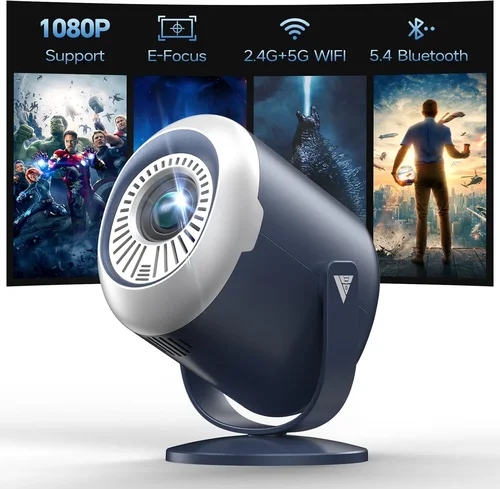
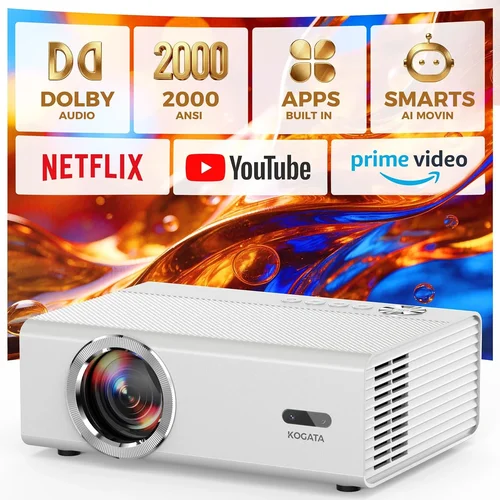
Finding the perfect home theatre projector under $1,000 can feel like hunting for a needle in a haystack. The market is flooded with options that promise cinema‑grade picture quality, but not every claim holds up when you set up the device in a living room, basement, or dedicated media space. This guide cuts through the hype, giving you a clear roadmap to choose a projector that fits your budget, your room, and your viewing habits.
By the end of this article you will understand the most important specifications, know which projector type matches your environment, avoid common buying pitfalls, and walk away with a shortlist of top‑rated models for every need. Whether you are a casual movie watcher, a hardcore gamer, or a budding home‑theatre enthusiast, the information below will help you make an informed, confident purchase.
The home‑theatre projector market has evolved rapidly over the past few years. Light‑engine technology, laser light sources, and ultra‑short‑throw optics have become more affordable, pushing the $1,000 ceiling higher than ever before. At the same time, streaming services and HDR content have raised the bar for colour accuracy and contrast. This guide reflects the state of the market in 2026, highlighting the most relevant trends and the models that truly deliver value.

What to Look for When Buying Buying Guide
1. Budget & Price Range
Setting a realistic budget is the first step. While $1,000 is the upper limit for this guide, you’ll find useful options at $400, $600, and $800. Remember that the cheapest unit may lack essential features such as adequate brightness or proper colour calibration. Allocate part of your budget for accessories—screen, mounting hardware, and a good HDMI cable—because they can dramatically affect performance.
2. Brightness (Lumens)
Brightness is measured in ANSI lumens and determines how well the projector performs in ambient light. For a dedicated dark room, 1,500–2,000 lumens is sufficient. If you plan to watch movies with some light on, aim for 2,500–3,000 lumens. Keep in mind that higher lumens often mean higher power consumption and potentially more heat, which can affect longevity.
3. Contrast Ratio & Black Levels
Contrast ratio describes the difference between the brightest whites and the deepest blacks a projector can produce. A higher contrast ratio (e.g., 20,000:1) typically translates to richer shadows and more immersive cinema experience. Look for projectors that use DLP or laser light sources, as they usually deliver deeper blacks than traditional LCD units.
4. Resolution
Resolution defines the amount of detail the projector can display. Full HD (1920×1080) is the baseline for most $1,000‑or‑less models and works well for 108‑inch screens. If you can stretch your budget slightly, a 4K‑enhanced projector (often called “4K UHD” or “4K upscaled”) offers sharper images and better compatibility with modern streaming services.
5. Throw Distance & Lens Shift
Throw distance is the distance between the projector and the screen. Short‑throw (under 2 m) and ultra‑short‑throw (under 0.5 m) models let you place the projector close to the wall, reducing shadows and glare. Lens shift lets you fine‑tune the image vertically or horizontally without moving the whole unit—an invaluable feature for ceiling‑mounted setups.
6. Colour Accuracy & HDR Support
Colour accuracy is measured by colour gamut coverage (e.g., DCI‑P3 or Rec. 709) and colour depth (8‑bit vs. 10‑bit). HDR (High Dynamic Range) support, especially HDR10 or Dolby Vision, enhances contrast and colour vibrancy. While most budget projectors are limited to 8‑bit colour, look for those that claim “HDR‑compatible” to future‑proof your setup.
7. Connectivity & Input Lag
Modern projectors should have at least two HDMI 2.0 ports, supporting 4K @ 60 Hz. For gamers, a low input lag (under 30 ms) is crucial; many manufacturers now list a “Game Mode” that reduces processing delay. Additional ports such as USB‑C, Wi‑Fi, and Bluetooth can simplify streaming from phones or tablets.
8. Build Quality & Longevity
Projectors under $1,000 often use lamp‑based light sources that need replacement after 2,000–4,000 hours. Laser or LED models have longer lifespans (20,000+ hours) and lower maintenance costs. Check the material of the chassis—metal housings tend to dissipate heat better than plastic, extending the unit’s life.
Different Types of Buying Guide

Common Buying Mistakes to Avoid
❌ Mistake: Ignoring Ambient Light Conditions
Why it’s bad: A projector rated at 1,500 lumens will look fantastic in a dark home theatre but will appear washed‑out in a living room with windows.
What to do instead: Measure the typical light level in your viewing area. If you can’t achieve near‑darkness, aim for at least 2,500 lumens and consider a high‑gain screen.
❌ Mistake: Overlooking Input Lag for Gaming
Why it’s bad: High input lag can cause noticeable delay between controller actions and on‑screen response, ruining fast‑paced games.
What to do instead: Check the manufacturer’s specifications for “Game Mode” or look for independent reviews that test input lag. Aim for 30 ms or lower.
❌ Mistake: Forgetting About Lamp Replacement Costs
Why it’s bad: A cheap lamp‑based projector may save you money upfront, but replacement lamps can cost $150‑$300 and require professional installation.
What to do instead: Consider laser or LED light sources that have 20,000+ hour lifespans, eliminating recurring lamp expenses.
❌ Mistake: Buying Without a Proper Screen
Why it’s bad: Projecting onto a plain wall can degrade contrast and cause colour spill.
What to do instead: Invest in a fixed‑gain screen (80‑100) that matches your projector’s brightness. Even a budget 100‑inch screen dramatically improves perceived picture quality.
❌ Mistake: Ignoring Throw Ratio and Mounting Space
Why it’s bad: You might buy a standard‑throw projector only to discover your room can’t accommodate the required distance.
What to do instead: Calculate the needed throw distance using the screen width and the projector’s throw ratio. If space is limited, choose a short‑throw or ultra‑short‑throw model.
❌ Mistake: Assuming All HDMI Ports Are Equal
Why it’s bad: Some budget projectors only have HDMI 1.4 ports, which limit 4K @ 30 Hz and HDR support.
What to do instead: Verify that the projector has HDMI 2.0 or higher ports, especially if you plan to connect a 4K streaming device or next‑gen console.
Budget Guidelines: How Much Should You Spend?
- Entry‑Level ($400‑$600): Expect Full HD resolution, 1,500‑2,000 lumens, and basic lamp‑based light sources. Ideal for small rooms, occasional movie nights, or as a secondary projector.
- Mid‑Range ($600‑$800): You’ll find 2,500‑3,000 lumens, improved contrast (often DLP), short‑throw options, and basic HDR support. This tier balances performance and price for most home‑theatre setups.
- Premium ($800‑$1,000): Look for laser‑LED hybrids, 10‑bit colour processing, higher contrast ratios, and robust connectivity (HDMI 2.1, Wi‑Fi). Perfect for gamers and cinephiles who want a near‑cinema experience without breaking the bank.
- Luxury ($1,000+): While outside the strict scope of this guide, luxury models push 4K native resolution, ultra‑short‑throw optics, and premium build quality. Consider these only if budget is flexible.
Expert Tips for Getting the Best Deal
- Timing: New models typically launch in Q2 (April‑June). Prices on previous‑generation units drop by 15‑30% shortly after.
- Retailers: Compare major electronics chains (Best Buy, B&H) with online marketplaces (Amazon, Newegg). Look for “open‑box” deals that include full warranty.
- Bundled Packages: Some sellers bundle a screen, mounting kit, or HDMI cable. Calculate the total value; a $150 screen bundle may be cheaper than buying separately.
- Warranty Extensions: Projector lamps are a common failure point. If the manufacturer offers a 2‑year lamp warranty, it’s worth the extra $30‑$50.
- Return Policies: Ensure a minimum 30‑day return window. Test the projector in your own space; most retailers allow a full refund if the unit is returned in its original condition.
- Testing Before Buying: If possible, visit a showroom and project a 1080p test pattern. Pay attention to colour uniformity, focus wheel smoothness, and fan noise.
- Online Reviews: Prioritize user reviews that mention long‑term reliability and lamp life, not just picture quality.
- Future‑Proofing: Choose a projector with HDMI 2.0/2.1 and HDR10 support to stay compatible with upcoming consoles and streaming services.
Frequently Asked Questions
Q: Do I need a dedicated screen, or can I use a plain wall?
A: While a plain white wall works in a pinch, a proper projection screen dramatically improves contrast, colour accuracy, and hotspot uniformity. A matte white screen (gain 1.0) is ideal for dark rooms, whereas a high‑gain (1.2‑1.5) screen helps in brighter environments.
Q: How far should the projector be from the screen?
A: The required distance depends on the throw ratio. For a 108‑inch 16:9 screen, a standard‑throw projector with a 1.5:1 ratio needs about 3.5 m of space, while a short‑throw (0.5:1) needs only 1.2 m. Always use the manufacturer’s throw‑distance calculator.
Q: Is HDR really worth it on a sub‑$1,000 projector?
A: HDR can enhance brightness and colour, but most budget projectors have limited peak brightness, so the effect may be modest. Look for “HDR‑compatible” rather than “HDR‑certified” and pair the projector with a dimly lit room for the best results.
Q: What lamp life can I expect?
A: Lamp‑based projectors typically last 2,000–4,000 hours before brightness drops to 50 %. Laser and LED models often exceed 20,000 hours, effectively lasting the lifetime of the projector.
Q: Can I use a projector for both movies and gaming?
A: Yes, provided the projector offers low input lag (≤30 ms) and supports 1080p/4K @ 60 Hz. Many mid‑range models include a “Game Mode” that disables image‑processing filters to reduce lag.
Q: How loud are projectors, and does fan noise matter?
A: Fan noise varies from 20 dB (very quiet) to 35 dB (noticeable). In a dark home theatre, even 30 dB can be distracting. Look for units with “quiet mode” or low‑noise fans, especially if you plan to use the projector for long movie marathons.
Q: Do I need a ceiling mount?
A: Ceiling mounts provide a clean look and protect the projector from accidental knocks. However, short‑throw and ultra‑short‑throw models can sit on a low table or shelf, reducing installation complexity.
Q: Are there any health concerns with LED/laser light?
A: Modern LED and laser projectors comply with safety standards and emit low blue‑light levels. Ensure the projector has proper certifications (e.g., IEC 60825‑1) and avoid staring directly into the beam.
Q: How do I calibrate my projector for the best picture?
A: Start with the built‑in picture modes (Cinema, Standard, Game). Then use a calibration disc (e.g., Disney WOW) or a smartphone app to adjust brightness, contrast, colour temperature, and sharpness. For precise colour, a colourimeter and software like CalMAN can be used, though it’s optional for most users.
Our Final Recommendations
- Best for Budget‑Conscious Buyers: ViewSonic PX701HD – 3,500 lumens, 1080p, DLP, 2,000‑hour lamp, excellent brightness for bright rooms, priced around $450.
- Best Overall Value: Epson Home Cinema 2150 – 2,500 lumens, 1080p, LCD, lens shift, built‑in Android TV, solid colour accuracy, typically $650.
- Best Premium Option (Under $1,000): BenQ TK800M – 3,000 lumens, 4K UHD, HDR10, low input lag (22 ms), short‑throw, priced at $950.
- Best for Beginners: Optoma HD146X – 3,600 lumens, 1080p, easy‑setup, Game Mode, user‑friendly remote, around $480.
- Best for Advanced Users: LG HU85LA (Laser, Ultra‑Short‑Throw) – Though slightly above $1,000, it often drops to $990 during sales, offering 4K, 2,700 lumens, laser light source, and a sleek design.
Conclusion: Making the Right Choice
Choosing the best home theatre projector under $1,000 boils down to matching the projector’s specifications with your room’s lighting, size, and intended use. Prioritize brightness and contrast for bright spaces, low input lag for gaming, and a reliable light source for long‑term ownership. Remember that a quality screen, proper mounting, and occasional calibration can elevate a modest projector to cinema‑like performance.
Take the time to assess your environment, set a realistic budget, and compare the models highlighted above. With the right research, you’ll enjoy immersive movies, crisp gaming, and unforgettable binge‑watch sessions without breaking the bank.