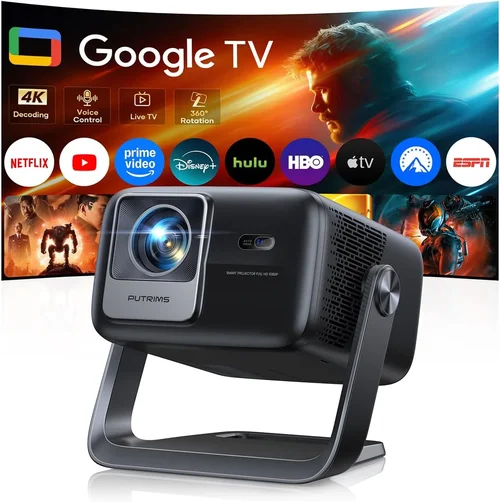
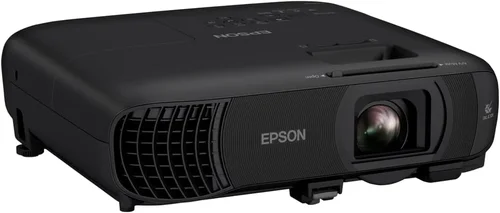
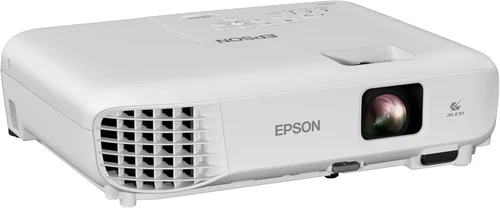
Finding the perfect home video projector under $1,000 can feel like hunting for a needle in a haystack. The market is flooded with options that promise cinema‑grade picture quality, but not every model lives up to the hype. This guide cuts through the noise, giving you a clear roadmap to choose a projector that fits your living room, budget, and viewing habits.
In the next few pages you’ll learn how to evaluate key specifications, understand the trade‑offs between different projector families, and avoid common pitfalls that leave buyers disappointed. By the end, you’ll be equipped to pick a projector that turns movie night into a truly immersive experience—without breaking the bank.

What to Look for When Buying Buying Guide
1. Budget & Price Range
Even within the sub‑$1,000 segment, prices can vary dramatically. A $200 unit may be a good starter but will likely lack the brightness and color accuracy needed for a dedicated home theater. On the other hand, a $950 model often includes premium optics, higher lumens, and better warranty coverage. Set a realistic ceiling based on how you plan to use the projector (dark room vs. ambient light) and factor in accessories such as a screen, mounting hardware, and cables.
2. Performance Specifications
The heart of any projector lies in its technical specs:
- Brightness (lumens): Measured in ANSI lumens, this tells you how well the image will hold up in daylight or a lit living room. For a dark home theater, 1,500–2,000 lumens is plenty. For rooms with ambient light, aim for 2,500+ lumens.
- Resolution: Full HD (1920×1080) is the baseline for crisp images. Some models push 4K UHD (3840×2160) via pixel‑shifting technology, delivering sharper detail without the price tag of native 4K.
- Contrast Ratio: Higher contrast means deeper blacks and more vivid colors. Look for a dynamic contrast of at least 20,000:1 for a satisfying cinematic feel.
- Throw Ratio: Determines how far the projector must sit from the screen to achieve a given image size. Short‑throw (0.5–1.0) is ideal for small spaces; standard throw (1.5–2.5) works in larger rooms.
3. Build Quality & Durability
A projector is an investment that should last 3,000–5,000 hours of use. Metal housings, sturdy lenses, and reliable cooling fans are hallmarks of durable units. Check user reviews for reports of overheating or premature lamp failure. Some models use laser or LED light sources, which typically outlast traditional lamps by a factor of three.
4. Features & Functionality
Modern projectors are more than just picture machines. Look for:
- Built‑in speakers: While not a substitute for a sound system, decent integrated audio can be handy for casual viewing.
- Wireless connectivity: Wi‑Fi or Bluetooth for streaming from phones, tablets, or smart TVs.
- Multiple HDMI ports: Enables simultaneous connection of a game console, Blu‑ray player, and streaming stick.
- Keystone correction & lens shift: Helps fine‑tune image geometry without moving the projector.
- HDR support: High Dynamic Range boosts color depth and contrast, especially on newer 4K‑capable models.
5. Brand Reputation
Established brands like Epson, BenQ, Optoma, and ViewSonic have proven track records for reliability and after‑sales service. Newer entrants may offer attractive specs at lower prices, but research their warranty terms and customer support reputation before committing.
6. Warranty & Support
A solid warranty can save you hundreds of dollars. Look for at least a two‑year coverage on the projector body and a minimum of 90 days on the light source. Some manufacturers also provide free lamp replacement within the first year—a valuable perk for lamp‑based units.
7. Size & Portability
If you plan to move the projector between rooms or take it to a friend’s house, weight and footprint matter. Portable pico‑projectors can fit in a backpack, but they usually sacrifice brightness and resolution. A mid‑size unit (under 8 lbs) offers a good balance of performance and mobility.
8. User Reviews & Ratings
Numbers on a spec sheet tell part of the story; real‑world usage reveals the rest. Scan Amazon, B&H, and dedicated AV forums for recurring themes—both praise and complaints. Pay special attention to comments about fan noise, heat, and firmware updates.
Different Types of Buying Guide

Common Buying Mistakes to Avoid
❌ Mistake: Ignoring Ambient Light Conditions
Why it’s bad: Purchasing a dim projector for a bright living room leads to washed‑out images and frustration.
What to do instead: Measure the typical light level in your viewing area. If you cannot darken the room completely, target a projector with at least 2,500 ANSI lumens.
❌ Mistake: Overlooking Throw Ratio
Why it’s bad: A standard‑throw unit may need to sit too far back, forcing you to rearrange furniture or use an expensive ceiling mount.
What to do instead: Calculate the distance you have available and choose a throw ratio that fits. Short‑throw models are ideal for rooms under 8 feet deep.
❌ Mistake: Assuming All 4K Is Equal
Why it’s bad: Many sub‑$1,000 “4K” projectors actually use pixel‑shifting, which can introduce flicker or reduced sharpness compared to native 4K.
What to do instead: Read the tech sheet for “native” versus “enhanced” 4K. If true 4K is essential, be prepared to spend a bit more.
❌ Mistake: Forgetting About Lamp Life
Why it’s bad: Replacing a lamp can cost $150‑$250 and involve downtime.
What to do instead: Look for LED or laser light sources, which often exceed 20,000 hours and are included in the warranty.
❌ Mistake: Neglecting Audio Needs
Why it’s bad: Relying on built‑in speakers can result in tinny sound that forces you to buy a separate sound system anyway.
What to do instead: Confirm the projector has an audio out (3.5 mm or optical) so you can connect to a soundbar or AV receiver.
❌ Mistake: Buying Without Testing
Why it’s bad: Online specs may not reflect real‑world performance such as fan noise or color fidelity.
What to do instead: Visit a local retailer, request a demo, or buy from a retailer with a generous return window.
Budget Guidelines: How Much Should You Spend?
Understanding what each price tier delivers helps you align expectations with reality.
- Entry-Level ($200‑$400): Typically DLP or LCD units with 720p‑1080p resolution, 1,200‑1,800 lumens, and a lamp life of 2,000‑3,000 hours. Good for occasional movie nights in a dark room.
- Mid‑Range ($401‑$750): Full HD or pixel‑shifted 4K, 2,000‑2,800 lumens, better contrast, and often include wireless streaming. This tier hits the sweet spot for most families.
- Premium ($751‑$1,000): True 4K or high‑end 1080p DLP, 3,000+ lumens, laser/LED light source, HDR10 support, and advanced lens shift. Ideal for enthusiasts who want cinema‑level performance.
- Luxury ($1,001+): Professional‑grade optics, ultra‑short‑throw designs, built‑in calibration tools, and robust warranty packages. Consider only if your budget allows.
Expert Tips for Getting the Best Deal
- Shop during major sales events: Black Friday, Cyber Monday, and Amazon Prime Day often feature 20‑30% discounts on top models.
- Consider refurbished units: Certified refurbished projectors from the manufacturer come with a full warranty and can save you 15‑25%.
- Bundle accessories: Some retailers offer screen‑plus‑projector bundles that are cheaper than buying separately.
- Check firmware updates: A recent update can add HDR support or improve fan control, increasing the value of an older model.
- Read the fine print on lamp warranties: Some “lamp‑only” warranties exclude the projector body—make sure you understand what’s covered.
- Test with your own content: Bring a 1080p or 4K video file on a USB stick to the store to see how the projector handles real media.
- Use price‑tracking tools: Extensions like CamelCamelCamel or Keepa alert you when a product’s price drops below your target.
- Don’t forget shipping: Heavy projectors can incur high freight costs; look for free‑shipping offers or local pickup.

Frequently Asked Questions
Q: Do I need a ceiling mount?
A: Not necessarily. A sturdy tripod or shelf works for most setups. Ceiling mounts are useful for permanent installations and help keep the image geometry consistent.
Q: Can I use a projector for gaming?
A: Yes, provided the projector supports low input lag (under 30 ms) and a refresh rate of at least 60 Hz. Models marketed for gaming often have a “Game Mode” that optimizes these settings.
Q: What is the difference between DLP and LCD?
A: DLP (Digital Light Processing) uses tiny mirrors for fast response and high contrast, while LCD (Liquid Crystal Display) offers richer colors and uniform brightness. Choice often comes down to personal preference and budget.
Q: How far should the projector be from the screen?
A: Use the manufacturer’s throw ratio chart. For a 100‑inch image, a 1.5 throw ratio requires roughly 12.5 feet of distance. Short‑throw models can achieve the same size from 4‑5 feet.
Q: Is a separate screen necessary?
A: While a white wall works, a proper screen improves gain, color accuracy, and reduces hot‑spotting. For the best image, especially in ambient light, invest in a gray or high‑gain screen.
Q: How often do I need to replace the lamp?
A: Lamp life varies; a typical UHP lamp lasts 2,000‑3,000 hours. If you watch 2 hours nightly, expect a replacement every 2‑3 years. LED and laser sources rarely need replacement within the product’s lifespan.
Q: Will the projector work with my smartphone?
A: Most modern units support HDMI, USB‑C, and wireless mirroring (AirPlay, Miracast). Check the connectivity list to ensure compatibility with your device.
Q: Does HDR really matter on a budget projector?
A: HDR can enhance contrast and color depth, but the effect is limited by the projector’s native contrast ratio. If HDR is a priority, aim for a model with at least 30,000:1 contrast and 2,500+ lumens.
Our Final Recommendations
Best for Budget‑Conscious Buyers
Model: Optoma HD146X
Why: 3,600 lumens, 1080p resolution, low input lag, and a price around $450 make it a solid performer for dark rooms without breaking the bank.
Best Overall Value
Model: BenQ HT3550
Why: True 4K UHD via pixel‑shifting, 2,000 lumens, HDR‑10 support, and a sleek design at roughly $850. It balances picture quality, features, and price exceptionally well.
Best Premium Option
Model: Epson Home Cinema 5050UB
Why: 2,600 lumens, native 4K enhancement, 2,500,000:1 contrast, and laser light source lasting 20,000 hours. Priced just under $1,000, it delivers near‑theatrical performance.
Best for Beginners
Model: ViewSonic M2
Why: Portable, LED light source, Full HD, built‑in Harman Kardon speakers, and Wi‑Fi connectivity. Easy setup and user‑friendly interface for first‑time owners.
Best for Advanced Users
Model: LG CineBeam HU85LA
Why: Ultra‑short‑throw laser projector with 4K resolution, 2,700 lumens, and AI‑based image enhancement. Perfect for enthusiasts who want a large image without ceiling mounting.
Conclusion: Making the Right Choice
Choosing the best home video projector under $1,000 boils down to three core questions: How much ambient light will you have? What resolution and brightness do you need? And how much are you willing to invest in future‑proof features like laser light sources or HDR?
By evaluating the factors outlined above, comparing the different projector families, and avoiding the common pitfalls, you’ll be able to select a unit that delivers cinematic thrills without the cinema price tag. Remember, the perfect projector is the one that fits your space, budget, and viewing habits—so prioritize what matters most to you.
Ready to upgrade your movie nights? Browse the recommended models, double‑check the specifications that matter to you, and enjoy the immersive experience that only a quality projector can provide.