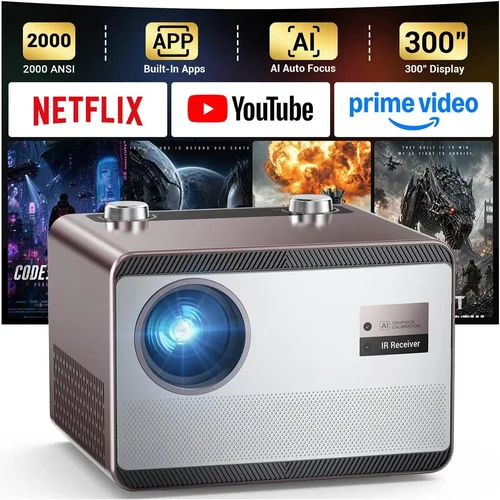
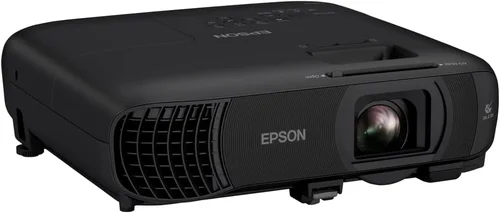
Long‑throw projectors have become the go‑to solution for anyone who wants a cinema‑sized picture without the hassle of mounting a projector on the ceiling or worrying about a short‑throw lens. Whether you’re setting up a home theater in a spacious living room, a conference room that’s 12‑feet from the screen, or a classroom that needs a clear image from the back row, a long‑throw projector can deliver a sharp, bright display at distances of 10‑30 feet or more.
This guide is designed to cut through the noise and help you choose the best long‑throw projector under $1,000. We’ll walk you through the most important specs, compare the main types on the market, flag common pitfalls, and give you a clear buying roadmap. By the end, you’ll know exactly what to look for, how much you should spend, and which models give the most bang for your buck.
The market for sub‑$1,000 long‑throw projectors has expanded dramatically in the last two years. Manufacturers such as Epson, BenQ, ViewSonic, and Optoma have introduced budget‑friendly models that still pack 3,000‑4,000 lumens, 1080p resolution, and flexible lens‑shift options. This growth means more choices, but also more confusion—especially if you’re not familiar with terms like “throw ratio,” “ANSI lumens,” or “color gamut.” Let’s demystify those terms and get you on the road to a perfect picture.

What to Look for When Buying Buying Guide
1. Budget & Price Range
Sticking to a sub‑$1,000 budget forces you to prioritize the features that matter most for your setup. In this price band, you’ll typically find 1080p native resolution, 3,000‑4,000 lumens, and basic lens‑shift. Some premium features—like 4K UHD, HDR10+, or laser light sources—are usually reserved for higher‑priced units. Decide early how much you’re willing to stretch; a $950 model may include a better lamp life or a more robust warranty.
2. Performance Specifications
Key specs include:
- Resolution: 1080p (1920×1080) is the sweet spot for most home‑theater and business uses under $1,000. It delivers crisp detail without the price premium of 4K.
- Brightness (ANSI Lumens): For a long‑throw setup in a dim‑to‑moderate ambient light room, aim for at least 3,000 lumens. Higher brightness ensures a vivid image even with some light leakage.
- Contrast Ratio: Look for a native contrast of 15,000:1 or higher. This gives deeper blacks and more detail in dark scenes.
- Throw Ratio: Long‑throw projectors typically have a throw ratio of 1.5 – 2.5. A 2.0 throw ratio means you’ll need 20 feet of distance for a 100‑inch image.
- Color Gamut: A wide color gamut (e.g., 100% sRGB or Rec. 709) improves color accuracy for movies and presentations.
3. Build Quality & Durability
Projectors that sit on a table or a ceiling mount need sturdy chassis, reliable cooling, and a lamp rated for at least 4,000 hours. Metal housings and reinforced lens mounts reduce wobble and vibration, which can affect image stability.
4. Features & Functionality
Consider these extras:
- Lens Shift: Vertical (and ideally horizontal) lens shift lets you fine‑tune the image without moving the projector.
- Keystone Correction: Digital keystone can correct minor image distortion, but it reduces resolution slightly—opt for optical solutions when possible.
- Connectivity: HDMI 2.0, USB‑C, VGA, and wireless (Miracast or AirPlay) give you flexibility with laptops, streaming sticks, and gaming consoles.
- Built‑in Speakers: Useful for presentations, though most home‑theater users will add external audio.
- Smart Features: Some budget models include Android TV or Roku, turning the projector into an all‑in‑one media hub.
5. Brand Reputation
Brands with a strong support network and a history of firmware updates—Epson, BenQ, Optoma, ViewSonic—tend to hold their value longer and offer more reliable after‑sales service. Checking online forums and professional reviews can reveal chronic issues like lamp flicker or overheating.
6. Warranty & Support
Look for at least a 2‑year limited warranty that covers the lamp and the projector body. Some manufacturers offer extended lamp warranties for an extra fee, which can be a smart investment given the cost of replacement lamps.
7. Size & Portability (If Applicable)
While long‑throw projectors are often stationary, a compact footprint can make installation easier. Units that weigh under 10 lbs are easier to mount on a shelf or move between rooms.
8. User Reviews & Ratings
Real‑world feedback highlights issues that spec sheets hide. Pay attention to recurring complaints about fan noise, lamp life, or software glitches. A product with a 4.2‑star average across 1,000+ reviews is generally a safe bet.
Different Types of Buying Guide

Common Buying Mistakes to Avoid
❌ Mistake: Ignoring Throw Ratio
Why it’s bad: Selecting a projector with a short‑throw ratio for a large room forces you to place the unit far from the screen, resulting in a dim image.
What to do instead: Calculate the distance you have and match it with a projector whose throw ratio delivers your desired screen size.
❌ Mistake: Focusing Only on Resolution
Why it’s bad: A 4K projector with only 2,500 lumens will look washed out in a bright living room.
What to do instead: Balance resolution with brightness and contrast for your ambient lighting conditions.
❌ Mistake: Overlooking Lamp Life
Why it’s bad: Replacing a lamp can cost $150‑$250 and involve downtime.
What to do instead: Choose a model with a long lamp life (≥4,000 hrs) or a laser/LED source that lasts 20,000 hrs or more.
❌ Mistake: Forgetting About Connectivity
Why it’s bad: You may end up buying additional adapters or streaming sticks.
What to do instead: Ensure the projector has HDMI 2.0, USB‑C, and wireless options that match your devices.
❌ Mistake: Ignoring Fan Noise
Why it’s bad: A loud fan can distract during movies or presentations.
What to do instead: Check dB(A) ratings; aim for ≤30 dB for a quiet environment.
Budget Guidelines: How Much Should You Spend?
- Entry‑Level ($500 – $700): Expect 1080p, 3,000 lumens, basic lens shift, and a lamp life around 3,000 hrs. Ideal for budget‑conscious home theater newbies.
- Mid‑Range ($701 – $850): You’ll get brighter lamps (3,500‑4,000 lumens), higher contrast, improved color gamut, and often a laser or LED light source for longer life.
- Premium ($851 – $1,000): Look for laser illumination, advanced color processing (HDR10), superior lens shift, and robust connectivity (HDMI 2.1, Wi‑Fi 6).
- Luxury ($1,000+): While outside this guide’s scope, luxury models add 4K UHD, ultra‑short throw, and integrated soundbars.
Expert Tips for Getting the Best Deal
- Timing: Purchase in Q4 (October‑December) when retailers clear inventory for new models.
- Where to Buy: Compare prices on Amazon, B&H Photo, and manufacturer sites. Look for bundled deals that include extra lamps or mounting kits.
- Spotting Deals: Use browser extensions like Honey or CamelCamelCamel to track price history.
- Warranty Considerations: Register the product within 30 days to activate extended warranty options.
- Return Policies: Ensure at least a 30‑day return window; test the projector in your actual room before committing.
- Testing Before Buying: If possible, view a demo in a store with a similar throw distance to verify brightness and color.
- Bundle Savings: Some retailers offer a free screen or mounting hardware when you spend over $800.

Frequently Asked Questions
Q: What is the ideal throw distance for a 100‑inch screen?
A: With a throw ratio of 2.0, you’ll need roughly 16.7 feet (5.1 m) from projector to screen. Adjust based on your unit’s specific ratio.
Q: Can I use a long‑throw projector in a bright living room?
A: Yes, but aim for at least 3,500 lumens and consider a high‑contrast panel. Adding blackout curtains will dramatically improve perceived brightness.
Q: How often do I need to replace the lamp?
A: Most lamp‑based models are rated for 3,000‑4,000 hours. At 4 hours of use per day, that’s about 2‑3 years.
Q: Are laser projectors worth the extra cost?
A: Laser units cost more upfront but offer 20,000+ hour life, consistent color, and no warm‑up time—ideal for commercial or heavy‑use environments.
Q: Do I need a separate screen?
A: While a white wall works, a dedicated projector screen improves gain, contrast, and color accuracy, especially in ambient light.
Q: Is lens shift more important than keystone correction?
A: Yes. Optical lens shift preserves native resolution, while digital keystone reduces image quality.
Q: Can I connect my gaming console directly?
A: Absolutely—ensure the projector has HDMI 2.0 or higher for 4K @ 60 Hz support if you plan to game at higher resolutions.
Q: How do I maintain the projector?
A: Keep vents dust‑free, replace filters regularly, and store the unit in a cool, dry place when not in use.
Our Final Recommendations
- Best for Budget‑Conscious Buyers: Epson Home Cinema 1060 – 3,200 lumens, 1080p, 2.0 throw ratio, under $600.
- Best Overall Value: BenQ TH671ST – 3,600 lumens, 1080p, low input lag for gaming, plus vertical lens shift, priced at $749.
- Best Premium Option: Optoma UHD50X (Laser) – 3,400 lumens, 4K UHD, 2.2 throw ratio, laser light source, $985.
- Best for Beginners: ViewSonic PA503S – Simple setup, 3,600 lumens, 1080p, easy‑focus lens, $529.
- Best for Advanced Users: BenQ HT3550 – 2,400 lumens (still bright with a dark room), 4K, 1.13‑1.47 throw ratio with extensive lens shift, $999.
Conclusion: Making the Right Choice
Choosing the best long‑throw projector under $1,000 boils down to matching your space, lighting, and usage patterns with the right blend of brightness, resolution, and throw ratio. Remember to prioritize lamp life or laser technology if you plan heavy use, and never underestimate the impact of a good warranty.
Take the time to measure your room, calculate the required throw distance, and compare the specs outlined in this guide. With the right research, you’ll enjoy a cinema‑quality experience without breaking the bank.
Ready to start your search? Use the recommendations above as a springboard, set a price alert, and you’ll be watching your favorite movies on a massive screen in no time.